
Test Setup
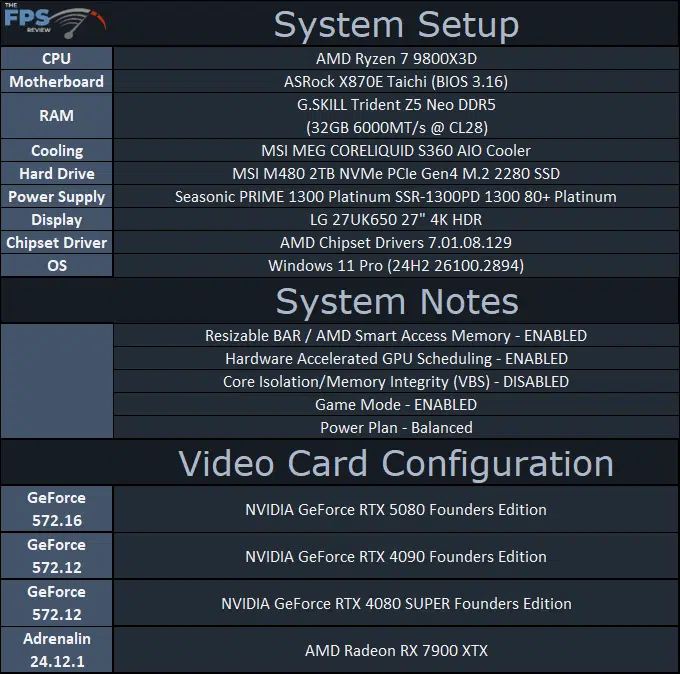
We are using an AMD Ryzen 7 9800X3D for testing. We are using the motherboard’s current default BIOS settings on the latest release BIOS. We have enabled PCI-Express Resizable BAR in the motherboard BIOS. We have enabled EXPO I in the BIOS for the memory. We are using a fresh install of Windows 11 Pro with the latest Windows Updates, including the 24H2 update. We have the latest drivers installed including the latest chipset drivers from AMD. We are using the “Balanced” power profile in Windows Settings.
Discussion (2 replies)
Join Discussion →I wonder what is preventing the card from automatically clocking higher at stock settings. Maybe NVIDIA needs to adjust their boosting algorithm?
Also curious how close the automatic overclocking in the NVIDIA App gets to manual this generation.
My guess would be nVidia intentionally holding it back - so that if AMD does come out with a stunner, nVidia can "magically" come out with a 10% increase via a driver update.
And if AMD doesn't have the right hand to play, nVidia can just hold it back and wait for the Ti edition.
I mean, it's not like nVidia has any competition at any level for this card right now, except for themselves with the 4080. And they stopped production of those, so ...