
Overclocking SAPPHIRE NITRO+ Radeon RX 9070 XT
For overclocking purposes, we used the Performance Tuning section of the AMD Adrenalin Software. Our driver was a brand new press release driver, and we did see some subtle changes with RDNA 4 compared to previous generations. The Performance tuning software was missing an element we generally use in overclocking with RDNA 3 and 2, the “Minimum GPU Clock Frequency” setting, it only had the Max Frequency Offset MHz slider available.
We were able to adjust the maximum GPU clock frequency, memory frequency, and power limit. Additionally, we could adjust the fan cycle if we wished. Voltage was grayed out. We employed our Cyberpunk 2077 manual run-through for the data and logged into GPU-Z to record the data. We also utilized HWiNFO64 to double-check the data.
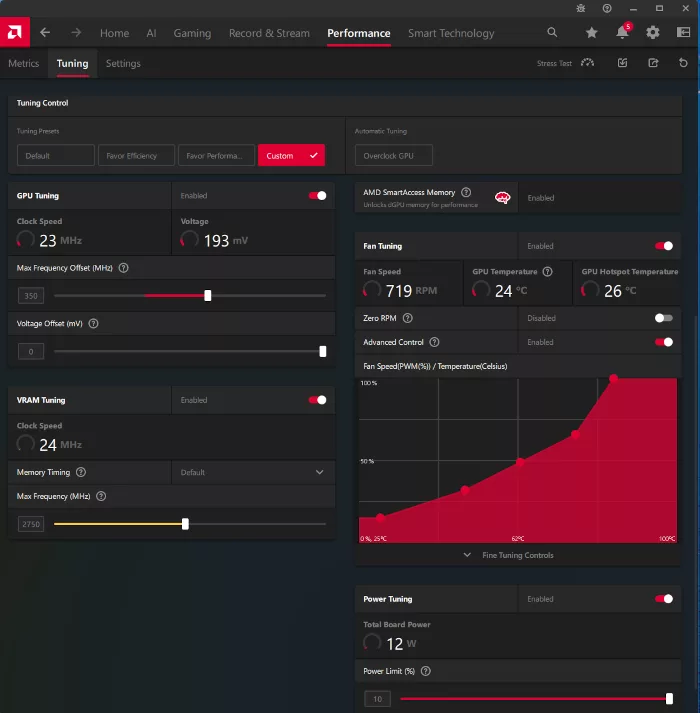
Our overclocking involved increasing the GPU clock to +350MHz and the memory to 22Gbps compared to the default 20Gbps. With the memory at 22Gbps, memory bandwidth increases to 704GB/s from the default 644GB/s of bandwidth. Voltage, as we stated, is grayed out. The power limit was pushed to its limit at 10%. We did any number of runs in three different real-world game benchmarks with different (read higher) frequencies, but beyond the ones listed above, there was no change in performance. Increasing memory frequencies did result in a crash.
The graph below will illustrate what the changes did for the in-game real-world frequency. It’s important to note that the SAPPHIRE NITRO+ Radeon RX 9070 XT already has a high factory overclock of 3060MHz, so we did not expect a ton of headroom, but we did get a little.
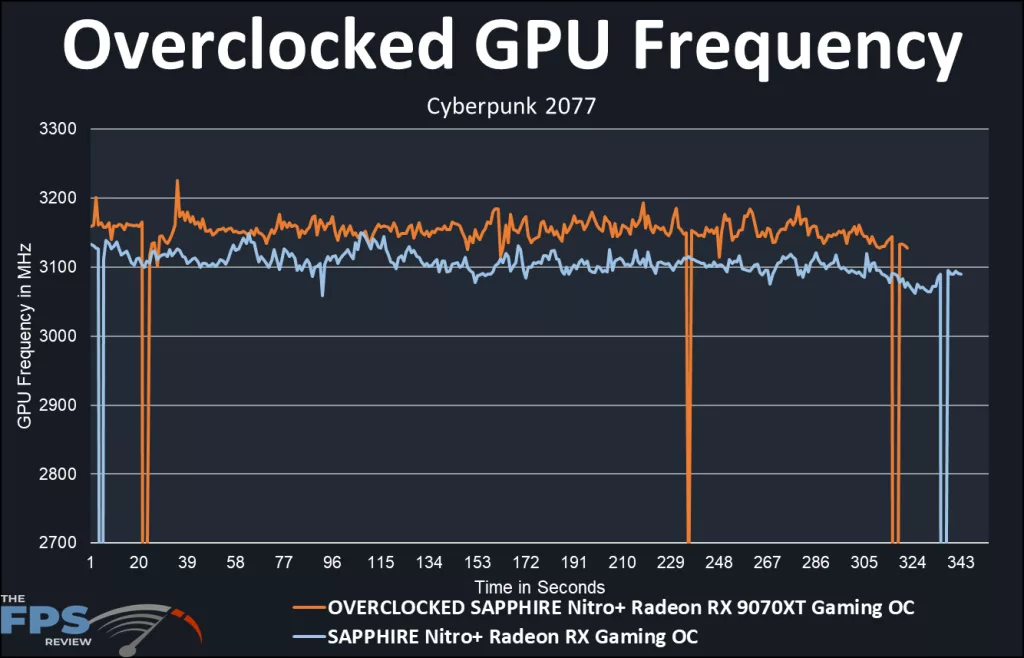
The blue line represents the default Boost Clock on our SAPPHIRE NITRO+ Radeon RX 9070 XT, while the orange is what we accomplished with our overclock. The reference Boost for this card is 2970MHz, while our card is listed at 3060MHz. The average Boost in default is 3090MHz. Out of the box, we are 3% better, and in real-time gaming, a total of 4% beyond reference.
The average Boost in overclocking is 3135MHz. This is an overall 5% uplift from the reference. It isn’t a bunch, but it seems that in working with this card, it has been pushed about as far as it can go right out of the box. So, an additional 5% isn’t so bad. Unless you could find more gas in the tank somewhere, it seems that trying to overclock this particular video card isn’t worth the effort.
All in all, you only gain about 1% over what the card does in real time right from SAPPHIRE. We have reviewed data from overclocking trials, and it strongly suggests a power limitation. In most run-throughs, we reached the 100% TDP for the video card, i.e., 360 Watts. At this point, there was no improvement in performance.
Final overclocking values: GPU clock 3135MHz, memory 22Gbps.
Discussion (7 replies)
Join Discussion →SON OF A BITCH will these AHOLES figure it out. LAUNCH IT AT MSRP AND YOU WILL DESTROY NVIDIA!!! Well at this tier.
Snagged one this morning from NE.
I was very impressed with the Sapphire 9070XT. The build quality is top notch and innovative. It ran so quiet. Also is pretty strong in every game at 1440p. Ray Tracing is still a little weak but AMD is inching closer......they need to fix that and then they will own the 600-1000 dollar GPU market.
Here, 6 or 7 years later, I'm still not convinced the Ray Tracing performance is a good metric to base my video card purchase decision on. I'm still considering it in the same vein as I am upscaling, frame generation, "AI", and proprietary feature sets: nice to have, but not worth spending extra money on over traditional rasterization performance and video memory capacity.
Sure, it's nice. And it may be the future. But I can upgrade again when that happens.
Not even the latest Indy Jones game with "required" ray tracing sways me on that, and it's what, the ~first~ game to have some level of ray tracing that isn't optional -- and even then, it just requires the feature set, not like the entire game is 100% ray traced. It still performs well on AMD and older RTX hardware (and even runs on some hardware without dedicated RT support)
Yup. Remind me again how mandatory PhysX is these days?
Going by support in the 5000 series... good point.
You should run the Half-Life 2 RTX demo and then tell me how you feel. Seeing a 20 year old game look entirely new is pretty amazing.