
Overclocking – Clock Speed – Power – Temp
On this page, we are going to take a look at the default GPU clock speed of the SAPPHIRE NITRO+ Radeon RX 9060 XT 16GB. We are also going to overclock the GPU, and see how high the GPU frequency can be pushed with the tools provided, and compare that with the default clock, how high can it go? We’ll also look at the power draw and temperatures.
Default Clock Speed
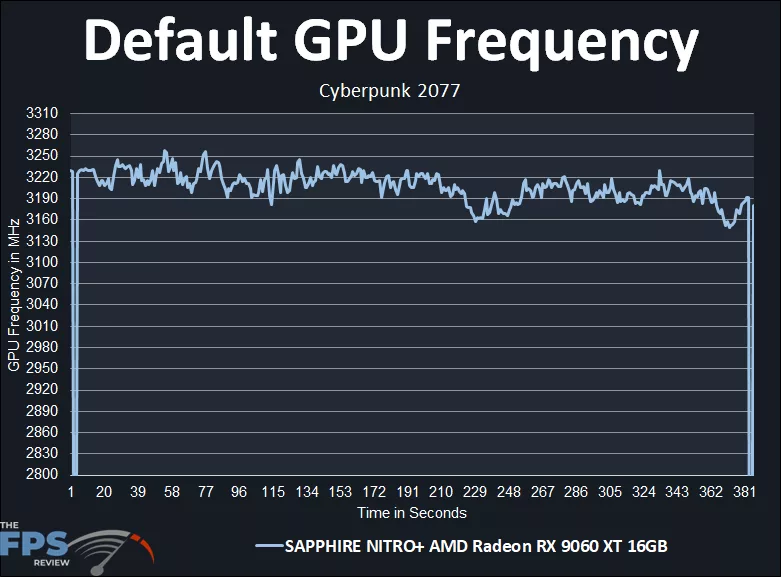
The SAPPHIRE NITRO+ Radeon RX 9060 XT 16GB has a default game clock set at 2780MHz and a boost clock set at up to 3320MHz. This is higher than the AMD defaults, which are 2530MHz for the game clock and 3130MHz for the boost clock. In our graph above, we can see what the frequency actually hits while gaming. It starts off above 3190MHz, but then after a time drops off slightly and recovers around that 3190MHz mark while gaming. This is already higher than another Radeon RX 9060 XT we have reviewed. The exact average clock frequency of this run was: 3200MHz while gaming, which makes it just a bit faster overall compared to the previous Radeon RX 9060 XT we have reviewed, so far, this is the fastest one out of the box.
Overclocking
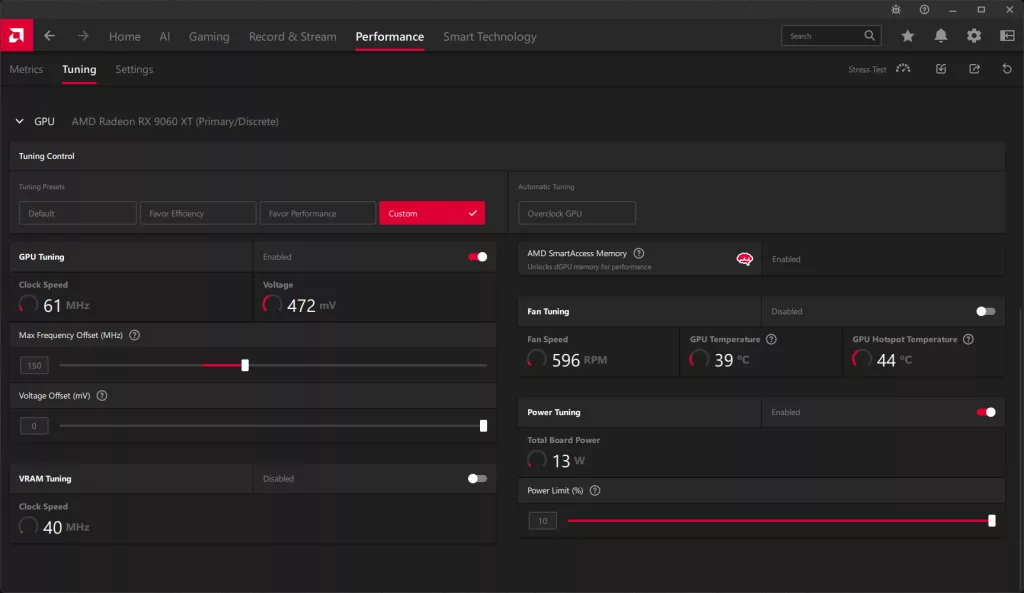
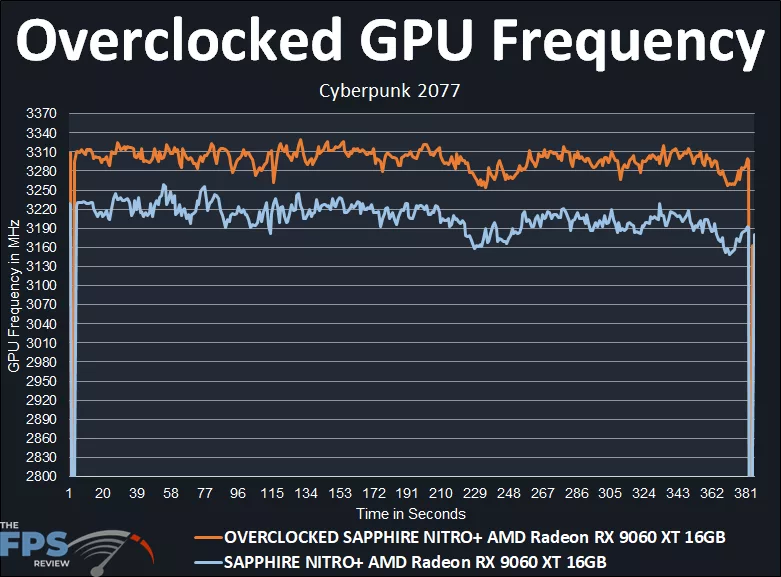
We pulled up AMD Adrenalin Software Performance Tuning to see what options we had available for overclocking the SAPPHIRE NITRO+ Radeon RX 9060 XT 16GB. We had the ability to raise the Power Limit by 10%, a small power adjustment, but 10% was the max we could push the power beyond 180W, but it did allow us to get to 200W on the SAPPHIRE NITRO+ Radeon RX 9060 XT 16GB. Otherwise, we couldn’t raise the Voltage, but we could lower it, and we were also able to adjust the Max Frequency Offset. In our overclocking endeavors, we pushed it up +150, which you can see the result of in the graph above.
With the SAPPHIRE NITRO+ Radeon RX 9060 XT 16GB overclocked +150 on the Offset slider, our overclock went up to above 3300MHz, it peaked at 3329MHz! This is, therefore, the highest overclock we’ve seen yet on a Radeon RX 9060 XT video card, and the fastest performance. The exact average of this overclock was: 3292MHz. Therefore, our overclock was a 92MHz increase or a 3% increase to the clock speed. We did not have to adjust the fan, temperatures still remained cool with the fan on automatic. The video card was pushing 200W, so the power adjustment was maxing out the TBP with this overclock. As we stated, this is the highest overclock we’ve achieved yet with a Radeon RX 9060 XT, hitting 3.3GHz while gaming is impressive, but it does max out the TDP to do so.
Power
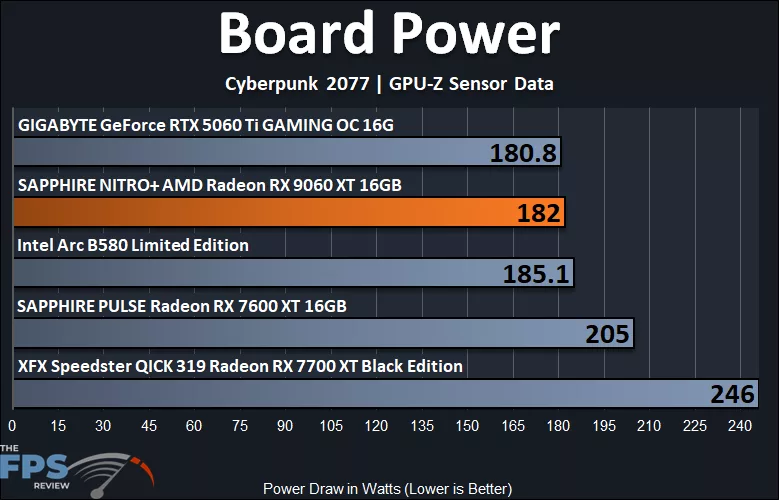
The SAPPHIRE NITRO+ Radeon RX 9060 XT Gaming Edition 16GB has a TBP of 182W, and we are exactly hitting that board power in our testing at 182W, hitting the max of the card. We can see that this is on par with the power draw of the GeForce RTX 5060 Ti 16GB OC video card. However, it is less, a lot less, than the Radeon RX 7700 XT and Radeon RX 7600 XT. The SAPPHIRE NITRO+ Radeon RX 9060 XT uses 35% less power than the Radeon RX 7700 XT! That’s massive and impressive, considering the SAPPHIRE NITRO+ Radeon RX 9060 XT performs the same as it. It even uses 13% less power than the Radeon RX 7600 XT, yet smashes it in performance with huge performance gains. The SAPPHIRE NITRO+ Radeon RX 9060 XT has impressive power numbers here, considering how highly overclocked it is out of the box and how high the clock speed runs.
Temperature
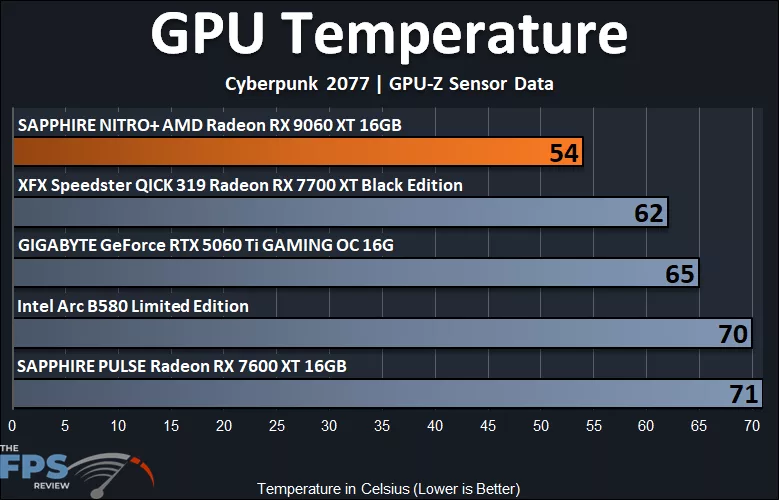
The SAPPHIRE NITRO+ Radeon RX 9060 XT 16GB was the coolest running card here, literally. GPU temps were 54c, unbelievable, this is way cooler than the Radeon RX 7700 XT, and GeForce RTX 5060 Ti. In our GPU-Z testing, we can see the Voltage peaking a little higher than the previous Radeon RX 9060 XT we tested, so that explains a bit warmer GPU temps, but still very good, of course, with the cooling on the SAPPHIRE NITRO+ Radeon RX 9060 XT.
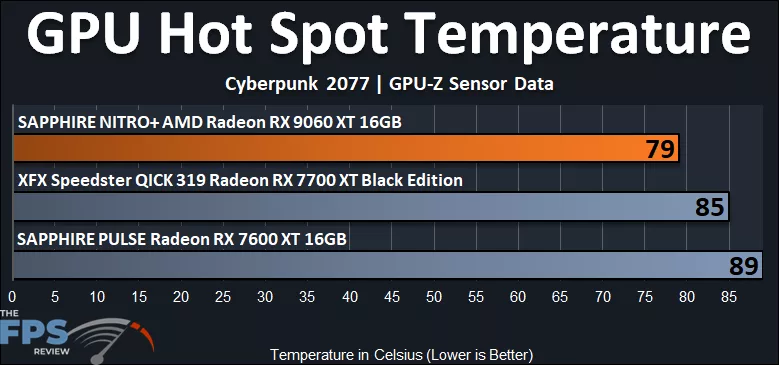
The Hot Spot temperature is also second to none, with 79c it runs way cooler than the Radeon RX 7700 XT or Radeon RX 7600 XT.
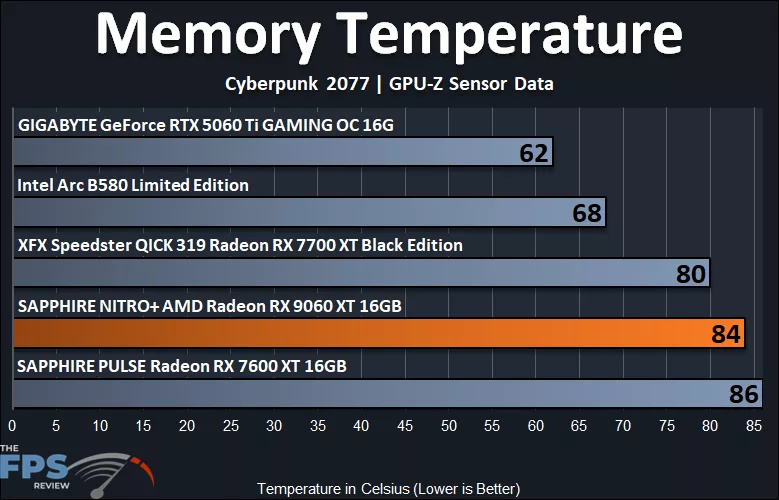
Memory temperatures were a little warmer than we expected for this video card. We had a peak of 84c, and this puts it in a pretty warm spot compared to the other cards. It wasn’t concerning warm, but it was among the warmest memory temperatures tested here, a bit surprising given the immense cooling of the SAPPHIRE NITRO+ Radeon RX 9060 XT.
Fan Speeds
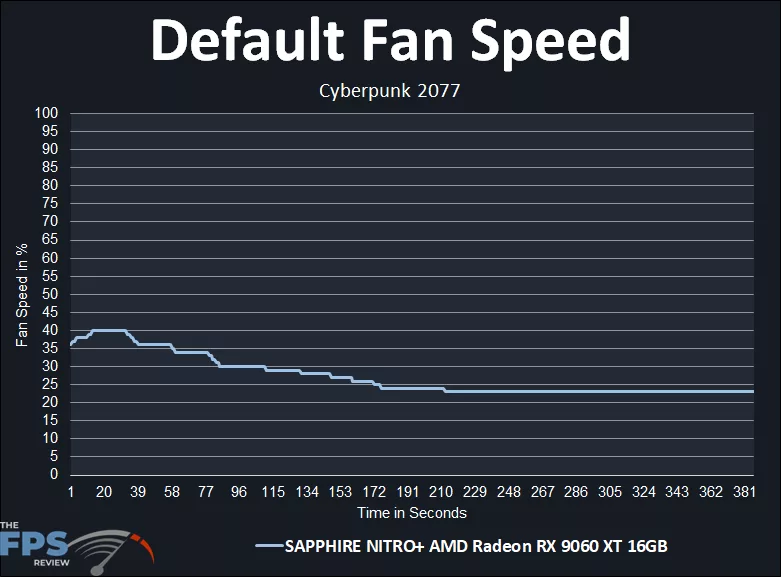
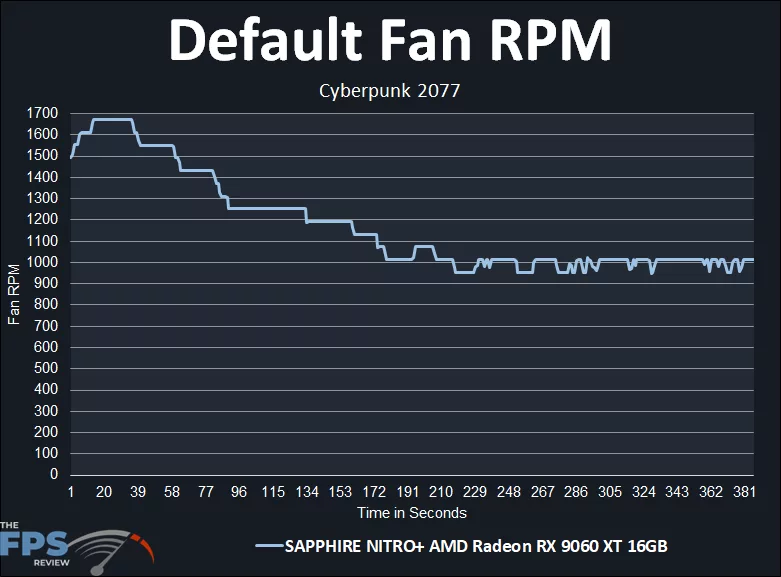
We also plotted the fan speed in percentage as well as the fan RPM, so you can see how they behave while gaming. The fans start out around 35%, peak at 40% speed, then ramp down slowly over time and settle in under 25% speed, and the fan ramp is gradual in steps, so not something that would annoy you. It starts out around 1500RPM, peaks at near 1700RPM, and hits a more consistent 1000RPM while gaming. The fan noise was very quiet, we didn’t hear them, so overall it looks like SAPPHIRE is not applying an aggressive fan speed by default; it is tame.
Discussion (13 replies)
Join Discussion →Looks like a solid product. Nice.
LoL....Trixx in Chinese.
From what I've seen, it trades blows with the RTX5060 Ti 16GB, what surprises me is that it's very close on RT, even wins in a couple of games.
so why isn't anyone making fuzz about no RX9060XT 8gb reviews? or is it wrong only when nvidia does it?
People are. Ltt went after them for it. But amd didn't prescribe "review parameters " and Nvidia specifically did for access to drivers. Different sort of thing.
Gamers Nexus went after AMD too regarding the 8GB variant.. AMD would have hit a home run if they could have just kept their mouth shut, but we all know that's not possible..
I think AMD would have hit a home if they released a 12gb card instead of the 8gb, even at a price premium. Otherwise only 16gb cards.
That'd require a redesign of the PCB since the bus width for the memory would be different for the 12GB version vs. 16GB/8GB version. I could be wrong but I believe that is the reason why you don't see 12GB variants with 16GB options for the card.
That depends on the density of the moduls. If they are running 4 2 gig modules for 8 gig upping.those to 3 gig modules would keep the bus the same and give 12 gig. But tje cost difference is probably a lot more. Same reason the top and just below top were 16 and 24 gig historically.
I realized it uses DDR6 had it used DDR 7 it could use 3GB ram chips. I guess they are also more expensive than 2GB chips.
Were there different NDA/embargo dates based on MSRP ?
[embedded media]
Honestly I think it's based on region. But I can't say for sure as I'm not behind the scenes.
Yes there were two embargo dates based on MSRP, and this is not uncommon; also happens with NVIDIA, nothing new or odd about this practice. Always important to confirm the embargo date/time you are allowed to publish with the specific card you have. I confirmed the NDA for both cards we had.