
FSR 3 vs FSR Redstone (ML/FSR 4) – Call of Duty: Black Ops 7
Call of Duty: Black Ops 7 exists on both the AMD FSR Redstone ML-Upscaling supported game list and AMD FSR Redstone ML-Frame Gen supported game list from AMD. This allows us to toggle between FSR 3.1 and FSR 4 (ML-Powered modes). In this game, there is a dedicated “FSR 4” option in the game menu to enable FSR 4 as long as it is turned on in the AMD Adrenalin software control panel.


When we have ML-Upscaling and ML-Frame Gen disabled in the control panel, the game only displays FSR 3 and defaults to the anaytlical model of FSR 3.1 Upscaling and FSR 3.1 Frame Gen. When we toggle the options back to Enabled in the driver control panel, we can go back into the game and now select the FSR 4 mode, and with ML-Frame Gen turned on in the control panel it will override Frame Gen and make it the ML-Frame Gen version. We can verify this in the image quality difference experienced, as well as the performance, and by hitting ALT+R to verify the features are enabled. For this game, we utilized the built-in benchmark to get our results, and we used the 1% Lows result for this one.
AMD Radeon RX 9070 XT
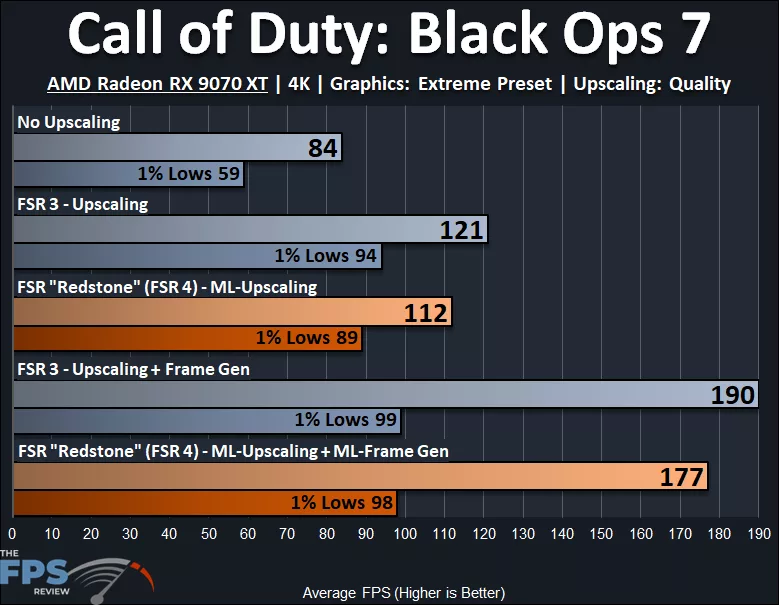
In Call of Duty: Black Ops 7, we have set the game to the “Extreme” preset and are testing at 4K on the AMD Radeon RX 9070 XT. Note, we have disabled Variable Rate Shading to get a more accurate performance result at native resolution, and to keep all tests apples-to-apples. The Radeon RX 9070 XT at native resolution 4K results in an AVG FPS of 84FPS, with 1% Lows at 59FPS. When we enable FSR 3, Upscaling performance increases by 44%, and 1% Lows increase by 59%. When we enable FSR 3 Frame Generation, the AVG FPS number goes up by 57%, but as you can see, the 1% Lows do not increase as much, only 5%.
What you will see that happens is that the difference or distance between the 1% Lows and the AVG FPS is much wider/greater with Frame Generation enabled vs with just Upscaling. In other words, the distance between the 1% Lows and AVG FPS with just Upscaling is 27, while the distance between the 1% Lows and AVG FPS with Frame Generation is 91. It is this greater distance that makes Frame Gen “feel” the way it does; greater distance means wider swings in FPS, means more lag, means worse latency, etc…
When we enable AMD FSR Redstone/FSR 4 ML-Upscaling, the performance increase from native resolution is 33%, with a 51% increase to 1% Lows. You can see that this is slower than FSR 3, ML-Upscaling is 7% slower than FSR 3 Upscaling, with 5% slower 1% Lows. When we turn on ML-Frame Generation the increase from Upscaling is 58%, and the 1% Lows increase 10%. Therefore, ML-Frame Gen is 7% slower than FSR 3 Frame Gen, and the 1% Lows are 1FPS in difference. Once again, however, the distance between the 1% Lows and AVG FPS is much greater and wider with ML-Frame Gen than compared to ML-Upscaling only.
AMD Radeon RX 9070
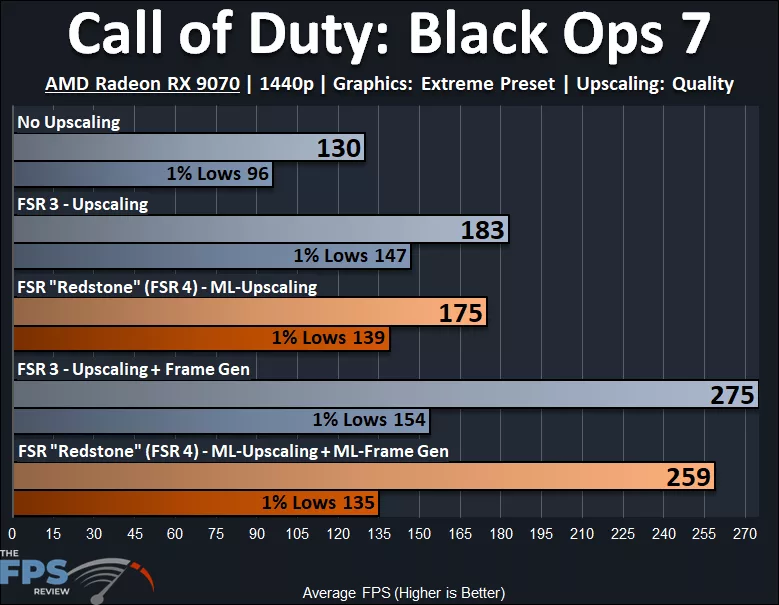
In Call of Duty: Black Ops 7, we have set the game to the “Extreme” preset and are testing at 1440p on the AMD Radeon RX 9070. Note, we have disabled Variable Rate Shading to get a more accurate performance result at native resolution, and to keep all tests apples-to-apples. The AMD Radeon RX 9070 produces 130FPS AVG at 1440p, with 1% Lows at 96FPS. When we enable FSR 3 Upscaling, performance increases by 41,% with 1% Lows increasing by 53%. Enabling FSR 3 Frame Generation increases the smoothness by 50%, and the 1% Lows slightly increase by 5%. Once again, the 1% Lows and AVG FPS with Frame Gen are spread very far apart, which is closer together with just Upscaling.
When we enable AMD Redstone/FSR 4 ML-Upscaling, performance increases over native resolution by 35%, and 1% Lows increase by 45%. You can see that ML-Upscaling is 4% slower than FSR 3 Upscaling, and the 1% Lows are 5% slower. Enabling ML-Frame Gen improves smoothness by 48%, but with ML-Frame Gen, the 1% Lows actually decrease by 3%, and the difference between 1% Lows and AVG is spread far.
AMD Radeon RX 9060 XT

In Call of Duty: Black Ops 7, we have set the game to the “Extreme” preset and are testing at 1080p on the AMD Radeon RX 9060 XT. Note, we have disabled Variable Rate Shading to get a more accurate performance result at native resolution, and to keep all tests apples-to-apples. The AMD Radeon RX 9060 XT provides 133FPS at 1080p with 1% Lows at 103FPS. When we turn on FSR 3, Upscaling performance increases by 36%, which is the lowest advantage so far, and 1% Lows increase by 42%. When we turn on FSR 3 Frame Generation, smoothness increases by 44%, and the 1% Lows take a major hit in performance at a loss of 14%. This also further separates the 1% Lows and the AVG FPS, making the spread worse.
When we turn on AMD FSR Redstone/FSR 4 ML-Upscaling, we see a 31% improvement over native resolution, with 1% Lows getting a 36% improvement. This is slower than FSR 3 Upscaling by 4%, and the 1% Lows are also 4% slower. Turning on ML-Frame Gen is a smoothness increase of 45%, but the 1% Lows really get slammed on the Radeon RX 9060 XT with ML-Frame Gen. The 1% Lows are 18% slower with ML-Frame Gen enabled vs ML-Upscaling alone, ouch. This puts the 1% Lows at almost as low as native resolution, without any Upscaling. It also makes the spread between 1% Lows and AVG FPS very very wide, creating a laggy feeling. Simply put, Radeon RX 9060 XT suffers more with ML-Frame Gen.