
FSR 3 vs FSR Redstone (ML/FSR 4) – Hogwarts Legacy
Hogwarts Legacy exists on both the AMD FSR Redstone ML-Upscaling supported game list and AMD FSR Redstone ML-Frame Gen supported game list from AMD. This allows us to toggle between FSR 3 and FSR 4 (ML-Powered modes) by using the AMD Adrenalin software control panel.

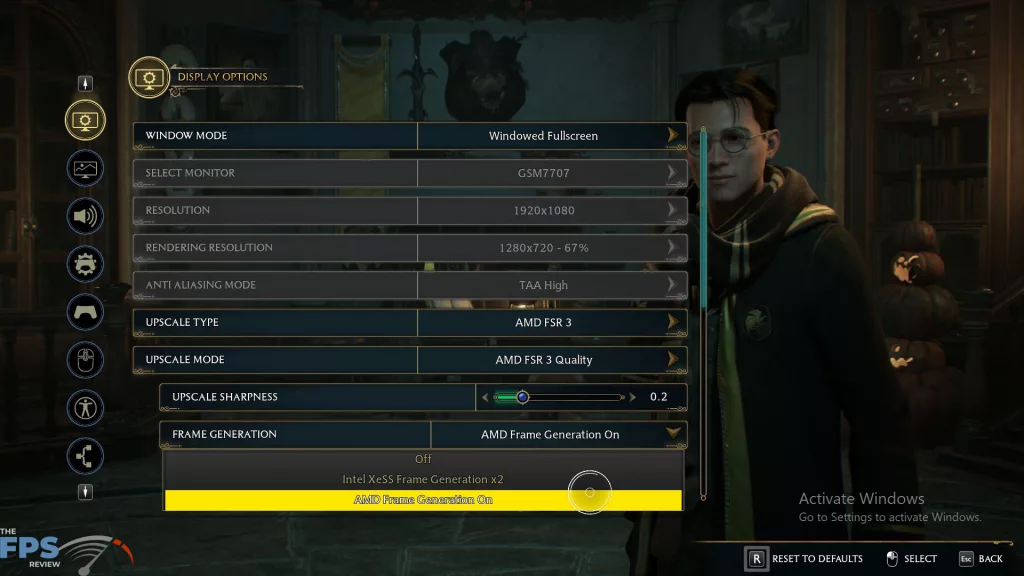
In Hogwarts Legacy, you’ll find an “Upscaler Type” drop-down menu, where you can select AMD FSR 3. If you have ML-Upscaling disabled in the AMD Adrenalin Software Control panel, then this game will run using FSR 3. However, if you enable ML-Upscaling in the AMD Adrenalin Software Control panel, then it will override the FSR 3 mode and put it in AMD FSR Redstone/FSR 4 ML-Upscaling mode. In addition, there is a “Frame Generation” drop-down menu, and under that is AMD Frame Generation. Whether you have the toggle enabled in the software control panel will also determine if you get ML-Frame Gen or not.
We are performing a manual in-game run-through in this game outside of Hogsmeade, in the open world, to focus on GPU-sensitive benchmarking. We are running at the “Ultra” quality in the game, no Ray Tracing.
AMD Radeon RX 9070 XT
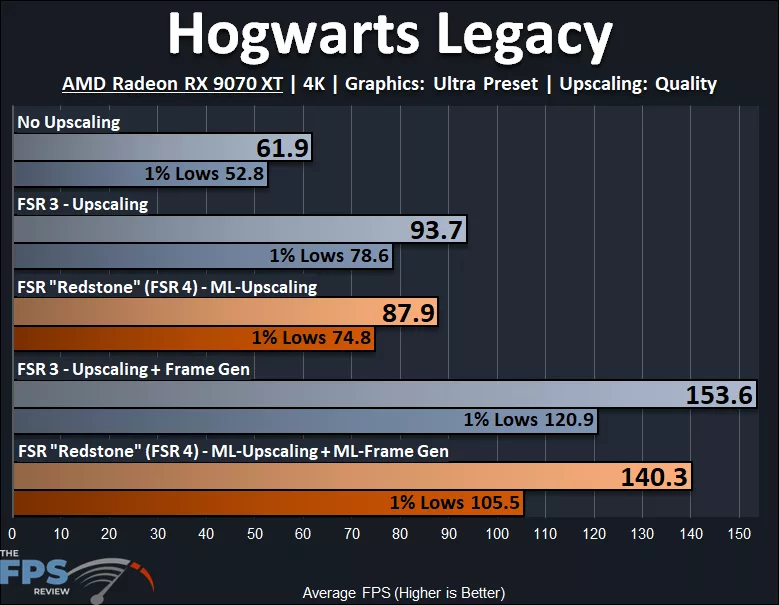
In Hogwarts Legacy, we are running at 4K and “Ultra” settings on the AMD Radeon RX 9070 XT. The AMD Radeon RX 9070 XT is barely able to provide a playable experience at native resolution, with 61.9FPS AVG and 52.8FPS for 1% Lows, the 1% Lows might be a bit too low to experience the game well. When we enable FSR 3 Upscaling we see a 51% performance improvement to the AVG and a 49% improvement to the 1% Lows, which is really what makes this game playable. When we enable FSR 3 Frame Gen we see a smoothness improvement of 64% and 1% Lows increase to 54%.
What is interesting about this game is how well the 1% Lows are managed with Frame Generation. The spread between the 1% Lows and the AVG isn’t as wide as some other previous games we tested. The grouping is tight with native resolution and upscaling naturally, but it isn’t too bad with Frame Generation enabled. This is actually a sign that this game does fairly well with Frame Gen, and not as bad as others, meaning it doesn’t feel as bad with Frame Gen as some other games. With the 1% Lows so high, it actually feels rather nice.
When we enable AMD FSR Redstone/FSR 4 ML-Upscaling, we get a 42% performance uplift from native resolution and 1% Low improvement of 42%. This is slower than FSR 3, with ML-Upscaling being 6% slower on AVG and 5% slower on 1% Lows. When we enable ML-Frame Generation, the smoothness increases 60%, and the 1% Lows increase 41%. This is 9% slower on AVG than FSR 3 Frame Gen and 13% lower on 1% Lows; those 1% Lows get hit pretty hard. Thankfully, the 1% Lows are still above 100FPS, and again, the grouping and spread here is smaller, so it actually doesn’t feel bad.
AMD Radeon RX 9070
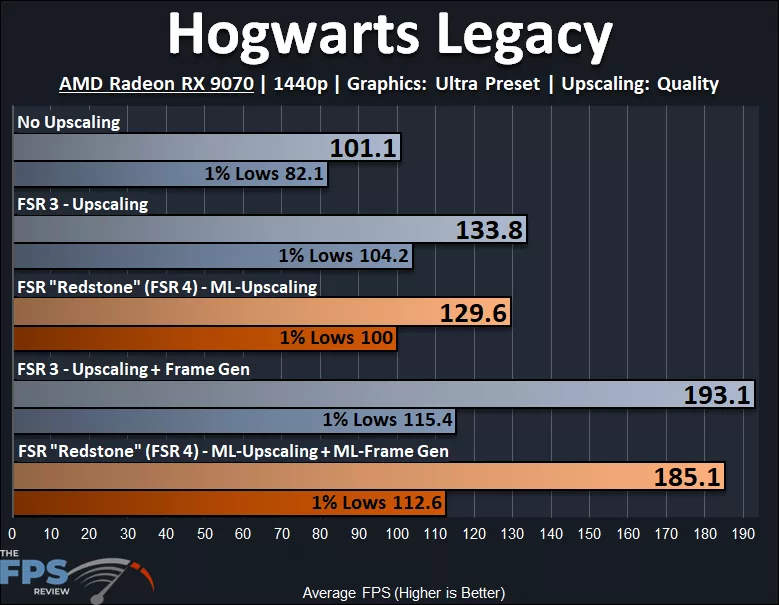
In Hogwarts Legacy, we are running at 1440p and “Ultra” settings on the AMD Radeon RX 9070. The AMD Radeon RX 9070 runs Hogwarts Legacy well at 1440p with an AVG FPS at 101 and 1% Lows at 82FPS. When we enable FSR 3, Upscaling performance increases by 32%, and 1% Lows increase by 27%. When we enable FSR 3 Frame Generation, we get a 44% improvement in smoothness and 1% Lows increase by 11%.
Now, Frame Gen is more of a problem for the AMD Radeon RX 9070 in Hogwarts Legacy than the Radeon RX 9070 XT was at 4K. Here, at 1440p on the Radeon RX 9070, the spread or gap between the 1% Lows and the AVG FPS with Frame Gen is much wider, and this introduces that same wider swing in FPS, which means more lag, which means worse latency, etc…
When we enable AMD FSR Redstone/FSR 4 ML-Upscaling, we get a 28% performance uplift to the AVG and 27% performance uplift to the 1% Lows. This is a little bit slower than FSR 3, 3% on AVG and 4% on 1% Lows, so not huge in this game. When we enable ML-Frame Generation, we get a smoothness increase of 43%, and the 1% Lows do see an increase of 13%. However, ML-Frame Gen is slower than FSR 3 Frame Gen by 4%, and 1% Lows are slower by 2%.
AMD Radeon RX 9060 XT
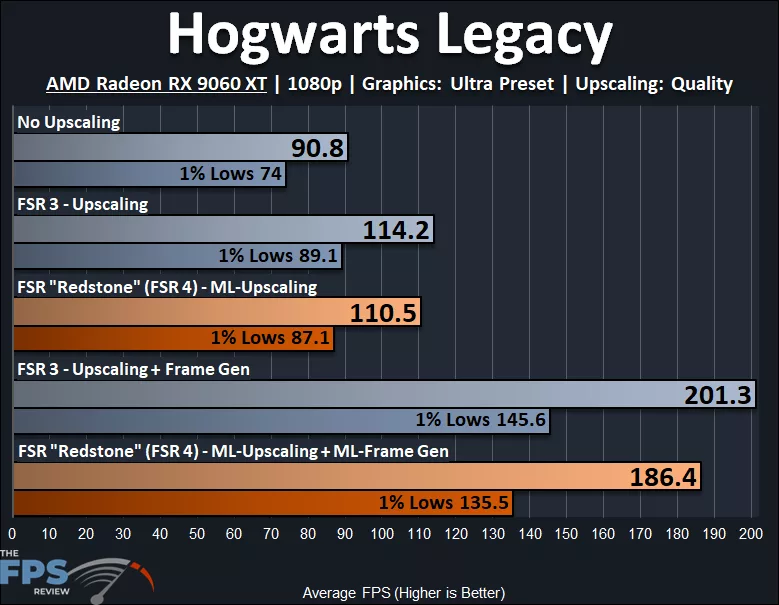
In Hogwarts Legacy, we are running at 1080p and “Ultra” settings on the AMD Radeon RX 9060 XT. The AMD Radeon RX 9060 XT runs with a playable experience at 1080p Ultra at 90FPS AVG and 74FPS for 1% Lows, so very well. When we enable FSR 3, Upscaling performance increases by 26%, and 1% Lows increase by 20%. When we enable FSR 3 Frame Gen, smoothness increases by 76%, and 1% Lows increases quite a bit by 63%. In this game, the spread between 1% Lows and Frame Gen isn’t too bad at 1080p on the Radeon RX 9060 XT.
When we enable AMD FSR Redstone/FSR 4 ML-Upscaling, we see a 22% uplift to performance on AVG and an 18% improvement to 1% Lows. This is slower than FSR 3 by 3% on AVG and 2% on 1% Lows. When we enable ML-Frame Generation, the smoothness increases by 69%, and the 1% Lows increase by 56%. ML-Frame Gen is slower than FSR 3 Frame Gen by 7% on AVG and 1% Lows also drop 7%.
Since the 1% Lows are still well above 100FPS on the Radeon RX 9060 XT with Frame Gen enabled at 1080p, the spread or gap between them and the AVG doesn’t feel as bad. With such high 1% Lows, Frame Gen doesn’t feel too bad on the 9060 XT at 1080p, but the same could not be said for the 9070 at 1440p.