
FSR 3 vs FSR Redstone (ML/FSR 4) – Mafia: The Old Country
Mafia: The Old Country exists on both the AMD FSR Redstone ML-Upscaling supported game list and AMD FSR Redstone ML-Frame Gen supported game list from AMD. This allows us to toggle between FSR 3 and FSR 4 (ML-Powered modes) by using the AMD Adrenalin software control panel.

In Mafia: The Old Country, you will find an option that says “ANTI-ALIASING & UPSCALING.” When you scroll through the options, it has AMD FSR and then the quality mode below. If you have ML-Upscaling disabled in the AMD Adrenalin Software Control panel, then this game will run using FSR 3. However, if you enable ML-Upscaling in the AMD Adrenalin Software Control panel, then it will override the FSR 3 mode and put it in AMD FSR Redstone/FSR 4 ML-Upscaling mode. There is also a toggle to enable “FRAME GENERATION” in the game. Whether you have the toggle enabled in the software control panel will also determine if you get ML-Frame Gen or not.
We are using an in-game manual run-through for our test, which takes place in the entire outdoor area of the PROLOGUE – TREMORI area. We are using the graphics quality preset of “EPIC” for testing, and we are running the latest December 2025 Update patch.
AMD Radeon RX 9070 XT
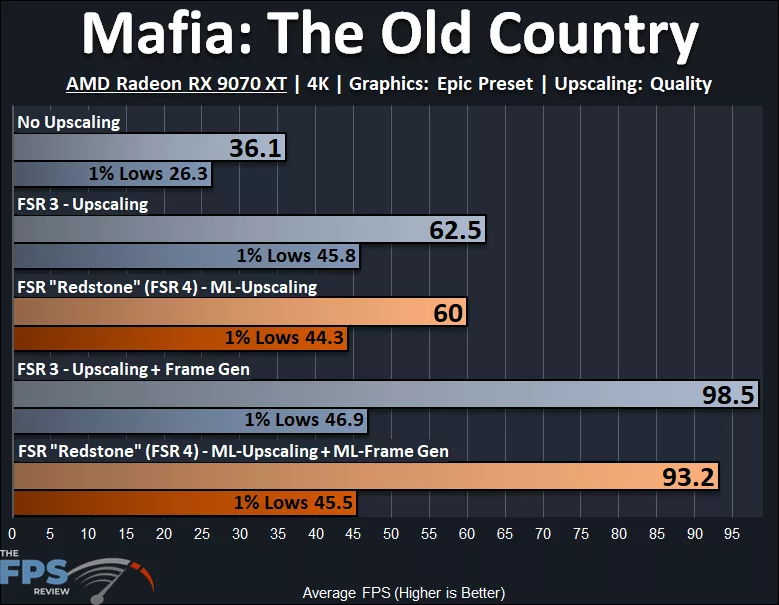
In Mafia: The Old Country, we are running at 4K at “Epic” preset on the AMD Radeon RX 9070 XT. The AMD Radeon RX 9070 XT is not playable at native resolution with just 36FPS AVG and 26FPS 1% Lows. Enabling FSR 3 Upscaling improves the AVG framerate to playable levels with a 73% performance uplift. However, the 1% Lows are still a bit too low, but they do have a 74% performance increase. When we enable FSR 3 Frame Generation, the smoothness increases by 58%, but the 1% Lows stay pretty much the same with only a 2% difference.
This game is another example of how bad Frame Gen can be when the 1% Lows and AVG FPS have such a wide gap, creating that slow or laggish feel, less latency and consistency, and a wider spread of FPS between the Lows and AVG. The 1% Lows do not change with Frame Gen, yet the AVG is very high, therefore the game feels, well…. off.
When we enable AMD FSR Redstone/FSR 4 ML-Upscaling, we see a performance uplift from native resolution of 66%, and 1% Lows increase 68%. ML-Upscaling is slightly slower than FSR 3 Upscaling, being 4% slower on AVG and 3% slower on 1% Lows. When we enable ML-Frame Generation, the smoothness improvement from ML-Upscaling is 55%, but the 1% Lows only have a 3% change. ML-Frame Gen is 5% slower than FSR 3 Frame Gen, and 1% Lows are 3% lower.
AMD Radeon RX 9070
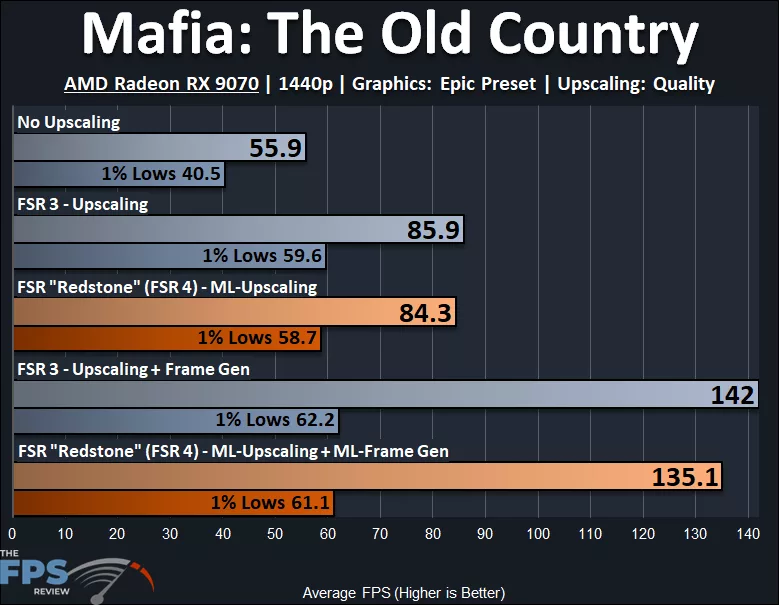
In Mafia: The Old Country, we are running at 1440p at “Epic” preset on the AMD Radeon RX 9070. The AMD Radeon RX 9070 is not able to hit 60FPS at native resolution 1440p, it’s close though, almost 56FPS, and 1% Lows are at 40FPS. When we enable FSR 3 Upscaling, the performance increases by 54%, and 1% Lows increase by 47%, and the game is now playable. When we enable FSR 3 Frame Generation, the smoothness improves by 65%, and 1% Lows improve by 4%. The same problem exists with Frame Gen, having a wide gap between 1% Lows and AVG.
When we enable AMD FSR Redstone/FSR 4 ML-Upscaling, we see a 51% improvement over native resolution and a 45% improvement to 1% Lows. ML-Upscaling is only slightly slower than FSR 3 Upscaling, 2% to AVG and 2% to 1% Lows. Enabling ML-Frame Gen, the smoothness improves by 60%, but 1% Lows are practically the same, with a 4% difference. ML-Frame Gen is 5% slower than FSR 3 Frame Gen on AVG, and the 1% Lows are 2% apart.
AMD Radeon RX 9060 XT
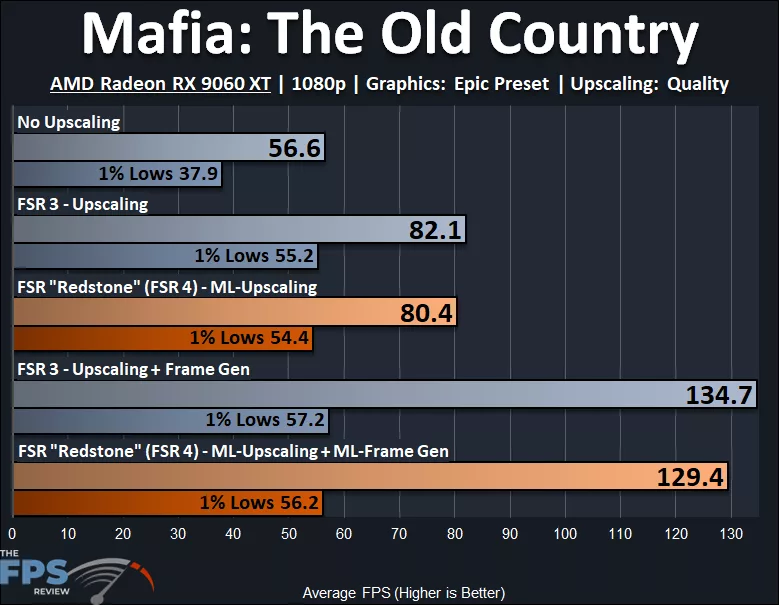
In Mafia: The Old Country, we are running at 1080p at “Epic” preset on the AMD Radeon RX 9060 XT. The AMD Radeon RX 9060 XT also struggles in this game at Epic settings at 1080p, not able to get us to 60FPS at native resolution, and 1% Lows are pretty slow at 38FPS; the game isn’t playable. When we enable FSR 3, Upscaling performance increases by 45%, and the 1% Lows increase by 46%, and the game is playable. When we enable FSR 3 Frame Gen, smoothness improves by 64%, but the 1% Lows stay the same, only a 4% difference. Once again, due to the wide gap between 1% Lows and AVG FPS, the game does feel like input is different with Frame Generation.
When we enable AMD FSR Redstone/FSR 4 ML-Upscaling, the performance uplift from native resolution is 42%, and the 1% Lows increase 44%. ML-Upscaling is 2% slower than FSR 3 Upscaling on AVG and 1% slower on 1% Lows. When we enable ML-Frame Gen, the smoothness increases by 61%, but 1% Lows only have a 3% difference. ML-Frame Gen is 4% slower than FSR 3 Frame Gen, and 1% Lows are 2% slower.