
Alan Wake 2
Alan Wake 2 was launched in October of 2023 and runs on the Northlight Engine. The game features high-quality assets, volumetric fog, animated foliage, advanced volumetric lighting, high-detail character models, and dense foliage. It also features full Ray Tracing and Path Tracing options that can be enabled with ray-traced reflections and shadows, along with DLSS Ray Reconstruction. It also supports RTX Mega Geometry, DLSS, and FSR Upscaling and Frame Generation. For our testing, we are going to use the in-game graphics preset options for the main quality option, as well as the Ray Tracing preset as needed. Our testing scenario is a manual run-through in the INITIATION 5 – ROOM 665 map. Both GeForce RTX 5060 Ti video cards were downclocked to the same GPU Boost Clock of 2572MHz, which is the NVIDIA reference Boost Clock.
Native Resolution
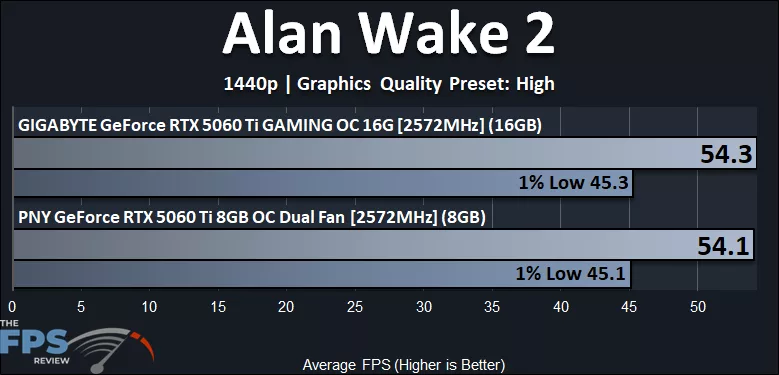
In Alan Wake 2, we are running at 1440p with the “High” preset, and at this native resolution, 1440p performance is the same between the GeForce RTX 5060 Ti 16GB and GeForce RTX 5060 Ti 8GB. We see no deviation or difference in the average framerate or the 1% Lows. At 54FPS average, the game is playable, for this particular game, and the 1% Lows remain above 40FPS, so the game feels smooth. The difference between the 1% Lows and AVG FPS is narrow, so the game doesn’t have wild swings in FPS.
DLSS Upscaling
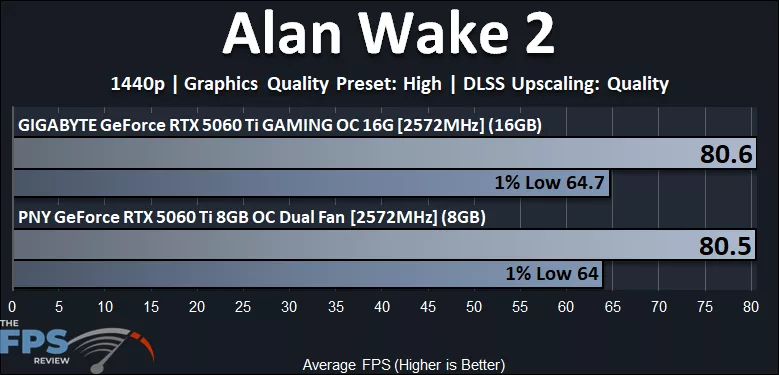
In the above graph, we have now enabled DLSS Upscaling “Quality” at 1440p. The framerate has increased, the game is now very smooth at 80FPS average, and the 1% Lows remain above 60FPS for a very enjoyable gameplay experience. We see no difference in this particular game between the GeForce RTX 5060 Ti 16GB and the GeForce RTX 5060 Ti 8GB in performance.
Ray Tracing With DLSS Upscaling
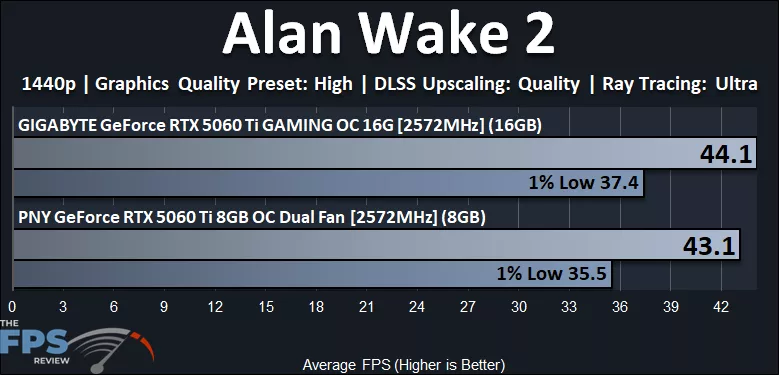
In the above graph, we have now enabled the “Ultra” Ray Tracing option in the game at 1440p, and we do have DLSS Upscaling at “Quality” enabled as well. Ray Tracing is a great burden on the performance of the GeForce RTX 5060 Ti in this game at 1440p, and even with DLSS Upscaling at Quality at 1440p, the game is not playable. When Ray Tracing is enabled, with DLSS Upscaling, we now see some separation and difference in performance between the GeForce RTX 5060 Ti 16GB video card and the GeForce RTX 5060 Ti 8GB video card. The 16GB RTX 5060 Ti is 2% faster on average FPS and 5% faster on 1% Low performance. Therefore, the 16GB RTX 5060 Ti does have a slight advantage when Ray Tracing is enabled.
4K With DLSS Upscaling
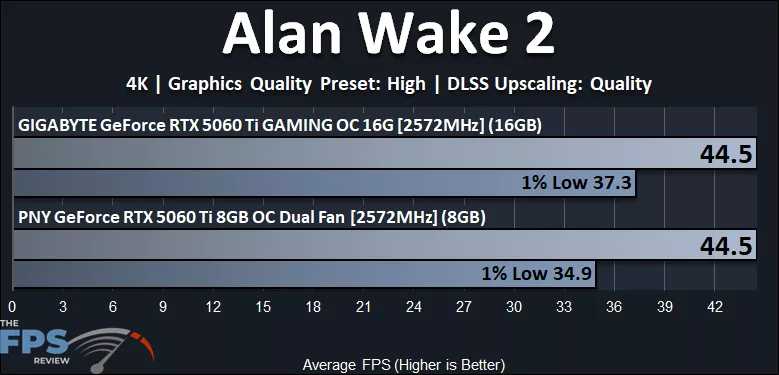
In the above graph, we are running the game now at 4K but with DLSS Upscaling at “Quality” enabled. Even with Quality DLSS Upscaling, this game is not playable on the GeForce RTX 5060 Ti; the average and 1% Lows are simply too low to enjoy. It would be possible to make 4K playable, but you will have to use lower DLSS Upscaling settings like Balanced or Performance at 4K. Interestingly, the average FPS is exactly the same between both video cards. However, there is a clear difference in the 1% Lows between the 16GB RTX 5060 Ti and the 8GB RTX 5060 Ti. The 16GB RTX 5060 Ti is 7% faster on the 1% Lows, which is pretty significant, showing that more VRAM is an advantage here on the 1% Lows.