
Clair Obscur: Expedition 33
Clair Obscur: Expedition 33 was released in April of 2025 and runs on the Unreal Engine 5. This is one of those games where ‘Ray Tracing’ is enabled at all times, native to the game. The game features Lumen for global illumination and reflections, and Nanite for high-detailed geometry. It also features DLSS Upscaling and Intel XeSS, but not FSR. Instead, for ‘FSR’ we will utilize the game’s built-in TSR setting at Medium, which is the closest render resolution to DLSS Quality mode. We will also use the game’s built-in graphics presets for quality settings. We are testing an area near the beginning of the game, in the Prologue, near the end of where the first chapter begins, which offers an opportunity to test a large open area with NPCs and a long stretch of the map freely. We are performing a manual run-through in this area.
Native Resolution at Epic
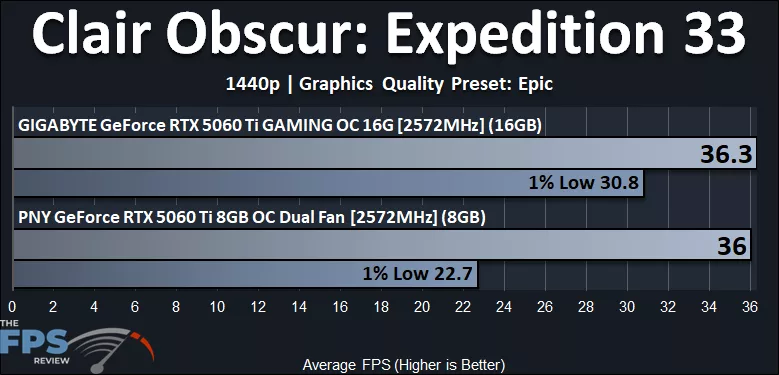
We wanted to really push the GeForce RTX 5060 Ti hard in this game as well, so we first tried it with “Epic” settings at 1440p native resolution. Well, this game is certainly not playable at Epic game settings, and would require the use of aggressive Upscaling to run at Epic settings. However, even at this unplayable level, we do find something very interesting again. The GeForce RTX 5060 Ti 16GB has much higher 1% Low performance compared to the 8GB GeForce RTX 5060 Ti. The GeForce RTX 5060 Ti 16GB is 36% faster on 1% Lows, showing the benefit of 16GB of VRAM.
Native Resolution at High
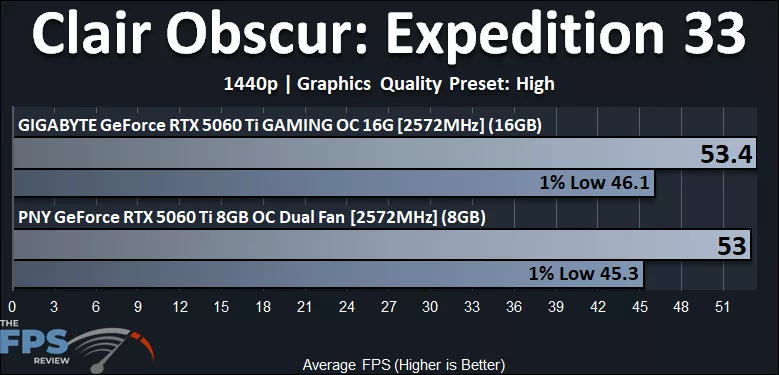
If we lower the game down to “High” settings at 1440p, the game becomes much more playable on the GeForce RTX 5060 Ti. However, because we are running at a lower game quality setting, the demand on VRAM is lessened, and now the two video cards are close in performance even on the 1% Lows. At “High” image quality, the GeForce RTX 5060 Ti 16GB is 2% faster than the 8GB RTX 5060 Ti. But again, if you turn that up to “Epic” that 1% Low widens at 1440p native.
DLSS Upscaling
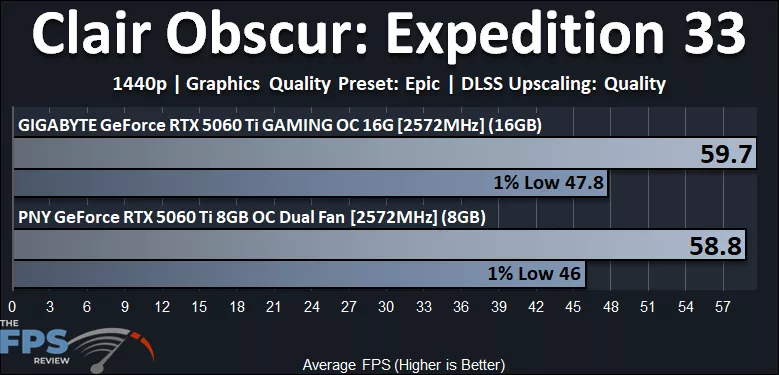
In the above graph, we have enabled DLSS Upscaling Quality at 1440p, but we are running the higher “Epic” image quality setting in the game. DLSS Upscaling Quality does improve gameplay performance, and we see some separation between the cards. The GeForce RTX 5060 Ti 16GB is 2% faster on average compared to the 8GB RTX 5060 Ti and 4% faster on 1% Lows. The dependency on VRAM is lessened a bit due to the DLSS Upscaling rendering at a lower resolution.
4K with DLSS Upscaling
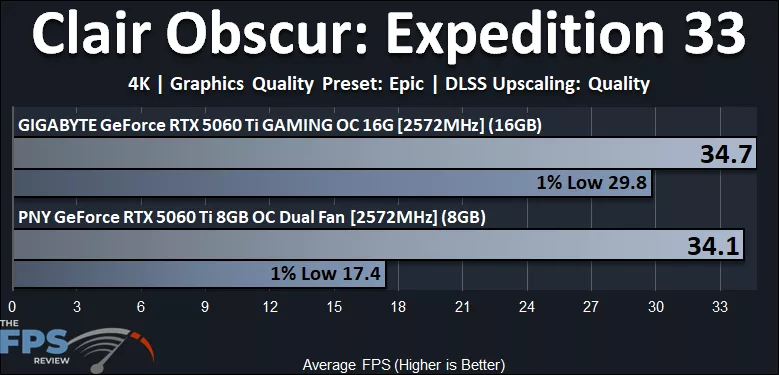
When we try running this game at 4K, we can see that once again the 1% Lows drastically differ between the GeForce RTX 5060 Ti 16GB and GeForce RTX 5060 Ti 8GB video card. This game is very dependent on VRAM with higher resolutions plus “Epic” game settings enabled. Even with DLSS Upscaling Quality enabled, the game isn’t playable, however the GeForce RTX 5060 Ti 16GB is 71% faster in 1% Lows compared to the 8GB RTX 5060 Ti.