
Dying Light: The Beast
Dying Light: The Beast was released on September 18th, 2025, and uses the C-Engine gaming engine. This game has improved character models, higher resolution textures, and better lighting with a more vibrant environment, and better indirect shadows and bounce lighting with screen space reflections. This game supports DLSS 4, Multi Frame Generation, NVIDIA Reflex, and FSR 4. We are utilizing a manual run-through in the Golden Pine area.
Native Resolution
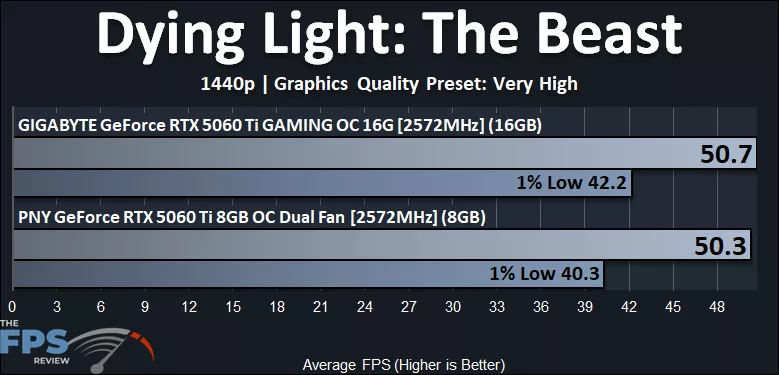
In Dying Light: The Beast, we are running the “Very High” preset, which is one notch below “Ultra.” The “Ultra” preset enables Ray Tracing, so for this test above, Ray Tracing is not enabled. We are running at 1440p native resolution. The GeForce RTX 5060 Ti almost allows a playable experience; in reality, you’d want DLSS Upscaling Quality enabled to get a playable experience at 1440p on Very High. The average FPS is the same, but we do see the GeForce RTX 5060 Ti 16GB about 5% faster than the GeForce RTX 5060 Ti 8GB video card.
DLSS Upscaling
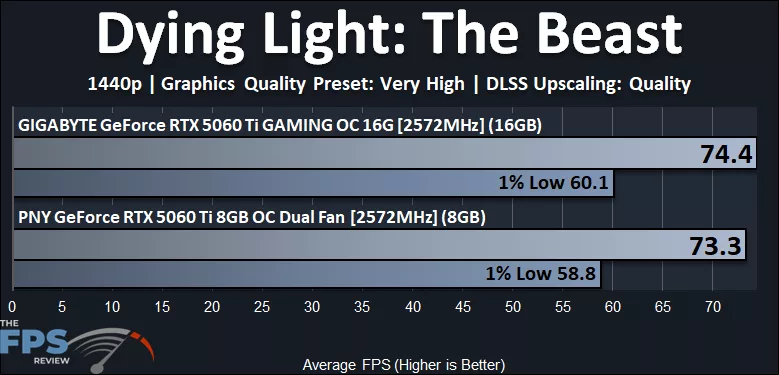
With DLSS Upscaling Quality enabled, this game is now playable on both GeForce RTX 5060 Ti video cards with average FPS in the 70’s and 1% Lows near 60FPS. The GeForce RTX 5060 Ti 16GB has a slight advantage, 2% on average and 2% on 1% Lows.
Ray Tracing with DLSS Upscaling
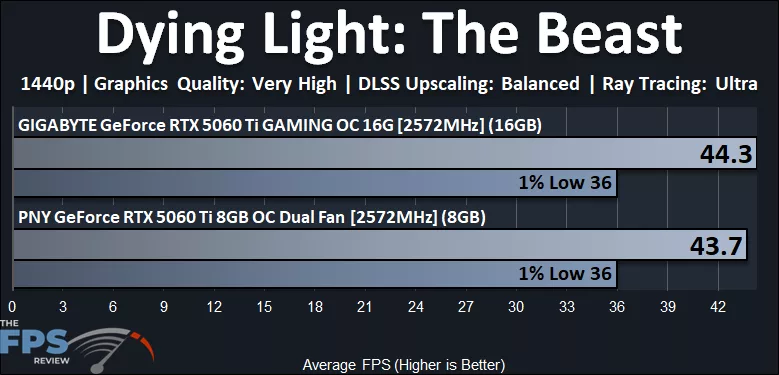
In this game, we can enable Ray Tracing by using the “Ultra” setting, so above we have Ray Tracing enabled with DLSS Upscaling Quality also enabled at 1440p. The game, though, is not playable on the GeForce RTX 5060 Ti at all, even with DLSS Upscaling. It would be with a more aggressive DLSS setting, like Balanced or Performance. We see no real difference in performance between the video cards, but we are certainly render-limited here.
4K with DLSS Upscaling
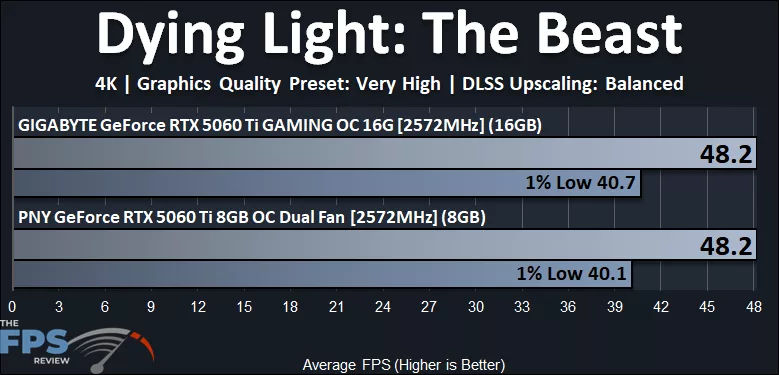
At 4K, we have enabled DLSS Upscaling, but performance is so demanding on the GeForce RTX 5060 Ti that we lowered it to “Balanced,” and even then, it is not playable. It might be playable on the Ultra Performance setting, but at that point, you are probably better off just lowering game quality settings. Because we are using DLSS Upscaling Balanced, the render resolution is lower, and we don’t see VRAM as an issue between the cards.