
Corsair has announced that the K70 MAX and HS80 MAX are now available for purchase from its webstore and worldwide network of authorized online retailers and distributors. The K70 MAX ($229.99) is the first gaming keyboard from Corsair to feature adjustable MGX, the company’s new magnetic-mechanical switches, while the HS80 MAX ($179.99) is a Bluetooth/2.4GHz wireless gaming headset that supports Dolby Atmos spatial audio. Both are backed by two-year warranties.


Corsair K70 MAX Magnetic-Mechanic Gaming Keyboard
The first keyboard with adjustable CORSAIR MGX magnetic-mechanical switches, the K70 MAX offers an unprecedented level of configurability in every keystroke. Whether for blistering speed or impeccable typing accuracy, the K70 MAX is the ideal device for those who seek maximum keyboard performance.
The K70 MAX gaming keyboard showcases all-new CORSAIR MGX magnetic switches, enabling you to set each key’s individual actuation distance from 0.4mm to 3.6mm, adjustable in 0.1mm steps. CORSAIR MGX switches also introduce dual-point actuation, which lets you set two discrete actions per keypress, opening up the possibility for one-two combos, such as lightly touching a key to walk, and pressing it hard to go into a run. With such an incredible amount of control over every keystroke, your imagination can run wild with potential in-game uses.
CORSAIR MGX switches will also enable a new Rapid Trigger mode, coming to K70 MAX via firmware update later in Q3, with full customization via iCUE launching later this fall. Rapid Trigger unlocks per-key hyper-responsiveness to give you a competitive edge in FPS and other fast-paced games. With Rapid Trigger enabled, keys reset immediately when they travel upward, giving K70 MAX the advantage over traditional mechanical keyboards for fast re-presses and input changes.
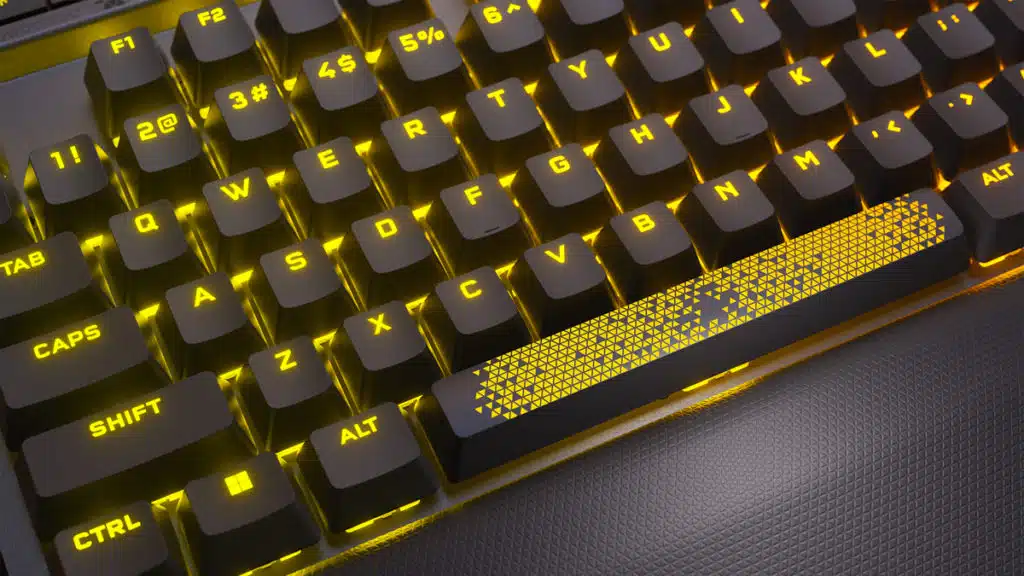
The K70 MAX also includes the trademark premium build that defines CORSAIR K70 performance and reliability. The K70 MAX incorporates two layers of sound dampening, so you can enjoy refined acoustics as you type. The keyboard’s iconic aluminum frame is etched with a striking tri-hex pattern, adding flair and sophistication to your desktop. Play in plush comfort as you place your hands on a memory foam-imbued detachable magnetic palm rest, and strike each key with confidence on sturdy PBT double-shot keycaps.
Corsair HS80 MAX Gaming Headset
Also launching today is the HS80 MAX, a multi-platform gaming headset that exemplifies superior audio quality and performance. HS80 MAX boasts Bluetooth support, offering versatile connectivity on a host of platforms and consoles to go along with ultra-fast 2.4GHz wireless. Now you can connect to all your devices, smoothly switching between 2.4GHz wireless and Bluetooth with the press of a button.
Alongside new connectivity options, all the best elements of the HS80 lineup are here: a broadcast-grade omni-directional microphone, super-comfortable floating headband, and aluminum reinforced construction. Truly get immersed in your games on PC and Mac with Dolby Atmos spatial audio, perfected for you via the intuitive Sonarworks SoundID tool that finds your unique hearing preferences and tailors a completely personalized audio profile. With some of the best headset speaker drivers and an expertly tuned microphone, you – and your teammates – will hear the HS80 MAX difference immediately.
Discussion (9 replies)
Join Discussion →Too rich for me but I do admit that K70 looks nice. The adjustable key feature seems pretty cool.
The Icue software has never been kind to me so that's a no.
While it's neat... and effectively magnaride for your keyboard.. being able to configure the magnetic resistance and actuation points of every key indvidually... is something I'm too lazy to do at damn near 50 years old.
Though I do see the benefit of two actuation points on some keys. I still question the use case for a keyboard to be THAT configurable.
I guess if you're into competitive online gaming.... maybe.
I'm just a bit over that mark and feel the same. I was thinking that perhaps the future of keyboards will involve some kind of configurable technology instead of manual. I'm sure the expense would be huge but it would be palpable than doing it manually. I can easily envision pros and cons but it would be interesting.
You're not the first I've heard say that.
To be fair I'm a lucky one I guess. Yea I went through some initial trials and tribulations but it's been solid for me for a long while.
Armoury crate on the other hand....
I agree there. I've been so fed up with that crappy software that I've somewhat regretted going all Asus this time around.
The really crappy thing is armoury crate doesn't even keep up with their own boos updates let alone driver updates.
I've been using MSI Center + AB for about a year now with all my rigs and have been pretty happy. AB for OCing and its overlay and Center for the rest. My only complaint is that it updates about 1x month and it can/will reset my lighting configs. Other than that it has been doing what I need. Like crate, it's still a bundle of apps (you pick which you want) but to me, it feels more like one than when I last tried crate (about 2 years ago). Just a heads up that after an update or install it can take a bit of time (about a minute or so) to initialize but after that, it's good to go.
As far as Afterburner goes, like most of us, been using that for the better part of forever but have tinkered with Asus and EVGA's offerings but always ended up going back to it. Although EVGA's extra 1%(lol) was always fun to see with its GPUs but Precision's overlay doesn't play nice with a number of things nor does it provide as many metrics as I prefer. If it wasn't for that I'd probably use it exclusively since it can also do a majority of what I use Center+AB for.