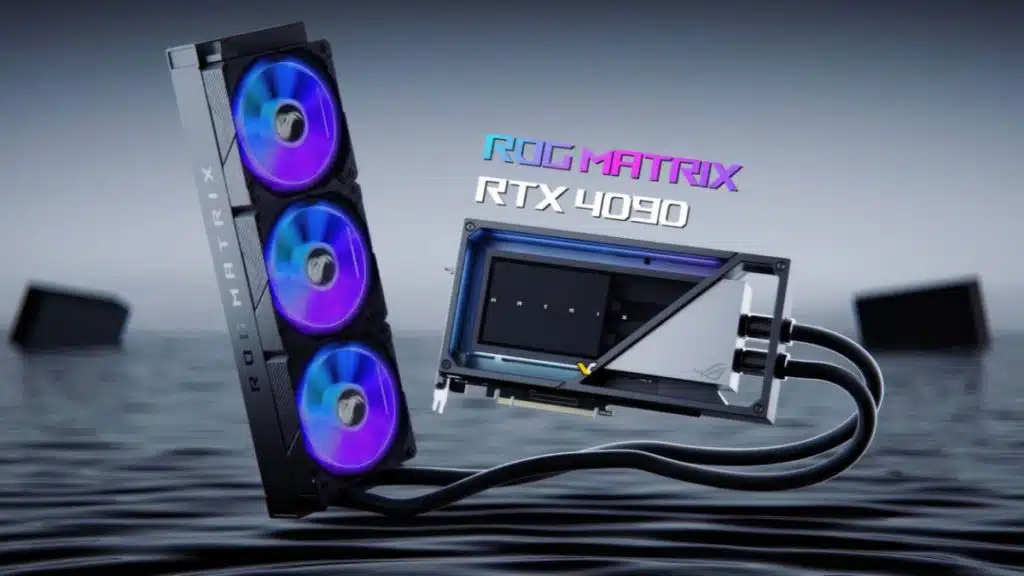
ASUS Prepares to Launch Its Flagship Liquid-Cooled ROG Matrix GeForce RTX 4090 GPU on September 19

The FPS Review may receive a commission if you purchase something after clicking a link in this article.

Image: ASUS

As ASUS prepares to launch its latest flagship card on September 19, those looking to upgrade to a new top-tier card may want to be on the alert. There have been a few different RTX 4090 graphics cards featuring AIO solutions but the ROG Matrix GeForce RTX 4090 looks like it could be the king of this generation’s offerings, that is unless NVIDIA surprises everyone with a 4090 TI or Titan ADA. Originally announced in May, this new premium graphics card boasts some impressive features.

Per VideoCardz:

“The ROG Matrix has already been distributed to skilled overclockers who have managed to break world records, thanks to the card’s superior binning process and enhanced power delivery system. This highly customized model comes equipped with a substantial 360mm radiator designed for a liquid cooling system. The card also boasts a custom coldplate that securely attaches to the GPU die, VRM section, and memory chips.”

Liquid Metal

Per the previous ASUS Press Release:

Liquid metal is an incredible thermal interface material, producing much lower temperatures when compared head-to-head with traditional thermal pastes. It does, however, have one significant challenge: it’s electrically conductive. When applied improperly, it has a chance to make contact with exposed components and risk a short circuit. But building on years of expertise with liquid metal in the ROG laptop division, ASUS has an exclusive production process that can safely harness the power of liquid metal while still allowing for vertical GPU mounting.

ASUS has used a custom UV-resin solution comprising two layers so that it could use liquid metal instead of thermal paste. Overclockers removed the custom cooler, and in showing how the premium binned GPUs perform, used liquid nitrogen to reach an astounding 4230 MHz in GPUPI. There is no word on what the ROG Matrix GeForce RTX 4090 will cost, although somewhere around or over $2,000 could be a safe guess. As ASUS prepares to launch the new graphics card, it has announced a live-stream event for the launch.

Join the discussion in The FPS Review Forums...

Discussion (19 replies)

Join Discussion →
Grimlakin
Grimlakin 👍 1

That does look neat but if I'm in the market for an AIO 4090 solution why wouldn't I use MSI's. Hell their AIO card is cheaper than some Air cooled editions of the 4090 and from the owners I know, nobody is complaining.

Niner51
Niner51 👍 1

Looks cool and all, but I wouldn't be a fan of the RGB

DrezKill
DrezKill 👍 1

Dang, since when did cards with AIO coolers start coming with 360mm rads?

"Niner51, post: 76327, member: 106" wrote:

Looks cool and all, but I wouldn't be a fan of the RGB


I assume you can turn it off. The question is, does doing that involve software that will most likely be sh1t? I wish you could do stuff like turning off RGB lighting with hardware switches. I'm not aware of any components with RGB that allow you to do that.

Niner51
Niner51 👍 3

"DrezKill, post: 76329, member: 230" wrote:

I assume you can turn it off. The question is, does doing that involve software that will most likely be sh1t? I wish you could do stuff like turning off RGB lighting with hardware switches. I'm not aware of any components with RGB that allow you to do that.


I have basically an all Asus build now, and honestly regret some of it to a point. Their bloatware Armoury Crate is annoying and the amount of background processes it takes is ridiculous. I pretty much deleted it all. I'm trying to get away from the RGB/lighting thing lately and just want a clean functional build, so this particular AIO would be a no for me, and if I did get it the fans would be replaced.

Peter_Brosdahl
Peter_Brosdahl 👍 1

"Grimlakin, post: 76326, member: 215" wrote:

why wouldn't I use MSI's.


I love mine but this one might, just might, end up clocking substantially higher.
"DrezKill, post: 76329, member: 230" wrote:

Dang, since when did cards with AIO coolers start coming with 360mm rads?


They've been around for the big three for a bit now but have only been accessible to us mere mortals for the 30 and 40 series. Prior to that, it was usually and announcement and either insanely overpriced compared to air or scalped, or simply you just couldn't find them in stock, or they were overseas cards that we in the US don't have access to.

My EVGA 3090 Ti hybrid is a 360mm. I'm aware the GIGABYTE has made 4090 with a 360 mm but a tricky thing with these is the firmware/TDP. Some manufacturers drop the TDP on their liquid-cooled cards a bit. The customer reviews on Newegg get interesting in revealing these details.

Peter_Brosdahl
Peter_Brosdahl

"Niner51, post: 76332, member: 106" wrote:

I have basically an all Asus build now, and honestly regret some of it to a point. Their bloatware Armoury Crate is annoying and the amount of background processes it takes is ridiculous.


Yeah, it drove me nuts. These days all I really use is MSI AB and MSI Center but I've no idea how/if MSI Center plays with ASUS but it has worked well with my EVGA cards. I use it for controlling their RGB, pretty much either white or off.

D
Grimlakin

"Peter_Brosdahl, post: 76337, member: 87" wrote:

I love mine but this one might, just might, end up clocking substantially higher.


That's really the only way to validate the cost. And really... I am betting the difference is less than 300 mhz.

Peter_Brosdahl
Peter_Brosdahl 👍 2

"Grimlakin, post: 76344, member: 215" wrote:

I am betting the difference is less than 300 mhz.


Probably true. Although I can bench mine higher it usually hangs in the 2895-2910 range during gaming, for what it's worth. This is with a multitude of games using different engines.

DrezKill

"Peter_Brosdahl, post: 76338, member: 87" wrote:

Yeah, it drove me nuts. These days all I really use is MSI AB and MSI Center but I've no idea how/if MSI Center plays with ASUS but it has worked well with my EVGA cards. I use it for controlling their RGB, pretty much either white or off.


MSI Center works with EVGA cards to control their RGB?!?!?!?!?!

I've been thinking about looking into the program OpenRGB (https://openrgb.org/). It's on both Win10 and Linux, and it would be helpful for A.) not having to use an AIB's sh1tty program and B.) being able to control that sh1t in Linux. I have to say though, I've been using MSI Center since you hooked me up with this RTX 3090, and it's surprisingly not absolutely terrible. Much better than Armory Crate and especially iCUE.

"Peter_Brosdahl, post: 76337, member: 87" wrote:

My EVGA 3090 Ti hybrid is a 360mm.


Oh snap, I did not know (or recall) that.

D
Ditchinit 👍 2

I use EVGA's Precision X1 to control the RGB on my hybrid EVGA 3090ti (360mm AIO just like Peter's). I have it set to show relative heat levels, because I figure that if I'm going to have RGB, then I'm going to make it useful rather than just for show. I can tell at a glance how hard a game is pushing the card ... without needing to run a screen overlay.

Peter_Brosdahl
Peter_Brosdahl 👍 1

"Ditchinit, post: 76365, member: 4253" wrote:

I have it set to show relative heat levels,


I've thought about doing that but just haven't gotten around to it.

"DrezKill, post: 76361, member: 230" wrote:

Oh snap, I did not know (or recall) that.


Yep, it's a stones throw from the Kingp[I}n model they made right before dropping GPUs. One of the last they made and was lucking enough to get it for MSRP straight from them. Also the first AIO card I ever got.

LazyGamer

"Ditchinit, post: 76365, member: 4253" wrote:

I use EVGA's Precision X1 to control the RGB on my hybrid EVGA 3090ti (360mm AIO just like Peter's). I have it set to show relative heat levels, because I figure that if I'm going to have RGB, then I'm going to make it useful rather than just for show. I can tell at a glance how hard a game is pushing the card ... without needing to run a screen overlay.


Should note that this also does all the OC stuff - so it replaces MSIs Afterburner (etc.) for GPUs. It's GPU-specific, but that also makes it extremely smooth for what it does.

Peter_Brosdahl
Peter_Brosdahl

Just a side note with all this talk about X1, although I do like it the main reason I stopped using it was because it lacked a number of metrics I like to keep track of that AB does, plus on more than one occasion it caused a game to crash plus the overlay doesn't always show in some games. It's been so long since I've used it consistently while gaming that I can't remember the titles but it did absolutely happen to me. I wanted to like X1 but it just didn't work out for me.

LazyGamer
LazyGamer 👍 1

If I need anything more than the GF Experience overlay provides, I just use HWINFO64 - to my knowledge, nothing escapes it, and the logging is to an easily scrapable CSV file (when needed).

Only thing I'd really need in addition to that is perhaps frametimes, but that's a whole nuther ball of wax :cool:

Peter Brosdahl
As a child of the 70’s I was part of the many who became enthralled by the video arcade invasion of the 1980’s. Saving money from various odd jobs I purchased my first computer from a friend of my dad, a used Atari 400, around 1982. Eventually it would end up being a lifelong passion of upgrading and modifying equipment that, of course, led into a career in IT support.

Recent News