
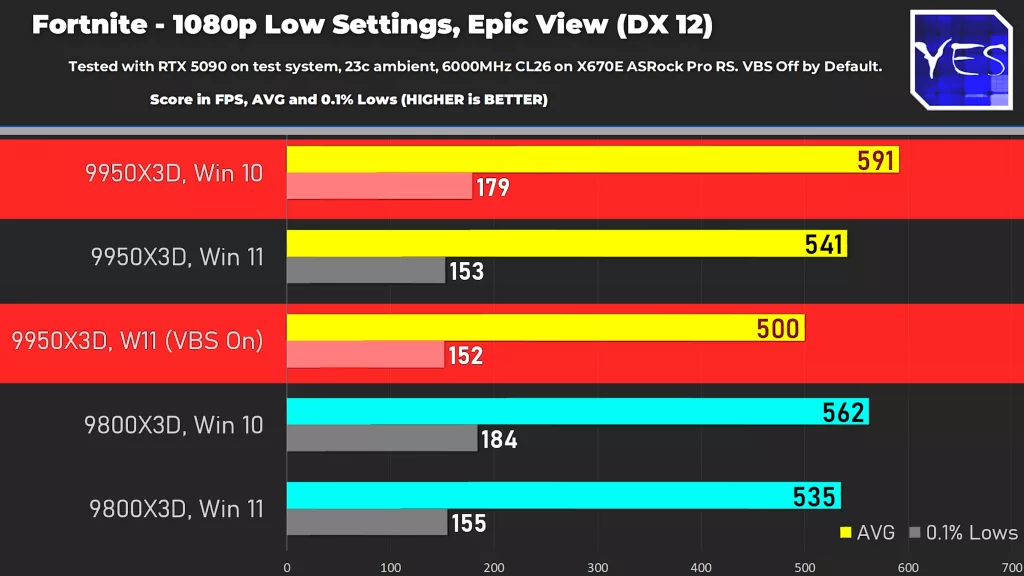
Tech YES City has shared some new gaming benchmarks for the AMD Ryzen 7 9800X3D and Ryzen 9 9950X3D, and with them comes the news that Fortnite players who own the latter—a Zen 5 chip that red team has described as being the “ultimate 16-core desktop CPU with 2nd gen AMD 3D V-Cache Technology”—may experience significantly higher performance on Windows 10 than Windows 11 under select settings, with or without VBS (i.e., Core Isolation) disabled for the latter.
See below for some of the benchmarks that were shared, which allude to (1) a 91 FPS increase under 1080p at low settings in Windows 10 versus Windows 11 with VBS turned on, and (2) the Ryzen 7 9800X3D performing better in Windows 10 versus Windows 11 (VBS turned off for both):
The full video, which also includes benchmarks for popular games that include Marvel Rivals, Baldur’s Gate 3, Kingdom Come: Deliverance II, can be watched in its entirety below:
“Windows 11 security measures include Memory Integrity and Virtual Machine Platform (VMP) to protect against malware, which are features that can also disrupt gaming performance,” Microsoft wrote in an article that was published in 2023 to teach Windows users how they could optimize their PCs for gaming performance. “If you choose to turn these features off before gaming, it can improve your performance and help you focus on the games at hand.”
“Afterwards, it’s important to turn them on again since you are opening your PC up to risks while it’s less protected,” the company went on to advise. “For short periods, you might try turning off your Memory Integrity and VMP to see if you notice a difference.”
Another article that can be found on one of Microsoft’s support sites echoes some of the information that was shared above:
As part of continued testing and feedback from users, Microsoft has seen that in some scenarios and some configurations of gaming devices there may be a performance impact with memory integrity and VMP on.
Windows provides choice and control for users to configure their PCs to meet their specific needs, including the ability to turn Windows features like memory integrity and VMP on and off. Gamers who want to prioritize performance have the option to turn off these features while gaming and turn them back on when finished playing. However, if turned off, the device may be vulnerable to threats.
Discussion (11 replies)
Join Discussion →Amazing. Another reason to not downgrade your windows to 11.
Security vs Speed.
I dont play Fortnight -- are there any other examples or is this a single game issue?
Those who are willing to sacrifice speed for security, deserve neither - Frank Benjaminson (probably)
But seriously what do you mean security? I feel less secure using W11 with its built in AI, recall, and custom ad serving.
All of which I have turned off. It's what I like to call stupid user bloat. Unless you like it then it's not bloat. Windows 11 will continue to see security updates and patching well after 10 has ridden to the sunset. Will inform and be informed by server os functionality and be a area where new features and ideas come to fruition. Like direct storage.
If you're only using a desktop OS then yea... OK. Even then I would recommend you get pro. It's solid when properly configured.
If you say you shouldn't have to do that... then go to console. No offense.but for me part.of using a PC to game and work on is fhe ability to make it mine and how I want it.
Really, the only option that is ~worse~ for this than Microsoft is Apple.
Which is exactly what you can do less and less with each new "feature" update in windows. Your PC is becoming more and more Microsoft's PC on which you are only a tolerated pest.
Windows 12 upcoming login greeting will be "Yeah, whaddya want? Stop bugging me I've got data to mine already!"
I've grown to like Windows 11 and I like the Windows insider program as well. Data is being mined everywhere now, so I've just learned to shut certain features off in Windows among other things.
Same. 10 was fine, and I feel 11 is fine too. Not having any issues with it. I just don't allow it a MS account, shut off the features I don't want on, which is most of them, and check those features again after a major patch. They sometimes have a tendency to 'forget' my settings after a big patch but it's been better lately. Generally, things run really smoothly. But I wish 7 was still here. 😦
Thanks to work on TPM the windows Pin thing loosing it is a PITA when you do a big bios update.
^^^ Truth. Although I used the Rufus special edition without TPM and/or 'secure' UEFI. Completely unnecessary on my home PC.