
Introduction
AMD FSR Redstone, previously FSR 4, has rolled out in different phases. The first phase began at the beginning of 2025, with the introduction of the FSR 4 ML-Upscaling component. The second phase is where we are today, in December of 2025, with the introduction of ML-Frame Gen and Ray Regeneration. The final phase will be in 2026, when we see the introduction and use of Radiance Caching for Ray Tracing in actual games.
This has been a rather staggered release for AMD FSR Redstone, releasing one component or part at a time, rather than the entire package when it is ready. In order to claim that a game is using AMD FSR Redstone technologies, only one of these technologies has to be supported, confusing gamers on exactly which components in the game are ML (Machine Learning) Powered.
You could have ML-Upscaling supported, but not the new ML-Frame Gen, yet the game would be stated as supporting AMD FSR Redstone. You could have a game support ML-Ray Regeneration, and or ML-Radiance Caching, but again not support ML-Upscaling and or ML-Frame Gen, yet the game would be stated as supporting AMD FSR Redstone. Not every component must be supported to be called “AMD FSR Redstone.” What this will ultimately lead to is confusion as to what version of Upscaling and Frame Gen is actually supported in a game, the old analytical model, or the new ML model.
To learn all about AMD FSR Redstone, please read our introduction article, which displays the entire AMD press-presentation full of information.

FSR Redstone Game Support
While this rollout has been one long, extended release, over the course of a year or more, the actual adoption and game support is both mixed and limited. The “FSR 4” ML-Upscaling component currently has the most adoption, with the most game support. Games today, which have FSR 3.1 built in, are being patched to support in-game graphical options to enable “FSR 4” ML-Upscaling, which is the new ML-powered Upscaling algorithm. The game list support for “FSR 4” (and we put that in quotes because it is no longer called FSR 4 technically) is much larger than the game list support for the new ML Powered Frame Gen.
In the screenshots below, the first two screenshots show the ML-Upscaling supported games, while the third screenshot shows the new ML-Frame Gen supported games. AMD updates the “AMD Gaming Technologies Supported Games” webpage that shows game support.


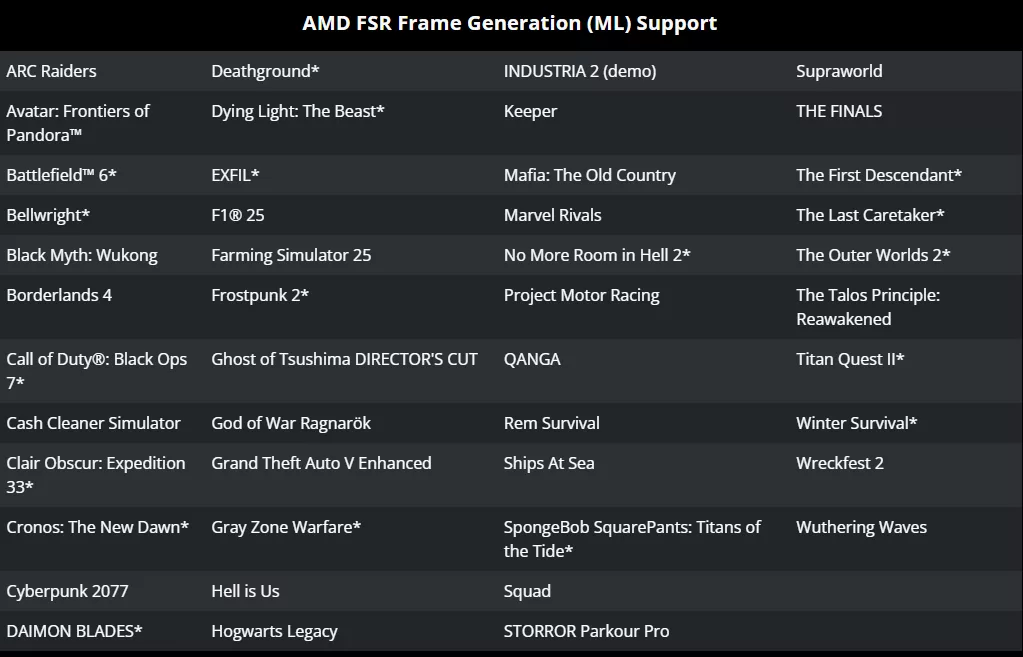
ML-Frame Gen, as part of FSR Redstone, has a higher requirement for support. The game must support Frame Gen version AMD FSR 3.1.4 in order to support ML-Frame Gen as enabled in the Adrenalin software control panel. That list of game support is much, much smaller right now. What’s even smaller, though, is the current game support for Ray Regeneration, which is also now “released”, and we say that lightly.
The only game right now that supports Ray Regeneration is Call of Duty: Black Ops 7, and even then, it only supports it in a limited capacity in the multiplayer mode. Multiplayer mode is exactly the game type that you wouldn’t want demanding Ray Tracing turned on, since high FPS is preferred for competitive gaming, it makes little sense.
Finally, the final component to FSR Redstone isn’t supported in any game at the moment, ML-Radiance Caching, which will debut in 2026. At the moment, we don’t even know what the first game will be, or when that will be supported. Clearly, adoption of the technologies within AMD FSR Redstone is spread out and very mixed as to which component has support in which games.
How To Enable ML-Upscaling & ML-Frame Gen
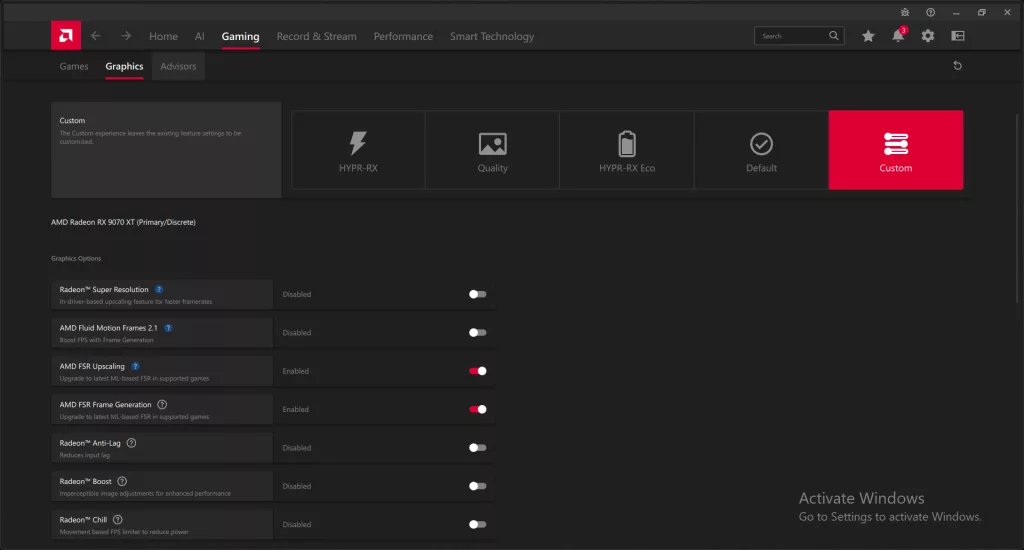
The first, and best way, to enable AMD FSR Redstone/FSR 4 ML-Upscaling is to use the in-game option for “FSR 4” if it is present. Otherwise, if the game supports FSR 3.1, then you can make sure “AMD FSR Upscaling” is enabled here in the AMD Adrenalin Software under the Gaming > Graphics tab. This will override the game’s FSR 3.1 mode and force enable FSR 4 ML-Upscaling.
For Frame Gen, it is a bit the same; if the game has an in-game option for specifically ML-Frame Gen, use it. However, right now, no game has this integrated. Therefore, the only way to get it is first if your game separately supports AMD FSR Frame Gen version 3.1.4. Then, and only then, can you go into the control panel and make sure “AMD FSR Frame Generation” is enabled. This will then override the game’s version of Frame Gen and force enable ML-Frame Gen.
The FSR Upscaling version of 3.1 is seperate of that of the FSR Frame Generation version number, which has to be 3.1.4 to support ML-Frame Gen. This is why the game list is much smaller. That means you will run into many cases where ML-Upscaling can be force-enabled on an FSR 3.1 Upscaling game, but not the ML-Frame Gen if it only supports Frame Gen 3.0, and not 3.1.4 Frame Gen.
AMD FSR Redstone Performance Benchmark Review
Regardless of all these facts, we did want to benchmark FSR Redstone ML Powered components, and see how they compare to their non-ML powered components, i.e. the previous anaylitical version of FSR 3.1 Upscaling and Frame Gen. Therefore, in this AMD FSR Redstone Performance Review, we are directly going to compare FSR 3.1 Upscaling and Frame Gen vs AMD Redstone FSR 4 ML-Upscaling and ML-Frame Gen. We will also take a look specifically at the impact of turning on AMD ML-Ray Regeneration in Call of Duty: Black Ops 7 to find out what kind of performance difference there is with it. We will also include ML-Upscaling and ML-Frame Gen in that testing as well.
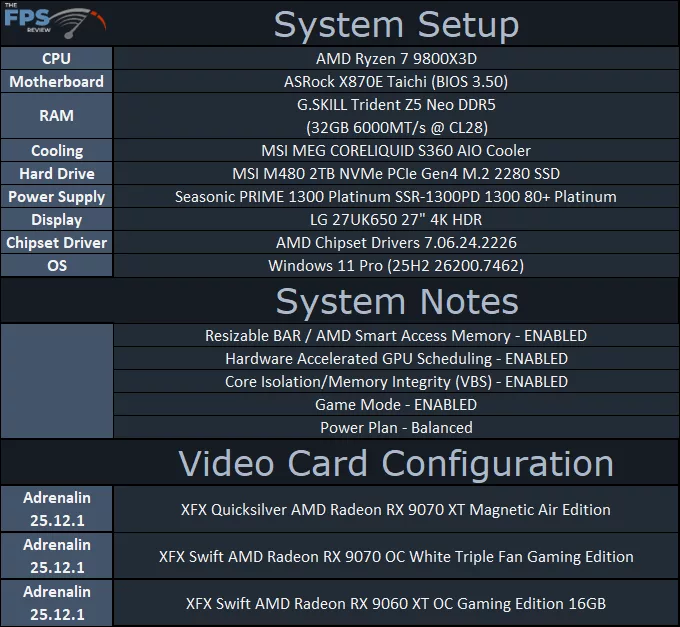
This is strictly a performance benchmark review; there are no image quality comparisons. This review is about the impact on performance, if there’s degradation in performance, and the overall benefit of these technologies versus native resolution performance. You can think of this as an FSR 3 vs FSR 4 Performance Review. We are going to benchmark all three AMD Radeon cards: the AMD Radeon RX 9070 XT, AMD Radeon RX 9070, and AMD Radeon RX 9060 XT. We will include AVG FPS as well as 1% Lows for each test. We are using the release driver from AMD.com Adrenalin 25.12.1.
To learn all about AMD FSR Redstone, please read our introduction article, which displays the entire AMD press-presentation full of information.
Discussion (3 replies)
Join Discussion →Thanks for the clear breakdown of what's been happening with FSR Redstone, and it looks very promising.
While I think it's a step in the right direction, I would say I'm somewhat disappointed. this is nowhere near the "DLSS 4 killer, many sites/youtubers are touting."
I was hoping for a slight performance increase or same performance, I really didn't expect a performance drop. Not that it impacts that much, but still.
In regards of Ray Regeneration, I'm even more disappointed as I expected it do as well as nvidia's counterpart.
Nevertheless, I would say the IQ improvements more than make up for the slight performance loss, but it's still far from DLSS IQ.
Finally, I gotta say every time I saw AVG, the antivirus came to mind. Why not use avg.?
I think AMD has done a decent job of keeping up when it comes to rasterization, but I would also recommend ignoring YouTubers who don't acknowledge how it is basically just getting into hardware-based ML features with its GPUs. I do believe that, generationally speaking, there might be a quick turnaround with whatever comes next for significant gains, as the GPU division will be able to tap into AMD's enterprise/server solutions, similar to what NVIDIA does.
I feel this is a beginning that is more akin to NVIDIA's 40 series features, and so not the worst way to get started on.