
Power and Temperature
To test the power and temperature we perform a manual run-through in Cyberpunk 2077 at “Ultra” settings for real-world in-game data. We use GPU-Z sensor data to record the results. We report on the GPU-Z sensor data for “Board Power” and “GPU Chip Power” when available for our Wattage data. For temperature data, we report the GPU (Edge Temp of the GPU or Package Temp) as well as Hot Spot (Junction Temperature) when available for our temperature data.
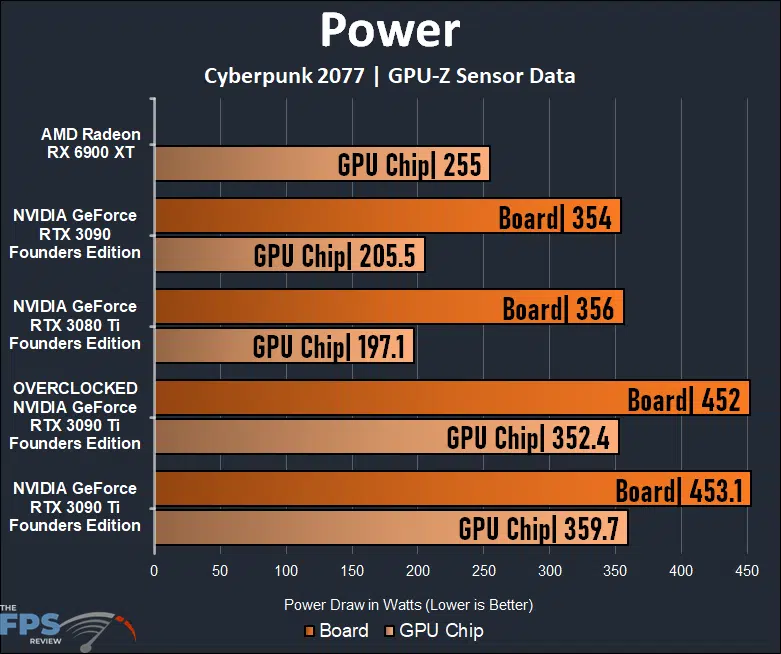
Keep in mind, that we were not able to increase the Power Target on the NVIDIA GeForce RTX 3090 Ti Founders Edition video card, therefore the TDP remains the same. The only increase is in GPU clock speed and memory clock speed. The power numbers show the overclocked GeForce RTX 3090 Ti FE to be practically the same, or even a bit lower than the default.
It may seem odd at first glance, but also keep this in mind, we have the fans at 100% and the GPU and memory is running a lot cooler overclocked, some voltages could be different. Even though the clock speeds are higher, the power demand is generally the same without any Power Target changes.
With the same TDP, the same limits are in place on power, and we just don’t see it increase by only overclocking the core and memory frequencies. Performance was obviously increased, as our testing shows, and the GPU frequency is also increased, as our GPU Frequency over time graph showed on page one. The GPU is running faster, but it just isn’t drawing any more power to do so without a Voltage increase or Power Target increase. This behavior is unique most likely to the Founders Edition, with no Power Target differences or options.
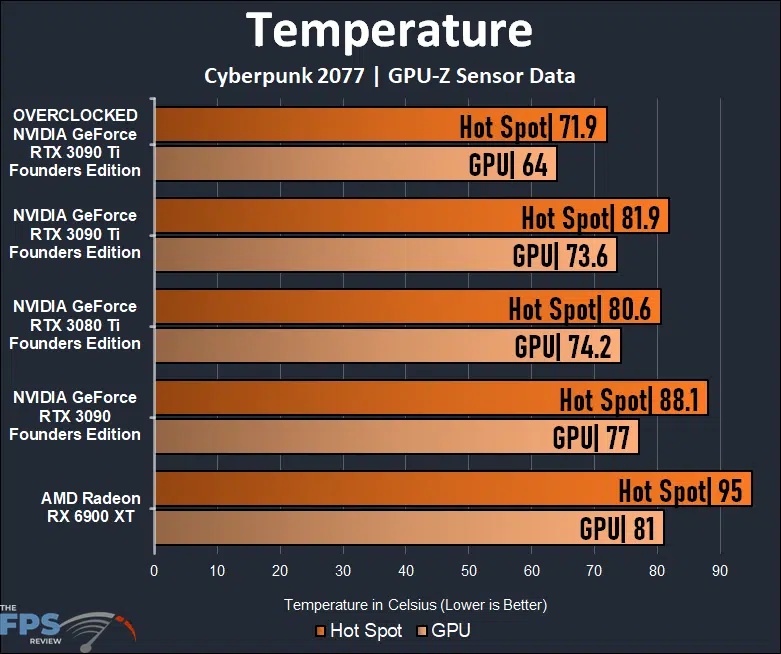
With the fans at 100% with this overclock the GPU and Hot Spot temperatures are much reduced. The Founders Edition cooling configuration is well built for the GeForce RTX 3090 Ti GPU.
Discussion (10 replies)
Join Discussion →Thanks, @Brent_Justice for another great review.
I tried overclocking my EVGA FTW3 Ultra 3090 Ti but with much more modest settings that did not net as impressive results as your tests. However, I plan to use, as I've done many times over the years, your review as a guideline just to see what it can do. I had tinkered with increasing the mem speed but with detrimental performance. I actually saw lower max frames in Metro and CB 2077. Not by a whole lot, perhaps 2-5 FPS but the averages were close to the same. I'll tinker a bit more with the mem but will focus more on the boost.
Precision X1 will let me raise the power limit to 107% for that card. I previously did that but only added a meager 25-40 MHz to the boost clock which saw it top around 2010-2040 MHz and I had set the fans to 100% which kept it in the mid-high 60s. I am now curious to see what could happen with ~140 added there. I'm only going to do it just to see what the ceiling really is for the card as at stock it's already doing most of what I need and with the fans on the stock settings, the card fairly quiet, about the same volume as the rest of the fans in the case, and never lets the card above 72c.
Really there is no longer point to overclocking. You get meager results vs power/heat increase. The days of even 20% OC are long gone. You are lucky if you get anywhere near 10%OC
You are better off doing UNDERCLOCKING. You loose very little performance but save quite a bit of power and heat. Might want to check that out.
Too true. These 3090 Ti s are a prime example of that. My previous OC attempts gained more heat, noise, and TDP than performance but it's still nice to see where the ceiling is.
Wait, I read that as 'undervolting' @Stoly, sorry!
But undervolting and overclocking at the same time would be the goal, if there's any allowance left for tuning efficiency.
Well, Thanks @Brent_Justice!
Those settings worked. We all know there's always an element of luck in the bin and I've had more than my share of cards where I was not able to reproduce what I've seen in other reviews using the same settings but these worked. I mostly got the same results. I saw the boost peak at 2140 MHz but it mostly held between 2115 and 2130 MHz with 11,502 on the memory. I get the feeling I might be able to squeeze a little more but I'm not going to worry about it right now. I attached some screenshots. I only tested in Metro Exodus.
The bench results are stock and then the overclock settings. The game screenshots look washed out because I had HDR on and even though it looks fantastic on the C2, afterburner cannot properly capture it. I like Precision X1 for its better tuning options for the card but prefer AB for its OSD.
A few more. Just whipping these out before bed but all are, including the ones above, at 3840x2160/HDR/120 Hz/G-Sync. These are all with the OC settings Brent used for the review. Beyond that it's a lot less scientific as graphical settings are mostly all textures maxed, RT is either maxed or close to it and DLSS is always Quality (except CB 2077-performance). HZ Zero Dawn doesn't have RT but does have DLSS plus it's one of the few games besides Crysis Remastered that can give the CPU a little workout even at 4K. I always turn off any blur, chromatic, lens flare, DOF, type settings. Bottom line is that I was able to replicate the GPU overclock flawlessly with his settings. I saw sustained peaks of 2145 MHz while it only dipped to 2115-2130 MHz during various moments. Again I do apologize for them looking washed out but it's because AB cannot properly capture HDR images.
Off topic... I notice you have a comparison between the RTX 3070 vs 3080 and 3080 vs 3080Ti.
Could you do RTX 3070Ti vs RTX 3080? I'd like to know if its worth the extra dough.
It's on the list! Going in order of the projected popularity based on search volumes.
Gr8 tnx. I'm thinking at this point I should maybe wait for the 4000 series, but I don't think I could get one anyway.