
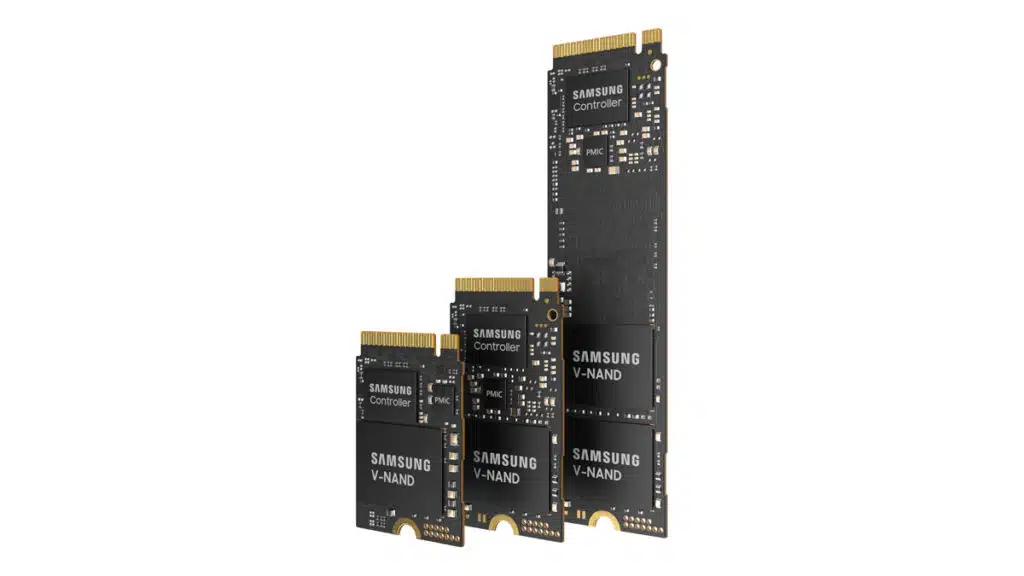
Samsung has announced the production readiness of the PM9C1a, a new high-performance PCIe 4.0 NVMe SSD. Featuring a new controller based on the company’s 5-nanometer (nm) process and seventh-generation V-NAND technology, Samsung says that the PM9C1a will provide elevated computing and gaming performance in PCs and laptops. Pricing and dates of availability haven’t been confirmed, but Samsung’s PM9C1a SSDs will be available in 256 GB, 512 GB and 1 TB storage capacities in M.2 form factors (22 mm x 30 mm, 22 mm x 42 mm, 22 mm x 80 mm).
“Our new PM9C1a SSD will deliver a robust combination of superior performance, greater power efficiency and increased security, which are the qualities that matter most to PC users,” said Yong Ho Song, Executive Vice President of Memory Solution Product & Development at Samsung Electronics. “We are committed to creating storage that satisfies the diverse and changing market requirements, as we continue to advance innovation in the PC SSD space.”
From a Samsung press release:
With top-tier speeds, the PM9C1a SSD is ideal for everyday use as well as for more demanding computing and gaming applications. Leveraging the PCIe 4.0 interface, Samsung’s PM9C1a boasts a 1.6x faster sequential read speed and a 1.8x faster sequential write speed than its previous storage offering (PM9B1), reaching 6,000 megabytes per second (MB/s) and 5,600MB/s, respectively. Additionally, random read and write speeds can support up to 900K input/output operations per second (IOPS) and 1,000K IOPS, respectively.
The PM9C1a also offers up to 70% more power efficiency per watt than its predecessor. This means the new SSD can handle the same amount of tasks using significantly less power. Furthermore, when a notebook PC goes into standby mode, the SSD will use approximately 10% less power.
To address the rising need for stronger security measures, the PM9C1a features powerful security. The SSD supports the Device Identifier Composition Engine (DICE) security standard created by the Trusted Computing Group (TCG), a global organization that develops open standards for computing security. DICE securely generates cryptographic keys inside the SSD, providing device authentication to protect against supply chain attacks — cyberattacks that target companies through vulnerabilities in their supplier network — as well as attestation to prevent any firmware tampering.
Discussion (19 replies)
Join Discussion →Huh I wonder what the controller will be.
Hopefully the 2230 gets a 1TB variant. I need one for my Steam Deck.
Is this just a development name for the 990 or a different product line altogether?
What good is 1TB these days? I don't even want to buy 2TB SSDs now, because I want to consolidate my storage not further fragment it.
1TB is 512GB more than is really necessary for an OS drive. Turns out it's also about 400GB more than is really necessary for a game drive, given I've been using this PC build for 2 years and I only have 588GB used for my game drive.
Everything else I store sits on spinning disk in my NAS and I just don't care how fast it is given its going to be contrained by 1gbit networking anyway.
1TB is not a lot for a gamer that plays a lot of different games. If you only play 1 or 2 games a year, or play a game until its done then uninstall it afterwards, then yea. Smaller SSDs will be fine for you.
But if you play multiple different multiplayer games then having a large SSD to save them to is much better than uninstalling/installing each time you want to play a specific game with your buddies that isn't already on your drive.
LOL, my OS drive is already 1 TB, I've been constantly running out of space on an 512, and I have less than 200GB free even on the 1 TB one. And I know what you are thinking but there are no games on it.
I have a 2TB drive for games, sharing space with work, and that's a constant struggle too. I want an affordable NVME 4TB to replace the games drive, so my games drive can become my new OS drive.
My games folder is "only" 600GB now because I did a clean wipe of all my SSDs 2 months ago.
Everything that doesn't require quick access like movies videos and images is on HDDs.
For me:
I can get by with 250, but it's tight and I have to do a lot of shuffling. Smaller drives are ok in use cases where there isn't gaming involved (some remote servers or consoles, for instance). For me, >=1TB is comfortable, still have to keep an eye, but there's enough room that I'm not constantly juggling stuff. Anything over that is icing on the cake.
I find it's a lot less important now that I have a faster ISP. Back when I was stuck at single-digit download speeds, it would take 1-3 days to download a game: you didn't want to have to delete it to just make room. Now, a couple hours and I can have the game back from download it isn't as critical.
But Space Management is where I stumbled upon the caching arrangement that I have now. It was very important when I had slow ISP and was tired of juggling everything on a smaller SSD. Now I have faster ISP service, a bigger SSD, and still have the platter, but don't use it nearly as often as I once did.
LOL, what the heck are you using your OS drive for?
I've got Windows, Office, drivers, and firefox on the OS drive, and couple other random things for sure. I'm using 290GB, and I wouldn't be shocked if I could squeeze into a 256GB OS drive, there just isn't a reason to. If there was an extreme performance 256GB drive (say, optaine came back) I'd make the effort.
I've got 5 games installed on my game drive and a backup of all the source code for various projects (incase my NAS goes horribly south one day), but code is so tiny it's hardly worth mentioning as its less than 500MB. I can see LeRoy's point where if you had a lot of different games you're playing with friends you don't want to be deleting and re adding them all the time, I just haven't run into that for years. My group made a pretty solid push with Diablo II resurrected for a while, but we all have little kids and only play one game at a time, generally with gaps in-between.
in my case there are a couple games I got via MS store on my OS drive since you could not choose an install location back then, but I got only around 170 GB used on my C drive, I do have around 2.8Tb in games installed atm, If I% choose to play a different game I want to be able to actually play it there and then, not 2 hours later after it is done downloading.
I do intend to phase out a couple of the 500GB Sata SSD's for the NVMe ones I bought on a black friday sale, my older less demanding games can stay on the 2 2TB QVO drives.
Thinking of doing that after upgrading to win11
I use 2TB NVMe drives out of necessity and budget restraints for my games in the laptop and gaming rig, and it mostly works, but I have enough games with ridiculous install sizes that I still have to manage what I keep installed. Now the reality is that all I usually will play is maybe 5 or 6 different games these days but it's nice having more installed instead of having to re-download them and eat up data from my ISP. If I put any hi-res audio or even average-sized (2-8GB) video files with my games, it fills it in a blink of an eye so I usually have to keep those separate.
I'm mostly happy with 2TB but if I could afford a 4TB I'd do that in a heartbeat just to know that I'm covered for a while longer. I'm tired of needing extra drives for everything. At this point, my 1TB/512GB drives are basically just leftover OS drives from various builds and not much good for anything else. I have access to a bunch of old 256GB SATA III SSDs and was considering building a NAS with them but just an enclosure for 10 with hardware raid costs more than a single 2TB NVMe so even that is pointless.
Back on topic. I really hope that PM9C1a SSD isn't what this product line is going to be called but also, 1TB would be useless for me as I don't need my OS to load that much faster right now and that's way too small for the games I play as I doubt this thing would be so cheap as to incentivize me to keep 6-8 games on it just for faster loading.
They have been using similar names for what seems forever for their enterprise stuff. ie PM1653 or PM1743
I use my PC both for fun and work, also many hobbies. My documents folder is 250GB alone, Users is 50GB, 150GB Apps. Plus it seems a few games did spill over to my program files folder, I just realized that. There is another 200GB, I probably put them there anticipating a shortage on my work / game drive then I forgot about it.
I play a bunch of games on and off, and it's just that I don't want to wait potentially an hour when I do decide to play some of them. So my favorite games I always installed, even if I have not played them in months.
Didn't know that. I've never bought one of their enterprise drives before. Thanks for the tip!
I burned through my 1TB game drive with 5 games. I'm considering adding another 2TB drive for games alone.