
Conclusion
The Intel Microcode 0x129 update is out for Intel Core 13th and 14th Gen desktop processors. Motherboard manufacturers have started to roll out BIOS updates, and many are now out of Beta status and official “Gold” status ready to update. The new Intel Microcode 0x129 update will primarily affect Intel Core i9 CPUs, K/KS/KF series.
Keep in mind, that this is just one mitigation, combined with others to keep non-degraded CPUs from degrading, or at least degrading faster, it should slow the process. However, it cannot, and will not, fix already degraded CPUs. It will simply prevent (hopefully), degradation from happening on a CPU that has not begun degradation, or at least, slow it down.
It’s impossible to know what the outcome will be, will it completely stop a CPU from degrading, or just slow down the process? Only time will tell on those answers. For right now, our goal was to apply this new update and see if the change in Voltage would cause any kind of performance loss. We tested synthetic benchmarks, and gaming, to see where it might cause performance differences in both the Extreme and Performance Intel Default profiles.
8 Game Average
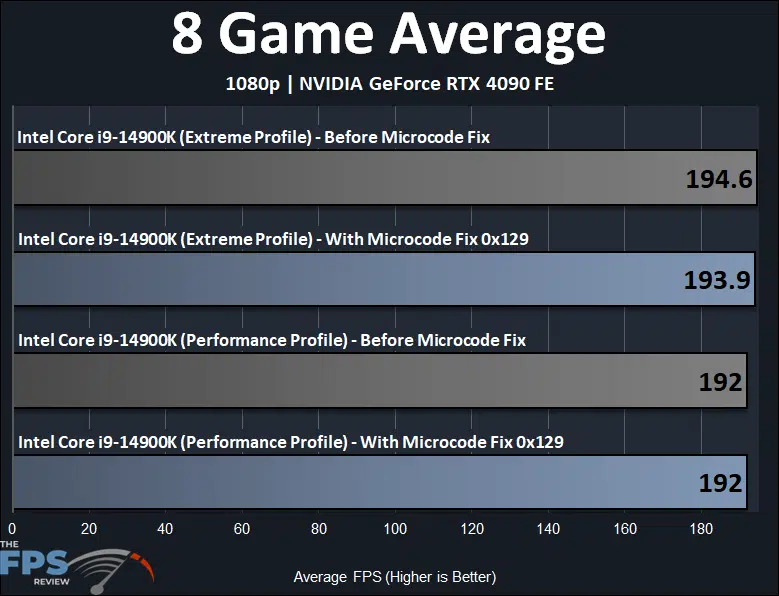
In the graph above we have averaged the performance across the 8 games we tested at 1080p. You will see that on average, for gaming, the new Microcode 0x129 BIOS fix in the Extreme Profile is just 0.35% slower. With the Performance Profile, the Microcode 0x129 BIOS fix averages out to exactly the same performance in gaming.
Final Points
When we look back at performance, a pattern became very clear with the new Microcode 0x129 BIOS fix update. On our Intel Core i9-14900K, it appears that single-thread/single-core performance was not affected by the update. We experienced performance in those workloads that matched the previous BIOS version in both Intel profiles. The largest differences in performance was in multi-core/multi-thread workloads primarily. We saw on average a 0.5% (half a percent) performance reduction using the new Microcode 0x129 BIOS compared to the previous BIOS. There were some outliers, perhaps up to a 1% difference. However, most differences were below 1% with the new Microcode 0x129 fix.
There were some instances in some workloads where performance was faster, and this would be due to the lower Voltage reducing throttling on frequency in some places, especially under the Performance Profile. Under the Extreme Profile, performance was closer as it reached its maximum power range. There was a tiny bit more difference between performance in the Performance profile, compared to the Extreme profile because of this.
In terms of power, it was the same with a maximum workload, and peak Wattage, since PL1/PL2 is locked at 253W. Temps were interesting, with slightly lower temps in the Performance profile with the lower peak Voltages. We also found that the frequency was in fact slightly affected, by 100MHz here or there on one or two P-Cores at a maximum full-load, but that was it, which resulted in the below 1% performance differences.
In terms of gaming performance, there was a ‘benchmarkable’ difference below 1%, and this would only result in a framerate difference of about 1 FPS. I think we can safely say that gaming performance is not affected to any negative or noticeable degree.
Overall, our conclusion is that upgrading to the new BIOS with Microcode 0x129 is a must. If you have an Intel CPU, even i5/i7 and especially i9, upgrade your BIOS right now. You won’t see a noticeable performance reduction. We do not recommend a Beta BIOS, but many BIOSs are now finalized from motherboard manufacturers, so even if you suspect your CPU has degraded, or if it hasn’t especially, upgrade the BIOS right now.
One thing to consider, however, is that if your CPU is degraded, it is possible it is only still stable because of higher peak Voltages, so if you update your BIOS to this new Microcode 0x129, and it is suddenly not stable, it may not be stable under the new lower Voltage peak of 1.55V. Otherwise, operate the CPUs in the Intel Default profiles, and if you are worried about stability or degradation, utilize the lower Performance Profile, instead of Extreme.
Discussion (18 replies)
Join Discussion →Great writeup as usual. This is "a time will tell" scenario if this was a placebo or if it indeed worked.
I can't help but wonder if this is akin to putting lipstick on a pig and declaring it is fixed. Slight changes all of a sudden will prevent degradation (if a chip has not been degraded yet)? I don't know. I get the impression that Intel has no idea what is causing this in their 13/14 series, so they put out this microcode to appease the angry mobs with pitchforks banging on their door. Right now, I do not trust anything they say or do.
good article, let's hope it works long term
The uCode update did not change the power draw, nor are the boost clocks much lower. The max voltage was lower however (1.495 V in HWinfo). A few questions:
1) What was the VCore before the update? (In HWinfo) ? Did you see the 1.55V?
2) Does this new limit on VCore have a built in margin for already degraded processors?
3) Does tracking VCore across loads tell us anything about whether a processor has degraded or not? (accounting for the effects of Silicon lottery?)
Thanks for this article. I didn't see any noticeable difference in my 14700K after the latest bios update other than my voltages going from 1.5XX down into the 1.4XX range.
I installed the update for my 13600K system and I'm sure I'll never notice a difference in performance.
I think the real comparison is between the new microcode and the initial version that was used for the day 1 13XXX and 14XXX reviews.
Just from what i seen, before the update my cpu voltage was in the 1.35 to 1.39volts range. After the update it was in the 1.45-1.49. I wasn't having any stability issues since my cpu wasn't running on that 4000watt profile for very long before i turned it off cause all issues.
Currently i have turned off unvolt protection so i can undervolt -0.1volts to be back where it was and gonna go lower to see help like did on my rtx4070s
From watching Buildzoid's video on the update, he had easily captured 1.58V+ on the VCore prior to the update, and not able to trigger the scope after the update.
Wow! That is crazy. However, it is important to ensure that such transients are not due to instrument/environment errors. Perhaps I ought to watch that video.
[embedded media]
Video form of this article is also up -
[embedded media]
Very informative. My findings were the same with both my Intel rigs.
Certainly not the terrible impact we had all feared, but I am still not convinced this was the only root cause and that it fixes the problem.
Time will tell.
Time hasn't been kind to Raptor Lake: https://www.overclock.net/posts/29521182/
I hate it when I'm right :(
I’ve found the older I get the more that I pray that I’m wrong