
Overclocking GIGABYTE GeForce RTX 5060 Ti GAMING OC 16G
To overclock the GIGABYTE GeForce RTX 5060 Ti GAMING OC 16G video card, we downloaded GIGABYTE Control Center software, the latest version available at the time of testing, which was version 25.04.07.01.
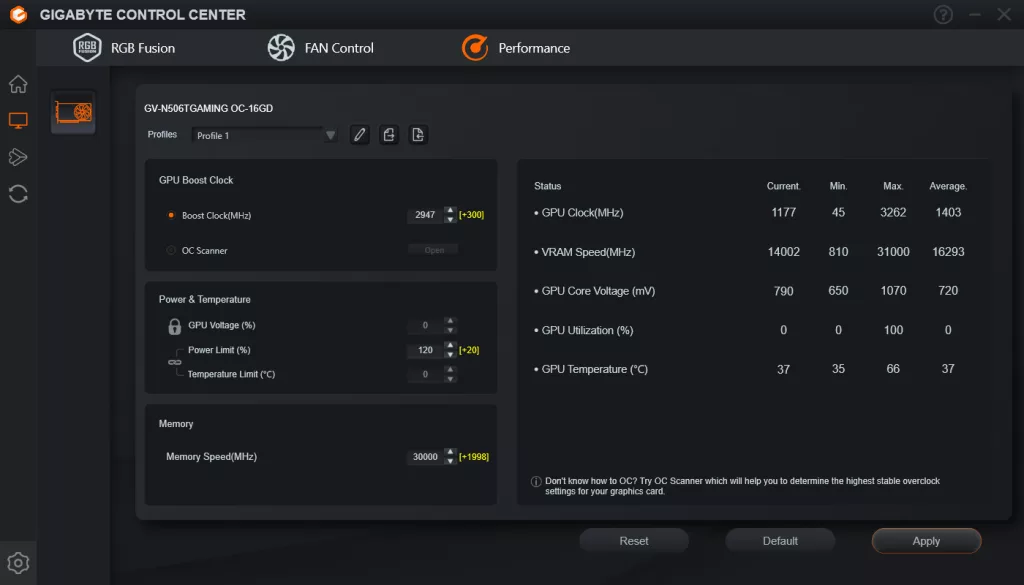
In GIGABYTE Control Center software, under the Performance tab we can control the Power Limit, Boost Clock and Memory Speed. However, we cannot adjust the GPU Voltage, it is locked out currently. With the Power Limit we were able to increase it by 20% from 100 to 120, which is a decent bump in power range for overclocking this video card.
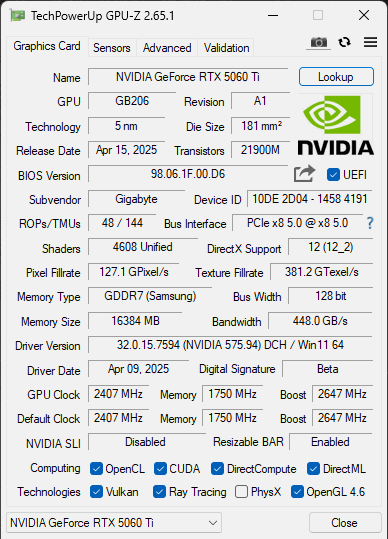
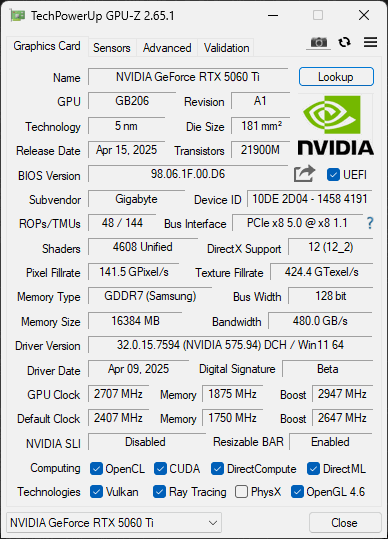
Using the Boost Clock and Memory Speed options, we managed to bump the GPU Boost up by +300 to a Boost Clock of 2947MHz, and the Memory Speed up by +1998 to 30Gbps from the default 28Gbps. The default GPU Boost clock of this video card is 2647MHz, and our overclock brings that up 11% to 2947MHz, but of course, this isn’t the real-world in-game frequency, so look for that in the graph below. We did feel that if we had the ability to raise the Voltage, we might have gotten it to push a little higher to +325 or thereabouts, but honestly, this is already a pretty big GPU clock speed increase, as you’ll see below.
On the memory front, this was also interesting because, technically, we could overclock it just fine to 31Gbps. However, when doing so, this ultimately ate into the power budget and lowered the GPU clock speed a bit. We found that by keeping it at a more modest 30Gbps, we were able to consistently attain a higher, more consistent GPU Boost clock frequency when overclocked. At 30Gbps this brought the memory bandwidth up from 448GB/s to 480GB/s, a 7% bump in memory bandwidth.
GPU Frequency
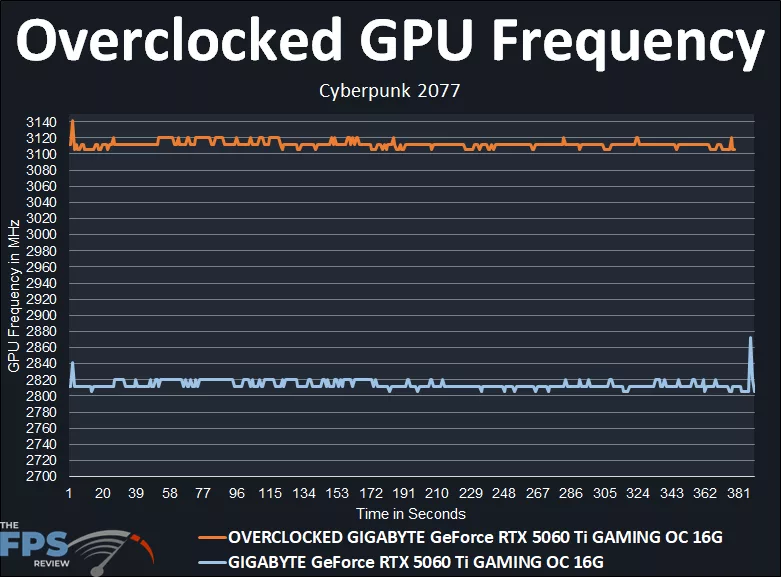
In the above graph, we are running Cyberpunk 2077 at 1080p, and this is a manual run-through. The GIGABYTE GeForce RTX 5060 Ti GAMING OC 16G, at default, seems to run around 2812MHz-2820MHz by default, real-world, in-game frequency out-of-the-box. The GPU Boost is set at 2647MHz, but in reality, it’s running above 2800MHz when gaming already. The exact average was: 2814MHz.
When we overclocked the GIGABYTE GeForce RTX 5060 Ti GAMING OC 16G with a +300 to the GPU Boost, and default fans, no Voltage, that boosted it up to above 3100MHz, between 3105MHz-3120MHz when gaming now. The exact average was: 3112MHz. Therefore, our overclock increased the clock speed by 298MHz, or 11%. That’s a pretty good overclock, bringing it consistently over 3.1GHz is very nice to see, and really pushes the card for not much more heat generation with the great cooling on it.
Discussion (13 replies)
Join Discussion →Anyone else remember when the current gen video cards would reliably smoke the previous gen one model revision higher in performance for less money? I remember.,..
Still a decent card for 1080p. Nips at the heels of the 5070 in every way when overclocked and while higher priced than MSRP, it is quite a bit cheaper than one. Not to mention very power efficient.
I bet a 9070 dusts it. ;)
I bet it does too, but can you find one, in stock, at $529. I checked for online just now and the closest prices I'm seeing are about $150 more.
of course it does, it's on a different bracket.
My wishful thinking was that it would stand between the RTX 4070 and 4070Super, but if you were on the market for a RTX 4060Ti, might as well get this.
Yea that's fair I suppose.
I guess the real question, if comparing sort-of like-for-like is how the 9060 series will compete but I've gotten a little confused as to whether there will be just XT or if an XTX is in the works.
F'n $600 for an entry level GPU is ... just gonna kill gaming rigs. Why not just get a console for that money?
Say hello to our new discrete graphic overlords.
Yeah, sigh, not the best of times for sure.
Although, giggle, that metric reference (consoles) probably won't matter much if the next gen is significantly over $600, which it could well be given what the NS2 will go for.
Honest to god consumer electronics are a freaking gameshow now.. guess the number nope too low nope not high enough... it's just stupid.
Video overview is up!
[embedded media]