
Test Setup
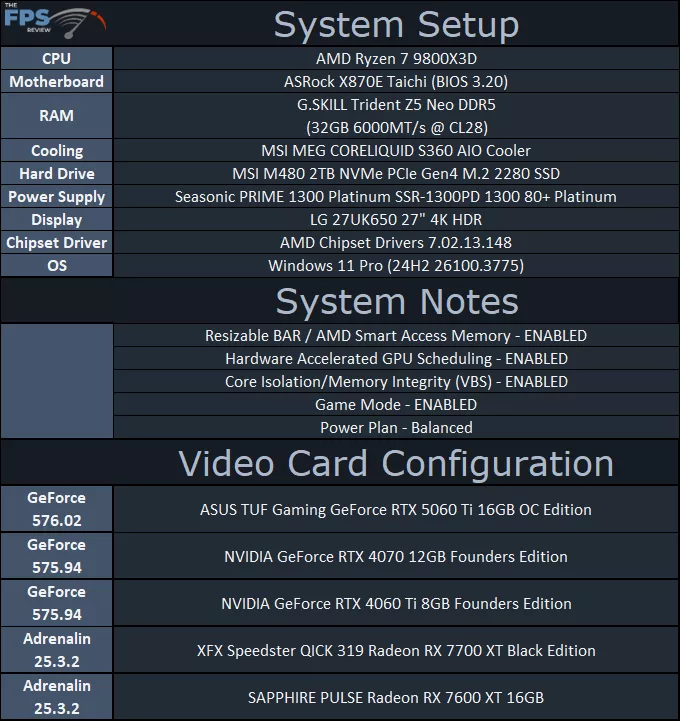
We are using an AMD Ryzen 7 9800X3D for testing. We are using the motherboard’s current default BIOS settings on the latest release BIOS. We have enabled PCI-Express Resizable BAR in the motherboard BIOS. We have enabled EXPO I in the BIOS for the memory. We are using a fresh install of Windows 11 Pro with the latest Windows Updates, including the 24H2 update. We have the latest drivers installed, including the latest chipset drivers. We are using the “Balanced” power profile in Windows Settings, and Core Isolation/Memory Integrity (VBS) is enabled.
We are using the latest NVIDIA-provided press driver for the ASUS TUF Gaming GeForce RTX 5060 Ti 16GB OC Edition, which is version 576.02.
Discussion (5 replies)
Join Discussion →Interesting how the cheaper Gigabyte 5060 Ti will give you very similar performance at a much lower price, just for comparison sake.
This ASUS card is nice and all but the price is steep.
Paying for the name... Plain and simple.. :(
Paying or the benefit of a notoriously difficult support experience should you need it.
Im getting the 8gb used for a very good price within my budget (Im on 1080p and i 90% play competitive games so More Vram is not really a deal breaker for me). Asus tuf gaming 5060 ti OC 8GB. Is the review covering the same? also is there no review for the benchmarking tests like furmark or 3d mark? I have checked ur guys review and i saw the temps and power consumption but you didnt mention the resolution used during getting this temp. Please let me know <3 Thanks.
Kloopy it's an 8gb card. It's 1080p in most conditions and unless called out should be expected to be 1080p. Most articles will state 1440p where needed as outliers. I hope that helps.