
Throughput Benchmarks
CrystalDiskMark
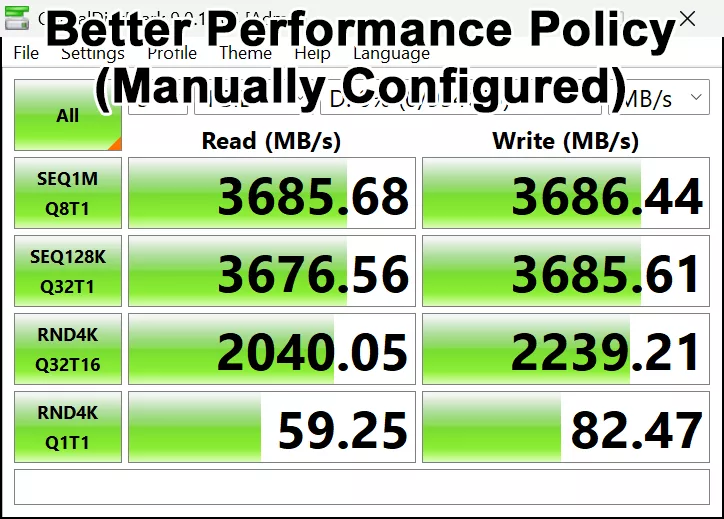
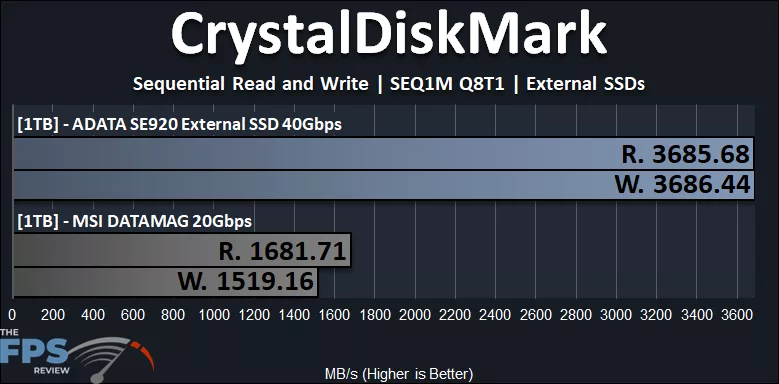
The ADATA SE920 has a quoted rated speed of 3,800MB/s read and 3,700MB/s write, sequential performance. We aren’t quite hitting that, but we are close, maxing out at 3,686MB/s and thereabouts for both read and write. It’s possible we are hitting an interface limit or overhead of some sort. Naturally, USB4 speeds will depend from motherboard to motherboard, controller to controller, and so forth. At any rate, this speed of 3,600MB/s is still incredibly fast, and miles above what a 20Gbps external storage device can offer in terms of performance. The ADATA SE920 is about 119% faster than the MSI DATAMAG 20Gbps external storage device.
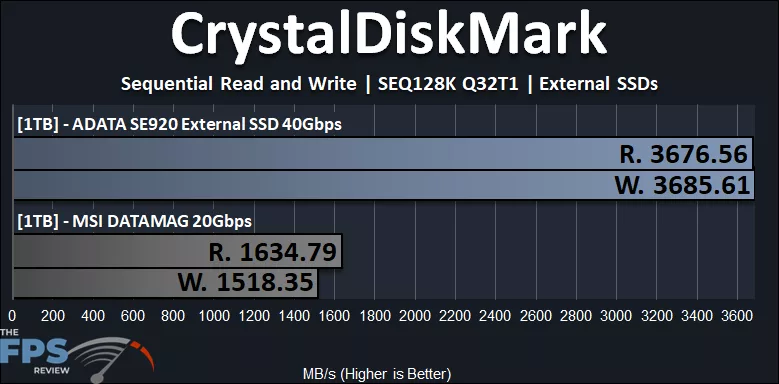
The same is true with SEQ128K Q32T1 as well; the ADATA SE920 is hitting that limit for us, but is certainly strong in sequential read and write performance.
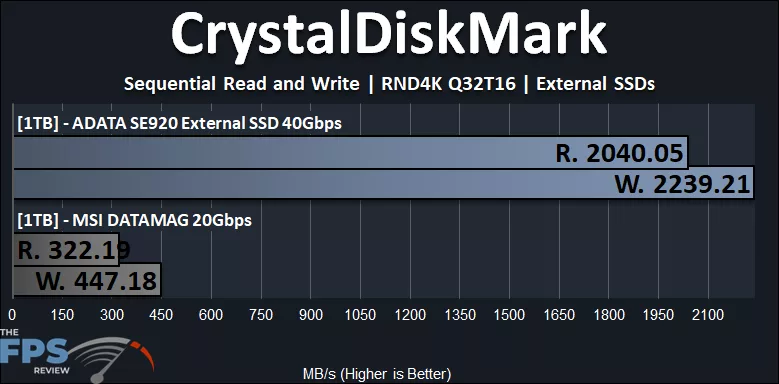
When it comes to random read and write performance, the ADATA SE920 is also miles ahead of the MSI DATAMAG 20Gbps. At 2,040MB/s read, it is 536% faster, wow, and write is 401% faster.
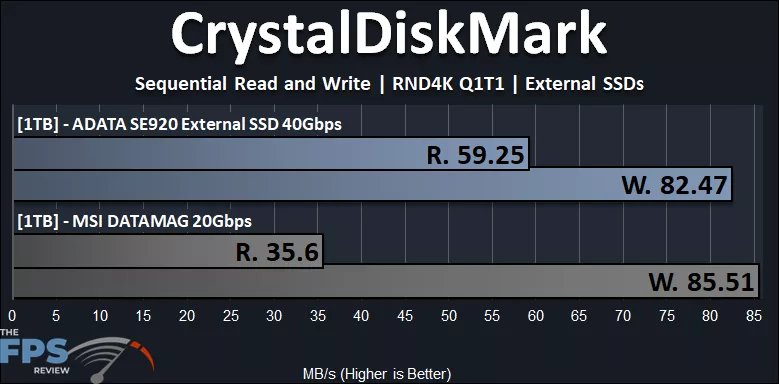
In the RND4K Q1T1 performance, the ADATA SE920 is 66% faster in read, but interestingly, just slightly behind in write performance. It isn’t far behind, however, so they are close in performance in that one particular metric.
ATTO
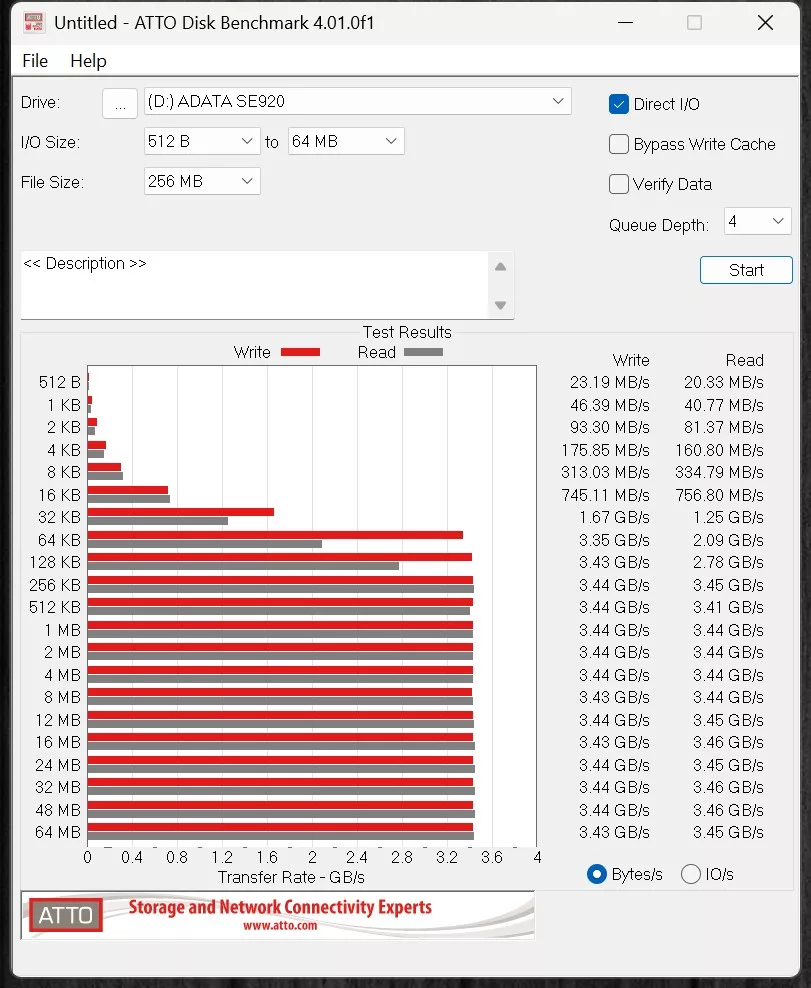
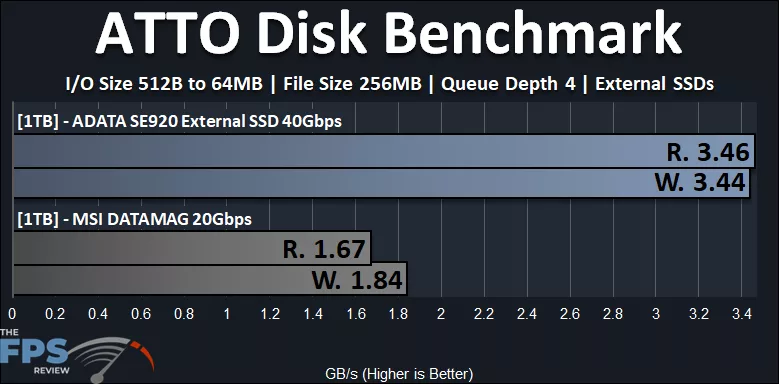
In ATTO, the ADATA SE920 is hitting 3.46GB/s read and 3.44GB/s write, which is 107% faster than the MSI DATAMAG 20Gbps for read and 87% faster on write performance.
Discussion (3 replies)
Join Discussion →So I took a old 1tb PCIE 3.x nvme drive in an 17 dollar external USB C enclosure. And tested. My speed results are here:
Then for giggles I pulled out my Sandisk 1TB external NVME drive. (supposedly faster and is encrypted and ran the same test.)
So that is without modifying disk settings or anything along those lines. Each test the drive was plugged into the same USB4 compatible USB-C port.
My system is in my sig. Just as a comparison.
Oh I for fun I did one pass in 'performance' mode on the drive to see how it would behave. The sandisk drive.
As you can see no REAL difference in speed. I'm not sure why your test was so vastly different with that setting on or off.
I am running this build of windows:
Perhaps that makes a difference?
It's more to do with USB 40Gbps drives; the faster the external drive, the greater the effect. It also has no affect on the MSI DATAMAG 20Gbps drive, in my testing, only the ADATA SE920, so it is definitely related to the maximum speed of the drive, and the interface speed it runs at.
The recommendation is also listed on ADATA's website, which is where I got the link from:
[URL unfurl="true"]https://www.adata.com/us/consumer/category/external-ssds-and-hard-drives/external-solid-state-drive-se920/[/URL]
If you scroll down on their webpage, you get this message in asterisks:
** When using external storage devices, following the two Windows principles of "Quick Removal" and "Improve Performance" is recommended. Please see link.
And so I tested it both at default, without changing anything, and then manually changed the option, and showed that result.
Interesting. Yea I guess I don't have a true USB 4.0 drive yet. Don't really feel a need for one.