
Gameplay Performance
We are testing only at 1080p to isolate CPU performance. We are using an NVIDIA GeForce RTX 5090 Founders Edition video card with driver version 591.74. All games are being run in their “Ultra” game settings, at native 1080p resolution, and with no ray tracing or upscaling.
Importantly, we are using ALL manual run-throughs for every game here except one. The one exception is Call of Duty: Black Ops 7. We are using the built-in multiplayer benchmark. However, for every other game, we are using long manual run-throughs in-game of actual gameplay.
Alan Wake 2
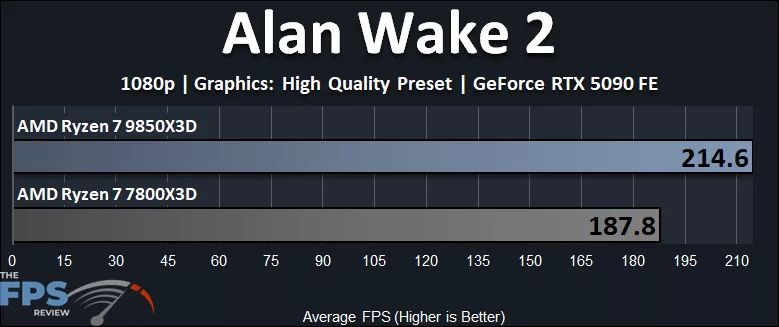
In Alan Wake 2, we are running at 1080p, with the High Quality Preset. Both CPUs provide high frame rates, capable of over 120 or 144FPS, but only the Ryzen 7 9850X3D allows over 200FPS in the game. We find that the Ryzen 7 9850X3D is 14% faster than the Ryzen 7 7800X3D. This isn’t a huge amount, but we can see the advantages of the architecture and clock speed differences in this game.
Battlefield 6
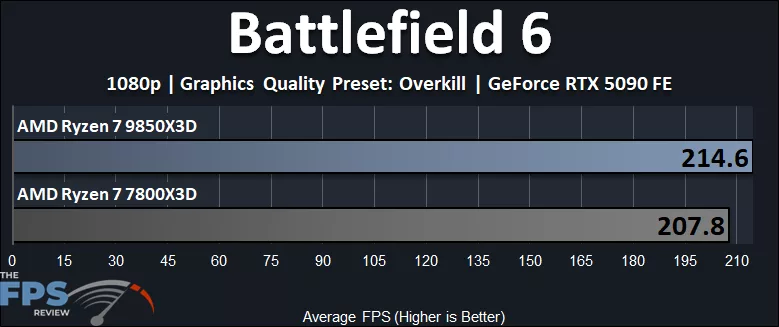
In Battlefield 6, we are running at 1080p on the GeForce RTX 5090 FE, but we are using the highest in-game quality setting of “Overkill.” This does appear to be somewhat GPU-limited, even at 1080p at this higher game setting. We find that the Ryzen 7 9850X3D is only 3% faster than the Ryzen 7 7800X3D, and both CPUs allow for over 200FPS at 1080p with the highest in-game settings. This game is easily GPU-limited, and only if we dropped game quality settings lower would the CPUs start to separate. Even at 1080p on an RTX 5090, the difference between the two CPUs is narrow at Overkill game settings.
Call of Duty: Black Ops 7
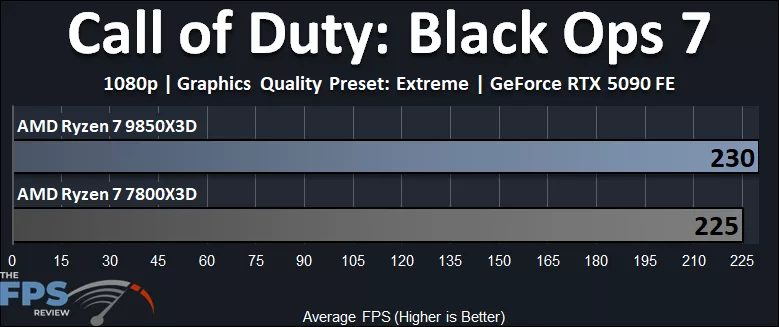
In Call of Duty: Black Ops 7, we are running at 1080p on the GeForce RTX 5090 FE, but we do have the highest “Extreme” quality enabled, with no VRS. The Ryzen 7 9850X3D is only 2% faster than the Ryzen 7 7800X3D at 1080p, and both CPUs are able to provide over 200FPS of gameplay performance with the Extreme setting enabled. This, like Battlefield 6, is remarkably GPU-limited even at 1080p using the highest in-game quality setting. It does show that the Ryzen 7 7800X3D is fast enough to deliver a similar performance to the Ryzen 7 9850X3D on the GeForce RTX 5090 with very high frame rates.
Clair Obscur: Expedition 33
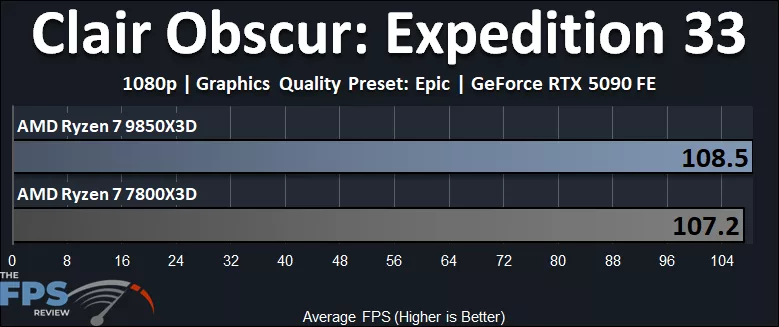
In Clair Obscur: Expedition 33 we are running at 1080p on the GeForce RTX 5090 FE, but we are running the game in the highest quality setting of “Epic.” The Ryzen 7 9850X3D is only 1.2% faster than the Ryzen 7 7800X3D in this game, even at 1080p, on the Epic game setting. Both CPUs are only able to provide upward of 100FPS in this game at 1080p because we are mostly GPU-limited, even at 1080p, in the Epic setting. Both CPUs deliver a similar level of performance on the GeForce RTX 5090 with a similar gameplay experience, and this game relies heavily on the GPU, and it’s a hard nut to crack for high framerates without turning down the quality settings quite a bit. That means even with these X3D CPUs, 120Hz gaming is hard to achieve without Upscaling.
Cyberpunk 2077
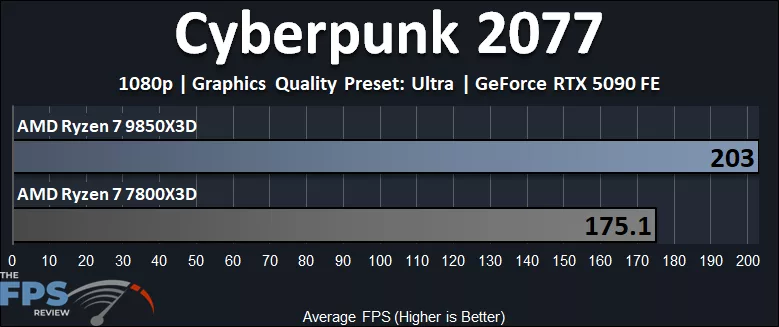
Ah, Cyberpunk 2077, like Alan Wake 2, scales very well with CPU performance. Though we are running at the “Ultra” setting, at 1080p on a GeForce RTX 5090 FE, the CPU can make a difference in gameplay performance. In this game, the Ryzen 7 9850X3D is 16% faster than the Ryzen 7 7800X3D, showing the potential difference in the CPUs when CPU-limited. This is so far the largest difference we’ve seen between the CPUs. The Ryzen 7 9850X3D allows for 200FPS, while the Ryzen 7 7800X3D does not.