
AMD has published a document detailing how its FidelityFX Super Resolution upscaling technology can be applied to professional use. While gamers are accustomed to seeing FSR used, it’s a bit less uncommon for it to be thought of when it comes to professional environments. AMD has explained that it can be implemented in scenarios such as presentations to offer a graphics boost for visualizations.
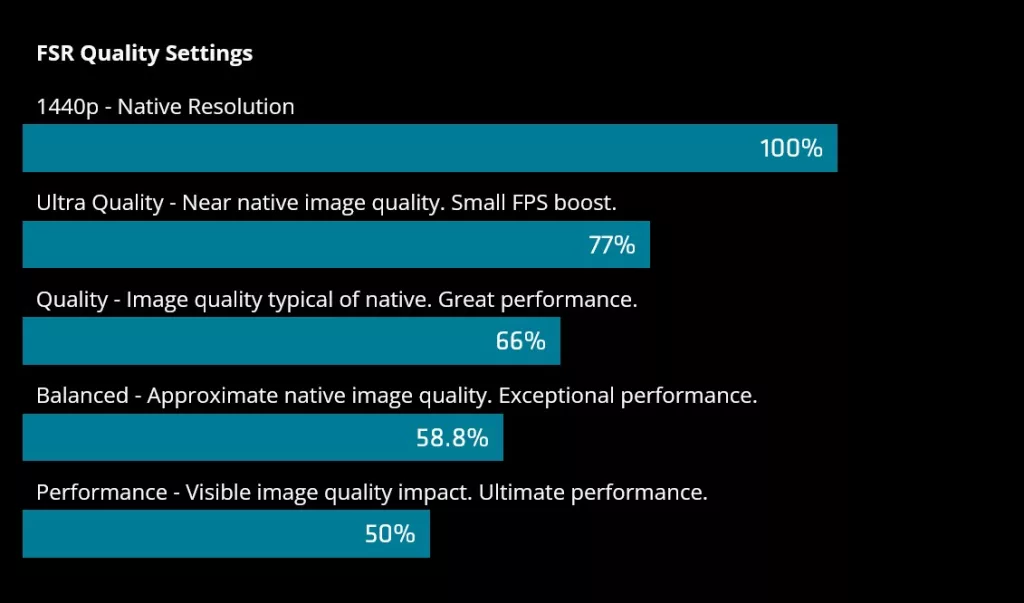
AMD suggests that architects and other design-specific users could ideally use FSR for PRO in their workflows to provide real-time rendering. Similar to gaming settings, FSR can be configured with four presets which focus on quality vs needed framerates by rendering at a lower resolution and then upscaling to a target resolution. AMD explains the four settings, ultra, quality, balanced, and performance, below.
“For a 1440p output, where native resolution is 2560 x 1440, Ultra Quality mode would render at 1970 x 1108 (77% of native resolution) while providing a small performance gain. It then uses 1706 x 960 (66.6%) for Quality mode, 1506 x 847 (58.8%) for Balanced mode, and 1280 x 720 (50%) for Performance mode which also offers the greatest performance boost.”
– AMD
AMD states that up to 3.5x performance gains can be had at 1440p using FSR for PRO and that its broad support of current and previous GPU solutions, including integrated, is a big plus. It also emphasizes that FSR for PRO is fully open source and does not require proprietary hardware to use. Partners such as ACCA Software (Edificius BIM) and Lumion are working with AMD to utilize FSR for PRO.
“Improve performance in design and visualization workflows with ACCA Edificius BIM software thanks to AMD’s upscaling technology and its adjustable image quality settings. Users can finally express their digital creativity and archviz capabilities on a broad range of supported hardware without sacrificing performance.”
– Tony De Palma, Edificius BIM Product Specialist, ACCA Software
AMD continues to evolve its upscaling tech, and while newer versions do require hardware support, it still offers versions such as FSR for PRO to users. This open-handed approach has enabled graphics cards from all three manufacturers to employ these technologies for improved performance.
Discussion (7 replies)
Join Discussion →So tbis is basically a response to Nvidias live pro render stuff.
The AA of these upscaling technologies is a godsend.
Like that's the only thing I'd really want out of it lol
Yup, DLAA is the best AA by far, I don't know why it's not praised more. It's the main reason DLSS can rival or even surpass native if only because most TAA sucks.
Gawd I love me some DLAA. The image quality is insaaaaaaaaaaane!!!
I have used DLAA but I find in forza horizon 6 it causes duplicate antennas on cars where they are prominent.
How close is FidelityFX Super Resolution to DLAA?
Haven't personally tested but I doubt its even close. I've used DLAA whenever possible at 4K with a 5090 and the perf hit can be major in some games but it does look nice. However I usually end up compromising with the latest DLSS models for higher frames, lower power/heat. I get a real kick out of seeing a 5090 using 250-350W and things still look pretty good.
I'm sure someone out there has to have posted a comparison video somewhere though.