
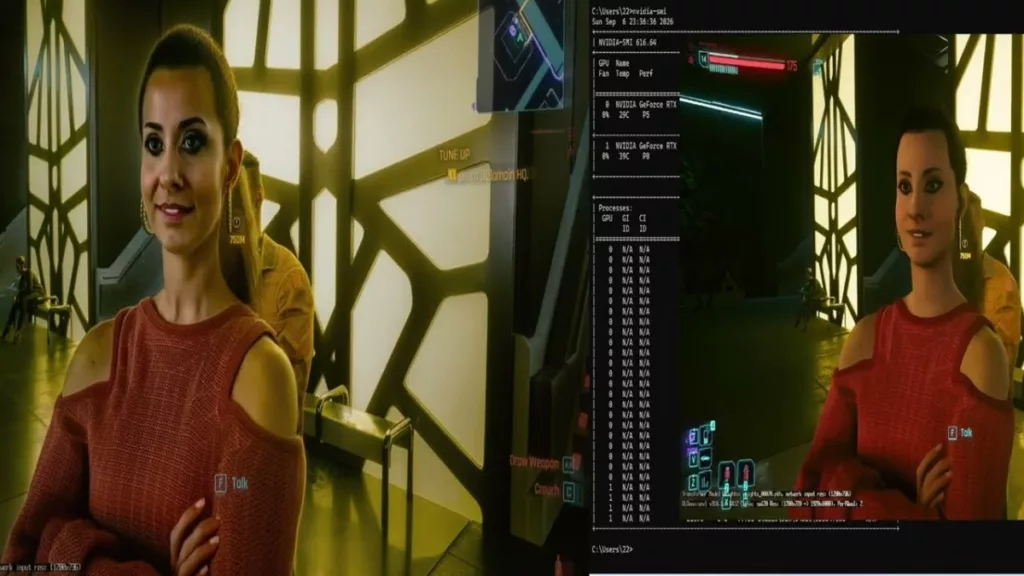
To say that DLSS 5 has made waves in the PC community is an understatement, and now one user has managed to get it working in a multi-GPU environment. There are many pros and cons to using DLSS 5, and we have a detailed op piece on them here from Brent Justice, but one of them is how computationally intensive the feature is for one GPU. From drastically decreased performance to significantly increased power draw, DLSS 5 has a monstrous appetite that even an RTX 5090 can satiate. Well, Developer Marcelo Guibout has shown (via VideoCardz) how two GeForce RTX 5060 Ti 16GB graphics cards can be used in tandem (not SLI) to improve performance with DLSS 5. Testing was done with Cyberpunk 2077 and The Blood of Dawnwalker.
Testing was done using a public add-on for ReShade called Neural Coprocessor, which allows one GPU to be dedicated to neural rendering while the other performs other tasks via the PCIe link. This should not be compared to SLI, which relied on each GPU handling different frame renders, but is instead much more similar to the short-lived time when one could have a dedicated PhysX GPU. While there was still a performance hit, the gains were impressive, with the second card almost doubling in FPS and getting within reach of FPS without DLSS 5.
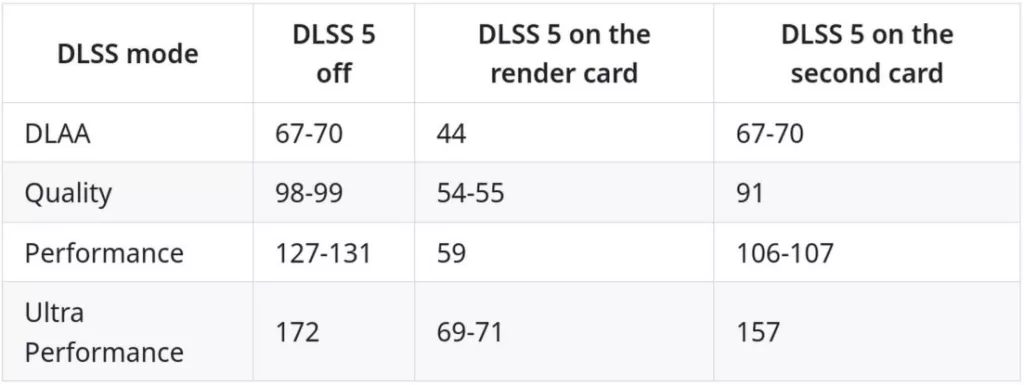
Hats off to Marcelo for an impressive test. The real question, though, is how long until NVIDIA manages to lock this unforeseen function to just one card, or if it will leave it as is. After all, it wasn’t long after NVIDIA acquired PhysX that a dedicated card became meaningless. However, the graphics card market is perhaps the worst it has ever been, and so this technique is likely only to help those who happen to have a 2nd GPU lying around. Who knows, this could create a sudden buying spree for NVIDIA’s low-to-mid-end GPUs.
Discussion (7 replies)
Join Discussion →The more you buy, the more you save. Team Green must be laughing all the way to the bank with this news.
Humm a 5060ti just for DLSS5 .. no... bad!!
has me wondering if I should get a new eatx board w/ full 16 lanes to 2x PCIe 5.0 slots (there's got to be one for a 9800X3D), and PSU w/ two 12vhwpr connectors so I can rig up my old MSI RTX 4090 liquid for this along with a 5090 that I already have. Only thing really holding me back is wondering how long NVIDIA locks it down to one card. Otherwise I've already got all the other parts to do this type of build.
With how I understand DLSS NR works, the FPS being reported and the actual FPS don't make sense.
NR happens to the full frame (unless it's modded in to work before upscaling) and has a set processing time. I don't see this as too helpful since it doesn't work in tandem.
If a standalone 5060Ti takes an additional 10ms after the final frame to process NR, I don't see how having a 2nd GPU of the same type will take that same image and process the same exact NR pass faster.
I assume the reported FPS and the actual FPS do not match.
Been a while since I had a need to track PCIe lanes for a build and was saddened to see what lengths you now have to go through to get 40 on a modern 5.0 build. Essentially not happening except for folks with deep pockets. Intel has slightly better consumer options, upto 28, but not enough for me to justify a new build and AM5 is pretty much a dead end for 2x 5.0 x16 and at best might be 2x 5.0 x8 but even that seems to be debatable with 24, although 5.0 x8 is still 4.0 x 16 which is plenty. The trick there is what's reserved for the CPU, GPUs, drives and any tricks the motherboard can provide.
However, thanks to autopilot DLSS 5 I really don't feel a need to go this route anyway.
Does make me miss my very outdated x79 build that had 40 lanes where I had SLI with both x16, and PhysX card x8. :)
Yeah I really enjoyed have 40 lanes on X99, so when I moved to X470 that crippled me. Ended up not being able to use one of my NVMe SSDs cuz of it (but in the end things worked out cuz I ended up needing to use that SSD in a different system).