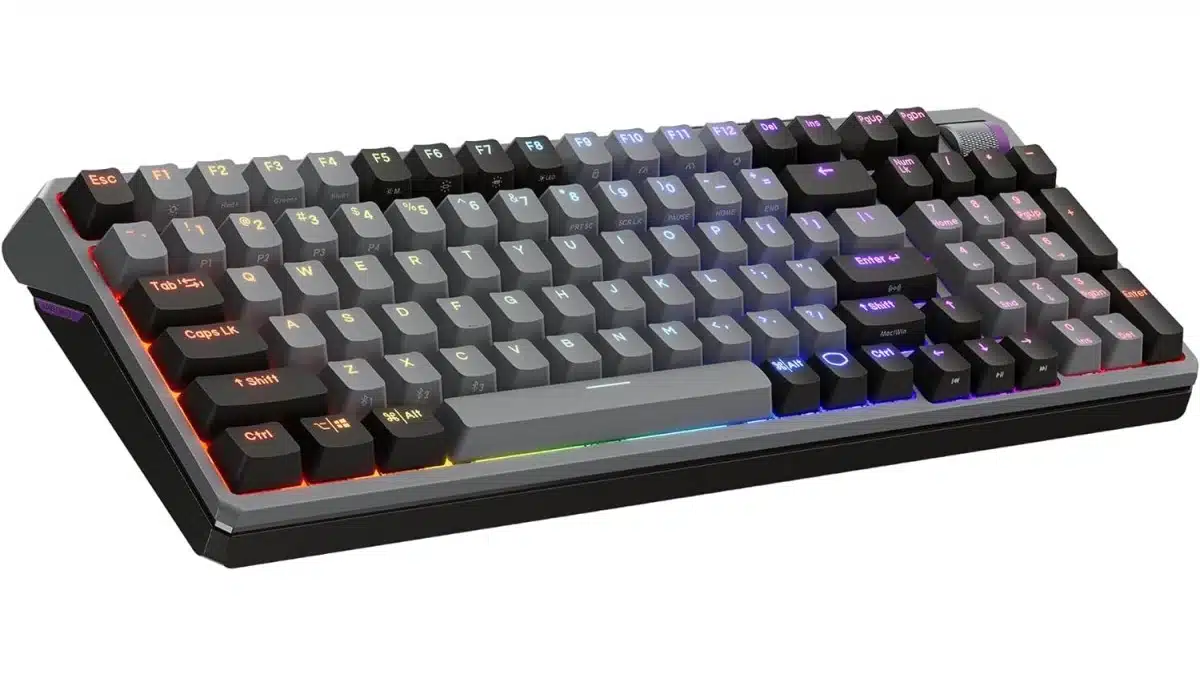
The Cooler Master MK770 Is a Cutting-Edge Mechanical Hybrid Wireless Keyboard Designed for Comfort, Customizability, and Performance

The FPS Review may receive a commission if you purchase something after clicking a link in this article.

Image: Cooler Master

The Cooler Master MK770 just might manage to check almost every box one could be looking at for a mechanical keyboard. It has been designed to be useful for productivity, gaming, and casual use with an emphasis on tactile performance and customization. The Cooler Master MK770 has 98 keys, a rare commodity for gaming keyboards where TKL has dominated in recent times, a noise-absorbing and vibration-reducing gasket structure, RGB, Kailh Box V2 Switches, and is compatible with Windows, Mac, iOS, and Android. Connectivity options include USB Type-C, Bluetooth 5.1, or 2.4 GHz. It is available in Macaron or Space Gray color schemes.

MK770 Feature Highlights (per Press Release):

  • Built for Endurance with Unmatched Durability and Tactile Control
  • Hot-Swappable Switches
  • Smooth Typing with KailhBox V2 Switches and Gasket Structure
  • Radiant RGB Backlighting with Noise-Absorbing Design
  • Next-Level Stabilizers and Seamless Connectivity
  • Wide Compatibility (Windows, Mac, iOS, Android)
  • Available in Various Striking Colorful Design Options

Specifications (per product page):

Product NumberMacaron: MK-770-MCKR1/W1/M1-**, Space Gray: MK-770-GKKR1/W1/M1-**
Keyboard Switch Type: Kailh Box V2 Switch
Keyboard Keycaps: PBT Double-shot Keycap (US/TC), ABS Paint & Laser-engraved Keycap (Other layout)
LayoutANSI: 98Key layout, ISO: 99Key layout
Keyboard Material: ABS
Keyboard Color: Macaron, Space Gray
Keyboard LED Color: RGB, 16.7 million colors
Keyboard Polling Rate: 1000Hz (Wired/2.4GHz Mode), 125Hz (Bluetooth Mode)
Keyboard Response Time: 1ms
Keyboard On-board Memory: 128 KB
Keyboard On-the-fly System: Yes
Keyboard Multimedia KeyThrough Function Key (FN)
Connectivity: Wired, 2.4 GHz, Bluetooth 5.1
Charging: Support Wired charging
Battery: 4000mah
Compatible OS: Windows 8+, Mac OS X 10.10+, Android, iOS
Software Support: MasterPlus+ Support
Keyboard Connector Cable: USB Type-C (Keyboard Side), USB 2.0 Type A (Computer Side)
Keyboard Cable: 1.8m, USB Type-C Detachable & Coiled Braided
Keyboard Dimensions: (L x W x H)Standard: 380.89 x 140.42 x 38.74mm, Feet Open 1: 380.89 x 140.42 x 42.9mm, Feet Open 2: 380.89 x 140.42 x 45.51mm
Keyboard Weight:1052g / 2.319 lbs (without cable)
Product: Keyboard
Series: MK Series
Keyboard Type: Mechanical
Table: Cooler Master

Join the discussion in The FPS Review Forums...

Discussion (6 replies)

Join Discussion →
Riccochet
Riccochet 👍 4

"next level stabilizers"

Man, all these years of using unstable keyboards. I'm definitely buying one.

D
Ditchinit 👍 1

"Peter_Brosdahl, post: 82649, member: 87" wrote:

The Cooler Master MK770 has 98 keys, ...


See full article...

101-keys or GTFO. ?

LazyGamer
LazyGamer 👍 1

"Riccochet, post: 82650, member: 4" wrote:

"next level stabilizers"


Man, all these years of using unstable keyboards. I'm definitely buying one.


Good stabilizers should be a given, but they aren't; they also make or break a keyboard experience as they're under every key that is wider than a single letter key (one key unit i.e. 1U). Stuff like having to hit the spacebar in the middle to get it to register exposes poor stabilizers.

"Ditchinit, post: 82652, member: 4253" wrote:

101-keys or GTFO. ?


This is worse for me personally. I prefer TKL which is just a keyboard with the number pad hacked off, and I use a separate USB numpad when needed. Instead, this '98%' layout congests all the keys together making stuff more difficult to find, and then forces you to use weird key combinations for Home and End. I use Shift+Home/End quite a bit when working with text.

That all aside, I do absolutely like where Cooler Master is going here. The build of the keyboard speaks to a focus on the typing experience with a layered gasket configuration and attention to detail on the aforementioned stabilizers. The use of 'dual-mode' wireless is very nice, as is the ability to switch between PC and Mac layouts (for those that need it), without having to remap and relocate keys.

If they do a TKL or full-size version, I'd like to take a look, most especially if their software is up to par.

DrezKill
DrezKill 👍 1

While I'm pleased to see it has a numpad, good gawd this weird layout without a proper section for the Insert-Home-PageUp-Delete-End-PageDown keys is some real @ss.

"LazyGamer, post: 82653, member: 1367" wrote:

...this '98%' layout congests all the keys together making stuff more difficult to find, and then forces you to use weird key combinations for Home and End. I use Shift+Home/End quite a bit when working with text.


Yeah man, this is some stupid-@ss sh1t.

LazyGamer
LazyGamer 👍 2

I built a Glorious GMMK that had the 98% layout. I declared the layout dead to me and moved on immediately.

Grimlakin

WTF... did I see that video correctly are the numb keys optionally on the left side?

Peter Brosdahl
As a child of the 70’s I was part of the many who became enthralled by the video arcade invasion of the 1980’s. Saving money from various odd jobs I purchased my first computer from a friend of my dad, a used Atari 400, around 1982. Eventually it would end up being a lifelong passion of upgrading and modifying equipment that, of course, led into a career in IT support.

Recent News