
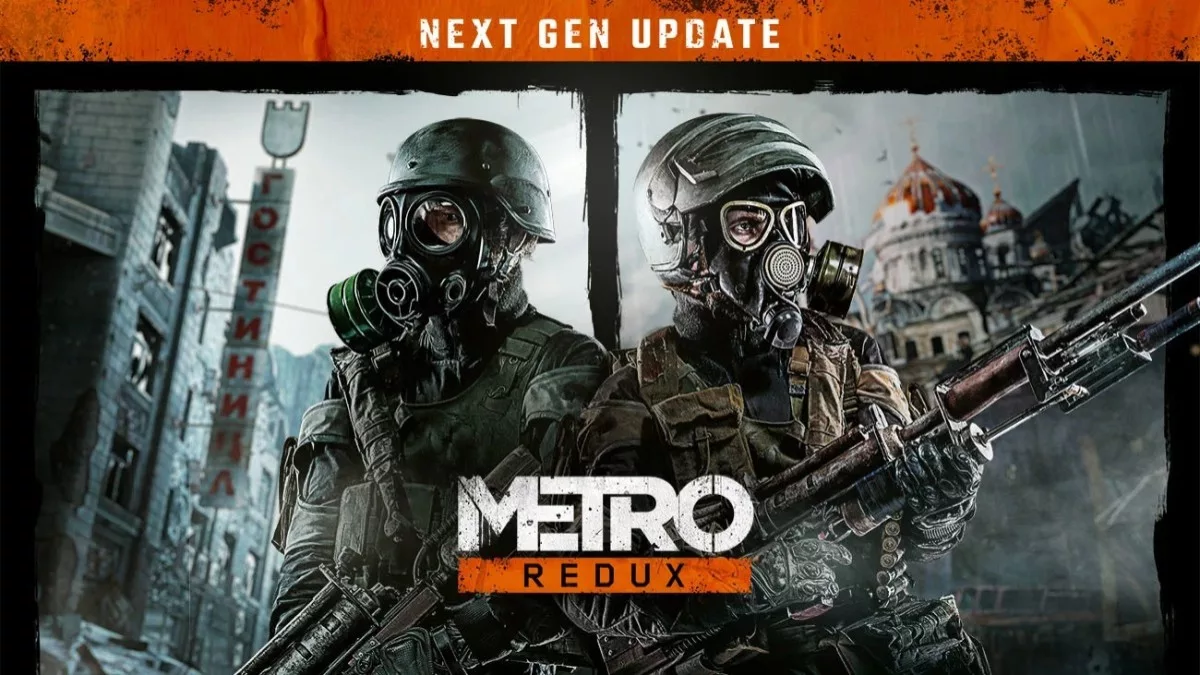
Deep Silver has rolled out next-gen updates for Metro 2033 and Metro Last Light Redux editions, adding 4K textures, bug fixes, and numerous QoL improvements. Announced a few weeks ago, these next-gen updates are the developers’ way of thanking fans and the gaming community for supporting the franchise over the decades, while prepping these titles with modern features ahead of the upcoming entry, Metro 2039, set to arrive on February 4.
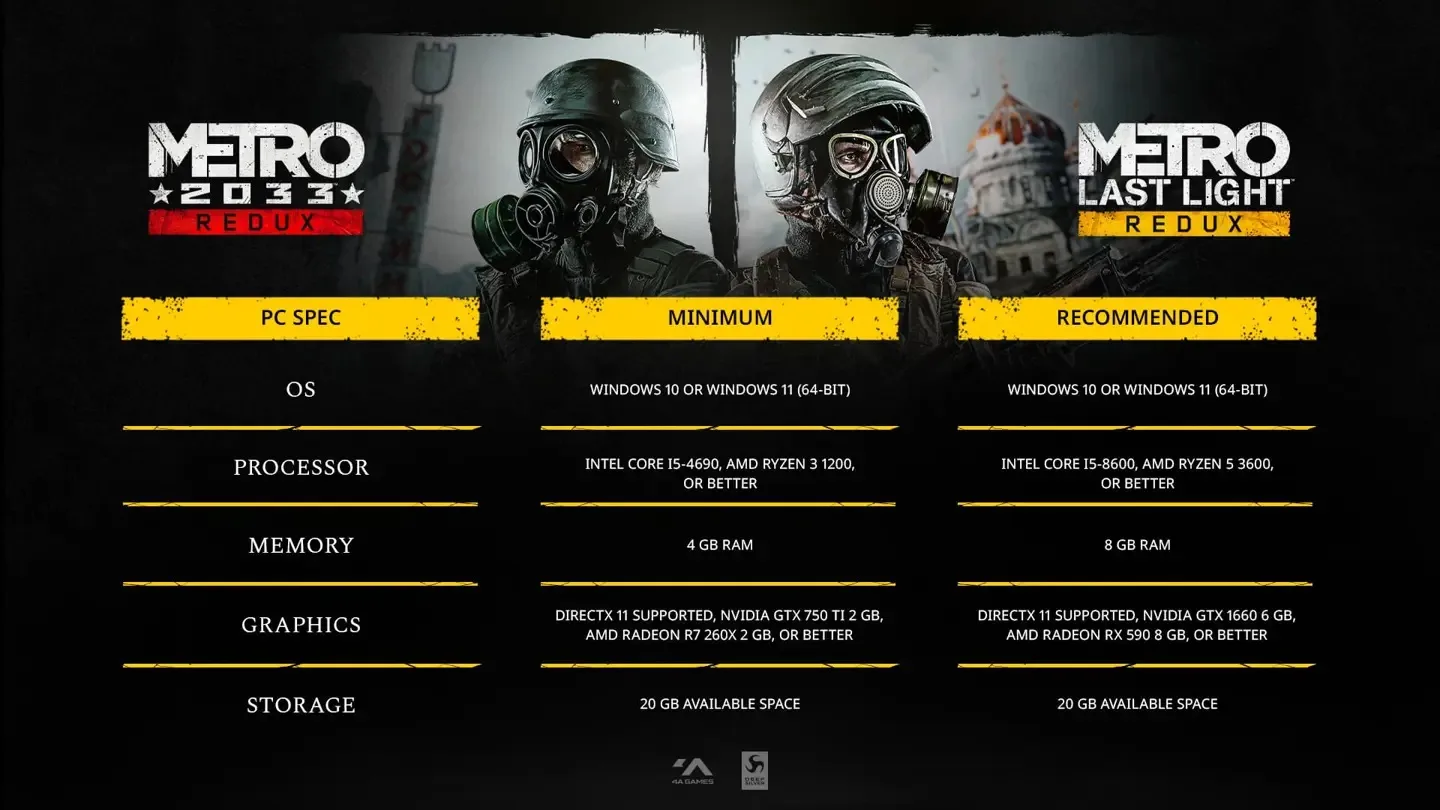
Both Redux versions now support unlimited frame rates and have been upgraded with 4K textures, support DLSS and FSR, or 4A TSR, to name a few new added features. Screen Space Global Illumination is also now supported, and various animations have been improved, and newer controllers such as DualSense 2 are now supported, but this is just the tip of the iceberg of what’s been done. Owners of the games from Steam, Epic, or GOG should receive the new versions as a free update. Of course, these new features mean that hardware requirements have changed (slightly but not much), and so the developers have also updated the recommended system requirements, but fear not, most folks can still play using older hardware and do not need a $10K system to enjoy them.
Patch Notes:
- Unbound FPS (depends on hardware)
- 4A TSR (ANY), DLSS (NVIDIA), and FSR (AMD) support
- DLSS Support
- Screen Space Global Illumination
- Increased geometry details
- Increased texture details
- Support 4k textures
- Improved PBR materials
- Fixed bugs related to high FPS
- Improved animation quality
- Improved sound quality
- Spatial audio support
- Community bugfixes as noted below
- Adaptive triggers for DualSense
- Impulse triggers for Xbox Controller
- Fixed bug with different horizontal and vertical sensitivity for mouse
- Power optimized mode for Xbox Ally/X and Microsoft Store version
- Epic – Integrated EOS (Achievements, Accounts)
Community-Reported Bug Fixes
Apply to all platforms unless noted otherwise:
Stability
- Fixed a black screen when resuming the game from suspend on Xbox Series X|S.
- Fixed instability after Quick Resume on Xbox Series X|S, including crashes and graphical corruption.
- Improved stability on modern PC hardware (Windows 11, AMD GPUs, high-refresh-rate displays), including crashes during chapter transitions and on launch.
- Fixed a crash when picking up a gas mask.
- Fixed hard freezes at splash screens, on “Press Any Button” and during chapter loads.
- Fixed infinite loading screens and black screens after the intro logos, particularly on newer AMD hardware and Xbox One X backward compatibility.
- Fixed freezes during level transitions and scripted sequences, and crashes with newer graphics drivers.
Gameplay
- Fixed the weapon getting stuck in an endless reload animation and being unable to fire if burning cobwebs was interrupted by reloading or switching weapons.
- Fixed enemies detecting the player through darkness and through walls, and their alert state escalating instantly.
Saves
- Improved save stability when resuming from suspend / Quick Resume and when syncing with cloud saves (Xbox Series X|S).
- Fixed Steam Cloud not uploading save data.
- The game no longer creates a checkpoint when the player has too little filter time left. This prevents saves where the player suffocates before they can find more filters.
- Fixed save corruption on PS5 that made later chapters (after “Regina”) unavailable and reset inventory after the console had been powered off for a long period.
- Fixed crashes and infinite loading when loading a checkpoint, including after repeated reloads.
- Improved save reliability when the game is quit or interrupted while autosaving.
- Fixed checkpoints being created when the player had too few filters, which could trap the player in a death loop.
- Fixed save files disappearing, “Continue” loading an older checkpoint, and saves becoming corrupted after a crash or improper shutdown.
Controls
- Restored default keyboard bindings that were missing after a previous update.
- Fixed the DualSense Wireless Controller not being recognized in the Steam version.
- Fixed the mouse cursor getting stuck at the edge of the screen in menus and vendor screens on multi-monitor setups.
- Fixed Xbox controllers only being partially detected, and button remapping failures.
Display & Settings
- Advanced PhysX is now enabled by default on PC.
- Fixed the title screen displaying incorrectly if the game lost focus straight after launch.
- Fixed the game not starting in full screen on first launch on 4K monitors with display scaling enabled.
- Fixed missing modern resolutions (such as 1440p and 4K) and the game being limited to legacy resolutions like 1600×1200.
- Fixed fullscreen not working, and fixed stretched images and incorrect aspect ratios on high-resolution monitors.
- Improved lighting and shadow quality, fixing pixelated bloom, broken shadows, missing volumetric lighting and white halo artifacts (e.g. Hunter intro, searchlights, backlit corridors).
- Fixed flickering shadows, shimmering textures, unstable SSAO and broken post-processing on modern GPUs and ultrawide displays.
METRO 2033 Redux
- Fixed the Demon freezing in mid-air during its grab attack in “Outpost”.
- Improved performance in “Torchlight”.
- Fixed being unable to collect the weapon from the armorer at the start of the game, which blocked progress.
- Fixed Khan and his men freezing in place or firing endlessly after the player plants the bomb in “Khan” (Turgenevskaya), and fixed the freeze / black screen when loading the last checkpoint there.
- Fixed the player getting stuck with no cutscene after finishing the encounter in “Library”.
- Fixed the crane, magnet and lever mechanisms near the end of the game not responding in “D6”.
- Fixed the ending cutscene not playing after finishing the game.
- Fixed instant death in toxic areas even with the gas mask on.
- Fixed achievements not unlocking even though their requirements were met, including “Armorer”.
- Fixed achievement progress made offline not syncing after reconnecting.
METRO Last Light Redux
- Fixed the bear staying knocked out during the boss fight in “The Garden”, which blocked progress.
- Fixed stealth knockouts and kills being unavailable from the “Revolution” chapter onwards.
- Fixed a crash when buying the RPK into an empty third weapon slot at the Venice armory.
- Fixed being unable to progress in the “Khan” DLC after Khan wakes Ulman from the visions.
- Fixed the player ending up out of bounds after falling into the water in “Nightfall”.
General note when upgrading the Microsoft Store version only:
- Saves will not carry over to the upgraded version and a New Game start is recommended.
- Chapter select will be unlocked to contain each chapter and you can start any chapter with a default set of equipment if desired.
So there you have it, a little bit of everything and perhaps the kitchen sink too. Something not clearly mentioned in the patch notes is that evidently the devs also added support for DLSS 5 aka DLSS NR. A screen shot showing the toggle was posted on social media and if the update for all PC users does include it, it will be the 2nd game to officially feature DLSS5 since NBA 2K27.
Uma surpresa, o jogo Metro 2033: Redux e Last Light Redux ganharam suporte ao DLSS 5 (Neural Rendering) no novo next-gen update. A DLL presente na pasta do jogo é a versão mais recente que também está no NBA 2K27. https://t.co/mnMREh4YQU
— Renan Maniero (@renan_maniero) October 23, 2026
Console owners won’t have long to wait for their next-gen updates, which will arrive on October 29. So, it’s the perfect time to either play these titles for the first time or return to the mutant-infested tunnels and wastelands ahead of Metro 2039, when the story circles back to these iconic locations.
Discussion
Join Discussion →No replies yet. Be the first to reply on the forum.