
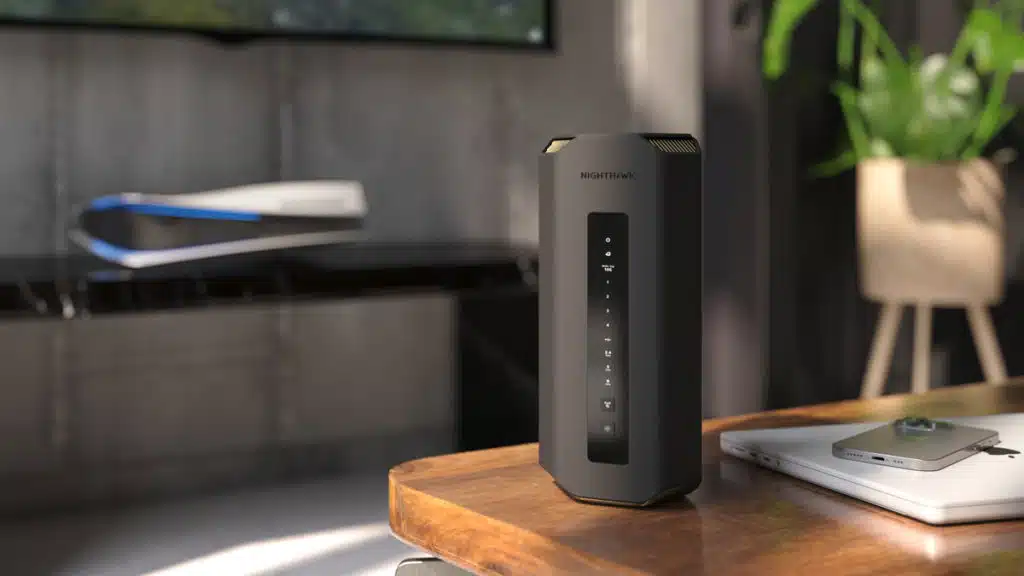
Wi-Fi 7 has seemingly arrived, but those who want to be on the cutting edge of wireless technology should prepare to pay a premium for it. NETGEAR has announced the Nighthawk RS700, the first Wi-Fi 7 router, and according to a press release that the leading provider of connected products shared today, it costs $699.99—a substantial increase over what the usual router might be priced at. That said, the RS700 promises to deliver some excellent performance, including up to 19 Gbps of what NETGEAR has described as blazing-fast WiFi, more than double the speed of previous generations. The NETGEAR Nighthawk WiFi 7 Tri-Band Router RS700S will be available in the US starting in Q2 2023, on NETGEAR.com first and at other major retailers subsequently.
“With the launch of our Nighthawk RS700 Router, we’re setting the pace for adoption of the next generation WiFi,” said David Henry, president & GM of Connected Home Products and Services at NETGEAR. “The RS700 is purposefully constructed for the highest possible performance. We’ve deployed our decades of RF expertise to maximize antenna range within a compact design that minimizes interference while fitting flawlessly into any home environment.”
NETGEAR Nighthawk RS700 Features
- 320MHz high-capacity channels & 4K QAM – New, ultra-wide bandwidth means 2.4x the speed to your connected devices. WiFi 7 smartphones and laptops can get speeds up to 5Gbps.
- Multi-Link Operation – Uses multiple WiFi bands at once to improve network reliability, reduce latency, and ensure data is delivered with maximum speed.
- Lower latency – Dramatically upgrades gaming and interactive online experiences and opens the door for immersive next-gen AR and VR.
- More Capacity for Data-Intense Activities – Connect up to 200 devices, such as security cameras, smart home devices, and speakers, while enjoying 4K/8K video streaming, online gaming and HD video conferencing.
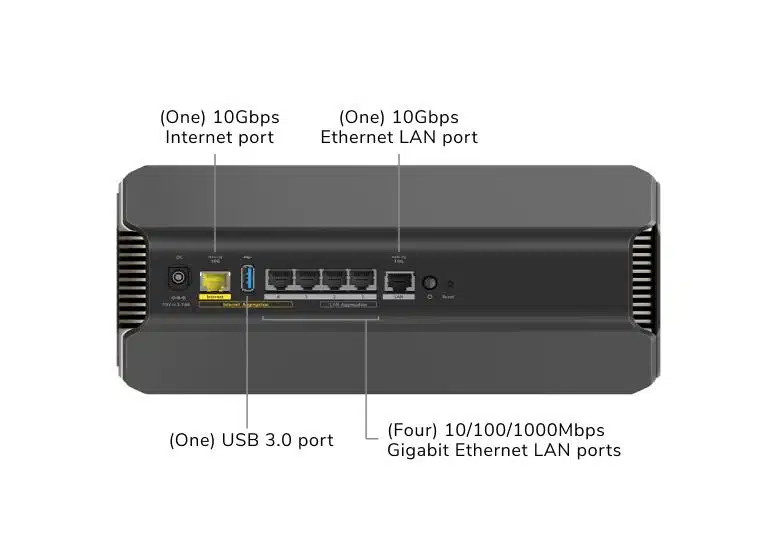
- Multi-Gig Speeds with 10GbE Internet Port – Use the 10 Gig internet port for cable and fiber plans up to 10Gbps. Compatible with any internet service provider.
- More wired ports on every device – Plug in wired devices to improve performance via a 10Gbps and four 1Gbps LAN ports.
From a NETGEAR press release:
Entering the world of WiFi 7
The WiFi requirements of modern, hyper-connected homes continue to push the boundaries of today’s WiFi standards. With the rise of faster multi-gig internet speeds now available to more and more households, the growing number of connected devices per family and the ever-increasing growth of bandwidth hungry 4K/8K video streaming, HD Zoom calls, hybrid collaborative graphics-intensive work, highly interactive real-time gaming and AR/VR applications and experiences, WiFi continues to evolve to support faster speeds, lower latency and increased capacity. While WiFi 6E opened the 6GHz band as a superhighway for the latest, fastest devices, WiFi 7 makes good on that promise by unleashing unprecedented speeds and performance. Maximizing that power, NETGEAR’s RS700 router, powered by Broadcom’s BCM6726/3 WiFi 7 system on a chip (SOC), achieves speeds up to 19Gbps. The tri-band WiFi 7 router, from the creators of tri-band technology, enables a dramatic decrease in latency for real-time responsiveness for next-generation AR/VR gaming or smooth UHD Zoom calls and 8K streaming for multiple simultaneous users.
The RS700 also features a 10Gb internet port, to support the fastest internet speeds of today and tomorrow, as well as a 10Gb and four 1Gb LAN ports for fast, flexible wired connections. The router comes with one year of NETGEAR Armor™ Powered by Bitdefender®, providing an automatic shield of security for all connected devices. Unlike traditional endpoint antivirus products, Armor is built into the router as a comprehensive security solution to monitor activity going to and from the internet, protecting computers, security cameras, baby monitors and other IoT devices and flagging external threats and nefarious outbound activities from IoT devices while eliminating the need for multiple security subscriptions or software.
The Nighthawk RS700 Router sports a new, slender chassis with high-performance antennas providing 360 degrees of coverage optimized to support up to 200 concurrent client devices throughout the home. The 3D antenna design provides the best connection for all varieties of homes from sprawling ranch styles to multi-story brownstones. Meticulously designed radio frequency circuits drive maximum power to push WiFi signals to the farthest range, up to 3500 sq. ft. The slim profile also makes for a smaller overall footprint, helping the router to fit unobtrusively on a bookshelf or tabletop.
The router includes link aggregation for concurrent multi-gig internet and LAN access, which offers a graceful transition for a home network to upgrade to a multi-gig network. A USB hard drive can be connected for network attached storage to facilitate large file backup or sharing as well as high-quality media streaming.
More to come
Although powerful on its own with high speeds and broad coverage, RS700 routers can be networked together via Nighthawk Mesh to provide wall-to-wall WiFi speed even in the largest homes. The router also enables four separate networks to maximize performance. In addition to a main and a guest network, users can create a priority network for low-latency applications such as streaming and gaming, ensuring a lag-free experience without interference from slower devices. Smart home devices can be isolated on the IoT network to prevent any possible intrusion from affecting the other networks. These features will be available in future software releases.
Discussion (19 replies)
Join Discussion →Seems overkill. Let's see what it offers for wired connectivity. There it is... 10 gig internet wan port and a mix of 10 and 1 gig normal ports. Wonder if they will step down to 5 and 2.5 gig for consumer grade devices?
Generally not a problem on more recent devices!
Meh. If only Netgear would better support their current routers with firmware that doesn't bork wifi most of the time.
Hehe, 700$ HILARIOUS (for home use). Whats the point of this thing in a home?. Looks sweet for a business though.
Yeah, no.
It's for the small segment of home users that have 10 gig internet. My best guess.
And people who don’t know any better
Meanwhile I am still on 802.11ac (I hate the new wifi 4-7 nomenclature, it feels dumbed down) and see no reason at all to upgrade.
Maybe that's because I use wifi as it was intended, only for laptops and mobile devices. Everything that is fized in one place gets wired Ethernet. Only things that have to move use wifi, and those things are generally only used for lightweight shit like web browsing and checking emails.
"Wifi 7" may be much faster than my 802.11ac, but it still isn't reliable or fast enough to replace wired Ethernet, and wifi never will be.
Wired Ethernet for life.
Networking has WAY more uses than just accessimg the internet.
On my home network I'd argue that 95+% of the traffic is local only, sending data back and forth between the NAS and local clients, as well as streaming video from the MythTB server, etc. etc. without ever going out over the WAN.
Networking does not equal the Internet.
I'd argue 10gig local speeds have value even if you have no internet service at all.
Heck, I would even like to upgrade to 25gig and get NVME like speeds over the network.
The only difference is, I am not going to do it wirelessly.
It's going to be a mix of copper and fiber. Wifi is annoying, untealiable, not secure, and doesn't live up to performance expectations due to interference and only being half duplex. As such I only use it where absolutely necessary. Everything else is wired.
And you are the father of edge cases.
This may be true, but in an average household, most of their traffic is directly to the internet. Very few homes have anything local served or stored - it's all out in the cloud.
I'd wager most people don't even know how to share files across PCs without resorting to a thumb drive (and it doesn't help than Windows keeps breaking SMB)
My old router had a usb for a sort of cheqp nas. Plug a usb drive on it, tested it, proceeded to never use it.
I'm on a mix. I added a Unifi U6 Pro which is WiFi 6. My other two AP's are still AP-AC-LR's so I get signal all over my property.
Honestly, I'm with you. I only use WiFi for my phone, tablet and firestick. AC is good enough for streaming anything. Only reason I added the U6 Pro was to fill a very weird dead spot in my living room. I'm guessing that the long range AC-LR's have a strange coverage pattern that doesn't work well at close range. But I get damn good signal 150 yards away at the back of my property!
Not going to lie.
The concept of having my data on my edge device weirds me out a bit.
Especially considering how poor consumer router companies are at keeping up with security patches.
Kind if why I use Asus with AI-Protect.