
It ain’t easy building a high-performance system that’s truly whisper-quiet, but that challenge could be getting even tougher with the advent of next-generation storage devices.
Sebastien Jean, Chief Technical Officer at controller firm Phison, has warned that the temperatures of future SSDs may be so intense that they may need active cooling in the form of a fan or blower, something that is sure to disappoint users who want the fastest drives on the market but would prefer to keep their systems running as quiet as possible or without less points of potential failure.
“There are lots of things that we’re doing to keep the SSD power within a reasonable envelope,” Jean said, “but for sure, the SSDs are going to be hotter, in the same way that CPU and GPU got hotter in the 1990s. As we move to Gen5 and Gen6, we may need to consider active cooling.”
While inadequately cooled SSDs won’t burst into flames or anything crazy like that during serious workloads, the implication is that a heat sink alone will not suffice for users who seek to maximize the performance of their drives and avoid throttling.
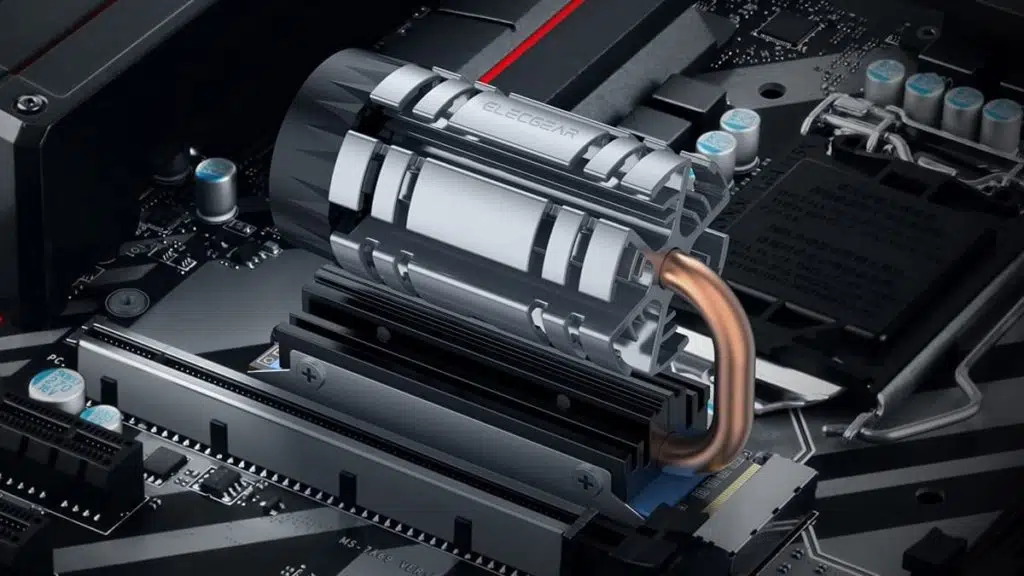
A tease of what future SSDs might come packaged with comes courtesy of ElecGear, which recently released a cooling solution akin to a miniature jet turbine.
ElecGear M.2 2280 SSD Cooler, Angle Adjustable Heatpipe + PWM Fan + Aluminium Heatsink for 80 mm PCIe NVMe and SATA NGFF Internal Gaming SSD with Thermal Padshttps://t.co/TruQxBCe5p pic.twitter.com/9MjQTYgAM6
— 188号 (@momomo_us) December 16, 2021
Turn Down the Heat on SSDs (Phison Blog)
Once the SSD starts to get hot, Jean said, there are two ways to pull that heat out. The first way is “the conduction path, which is, believe it or not, the little [M.2] connector that plugs into the board. Not super efficient, but it still contributes.” There’s also a small screw at the back of the M.2 PCB that attaches the SSD to the motherboard. Thermal conductivity is based on the material and the volume. The small metal screw has significantly more thermal mass than the gold fingers on the M.2 connector. The screw represents 70 percent of the thermal conduction path from the SSD to the motherboard,” said Jean. He added that some vendors have started using a nylon screw on the motherboard to save money, which eliminates the most important conduction path.
The second way to dissipate heat is through convection, which occurs as heat comes off the SSD itself and warms the air around it. If a PC case has good airflow, it could eliminate the need for a heatsink.
Jean likens the evolution of SSD heat management to what happened with gaming computers and GPUs over time. Early gaming computers typically had small metal heatsinks and eventually a small fan was added to manage heat. Today’s rigs have massive coolers and fans, and Jean sees more deliberate and robust cooling mechanisms down the line for SSDs.
“I would expect to see heatsinks for Gen5,” he said. “But eventually we’ll need to have a fan that’s pushing air right over the heatsink, too.”
Discussion (4 replies)
Join Discussion →Let me ready my chilled NVMe loop...
AFAICT, there are water blocks for NVMe (well, M.2) drives. Personally I'm still just waiting for a motherboard vender to arrange all of their M.2 slots vertically so we can reclaim some board space back, and maybe get a few more PCIe slots back on higher-end motherboards. Should be easy enough to come up with an inexpensive active cooling solution then too.
I'm thinking that someone like corsair is going to have to put together an aio package that cools the cpu and an nvme drive. I don't envy that task without somewhat standardized nvme locations.
My X99 board actually has such an M.2 slot. That's the only M.2 slot it has though.
I knew I'd seen one before!
Motherboard manufacturers really could just put four of those in a line where an expansion slot would go. Granted they could also just put in a PCIe x16 slot card set up for the M.2 interfaces. ASUS has done something similar by putting two M.2 slots on a PCIe card, which I find off-putting as it burns the only unshared PCIe slot on those boards.