
Ray Tracing Performance
We are going to focus on Ray Tracing 1080p gameplay performance with the MSI GeForce RTX 3050 GAMING X and SAPPHIRE PULSE Radeon RX 6600 GAMING video cards. We will include DLSS and FSR performance on the same graph in the games that are supported. We will use DLSS on NVIDIA GPUs and FSR on AMD GPUs in games that support both technologies.
Dying Light 2
Dying Light 2 was released in February 2022 on the PC and uses Techland’s C-Engine. The game supports both DLSS and FSR upscaling technologies. This game supports Ray Tracing for various environmental effects including Ray Traced Soft Shadows, Ray Traced Ambient Occlusion, Ray Traced Global Illumination, and Ray Traced Reflections. We are running the game in DX12 Ultimate, and with ASYNC Compute turned on in the game. We will set the graphics options at the highest settings with Ray Tracing. For our benchmark, we are using a custom manual run-through at the end of the game hopping between many rooftops, as well as free-roaming on the ground running among the zombies, a forested area, and downtown city scenes in the daylight.
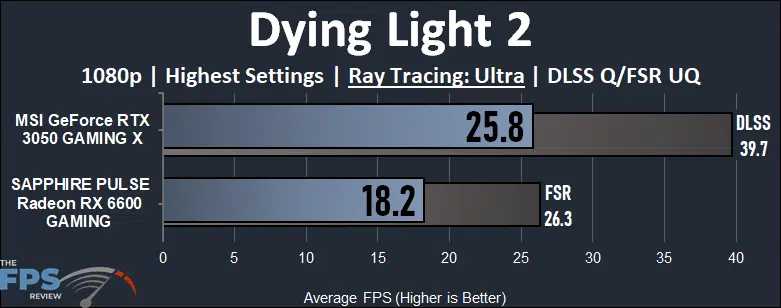
In Dying Light 2 the Ray Tracing effects are fantastic, and in the graph above we have all of them enabled at the highest possible settings at 1080p. Neither of the video cards delivers a playable gameplay experience at all with Ray Tracing at 1080p in this game, it’s just too demanding. Technically the GeForce RTX 3050 is faster though, by 42% which goes to show the advantage in Ray Tracing performance NVIDIA GPUs have at the moment.
Now, this game does use DLSS and FSR. With DLSS turned on it brings performance up to 40FPS on the RTX 3050, a 54% performance improvement. Though performance is better, it is still not playable because the minimums dip too low, and it’s not very smooth. We can enable FSR on the Radeon RX 6600 which brings performance up 45%, but it’s still not playable and under 30FPS.
Far Cry 6
Far Cry 6 was released in October of 2021 and uses the Dunia Engine. We utilize the built-in benchmark for testing. We have the HD Texture pack installed and turned on. We utilize the “Ultra” graphics preset which sets all options to the highest game settings. This game supports Ray Tracing via two DXR settings, one for Reflections and the other for Shadows. This game supports FSR upscaling.
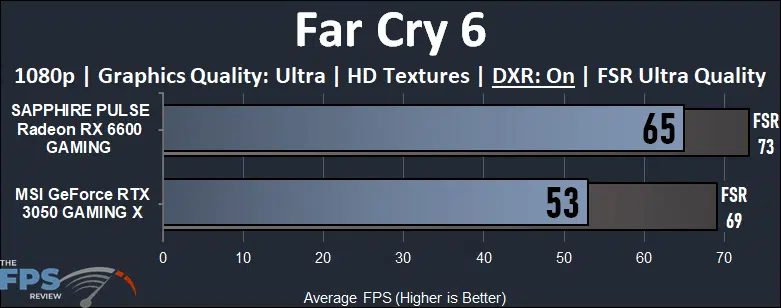
In Far Cry 6 we have all the DXR Ray Tracing options turned on, reflections and shadows, at 1080p, with HD Textures. Both video cards handle this rather well, but the Radeon RX 6600 for a change clearly has a performance and gameplay experience advantage. The gameplay is just smoother and runs faster. The Radeon RX 6600 is 23% faster than the GeForce RTX 3050. Turning on FSR on both video cards definitely helps performance. It really makes a big difference on the RTX 3050, which is now playable at 70FPS. FSR has improved performance on the 3050 by 30% and on the 6600 by 12%.
Cyberpunk 2077
Cyberpunk 2077 was released in December of 2020 and uses the REDengine 4. We have the game patched to version 1.52 for our testing and perform a long manual run-through driving in the game’s open world. We test using the Graphics Preset option to set graphics settings. We use the Ray Tracing Graphics Preset of: Low, or Medium or Ultra. This game supports DLSS and FSR.
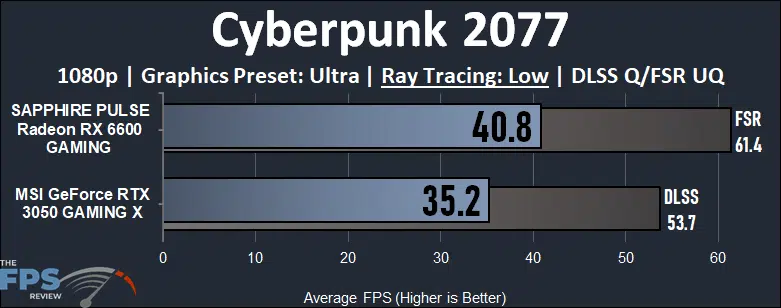
New with the patch 1.5 version in Cyberpunk 2077 is the addition of a “Low” Ray Tracing preset option. This only enables Ray Tracing on Local Shadows, but is the easiest and fastest Ray Tracing option. With Ray Tracing: “Low” the game is not playable on either video card, it’s just too demanding. However, interestingly, the Radeon RX 6600 is faster by 16%. This breaks from the tradition of NVIDIA GPUs dominating Ray Tracing performance.
Turning on DLSS and or FSR is what really makes the game usable though with Low Ray Tracing. The GeForce RTX 3050 with DLSS improves performance by 53% and is borderline playable. However, the Radeon RX 6600 with FSR beats it by averaging over 60FPS. FSR has improved performance on the RX 6600 by 50%. The 6600 with FSR is 14% faster than the RTX 3050 with DLSS, and that’s with Ray Tracing enabled.
Watch Dogs Legion
Watch Dogs Legion was released on the PC in October of 2020 and uses the Disrupt game engine. We utilize the built-in benchmark for testing. We have the HD Texture pack installed and enabled for testing. We use the built-in graphics preset of “Ultra” for testing. We utilize the preset quality option for Ray Tracing. This game supports DLSS upscaling.
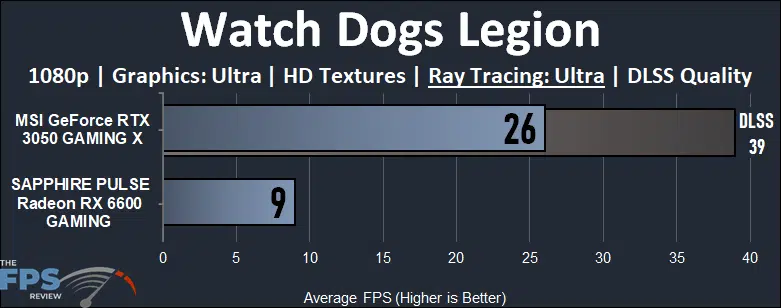
In Watch Dogs Legion we have enabled the “Ultra” quality level of Ray Tracing. Neither video card is playable, and even with DLSS the RTX 3050 is still not playable at the highest level of Ray Tracing. The Radeon RX 6600 however completely chokes in this game at “Ultra” Ray Tracing. It could be a bug, but whatever the case neither are playable. This was the only game where that happened with the RX 6600.
Discussion (8 replies)
Join Discussion →OOOhhh I get it. It's an april fools joke ;) :rolleyes: :LOL:
$389 for a 3050 at my local Micro Center.... for the 2022 version of a 1050ti. 3 years ago this card would be worth about $150-200 TOPS. Barely adequate 1080p card.
I was wondering earlier today, seeing cards in stock at Newegg, where that 'entry level' line was - and it seems that even with DLSS on the 3050, that line is the RX 6600.
I'll say that my only interest in the 3050 is outside of gaming - compatibility with content creation workloads and support for NVENC give the Nvidia GPU legs that AMD cannot currently match.
And while I shouldn't be surprised about the power draw - Nvidia is using an inferior process, after all - it looks like the AMD GPU is the clear winner here too.
Newegg‘s best selling RX 6600 is down to $259 with a $20 coupon.
But it‘s outsold by several (!) different RTX 3050 models that cost $329.
[URL unfurl="true"]https://www.techspot.com/review/2505-geforce-rtx-3050-vs-radeon-6600/[/URL]
The way things are going, I expect the 6600 to always be cheaper than the 3050. If the 3050 drops in price then the 6600 will too !!
Faster and cheaper, and still gets outsold. It's amazing really.
Its almost as if the Nvidia cards have some capability beyond gaming that people want to use and maybe game on them... like the more mature noise cancelation. The video background backdrop. Perhaps the ability to use various multimedia apps and have them accelerated.
Could be. I have an nVidia card and I couldn't tell you how to use any of that though - it makes no difference to me at all.
I don't really think to buy a video card for audio... it's neat it can do it and all, but if I want good audio, I'll go looking for a good microphone.
It isn't perfect - I've played with it a bit - but it does work.
And having experimented with microphones, better microphones just make noise more apparent!
(the real answer for better audio is a decent microphone and a well treated acoustic environment - beyond that, noise reduction works wonders)