
AMD spent the week trying to keep a graphics card away from reviewers, which is the surest possible signal that the graphics card is bad. It is, and the numbers are below. Elsewhere it was a storage and display week: Kioxia’s Gen 5 flagship finally got broad Western coverage, two 32-inch flagship OLEDs landed at opposite ends of the panel-technology argument, and Cooler Master’s HAF revival kept collecting thermal wins. Ten products, and one the reviews is ours.
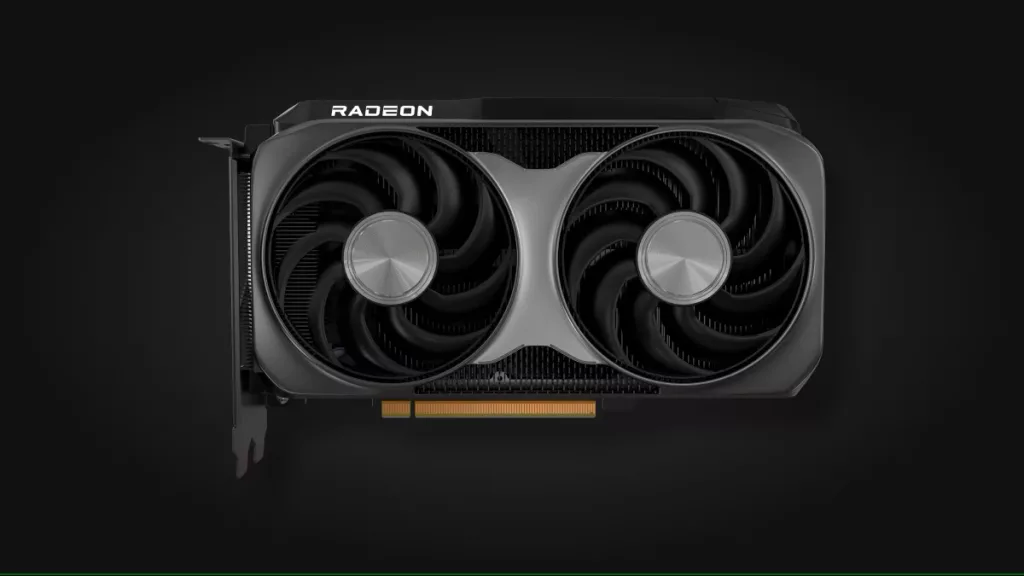
AMD Radeon RX 9050 8GB
Written reviews:
Video reviews:
- Hardware Unboxed: https://www.youtube.com/watch?v=zYfw1gi9xf4
Consensus summary: Both tests come from the same organization, TechSpot and its video arm Hardware Unboxed, so treat this as one verdict rather than two, and there is a reason for that: AMD did not sample the card and reportedly instructed partners not to either. The verdict is not close. Across ten games the RX 9050 averaged 49 fps at 1080p and 33 fps at 1440p, putting it roughly 20% behind the GeForce RTX 5050 and about 22% behind AMD’s own two-generation-old RX 7600. It is a Navi 44 die with half the shaders of an RX 9060 XT, 8GB of GDDR6 on a 128-bit bus, and a 92W board power that still needs an external connector. TechSpot scored it 30 out of 100 and concluded it cannot make sense above $200 against a $280 asking price.
FPS Review take: The efficiency story is real, the value story is not, and a 92W card that still needs a PCIe connector misses the one thing that would have justified it. If you are shopping this tier, our Radeon RX 9070 GRE review and our RX 9070 GRE versus RTX 5070 head-to-head show what another step up the stack actually buys you. Full analysis in our standalone piece on the sampling blockade.
GIGABYTE GeForce RTX 5090 GAMING OC 32G
Written reviews:
- The FPS Review: https://www.thefpsreview.com/2026/08/17/gigabyte-geforce-rtx-5090-gaming-oc-32g-video-card-review/
Video reviews:
The FPS Review: https://youtu.be/aERzWRAzfLI
Consensus summary: Brent put the factory-overclocked GAMING OC against the Founders Edition and the Radeon RX 9070 XT using 2026’s current test suite, looking at what the higher power ceiling and the triple-fan WINDFORCE cooler actually return over reference clocks rather than what the box claims.
FPS Review take: AIB RTX 5090 variants have quietly become the only way most people will ever buy this card, which makes cooler quality and sustained clock behavior the whole argument rather than a footnote. Read the full GIGABYTE GeForce RTX 5090 GAMING OC 32G review for the numbers.
MSI MPG 322UR X24
Written reviews:
- KitGuru: https://www.kitguru.net/peripherals/monitors/dominic-moass/msi-mpg-322ur-x24-review-penta-tandem-4k-240hz-qd-oled/
- Wccftech: https://wccftech.com/review/msi-mpg-322ur-qd-oled-x24-gaming-monitor-review/
- PC Monitors: https://pcmonitors.info/msi/msi-mpg-322ur-qd-oled-x24-with-240hz-4k-uhd-panel/
- TechPowerUp: https://www.techpowerup.com/review/msi-mpg-322ur-qd-oled-x24/
- Tom’s Hardware: https://www.tomshardware.com/monitors/gaming-monitors/msi-mpg-322ur-qd-oled-x24-32-inch-4k-240-hz-gaming-monitor-review
- Club386: https://www.club386.com/msi-mpg-322ur-qd-oled-x24-review/
- TFTCentral: https://tftcentral.co.uk/reviews/msi-mpg-322ur-x24
- PC Gamer: https://www.pcgamer.com/hardware/gaming-monitors/msi-mpg-322ur-x24-review/
- TweakTown: https://www.tweaktown.com/reviews/11515/msi-mpg-322ur-qd-oled-x24-a-brighter-tougher-4k-240hz-qd-oled-for-dollars1099/index.html
Consensus summary: A couple new reviews for this monitor showed up this week, so we figured it’d be a good time to revisit it. Samsung Display’s fourth-generation Penta Tandem QD-OLED panel brings higher full-screen brightness and, paired with MSI’s DarkArmor film, kills the purple ambient tint that made earlier QD-OLEDs look washed out in a lit room. KitGuru scored it 9 out of 10. Tom’s Hardware measured over 107% DCI-P3 coverage with grayscale errors below 2dE straight out of the box and called it flawless aside from missing speakers. The recurring complaints are narrow: no portrait pivot on the stand, and 240Hz is now the slow end of the OLED market even if nothing drives 4K faster anyway. At $1,099 it undercuts what the outgoing 321URX launched at.
FPS Review take: This is the display to point at when someone asks whether 32-inch 4K OLED is finally sorted for mixed work and gaming use, and the answer is close enough to yes that the remaining objection is price. Pair it with something from our video card reviews that can actually feed 240Hz at 4K, or accept that you are buying it for the picture rather than the refresh ceiling.
ASUS ROG Swift PG32UCWM
Written reviews:
- Tom’s Hardware: https://www.tomshardware.com/monitors/gaming-monitors/asus-rog-swift-pg32ucwm-32-inch-oled-gaming-monitor-review
- TFTCentral: https://tftcentral.co.uk/reviews/asus-rog-swift-pg32ucwm
- PC Gamer: https://www.pcgamer.com/hardware/gaming-monitors/asus-rog-swift-pg32ucwm-review/
Video reviews:
- Monitors Unboxed: https://www.youtube.com/watch?v=XODfpEF5j2o
- Wired Hardware: https://www.youtube.com/watch?v=2rMFmMnFS3Q
Consensus summary: The interesting one technically, and the harder one to recommend. This is LG’s Tandem WOLED panel with the white subpixel removed in favor of a true RGB stripe layout, which fixes the text fringing that has haunted OLED monitors in office use. Tom’s Hardware measured 532 nits from a 25% window, validated the 1,000 nit peak claim, and called out Dolby Vision support as genuinely rare on a monitor. TFTCentral is more pointed about the tradeoff: the TrueBlack glossy coating produces a superbly sharp image and deeper blacks, but there is no anti-glare treatment at all, so reflections become a real problem in a bright room, and panel uniformity was only mediocre. PC Gamer lands on value, noting that at $1,299 you are paying roughly double a first-generation 32-inch 4K QD-OLED for an improvement that is real but not proportional.
FPS Review take: RGB stripe is the correct direction for anyone who reads text on their gaming monitor all day, but this is a first-mover premium and the coating decision means your room dictates whether you will enjoy it. The MSI above is the safer buy at $200 less.
Kioxia Exceria Pro G2
Written reviews:
- TechPowerUp: https://www.techpowerup.com/review/kioxia-exceria-pro-g2-4-tb/
- PC Gamer: https://www.pcgamer.com/hardware/ssds/kioxia-exceria-pro-g2-nvme-ssd-review/
- FunkyKit: https://www.funkykit.com/reviews/storage/kioxia-exceria-pro-g2-2tb-nvme-m-2-pcie-5-0-x4-ssd-review/
- Club386: https://www.club386.com/kioxia-exceria-pro-g2-review/
- KitGuru: https://www.kitguru.net/components/ssd-drives/simon-crisp/kioxia-exceria-pro-g2-4tb-pcie-5-0-ssd-review/all/1/
- Guru3D: https://www.guru3d.com/review/kioxia-exceria-pro-g2-ssd-pcie-gen-50-nvme-ssd-14gb-s-review/
- Igor’s Lab: https://www.igorslab.de/en/kioxia-exceria-pro-g2-4tb-test-fast-cool-expensive/
- The SSD Review: https://www.thessdreview.com/our-reviews/nvme/kioxia-exceria-pro-g2-gen5-2tb-ssd-review/
- GeekaWhat: https://geekawhat.com/kioxia-exceria-pro-g2-review/
Consensus summary: A couple new reviews of this drive appeared this week, so we’re running with it. Silicon Motion’s SM2508 controller paired with Kioxia’s own BiCS8 218-layer TLC and a DRAM cache, rated at 14.9 GB/s read and 13.7 GB/s write on the 4TB model. TechPowerUp put it in the top five for both sequential and random IO and singled out fSync write performance at over 7,200 IOPS as the fastest in its entire test group, which matters for databases and anything needing durability guarantees. Thermals are a strength thanks to the efficient controller, with no heatsink required for normal use, though idle power is above average and will nibble at laptop battery life. The recurring complaint across every outlet is availability: Kioxia does not sell retail drives in the United States, so US buyers are looking at grey-market listings. Pricing runs roughly $185, $340, and $610 for 1TB, 2TB, and 4TB converted from European retail (Ed: LOL, not sure how well those stand up today).
FPS Review take: Launching a consumer SSD into the middle of a NAND drought and then sampling it to reviewers is a genuinely gutsy move, and the drive earns the attention. The catch for our audience is that the company with the best NAND supply position in the industry still will not sell you a drive directly in the US. Our storage reviews cover the Gen 5 drives you can actually walk into a store and buy.
Cooler Master HAF II 500
Written reviews:
- TweakTown: https://www.tweaktown.com/reviews/11575/cooler-master-haf-ii-500-mid-tower-chassis/index.html
- Hardware Asylum: https://www.hardwareasylum.com/reviews/cases/cm_haf_2-500
- GamersNexus: https://gamersnexus.net/cases/new-best-cooler-master-haf-ii-500-case-review-thermals-fan-tests-build-quality
- Tom’s Hardware: https://www.tomshardware.com/pc-components/pc-cases/cooler-master-haf-ii-500-case-review
- OC3D: https://overclock3d.net/reviews/cases_cooling/airflow-beast-cooler-master-haf-ii-500-pc-case-review/
- eTeknix: https://www.eteknix.com/cooler-master-haf-ii-500-pc-case-review/
- Hardware Busters: https://hwbusters.com/chassis/cooler-master-haf-ii-500-review/
Video reviews:
- GamersNexus: https://www.youtube.com/watch?v=9xuK_-RBuPA
- Machines and More: https://www.youtube.com/watch?v=QKSk1z1FOIQ
Consensus summary: A couple new reviews of this case showed up this week, so here we go. Near-total agreement that the fans are the product. Two 220mm intakes and a 180mm rear exhaust, all 40mm thick and built from liquid crystal polymer, in a roughly 80-liter chassis at $199.99. GamersNexus put it at the top of their noise-normalized charts for CPU, GPU VRAM, VRM, and DDR5 temperatures and called it the new best performer. Tom’s Hardware recorded the lowest video card temperature in its new test group by a full five degrees. Both flag build quality nits rather than thermal ones: flimsy velcro strap hooks, thin metal in places, and some flex around the PCI-E brackets. The interior takes E-ATX up to 310mm wide, two 3.5-slot cards, or dual 360mm radiators.
FPS Review take: This is a genuine return to form for a name that had been coasting, and the fan engineering is doing all of the work. For comparison, we took a look at the original HAF 500 a few years back.
Formula V Line FV-1200GM
Written reviews:
Consensus summary: A 1,200W 80 Plus Gold unit pitched at a tight budget and a compact footprint. TechPowerUp found efficiency and ripple both performing admirably, but the review flags other issues buyers need to be aware of before treating the price as a bargain.
Review take: Budget high-wattage units are exactly where “meets spec on the two headline numbers” and “safe to put a $2,000 graphics card behind” stop being the same question. Our power supply reviews go into the protections and hold-up behavior that specification sheets skip.
ADATA XPG Novakey RGB DDR5-6000 CL30 32GB
Written reviews:
- Tom’s Hardware: https://www.tomshardware.com/pc-components/ram/adata-xpg-novakey-rgb-ddr5-6000-c30-2x16gb-review-turning-salvage-into-pure-performance
- TechPowerUp: https://www.techpowerup.com/review/xpg-novakey-rgb-ddr5-6000-32-gb-cl30/10.html
Consensus summary: A 2x16GB DDR5-6000 CL30 kit landing in the sweet spot for AM5 memory controllers, which is where most Ryzen builders should be shopping regardless of what the higher-clocked kits promise on the box.
FPS Review take: DDR5-6000 CL30 remains the default recommendation for Ryzen, and we put that assumption on the bench ourselves in our G.SKILL Trident Z5 Neo DDR5-8000 review, which asked whether paying for 8000 MT/s on AMD gets you anything. In the current memory market, a sensibly priced 6000 CL30 kit is the entire argument.
NZXT Kraken Core 360 RGB
Written reviews:
Consensus summary: The Kraken Core sits at the accessible end of NZXT’s AIO line, trading the LCD pump display of the flagship models for RGB and a lower price.
FPS Review take: The Core line exists to answer the question of what you lose when you skip the screen, and for most builders the honest answer is nothing that affects temperatures. Our cooling reviews have the comparison data.
Pulsar ZywOo The Chosen Mouse Gen.2
Written reviews:
Consensus summary: True 8,000Hz polling, very low click latency, high quality optical switches, and a glide that draws praise. TechPowerUp’s reservation is not about the hardware but the generation gap: the updates over the original are incremental enough that the price becomes the sticking point.
FPS Review take: Pro-signature mice have quietly become the most expensive way to buy a sensor that is already at the point of diminishing returns, and “Gen.2” is doing a lot of work in that product name. See our mice reviews for what the same money buys elsewhere.
Discussion (1 reply)
Join Discussion →AMD, ever heard of the Streisand Effect? :D