
Gaming Performance
Now we come to the interesting testing we are sure you all can’t wait for, we were also anxious to get to this part and see how it all ends up for gaming performance. In order to test this properly, really get a good feel for it, and cover all the bases for the big picture, we decided to test 1080p, 1440p, and 4K resolutions, all three resolutions to see from top to bottom how these CPUs affect performance games. For testing, we are using an NVIDIA GeForce RTX 3080 Ti Founders Edition video card. Since we are testing all 3 resolutions, it’ll be a good mix to see where the CPU matters and where it doesn’t.
Dying Light 2
In Dying Light 2 we are running the game at the highest graphics settings but without Ray Tracing. We are running in DX12 with Async Compute, and we use a custom manual run-through.
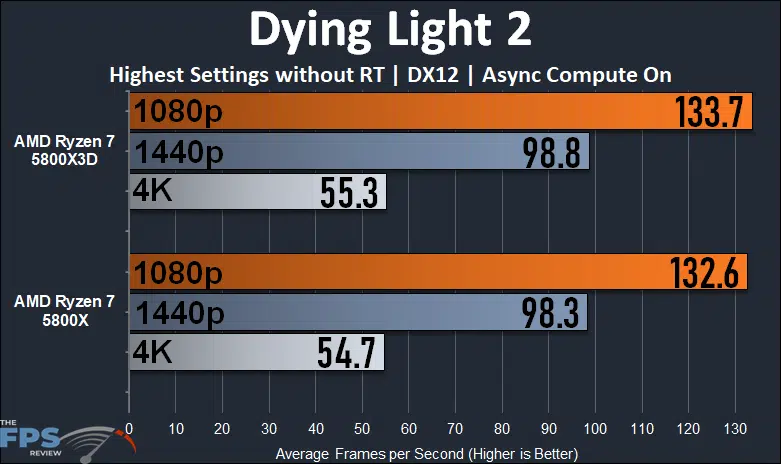
The performance results are very close in Dying Light 2 between both CPUs. If you want to say the Ryzen 7 5800X3D is faster, you can say that it technically is, but only by the smallest of margins. There aren’t any large or noticeable performance differences here at all. At 1080p is the largest difference, where the Ryzen 7 5800X3D is just 1% faster than the Ryzen 7 5800X. The results only get smaller from there, with 1440p and 4K being nearly identical, and within the margin of error for a manual run-through. In this game, it doesn’t matter which CPU you use, the performance will be the same.
Cyberpunk 2077

In Cyberpunk 2077 we are running at “Ultra” settings at each of the three resolutions and we utilize a custom manual run-through. This game shows a little bit of a bigger difference than Dying Light 2, but only at 1080p. Here, at 1080p the Ryzen 7 5800X3D is 4% faster than the Ryzen 7 5800X. While yes this is faster, 4% is overall a small amount, and at the performance, we are playing at above well above 100FPS it doesn’t really matter, you cannot tell the difference. Once we get to 1440p and 4K performance is the same between the CPUs, there is no difference in performance.
Forza Horizon 5
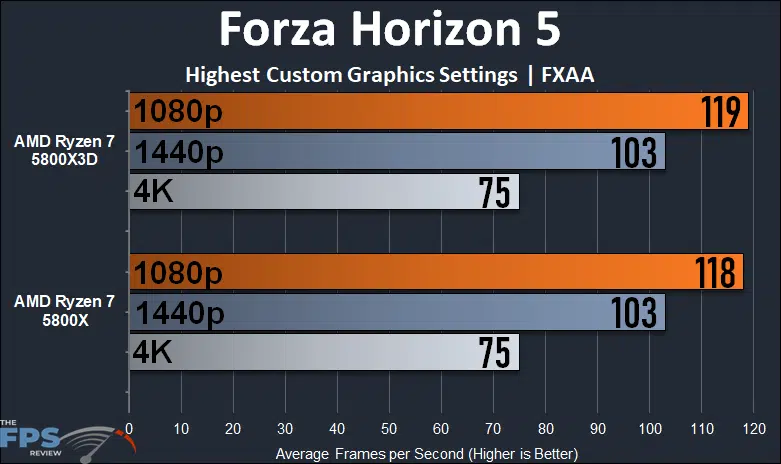
In Forza Horizon 5 we are running the game at the custom highest possible in-game settings with FXAA. We see only a 1FPS difference at 1080p between the CPUs, and no difference at all at 1440p or 4K. This game performs exactly the same between both CPUs.
Far Cry 6

Finally, this is the first game in our testing suite where we do see a big, and we mean big, difference between both CPUs at 1080p and 1440p. At 4K, not at all, but at 1080p and 1440p yes. The Ryzen 7 5800X3D is much faster than the Ryzen 7 5800X at 1080p, 28% faster to be exact. That’s pretty massive. In addition, at 1440p the Ryzen 7 5800X3D is 8% faster, not as much as 1080p, but still an improvement. The reason for this is quite simple, this game is CPU limited, and it really shows at 1080p on a video card like the RTX 3080 Ti.
The new Ryzen 7 5800X3D with its 3D V-Cache is just what this game needed at 1080p to overcome that CPU bottleneck. That’s why you see a tight grouping between 1080p and 1440p on the Ryzen 7 5800X. Yet, on the 5800X3D they are able to separate at those two resolutions, thanks to the new L3 3D Cache. It’s pretty darn amazing right there, but its usefulness drops off quickly as the resolution increases.
Microsoft Flight Sim 2020 GOTY Edition

Microsoft Flight Simulator 2020 Game of the Year Edition is another game that greatly, and we mean greatly, improves with the higher capacity L3 Cache on the Ryzen 7 5800X3D. In this game, it even helped at 4K! Right across the board, the 5800X3D is simply the better CPU for this game. At 1080p it’s 21% faster, at 1440p it’s 24% faster and at 4K it’s 9% faster than the 5800X. We see the 5800X is bottlenecking this game pretty hard, but the 5800X3D allows it to come out of its shell on the RTX 3080 Ti. Though we are still even seeing CPU bottlenecking at 1080p, because 1440p is beating 1080p performance, this shows that this game will benefit from even faster CPUs to really make that 1080p come out where it needs to.
Crysis Remastered

Crysis Remastered is another game where it can be CPU bottlenecked, and we find the Ryzen 7 5800X3D to provide a benefit at 1080p and 1440p, but not 4K. At 1080p the 5800X3D is 14% faster than the 5800X and at 1440p it’s 3% faster.
Discussion (19 replies)
Join Discussion →I'll say that, for me, coming from a 3700X, I've seen much bigger FPS gains. I wasn't able to use resizable bar with that CPU and seeing it in action now with Horizon Zero Dawn has been impressive as well. It used to take ~30+ seconds to load and now it's more like 10. I don't know if Crysis 1-2 remastered use but they seem to load a little quicker now but that could also be due to those last patches Crytek put out.
I only just went to using an AIO with this chip but I've been able to keep the Plex 360 at stock speeds and it's been able to keep this CPU at ~65c or less during gaming, mostly in the 50s, and that was in a room that was 75 degrees Fahrenheit at the time so I'm happy everything will work well in the summer. The two combined have also resulted in my GPU running a few degrees cooler as well which was an unexpected bonus. Up until recently, I had been setting the AIO to max fan speeds for gaming but now I see that is totally unnecessary.
For me, gaming just feels smoother than when I had the 3700X, even in titles like SOTR and Metro Exodus. Granted, since I never had a 5800X I couldn't say what that would've been like but it was also Brent's comparison review between the two that first got my attention in regards to an upgrade. He'd already seen some unusual FPS gains back then.
I game almost entirely at 5120x1440 with my rig, usually at 100 Hz so I can use HDR with my monitor but then 120 Hz for non-HDR gaming, and things definitely seem more fluid regardless if there's a significant gain in frames but even then I'm seeing anywhere from ~5 to ~20, depending on the game plus the lows seem to have gone up a bit. I also use DLSS on the quality setting as much as possible to try and offload some work from the GPU and give a little more to the CPU. I had games that would hang ~70-90 FPS that are now basically hammering 100 FPS or at the least the high 90s. Obviously, like @Brent_Justice 's review shows, moving from a 5800X is mixed at best and its ability to use PBO will definitely pull ahead but there's a cost of power and heat when you do that as well. I'm loving that I can now cut back on the fans and still enjoy more than I used to when everything was maxed. Definitely not a chip for everyone but for me, for the games I play, I'm loving it.
Yes, coming from a 3700X that makes sense. The goal of this review though was to see what advantages, if any, versus the 5800X. If you had purchased a 5800X now, you would save quite a bit of money over the 5800X3D, and still get similar gameplay performance as the 5800X3D, yet you'd save money, and have the ability to use PBO, and everything else besides gaming would also just run faster with the 5800X due to the higher clock speed natively. That is honestly the best value until Zen 4 comes out the end of this year, which is not too far away now.
And also, we have done coming from a 3700X to the 5800X benchmarks and gaming performance here:
https://www.thefpsreview.com/2021/10/06/amd-ryzen-7-5800x-vs-ryzen-7-3700x-performance-review/
Absolutely! That was the review you did that really raised my eyebrows! I was totally shocked to see so much gain in one CPU gen. Thanks!
I'm only just coming to realize how much I've shorted myself over the years in using more mid-grade CPUs. Moving forward I'll definitely be aiming a bit higher, but for now, pretty happy. My previous home desktop CPUs have been in the order of 2600K(OC'd to 4.2 GHz)>4930K(OC'd to 4.3 GHz-still in the cave), 3700X(stock)>5800X3D(stock) so I'm still getting used to identifying other performance metrics of how CPUs can affect high-end GPUs. I've been using the fastest GPUs I can afford for some time since I stopped using SLI: 1080 Ti>2080 Ti>3090, and now I've got a 3090 Ti coming via EVGA Step Up. Thanks again for the great review!
edit: Just to add that I'm only including what I consider modern CPUs in my previous desktop rigs. It'd take some thought to remember all those other ones from the 80s-2000s-lol!
This is a good comparison of the similarly priced 5800X vs 5800X3D.
It does not, however, actually address the title question: how much does the cache actually benefit?
You can only answer that question if you either lower the clocks/voltages to match on the 5800X (essentially under clock it), or lower the cache to match on the 5800X3D (which I don't know of any handy tool to accomplish this, but wouldn't call it impossible). You should expect them to perform identically except for cases where the cache actually benefits -- or detriments, although I can't think of any cases were it ~should~ do that, but this test as run would completely mask if that were the case, since you would just think it's because of the clocks difference.
Or you could change the title.
Here, we see many situations where the faster clocks allow the older chip to eek out the lead, and a few where the cache actually plays a big role, but it's not just the effect of the cache being evaluated because you have the clock mismatch.
Also - curious, why disable Resizable BAR?
The chart on Pg 6 where you break down the results so far -- nice to have the chart. It needs some coloring or something so you can tell which one was the winner, or include it in a bar graph or something. Just a chart of numbers is... hard to really interpret.
The CPU speed charts on Pg 8 are awesome, they do illustrate the clock delta that I did complain about allowing above -- but if you're going to allow it, and it's a valid point in a CPU vs CPU comparison (just not in a cache-only benefit analysis), may as well make it easier to interpret. They would be better if you could fix them so they have the same vertical range - would make it better to make a cross comparison, especially since they are sitting side by side.
This is interesting.
I haven't been in the CPU market lately, so I haven't kept up. I had heard of the new cache AMD was bringing out, but when I saw the 5800X3D I had assumed it was just the same CPU as the 5800X but with the improved cache. I didn't realize they were cutting the core clock so much.
Curious choice. I wonder why they did that. To get better yields? Or to offset the extra power used by the cache?
I'd be curious how they look clock to clock, to tease out just how much good the cache itself does.
Also, I thought it was really odd that 1080p performed worse than 1440p in Ms Flight Sim....
This review is one of the reasons I am pissed at AMD for shafting us TRX40 users and refusing to give us a Zen3 version.
I hate compromises. I want a build that gives me everything a HEDT system offers (primarily ECC, high PCIe lane counts and IOMMU, but high core counts don't hurt either) without sacrificing top of the line game performance.
I hate compromises. They drive me nuts.
My understanding is the stacked cache is more voltage sensitive, so the 3D version has lower voltage limits, which in turn limited the clocks. The TDP remained unchanged, but you just can't get as much if you can't boost the voltage as far.
Is the L3 cache directly on the core? It ought to be able to operate at a different voltage than the rest of the package...
Not an engineer so I don’t know — could be some limits on AM3 pinouts at play there - you only get so many to do different voltages.
The cache also acts as an insulator with respect to heat transfer - a disadvantage of stacking technology at this time. Wattage isn't changing as you note, yet temperatures from the same sensors as on the 5800X at the same power draw may be higher. And thus temperature throttling limits lower, leading to the need for more cooling capacity to get the best out of the CPU.
It will be interesting to see how far the more adventurous 'extreme' overclockers are able to push the 5800X3D. Last I checked they were manually flipping bits in BIOS images to try to turn on things that AMD thinks should be left off :D
It would be nice to see the min frames as well here.
Im curious if in the stress cases the cache is helping or not.
I fell thats a pretty important metric to expose for all video card/cpu reviews.
Honestly,. I don't even understand why they have to stack it on the CPU core.
It's not like there isn't PLENTY of space underneath the heat spreader to put them side by side and allow for more efficient cooling.
Here is the 5800x for reference:
Shift one of those chiplets to the side and you have almost half the area under the heat spreader to work with, where you could shift in a 3rd chiplet containing the cache.
I too would have liked to see the impact of the cache by itself - although that may never be truly possible because the latency is increased (but then, that is part of the cost of having more cache).
To be honest, the games that show the most benefit may be those that are least optimized, because they have been designed to access more data at once than will fit in the cache. Both Crysis and Flight Simulator feature vast vistas which can drain frame rates. I suspect some database operations could also benefit significantly from this, and that overall games are likely to operate more smoothly, even if they don't go as fast at their peak.
I think the real benefit will come five years down the line when every new CPU has 96MB cache, and software (especially games) expects to make use of that, because you won't need to get a new CPU to keep up. Of course, might want it to go a bit faster, but the CPU might also be less likely to bottleneck a new graphics card (whereas now, the card is clearly the bottleneck for 4K, and to an extent 1440p).
It'll also benefit your electricity bills over that time. If you use the CPU continuously, you'll be using 20W less, the temperature will be 8°C lower, and the fan may be quieter as a result. This is a big win from AMDs perspective of performance per watt. Even if you don't game all the time, many run BOINC or similar to use up idle CPU.