
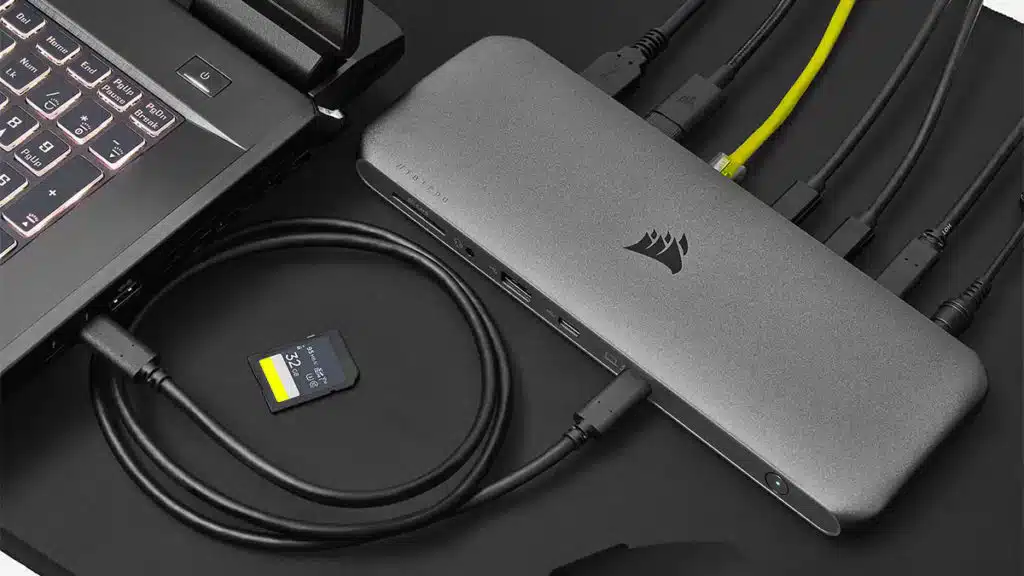
Corsair has launched the TBT200, a Thunderbolt 4 dock that unlocks an array of connectivity options for compatible laptops, Macs, PCs and Chromebooks over a single cable. Encased in an aluminum-clad package and priced at $339.99, the dock features four Thunderbolt 4 ports (including one host connection) and a multitude of additional connections that include HDMI 2.0, DisplayPort 1.4, 2.5Gb ethernet, 3.5 mm audio, USB Type- C, as well as Type-A and more. Corsair’s TBT200 Thunderbolt 4 Dock will arrive at resellers and the company’s webstore in early December.
Corsair is also launching its TBT100 DP Thunderbolt 3 dock today, an update that features the same form factor, design, and functionality of the TBT100 but adds two DisplayPort 1.4 ports, each capable of driving a 4K60 display. Its connectivity options include Gigabit Ethernet, a UHS-II SD card reader, 2x USB Type-C SuperSpeed 10 Gbps ports, and up to 85 watts of power delivery. Corsair’s TBT100 DP Thunderbolt 3 Dock is priced at $289.99 and available immediately from the company’s webstore and its worldwide network of authorized retailers and distributors.
From a Corsair press release:
With Thunderbolt 4, the TBT200 unlocks even more connection options for today’s most advanced laptops and PCs over a single cable. While Thunderbolt 4 shares the same bandwidth as its predecessor at 40Gbps, it unlocks an array of new connection options, including up to 3 simultaneous connected Thunderbolt devices. Users can choose to connect their displays via any combination HDMI 2.0, DisplayPort, or via the included USB Type-C to DisplayPort and USB Type-C to HDMI adapters, supporting a huge range of hardware from 4K TVs to professional production-level displays.
In addition to its four Thunderbolt 4 ports, making it easy to connect all your Thunderbolt devices at once, TBT200 also offers a massive array of ports to connect almost any legacy or peripheral device. 3x USB Type-A Ports (up to 10Gbps combined bandwidth), 1x USB Type-C port, a 3.5mm audio combo jack, 2.5Gb ethernet and a UHS-II SD 4.0 card reader can handle even the most demanding creative armada of devices.
What’s more, TBT200 also offers up to 96W of host power delivery, able to drive even power hungry professional laptops at full performance, or simultaneously charge a whole array of devices at once with smart charging technology.
Encased in a minimalist aluminum case that includes a built-in Kensington Security Slot, the TBT200 effortlessly fits into even the most refined workstation setup and is fully compatible with Windows, Mac, and Chromebook, including the Thunderbolt Dock Utility, Apple SuperDrive and Keyboard on Mac.
Discussion (13 replies)
Join Discussion →I hate all these modern cable based docks.
I want the old school Dell Latitude top-down pop-in docks back.
I am fond of them. Can throw them in the bag with the laptop and carry them around. They take up less than 1/4 of the space. And it’s one cable - not a power cord and everything else.
Screw the old docking stations. May as well just get a separate desktop.
I like the new docks too... with laptop connectivity becoming more and more shit.... they should just include them in the box with laptops and not make them an addon charge.
I guess I don't understand your usage case.
The whole purpose of a dock is to essentially turn your laptop into a desktop when you are at your desk.
Why would you carry it around with you? Do you also have a monitor and a full sized keyboard in your bag? :p
The sites I travel to almost always have a monitor or tv I can plug into. Getting Ethernet on the same package is nice, as is extra usb ports.
For me it’s not about turning my laptop into a desktop; it’s about adding a few extra IO options to the laptop that aren’t there natively - mostly stuff I rarely use but occasionally comes in handy.
I do when I am going to LANParties. Well the monitor gets its own separate carrying harness thingy.
Hey, do you or anyone else know of a good bag I can use to carry around my laser printer? I need access to good quality printing no matter where I am. It won't fit in my laptop bag. I even take my printer with me to the commode. You never know when you'll need to print something.
F*cking TSA wouldn't let me bring my laser printer on the plane. Then again they won't even let me bring a bottle of solution for my contact lenses.
I think what Corsair has here is more of a USB/display hub. And sure, that might be something you wanna carry around, if say you have something like a Surface laptop that doesn't have ANY f*cking ports except a USB-C port. This thing here is just a device to add more ports to your laptop. It's not what I would call a "dock."
Yeah that's basically what I was getting at.
I propose for things like laptops charged over the USB 3.2 or Thunderbolt port that the power adaptors for these get to a reasonable size AND act as a port replicator for these devices. Build it into the use case of the device you buy so you don't have to go out and get an additional 300 dollar piece once you have your thin as fuck laptop?
That’s almost how my MacBook works. It has 2 USB C ports. Which is just shy of perfect. I can charge with either of them, and plug in one of these hubs if I need more to the other. And when I don’t need the ports from the hub, they aren’t taking up space on the chassis.
Yeah that would drive me insane. I'd rather my laptop have a ton of ports built in, rather then have to rely on a hub of some kind.
What's really shameful to me is not having Ethernet built in. I didn't even know they made laptops like that until I received a cheap laptop earlier this year from a family member who bought it then decided they didn't really need it. It also came with an HDD. Did you know laptops still come with HDDs?!?!!! Probably the worst choice of storage for a portable computer that will also spend time in sleep mode. I definitely did not use that drive. I took it out and threw an NVMe drive in there.
That is fair.
That is something I would call a "hub" though. Not a dock. They are completely different things.
And honestly, a hub shouldn't be required for regular use. If it is, the manufacturers have included too few ports in the laptop itself.
What good is a thin little device if you have to lug along extra breakout boxes just to use it right?
That or you bought the wrong tool for the job - but yeah, I agree with your post.
From a recent email delivered to my inbox:
Links to here: https://tripplite.eaton.com/products/docking-stations-explained
Why the F*CK are all these companies calling these things "docks"?!?!?!?!! They are NOT docks, they are hubs!
I keep thinking of the NSFW “docking”
Hence, I prefer the term “hub” or “port extender”
But you guys can dock all you want - I won’t judge