
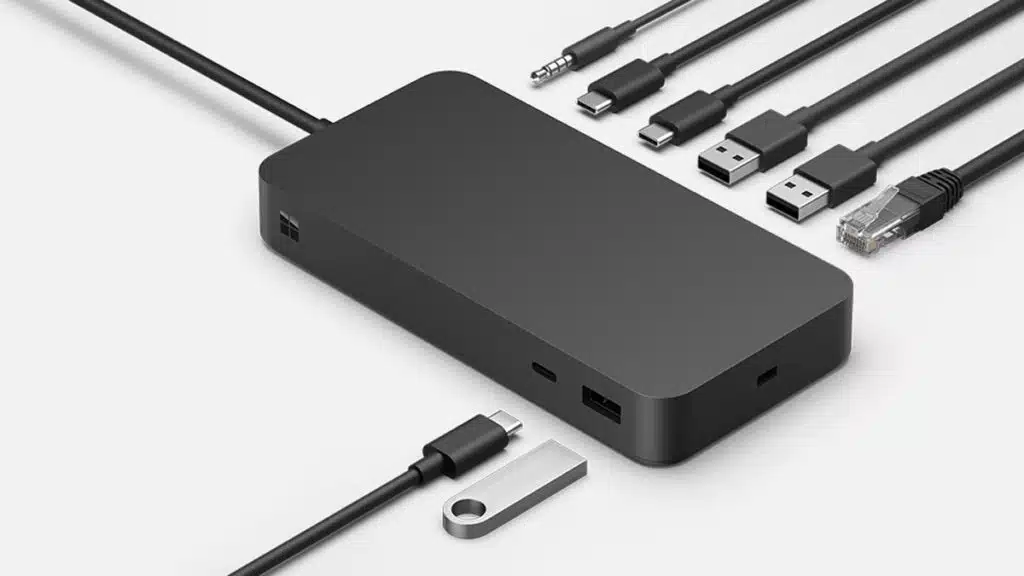
Microsoft has announced that the Surface Thunderbolt 4 Dock is now available to purchase for $299.99. The Surface Thunderbolt 4 Dock delivers ultra-high speed data transfer for a range of Surface devices, including the Surface Laptop 5 and Surface Laptop Studio, featuring multiple USB4 Thunderbolt 4 and USB 3.1 Gen 2 ports, a 2.5 Gbit/s Ethernet port, and more. Microsoft’s Surface Thunderbolt 4 Dock is not compatible with the Surface Duo and Surface Duo 2, according to its list of specifications.
Microsoft Surface Thunderbolt 4 Dock Connections
- 165 W power supply (up to 96W passthrough)
- Thunderbolt 4 Cable with LED charging indicator (80 cm)
- 1 front-facing USB-A (USB 3.1 Gen 2, 7.5W)
- 1 front-facing USB-C (USB 4 Thunderbolt 4, video display enabled, 15W)
- 2 rear-facing USB-A (USB 3.1 Gen 2, 7.5W)
- 2 rear-facing USB-C (USB 4 Thunderbolt 4, video display enabled, 15W)
- 1 Ethernet (2.5Gbit/s)
- 3.5 mm audio jack
- Security lock support (Kensington compatible)
- Screw nut for desk mounts
- Compatible with Cable Matters Desk Mount for Surface Thunderbolt 4 Dock
From a Microsoft Devices Blog post:
Surface Thunderbolt 4 Dock is a USB4/Thunderbolt 4 dock that helps maximize workspace, delivers ultra-high speed data transfer and the versatility to connect and charge your most important peripherals. This new accessory also carries forward our continuous commitment to security, sustainability and accessibility.
This new dock connects to the device via USB-C and is designed for use with Surface and other devices, featuring USB4/Thunderbolt 4. Easily connect to two 4K monitors at up to 60Hz1, experience fast data transfer speeds of up to 40Gbps2 and charge your device with power of up to 96W and enjoy extra power to charge accessories3. It offers an instant connection to three USB-C ports, three USB-A ports, a 3.5mm audio jack, a 2.5 Gigabit Ethernet port and a security lock slot. Windows 11 also ensures that settings are retained when connecting, so even if multiple devices use the same dock, each of them will have the display and connection settings that let them get right to work.
Discussion (3 replies)
Join Discussion →I wish companies would stop referring to hubs as "docks." @Zarathustra knows what I am talking about.
I just want the top down pop-in docks back :p
I don't know why Dell decided to get rid of the ones they used for their Latitude line. they were the best in the industry.
Man both Dell and Thinkpad/IBM had good serviceable docking stations that have gone the way of the DODO. I hate the new ones... while I still use them and see the function I miss the ability to just slap my laptop down and get to work. Now I gotta plug shit in and make sure i have a space for the laptop and other comparatively minor inconveniences.
I wouldn't care if it was via a usb 3.2 port recessed on the bottom of my laptop custom to slap down on a docking station. Make it as durable and functional and I'll be good.