
Test Setup
Please read our SSD Storage Review Format and Methodology article for an explanation of our test system, how we test, procedures, and goals for SSD reviews.
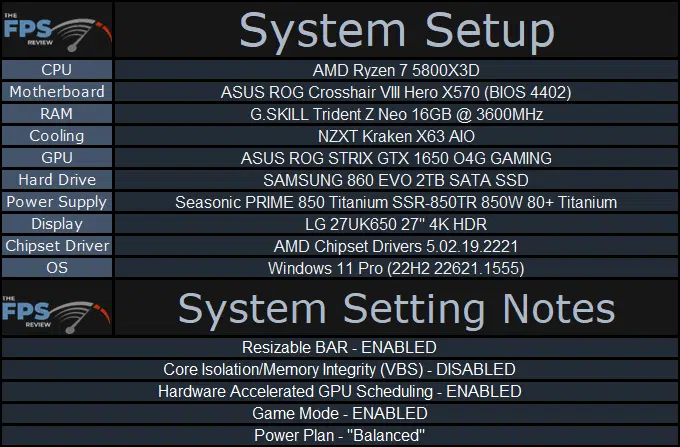
We are using the motherboard’s current default BIOS settings. We have DOCP enabled. We are running the latest motherboard BIOS. We have Windows 11 Pro configured to run in the “Best Performance” power profile. Windows has the latest updates. NVMe drivers are installed if present on the manufacturer’s webpage.
We compare SSDs on our graphs by PCIe or SATA version. For example, all PCIe Gen4 SSDs are on a graph for comparison, and all PCIe Gen3 SSDs are grouped together separately when reviewed. SATA is also grouped separately when reviewed. In this way, we are comparing similar PCIe or SATA performance, so that it doesn’t skew the results and you can see the best drive in that grouping based on the generation of performance.
CrystalDiskInfo
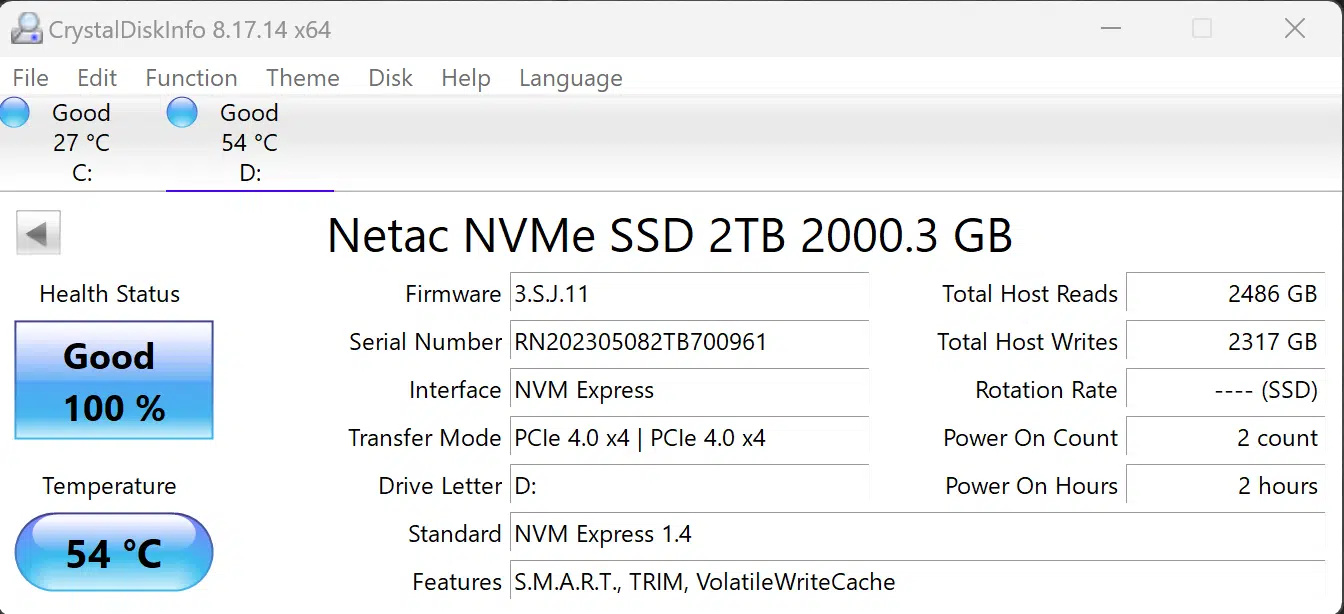
Installation of the SSD went smoothly, this SSD does not need a special NVMe driver. It uses the default Windows NVMe driver. In CrystalDiskInfo we can see information on the SSD below.
Discussion (3 replies)
Join Discussion →Pricing on the 2TB is pretty darn good at $113. Doesn't make sense to get the 1TB for $95. Or the 4TB for $389.
Yea the 2tb in this case is the sweet spot... people that go for the 4tb just need the data density.
or endurance, the endurance on the 4TB is nice, but it will cost you, agree that the 2TB is the real sweet spot here