
Overclocking ASUS TUF Gaming Radeon RX 7800 XT OC Edition
To overclock the ASUS TUF Gaming Radeon RX 7800 XT OC Edition video card we are going to use the built-in overclocking performance tuning in AMD Radeon software drivers.
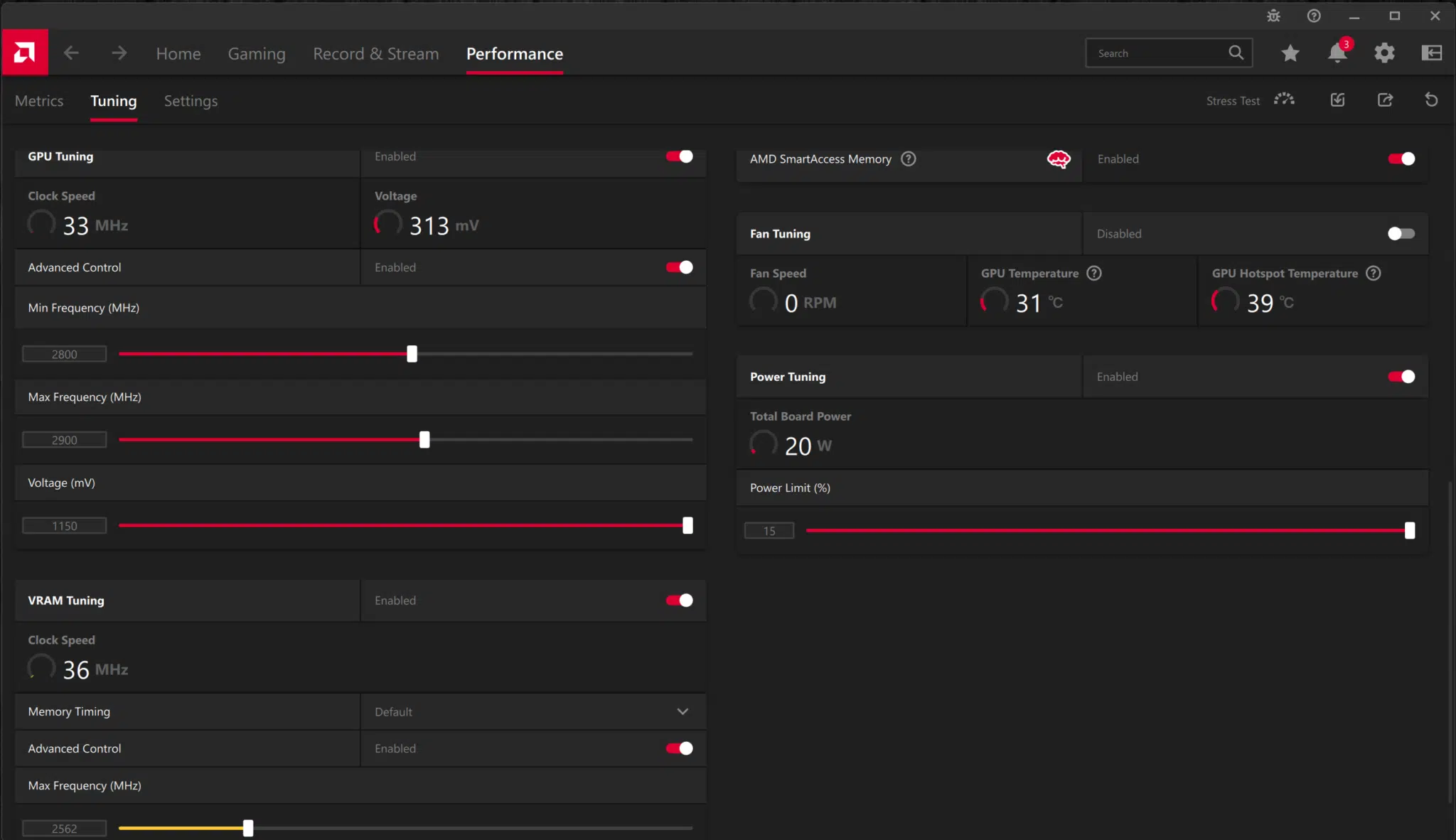
When we open up the Performance Tuning and hit Custom, we find that we can control GPU, memory, fan, and Power Tuning on the ASUS TUF Gaming Radeon RX 7800 XT OC Edition video card. We cannot, however, raise the Voltage. We can set a maximum Power Tuning slider to a maximum of 15% over the default on the ASUS TUF Gaming Radeon RX 7800 XT OC Edition. We can also enable 100% fan speeds to ensure the highest overclock, however, we did not have to with this video card. The cooling was so good, that we could leave it at default for our overclocking adventures, which definitely kept the noise level down.
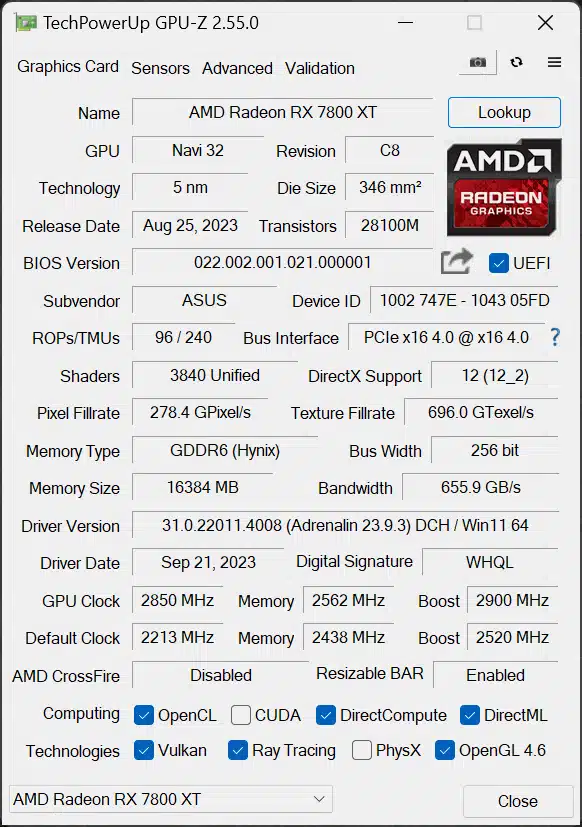
Due to the way AMD GPU frequency scaling works, which is very dynamic, we can simply raise the Max Frequency slider and Minimum Frequency slider in increments until we find the highest overclock, or maximum allowable clock speed. We found that by matching the Minimum Frequency slider to the Maximum Frequency slider, we found an increase in GPU Frequency, and this worked the best for providing a frequency overclock. It was important to move the Minimum Frequency slider, as the Maximum one did not produce higher frequency results. It wasn’t until we moved the Minimum as well, that we saw a bump in frequency. Our final overclock was a Minimum Frequency of 2800MHz and the Maximum Frequency slider at 2900MHz.
The default memory frequency is 19.5GHz on the ASUS TUF Gaming Radeon RX 7800 XT OC Edition video card, which is the reference spec. We managed to push it up to 2562MHz or 20.5GHz, an increase of 1GHz. At 21GHz, it worked mostly, but there were odd flashes that we could tell were due to the memory frequency being too high. Backing it down to 20.5GHz was completely stable, and did not eat too much into the overall TDP of the video card to allow a higher GPU frequency overclock. Therefore, the memory in our overclock was running at 20.5GHz for the overclocking results. This improved bandwidth to 656GB/s from the default of 624GB/s.
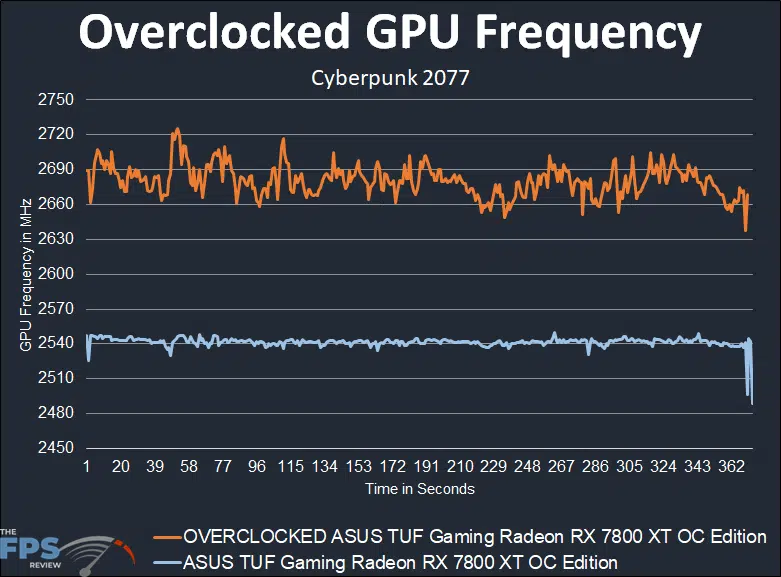
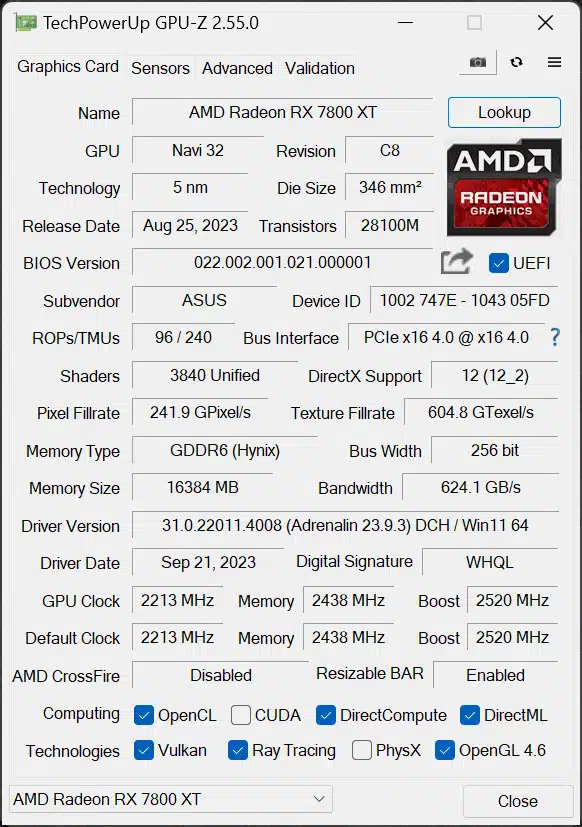
In the graph above, we have graphed out the default (blue line) GPU clock frequency to our overclocked (orange line) GPU frequency as reported by the single metric in GPU-Z. The factory overclock boost is set at 2520MHz on the ASUS TUF Gaming Radeon RX 7800 XT OC Edition, and the game clock is set to 2213MHz. According to this, we are actually running over the boost clock slightly at around 2540MHz very consistently. This is great news and shows how good the power delivery and cooling is on the ASUS TUF Gaming Radeon RX 7800 XT OC Edition. The average result is exactly: 2541MHz.
Looking at our overclocking results, we can see that raising the Minimum Frequency slider and Maximum Frequency slider has resulted in a higher GPU clock speed. It now fluctuates between 2660-2690MHz mainly. The exact average is 2680MHz. Therefore, our total overclock from the default is 139MHz, or a 5.4% increase in GPU clock speed. This isn’t a huge increase, but consider that the ASUS TUF Gaming Radeon RX 7800 XT OC Edition is already running at a very large GPU boost compared to the reference AMD specs as is out-of-the-box with its factory overclock. At 2541MHz it is over 100MHz faster than the reference AMD clock speed out-of-the-box to begin with.
Discussion (7 replies)
Join Discussion →I get comparing to it's closest competitor. But I feel like I must be remembering reviews with rose colored glasses. Didn't reviews compare new cards to one step up and one step down as well to see how they fit in the stack and if they were worth while?
I mean if you're constantly reading/watching reviews and ingesting data I suppose having just an review against the other teams price parity (or closest) makes sense. But as a consumer I would love to see if the 78000 XT card stacks well against another brands work with an same model, a 7900xt, and a 7600xt, as well as a 4080, and 4070ti/non ti.
Nice review, Brent.
Man I just about had my mind set on a 4070... this is $30 cheaper (than the $550 4070 Gigabyte I was looking at) and seems to be better in most cases. HMMMMMM.
You can look at what we've already reviewed and get a good idea of just that. We have already reviewed the XFX, Sapphire Nitro and reference AMD 7800XT cards. Thats real apples to apples. If you throw in a lesser or higher tier card, then you really don't get fair comparisons. What we try to do is show what is out there in the same price bracket or aimed at the same or similar gaming experience. TBH, right now the prices are all over the place, so that can be hard to do. That said, these reviews have always been pretty much about comparing cards that are closest in price and performance. We do throw in prior generation cards when a new gen is released. Also you have to consider the time it takes to run the data, graph it all out, compile the stats and then publish it. It takes about 4 or 5 days to knock out a polished review using an overclocked card, the out of box card and then the comparison card. If we did any more this stuff would be ancient history by the time you read it.
So why not include those in the chart? Or are we dealing with a like for like hardware issue between reviews. Since recreating the data doesn't make sense. Oh.. I get it with how intrisic driver versions are to performance improvements that wouldn't make sense.
Either you bench everything with an older driver, or you bench everything again with a newer one - and if you're doing it correctly and not over-automating reviews such that you miss things like artifacting and such, or using built-in benchmarks that do not represent gameplay (and perhaps favor one vendor over another, and that is different than gameplay) so that you wind up with results that are correct. At a minimum, really.
Benchmarking well is really a throughput problem that isn't easy to solve, unfortunately.
That has alot to do with it. Everything is tested on that day, using the latest most up to date everything.
Game updates can also make a difference - some games like Cyberpunk on GOG are easy enough to time machine into a specific version, but the more connected ones can force upgrade you.
There's a lot of variables to control for that we have a stack of internal documentation on to get things set up the same way every time. When looking at a single card, it's focused on 1-2 comparison options at that point in time. For a GPU level review, you'll see we run a much larger comparison dataset (usually limited by time before launch and who has what to ship to whom).