
Test Setup

Both the AMD platform, and Intel platform share the same AIO an MSI MEG Coreliquid S360 360mm AIO, and inside MSI Center the fan profile was set to “Gaming.” Both platforms share the same power supply, and Coarsair MP700 PRO 2TB PCIe Gen5 x4 NVMe SSD, and monitor. The same GeForce RTX 4090 Founders Edition was used on both platforms with driver GeForce 560.70. Each platform received a fresh install of Windows 11 Pro with all updates and a fresh install of all applications and games per platform, the same version of the OS was used. We do have Core Isolation/Memory Integrity DISABLED on each platform and CPU, and the Power Plan was set to “Balanced” for every CPU.
AMD Platform Setup
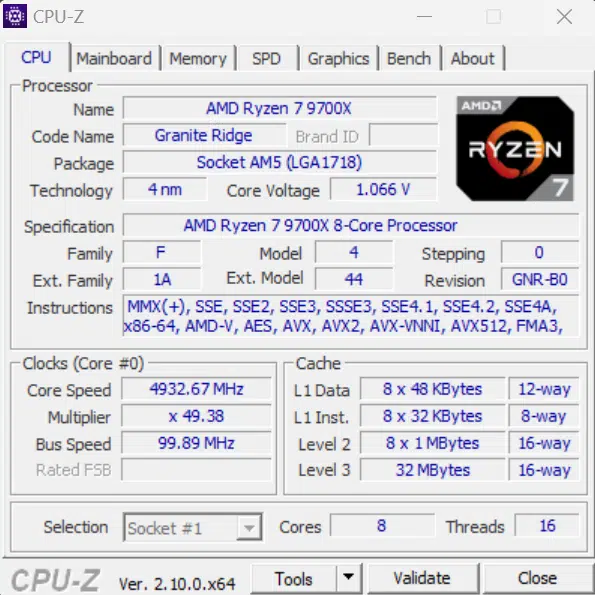
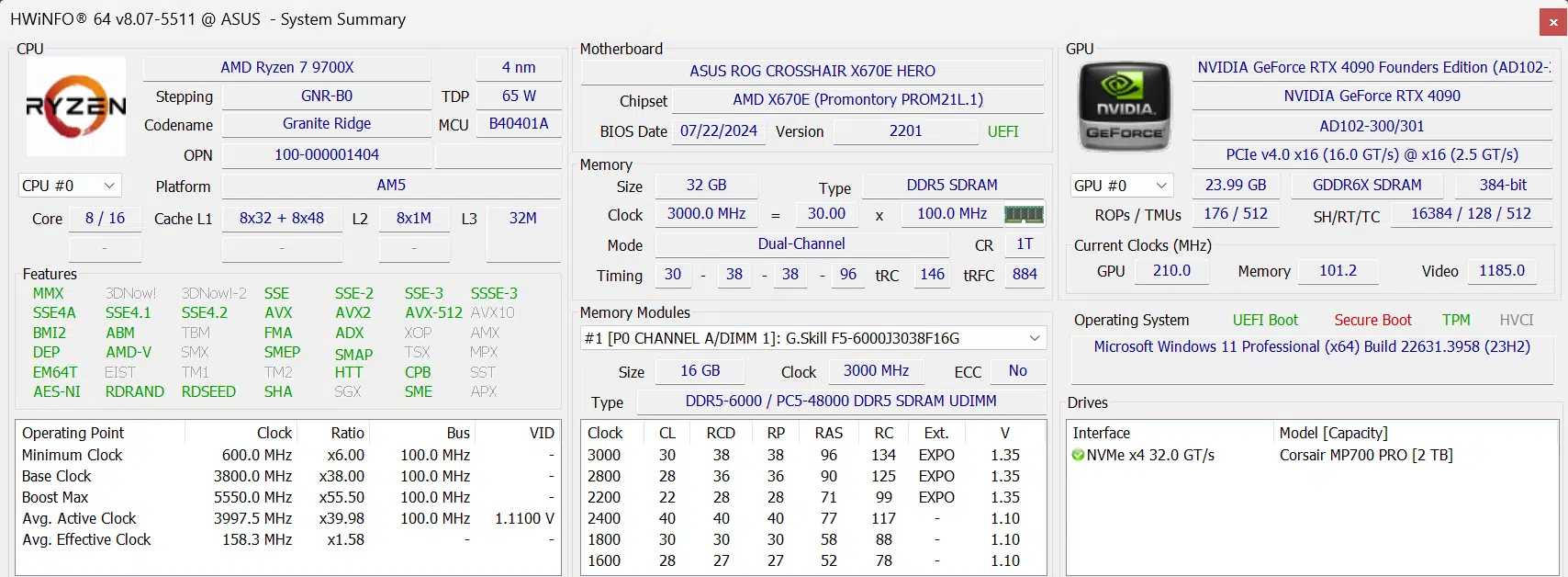
The AMD platform used BIOS 2124 dated 7/19/2024 for the ASUS ROG Crosshair Hero X670E motherboard for all Ryzen 7000 series CPUs, which is based on AGESA Combo AM5 PI 1.2.0.0a. This was the latest BIOS at the time of testing for all Ryzen 7000 series CPUs.
For the Ryzen 9000 series CPUs, we updated to an AMD-provided BIOS for this motherboard which was version 2201. This BIOS is still based on Combo AM5 PI 1.2.0.0a but adds a “PatchA” to the version. According to AMD PatchA has some tweaks specific to the Ryzen 9000 series 12-core and 16-core CPUs. Therefore, it would not have made any difference on Ryzen 7000 series CPUs, it’s still based on the same Combo AM5 PI 1.2.0.0a AGESA code, so everything is similar between them from a BIOS standpoint and AGESA standpoint.
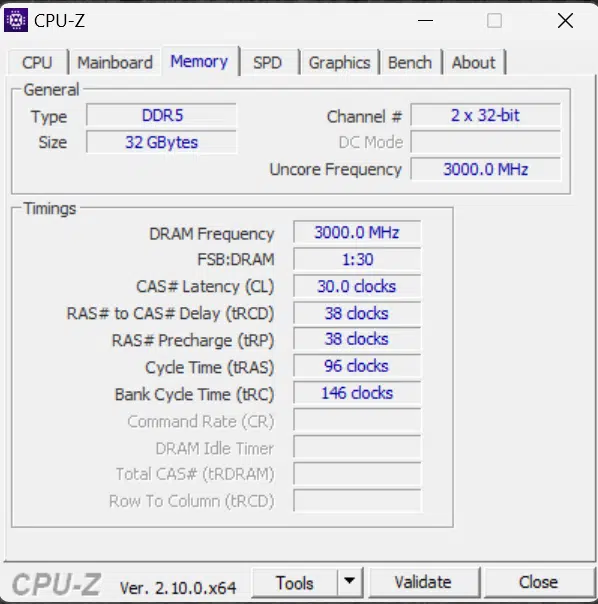
We also installed the latest AMD Chipset drivers from AMD’s website which is version 6.07.22.037 dated 7/26/2024, this same version was used for every AM5 CPU tested. The RAM utilized on the AMD AM5 platform for all AM5 CPUs was 32GB of DDR5 at 6000MT/s CL30 set to EXPO I. This was the same on Ryzen 7000 and Ryzen 9000 CPUs.
*Note* – The FCLK (Infinity Fabric) was set to motherboard defaults with the “AUTO” setting in the BIOS after loading default settings. We confirmed that the FCLK frequency was running at 2100MHz for all of our testing. It was the same for each CPU. We opted to keep it on the default motherboard setting of “AUTO” to represent the ‘out-of-box’ experience with this motherboard/CPU/RAM combination at defaults. We always use default BIOS settings for testing, on all CPUs, with all motherboards, to keep it fair. All AMD CPUs were tested on this same motherboard and RAM kit.
Therefore, we are running AUTO:1:1 – which in effect is 2100:3000:3000 (FCLK/UCLK/MCLK) using EXPO I profile on this RAM, for 6000MT/s DDR5.
Intel Platform Setup
For the Intel platform, we updated our BIOS on the ASUS TUF Gaming Z790 PRO WIFI to version 1661 dated 7/10/2024. This is important because this BIOS supports new Intel Default Profiles of “Performance” and “Extreme” on the 14900K and runs at Intel Fail Safes with Multi-Core Enhancements from ASUS disabled. It also contains microcode 0x125 to ensure eTVB operates within Intel specifications. It does not, however, contain the new microcode fix for mismanagement of Voltage requests to the CPU that Intel has yet to release at the time of testing (estimated middle of August release).

This is, however, the latest BIOS we have access to, and is publically available, so it is pretty much all we can do at the time of testing is to use this version right now. We are running the motherboard at the default BIOS settings on the Intel Core i7-14700K and Intel Core i5-14600K. In the BIOS, these two CPUs do not have the Intel Default Settings Profiles of “Extreme” or “Performance” profiles available, which is only supported on the 14900K. However, for the 14600K and 14700K, the BIOS does run at “Intel Default Settings” under Performance Preferences and also sets SVID Behavior to “Intel’s Fail Safe” as well as “Disabling” ASUS MultiCore Enhancement.
Otherwise, we are running 32GB of DDR5 at 7200MT/s set to XMP I with 34-42-42-84-2T timings. We installed Intel Chipset Driver V10.1.19600.8418 dated 12/11/2023 from ASUS’s website for this motherboard. We also installed ME drivers, and other optional drivers for all supported hardware from ASUS’s website.
Discussion (19 replies)
Join Discussion →I'm sorry. LESS Power draw, Slower Clock. But so much IPC gain that it out performs it's previous generation.
I can not WAIT to see the 9950 and 9900 reviews!!! (Especially when you get the new gen of motherboard chipsets!)
So all we get basically this go-around is better power-efficiency.. I mean, that's all well and good but this was AMD's chance to put their foot on Intel's throat and they missed the mark...
Thank you Brent for a thorough review as always!
How do you figure they missed the mark? the 9700x is out performing in many cases systems with more threads from Intel.
Maybe if the 9900x is loosing to the 14700k you will have a point.
But an 8 core processor trading blows with 20 and more thread CPU's from the competitor is impressive. And for FAR less power?! AND lower GHZ rating. That's an IPC and Power improvement on an impressive scale.
Missed the mark... do you work for intel marketing? Or did you just misread the article?
Nah, think @Space_Ranger may have not realized that these are basically i5 competitors, but also are falling between 14th gen and whatever comes next from Intel. Weird place to be.
Intel was barely holding on to any 'marks' up to this point. 7800X3D erased really any reason to go Intel purely for gaming aside from cost or wanting something that is only available on the Intel platform.
Higher IPC, efficiency, and lower temperatures. There's still overclocking to consider, could be plenty of headroom above 88W stock, and the thermal improvement bodes well for overclocking as well as for the eventual X3D releases.
Yeah idk, it feels like techtubers are missing the mark on this one and people are just being dense.
I didn't misread the article. I did take other reviews into my OPINION on the matter. If having an opinion you don't like placing me in "Intel Marketing" territory, then so be it..
No it just seems way off the mark of the review. And others in have seen this far. To be fair inhacent hunted for ones either.
Personally excited for the 9900x and the 9950x
Thanks, @Brent_Justice for the thorough review. Glad to see the single-threaded performance gains and improved power efficiency. I'll probably be holding out for a bit longer but still keeping track of AM5 progress and happy to see CPUs like this making their strides.
@Brent_Justice
Yeah I would like to echo Peters comment, that was a great review.
The title picture is a bit cheeky tho.... =)
I did not see it mentioned but I have not read everything, how is RAM and/or system stability? I seen techtubers having lot's of issues with RAM speeds and crashing of benchmarks.
I need to see this improved b4 I will consider these CPU's (the 3D variants anyways)
@Brent_Justice can probably expand more on this...
1. We haven't had stability issues with our systems.
2. We're using AMD's suggested configuration, which is essentially the X670E board and EXPO ram kit that they shipped for the Zen 4 launch reviews. We haven't dabbled with various configurations.
3. We're using a very new bios for the board that AMD sent us (that is not released yet to my knowledge).
4. The motherboard/bios combination is what is setting FCLK in EXPO mode. Our board is setting it to 2100MHz - different boards will set it to different values, however, AMD says that if you're not stable at 2100MHz (as it's going to depend on CPU quality and board), to drop the FCLK manually to 2000MHz (in non EXPO mode it runs even lower than this). I suspect this could be part of what the TechTubers are running into is having a board/CPU combo that doesn't like the board's selected FCLK.
I will echo what David said. So far, I have only seen 1 TechTuber report stability issues, but I haven't watched a ton of videos yet. I do not know if stability problems are a widespread issue. For my testing, I had absolutely no stability problems with the 9700X and 9600X. I actually tried 2 different BIOS's on the ROG CROSSHAIR X670E HERO I'm using, first, the official public BIOS from ASUS prior to the launch, which was version 2124 dated 7/19, this BIOS is based on AGESA Combo AM5 PI 1.2.0.0a. I had no problems at all with the 9700X on this BIOS. Second, I updated to BIOS 2201 provided by AMD, it is still based on Combo AM5 PI 1.2.0.0a but adds a PatchA for improvements with 12c and 16c Zen 5 CPUs, that's the only difference in that BIOS, but I also had no problems with that. Right now, ASUS has an even newer one on their website, 2204, but I have not used it yet, it only became available on the 5th, and it says the exact same Combo AM5 PI 1.2.0.0a PatchA version as the one AMD sent.
David hit the nail on the head with FCLK. It is possible some might experience issues on certain CPUs/RAM/Mobo combos with a higher 2100MHz (or higher) FCLK (Infinity Fabric). The "sweet spot/safe spot" for stability is 2000MHz. In the one video I saw, of the tech tuber having stability issues, they did manually set it to 2000MHz. So beyond that, I don't know what else would case stability issues. But, surely you may see some differences in both performance benchmarks, and stability, based on the motherboard/RAM a reviewer is using for reviews, so as I stated in our YouTube video, make sure to always check the Test Setup page for any review you read online, to see what they are running.
For me, and the hardware I'm using, this launch was super smooth. The only thing that I questioned was the performance I experienced, I felt it to be below expectations, therefore I exchanged a lot of messages back and forth with AMD to share my concerns, and experiences and compare benchmarking performance. AMD actually re-ran several benchmarks in their labs, of what I was using, so we could compare notes and validate performance. There was a good interaction there with AMD, and AMD was very tentative about my experiences in regards to the performance that I experienced.
Great review. I sat out the last round, still on AM4 5700x. I hope the AM5 mobos that are in the wild will at least boot and allow a firmware update, if I end up buying a Microcenter bundle or whatever.
I'm going to wait on the new chipset because I'll ride that combo for a least a couple years.
AM4, one for the history books for sure. Nothing really wrong with AM5 and some nice features for sure but AM4 has stood the test of time for just getting the job done.
Just checked, coming up on its 8-year anniversary in September.