
Synthetic System Benchmarks
On this page, we will show synthetic benchmarks, some that test a variety of system use-case scenarios, and others that test specific multi-core and single-core/thread workloads to hone in on performance differences. Note that the graphs are arranged from fastest to slowest, and the AMD Ryzen 9 9950X CPU is highlighted. One of the primary goals while reading the performance is to see the difference between the Ryzen 9 9950X and Ryzen 7 7950X. Of course, the competition is included as well, and we are showing both the Extreme Profile and Performance Profile from the BIOS. Take note that Core/Thread count differences will affect many results in multi-core/multi-thread testing.
PCMark 10 Express
PCMark 10 Express tests workloads as follows: PCMark 10 Express is a benchmark that focuses on basic work tasks. It is a good choice when tendering for PCs for general office use. The PCMark 10 Express benchmark focuses on the performance needs of a typical office worker. It tests Essentials and Productivity.
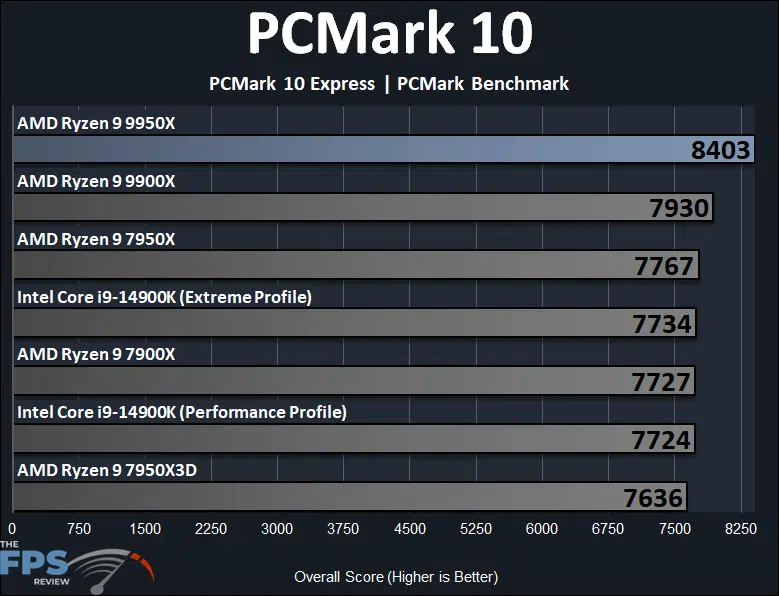
This benchmark focuses mainly on workloads that are more lightly threaded in office applications. The new AMD Ryzen 9 9950X is performing the fastest in this benchmark, topping the charts with a score of 8403. This makes the AMD Ryzen 9 9950X 8% faster than the previous generation Ryzen 9 7950X in PCMark 10 Express benchmark. If we compare it to the competition, the AMD Ryzen 9 9950X is 9% faster than the Intel Core i9-14900K at either the Extreme or Performance profiles. Compared to the new Ryzen 9 9900X, the AMD Ryzen 9 9950X is 6% faster in this benchmark with the higher core/thread count part.
Geekbench 6
We are using Geekbench version 6.3.0 for our testing. We will show Multi-Core (nT) and Single-Core (1T) performance in separate graphs.
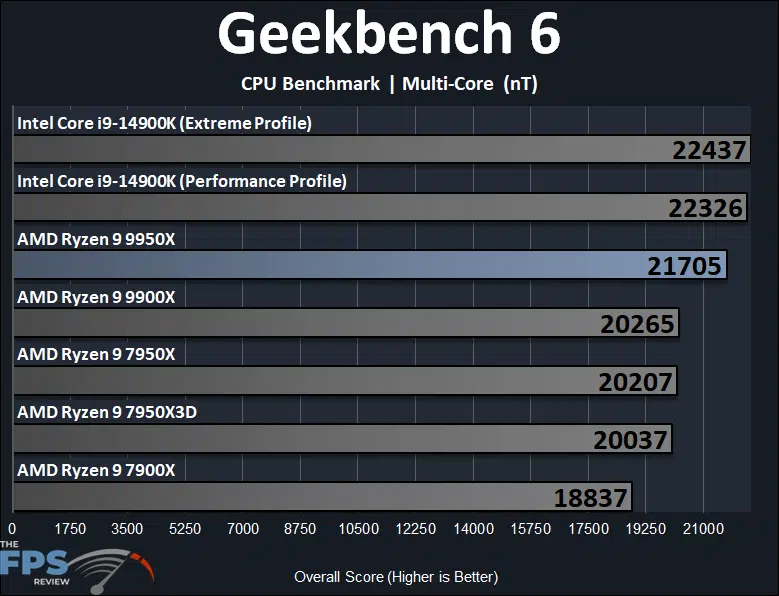
According to Geekbench Multi-Core testing, the new AMD Ryzen 9 9950X is 7% faster than the previous generation Ryzen 9 7950X in this multi-core oriented benchmark from Geekbench and 8% faster than the Ryzen 9 7950X3D. However, the new AMD Ryzen 9 9950X is slower than the Intel Core i9-14900K by 3% in this synthetic multi-core benchmark. When we look at how the AMD Ryzen 9 9950X performs over the Ryzen 9 9900X we find that it is 7% faster in this benchmark for the higher core/thread part.
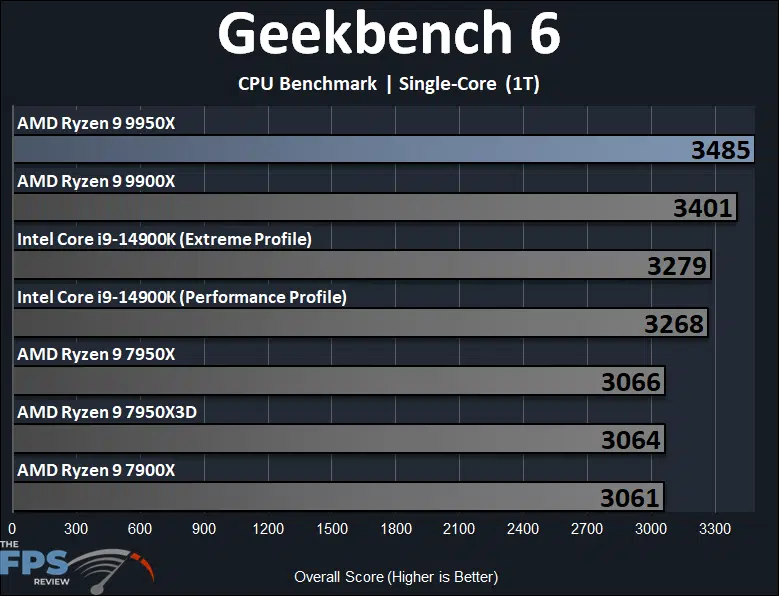
In Geekbench 6’s Single-Core performance testing, we find that the new AMD Ryzen 9 9950X really shines in single-core performance uplift compared to the Ryzen 9 7950X. The AMD Ryzen 9 9950X is 14% faster than the Ryzen 7 7950X and 7950X3D in single-core performance, which is an impressive uplift from the previous generation’s performance. The AMD Ryzen 9 9950X is also able to perform 6% faster than the Intel Core i9-14900K as well in single-core performance, taking the lead here. The AMD Ryzen 9 9950X is about 2.4% faster in single-core compared to the Ryzen 9 9900X.
3DMark CPU Profile
We are testing 3DMark’s CPU Profile which tests Max Thread performance and Single Thread performance, we are reporting both on separate graphs.
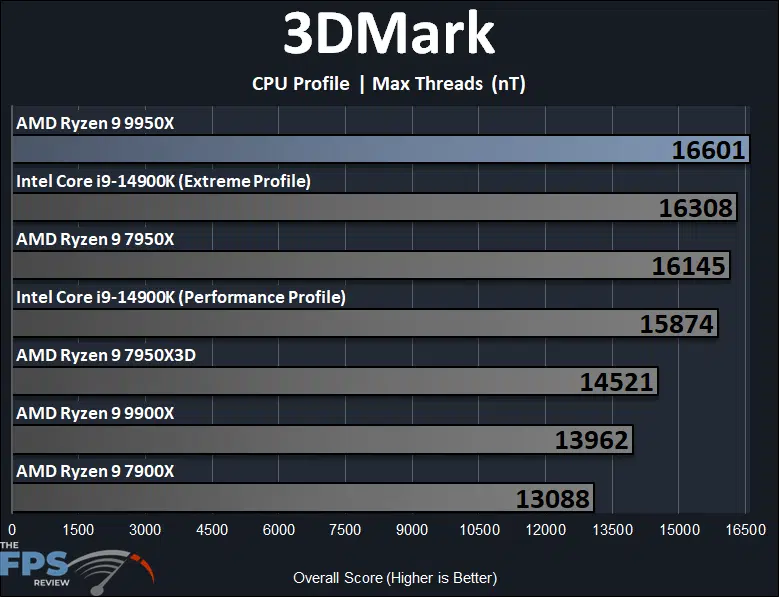
In 3DMark’s CPU Profile test, the AMD Ryzen 9 9950X has a very modest, and close 3% performance difference over the previous generation Ryzen 7 7950X. Compared to the Ryzen 9 7950X3D however, it is 14% faster. The AMD Ryzen 9 9950X is also very close in performance to the Intel Core i9-14900K in the Extreme Profile at only a tiny 2% difference. However, in the Performance Profile for the 14900K, the AMD Ryzen 9 9950X is 5% faster, still an overall small amount. When looking at the performance over the Ryzen 9 9900X the AMD Ryzen 9 9950X is 19% faster, showing us what the difference in cores looks like.
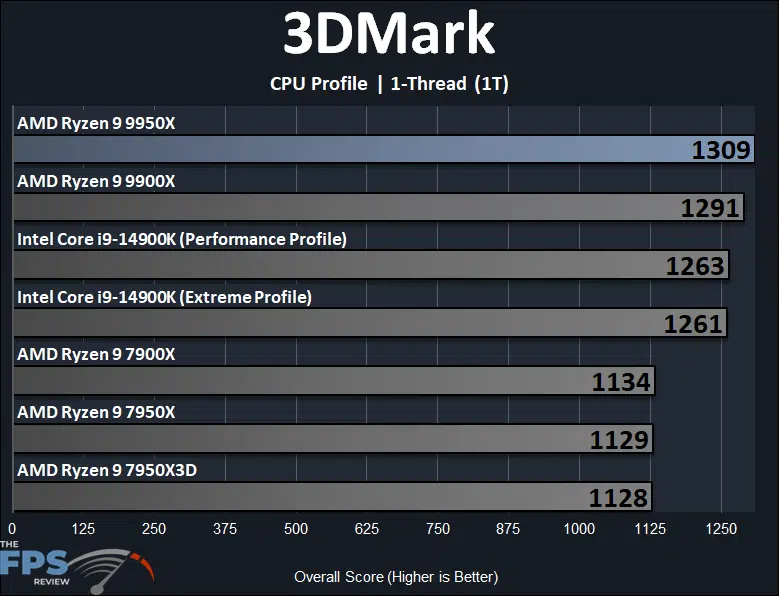
Similar to Geekbench 6’s testing, in 3DMark’s CPU Profile 1-thread testing, the AMD Ryzen 9 9950X is 16% faster than the previous generation Ryzen 7 7950X, which matches AMD’s IPC claims. This is the first time actually, that we have received exactly that percentage difference as was AMD’s IPC claims. It manages to pull ahead of the Intel Core i9-14900K by a smaller 4%, the 14900K has very good single-thread performance to begin with. When comparing the AMD Ryzen 9 9950X to the Ryzen 9 9900X the AMD Ryzen 9 9950X is within 1% of it on 1-thread performance.
PerformanceTest 11
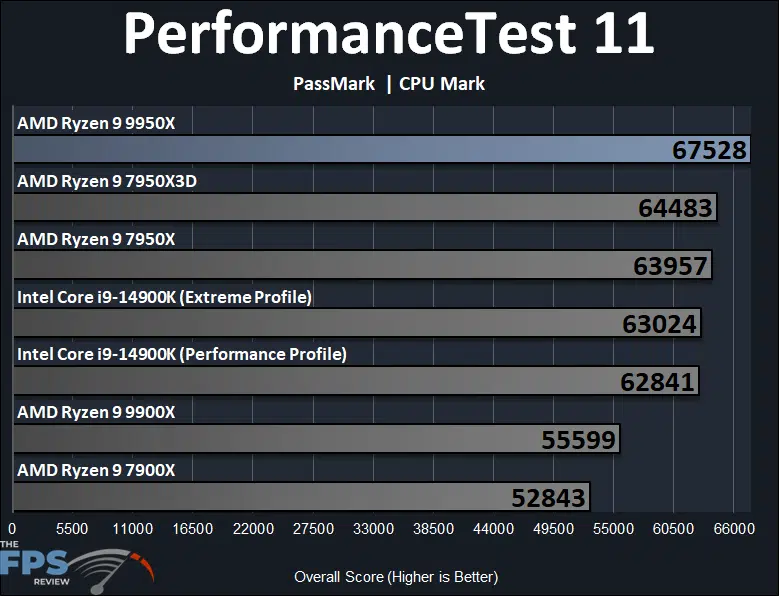
In PassMark PerformanceTest 11 CPU Mark result the AMD Ryzen 9 9950X is only a smaller 6% performance advantage over the Ryzen 7 7950X. We can see that 3D V-Cache plays an important role in this benchmark for performance as the Ryzen 7 7950X is within 5% of the AMD Ryzen 9 9950X. This puts the AMD Ryzen 9 9950X 7% ahead of the Intel Core i9-14900K. When looking at the AMD Ryzen 9 9950X over the Ryzen 9 9900X the AMD Ryzen 9 9950X is 21% faster with its higher core count.
Discussion (14 replies)
Join Discussion →@Brent_Justice
Thank you again for a good review worth reading.
But....
Did you realize that picture at the top of the article looks like a bandaid?
Damn you - now I can't unsee this.
Would be better if it were a 90 yr old stripper with a boob job.
ps - I finally found a good use for AI
Damn it totally does...and I kinda want those for the Datacenter for the inevitable nicks and scratches people get handling computers. CPU themed bandaids.
Great review!
Could you delve a little further on this? I find myself not really familiar with what this is, and why one would disable it.
It sounds like it might be an important security feature?
Also....
Memory appears to behave rather interestingly with this release.
If you guys get around to it at some point I'd love to see your breakdown on memory settings and performance.
The settings you used seem like they would be the best easily achievable RAM settings for this platform, and a good choice for the initial review, but I am curious about other settings as well.
How do they - for instance - compare to DDR5-6400 with fabric at 2133 in a 1:1:1 configuration? Is this stable?
And how does the performance of this compare to - say - DDR5-8000 in a non 1:1:1 configuration? Is it better to go for that perfect 1:1:1 or to shoot for higher clock speed?
Also, I understand CL is less important than it once was, but how important are timings?
I think this could make for an interesting follow-up test.
Wendell over at level1techs also has some really interesting remarks in his Zen5 reviews (both on the main channel and the level1techs Linux channel) about how he thinks the current Windows 11 scheduler might be wonky with Zen5 and is holing it back. Unlike with other CPU's he is seeing much better performance under Linux with this architecture. I'll be looking forward to further investigation into this.
Also,
One more thought,
Your review does not have this data, but in other reviews I've seen, the 9950x - while it does well in average frame rate, it has been very impressive in 1% and 0.1% lows compared to other CPU's even beating the 14900k in many benchmarks.
I find this to be very interesting and I can't help but wonder why. What about this CPU specifically makes it so good at minimum frame rates?
I suspect some of it may have to do with Intel's E-cores getting in the way, and Intel's much higher memory bandwidth allowing the CPU to run away with it in some cases, pulling up the average, but keeping the minimums where they are. Not sure though
I've been a long time believer that 1% and 0.1% lows are of much greater importance than average frame-rates. That's what I determine my "playability" on. I want minimums/lows to be 60fps or greater. IN reality this tends to result in averages at or about 90fps, but some CPU/GPU's have a smaller difference between averages and lows than others.
I'm glad I'm at the age where I can truly forget things because I need to forget this. @Dan_D , I think you mentioned something like this in another thread recently.
Yes I did.
Nice my CPU holds up for gaming at least.
Yea that's a solid CPU and I wouldn't go with a 9000 series just yet.
I don't think she'd take no for an answer.
I should probably go to the gym more often.
Ummm.... what?
The 90 year old with a boob job.
Ahhhh ook
Hi guys ! I have a 9950x. BTW, I used to me a moderator for 17 years on Anandtech forums. The main site is dead as of today, so I may be here a lot more.
Sorry to hear about the final shutdown of Anandtech. I used to read the site a lot from founding in the late 90's until 2014 when Anand left and sold the site, and I felt that the quality of the content started to go downhill.
I still miss Anandtechs excellent SSD reviews (from ~2010-2014). They were some of the best.
The more the merrier. Good to have more people in these forums! :)