
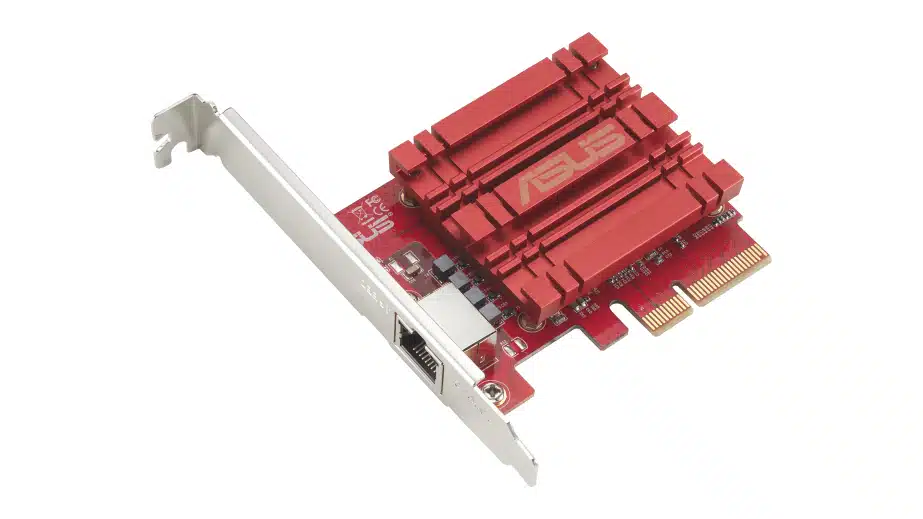
The XG-C100C V3, a new 10GBASE-T PCIe network adapter that is said to deliver astounding data-transfer speeds, featuring support for 10 Gbps networking and universal compatibility with current networking standards (i.e., 10/5/2.5/1 Gbps to 100 Mbps), is coming to retail, ASUS has announced. Users will find a single RJ45 port, which supports standard copper network cables for what ASUS has described as being easy migration.
Key features include:
- “Hyper-fast 10Gbps Networking – Achieve astounding data-transfer speeds, 10 times faster, ideal for bandwidth-intensive tasks.”
- “Universal Compatibility – XG-C100C supports current network standards, from 10/5/2.5/1Gbps to 100Mbps, ensuring smooth backward compatibility.”
- “Windows and Linux Support – Flexible OS integration with Windows 11/10 and Linux Kernel.”
- “RJ45 Port for Easy Migration – Effortlessly transition to 10Gbps networking using standard copper network cables through the convenient RJ45 port.”
- “Prioritize Your Games – Built-in Quality-of-Service (QoS) technology allows you to prioritize bandwidth and gaming packets, delivering a lag-free gaming experience.”
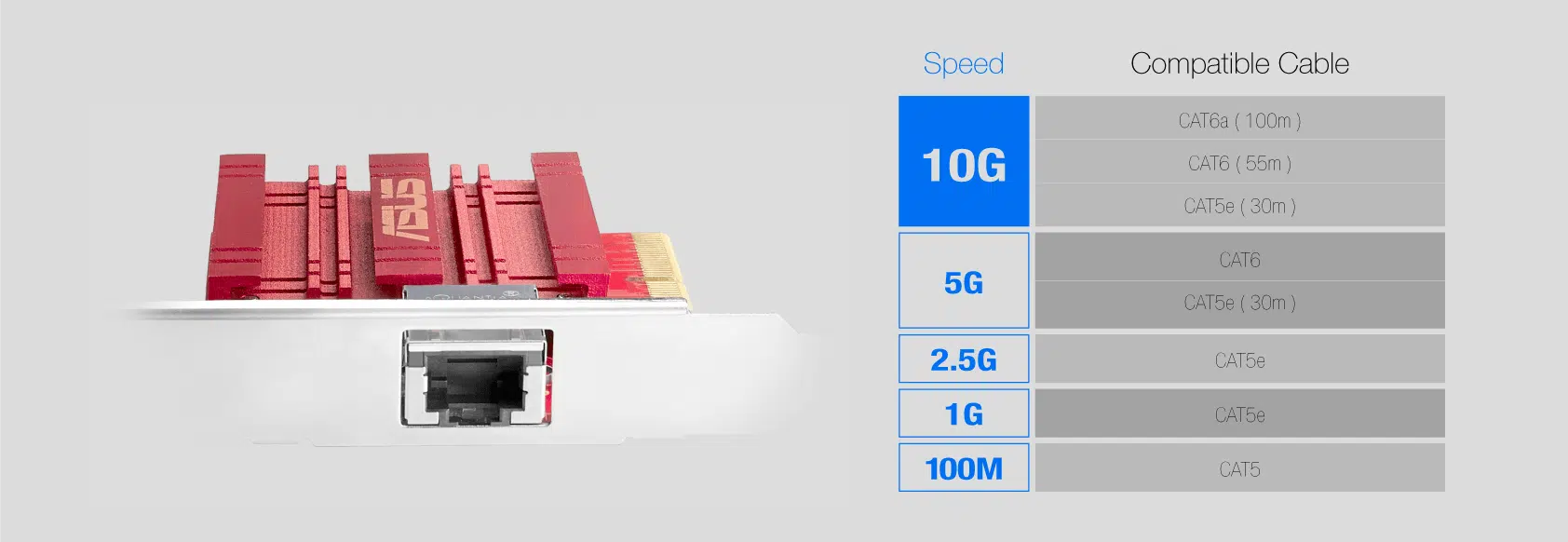
A look at its cable compatibility:
ASUS on some of the network adapter’s key features:
XG-C100C uses next-generation 10GBase-T (10G) networking technology to deliver speeds of up to 10Gbps –10X faster than standard gigabit Ethernet. It enables ultra-fast 10Gbps network access for desktop PCs, so you can easily handle the most data-intensive tasks in your office or at home.
XG-C100C supports 10/5/2.5/1Gbps and 100Mbps networking standards. It’s designed to provide you with the latest technology, while ensuring full backward compatibility with your existing network infrastructure. Full compatibility with Windows 10 and Linux Kernel allows flexible OS integration.
Discussion (17 replies)
Join Discussion →Now someone get me an 16 port 10gbe switch for a reasonable price!
Cheaper if you use fiber, which at any density, you should (or DACs). 10G over copper at any distance is expensive power wise.
Yup. I've been using 10gig fiber at home since 2014.
Switches where prohibitively expensive back then, so I just ran a direct link between the workstation and the NAS.
Used decommed 10g capable enterprise switches with at least a few SFP+ porta have been affordable for a LONG time now though.
I picked up an Aruba 48 port gigabit switch with four 10gig SFP+ ports for $125 on eBay back in early 2019.
More recently I've been using Mikeotik switches though. They are usually very affordable for what they can do. I have several that are 10G+ capable:
Also,
Putting a single 10gig interface on a 4x PCIe card seems like a waste of PCIe lanes.
A single PCIe Gen 4 lane should be able to fully support 10gig Ethernet bandwidth.
Heck, a single Gen3 lane could even support ~7880 Mbit/s, and depending on whats on the other end of that connection, you may never hit 7880 Mbit/s anyway.
Maxing out fast Ethernet standards can be harder than it seems.
I've only been able to max out 10gig relatively recently. When I first got a 10gig NIC back in ~2014 (used brocade BR-1020's), even in a direct connection between a high end server and desktop, I rarely saw more than 3000 to 4000 Mbit/s.
Still can't max out 40gig (though I do get well above 10gig bandwidth)
Those of us who know what we are doing could totally max out 10gig Ethernet, but for most people, running it on 1x Gen3 would likely be more than enough to both exceed multigig performance, and provide more than enough performance.
Yeah but new ones still are not cheap!
You bring up a good point.... I should look used. I usually never do but this.... yeah...
Depends on how many ports you need.
If you are ok with 24gigabit and two 10gig (SFP+) a Mikrotik CSS326-24G-2S+ is one hell of a bang for the buck. Mine cost me $129 a few years ago (pre-pandemic inflation). Now they appear to cost slightly more, but still not terribly so.
[URL unfurl="true"]https://mikrotik.com/product/CSS326-24G-2SplusRM[/URL]
The two 10gig ports were probably originally intended as uplink ports, but there is no reason you couldn't connect a workstation to one, and a NAS or other server to the other, and just use the rest of the ports for regular gigabit stuff.
They also sell the SCRS309-1G-8S+IN which has 8 10gig SFP+ ports for $269.
[URL unfurl="true"]https://mikrotik.com/product/crs309_1g_8s_in[/URL]
These SFP+ ports can also be populated with adapters that turn them into copper 100/1000/2500/5000/10000 ports, though if you get lots of those the price adds up quickly. They also tend to run a little hot, so you don't want to stack too many right next to each other.
There are also gigabit only adapters that are much cheaper and run pretty cool if all you need is another gigabit port.
I have mixed a few of these (some 10gig/multigig and some gigabit adapters) in the 24 SFP+ ports in my main switch with good rwsults. Most of the ports use SFP+ with fiber transceivers though.
If you want to do fiber and transceivers there are some really good deals on fs.com. Generally for home fiber use your want a 10GBase-SR transciever on each side, and an LC-LC fiber optic patch cable between them. It can be a little intimidating to dive into something new when we have been used to RJ45 for so long, but it really isn't that complicated.
Direct SFP+ copper cables also exist. So called DAC cables. Fiber tends to perform a little better though for some strange reason I have never been able to explain. And with FS.com pricing, there is no reason not to use fiber.
The only downside with Mikrotik switches for small office and home use is that they have been pretty slow to adopt native multigig. There are a small number of models, but not a lot yet.
Most of their switches dual boot RouterOS and SwOS. Unless you are a masochist, you'll want to use the latter, as RouterOS while insanely powerful is also very clunky, unintuitive and feels like a perpetual beta. SwOS is slick and works well for everything but layer3 stuff, which you probably don't want to do too much of on these switches anyway, as the CPU's really aren't powered for it.
Some of the higher end models can also be a little on the loud side, but the fans can be swapped out and made much quieter.
@Zarathustra
But thanks for the nice write up and suggestions!
Sadly I work some where that the gear never lands in anyones home after its out of support.
Im an Infrastructure Guy by trade, so yeah Im fully aware of the combinations, as the stuff I work with is usally using 100/400Gbps connections currently.
Nice to meet someone else who actually has a good grasp on all this!
I have never looked at the Mikrotick stuff so Ill look.
What I need is 16-24 - 1/2.5/5 Gbps and 4-6 10Gbps.
The 10Gbps only needs one "long run" about 30 ft so copper would be great as I could use short DACS for most, but fiber is fine too.
Prefferably some POE on the low speed stuff and I would like it to be ubiquity as I have alot of thier stuff and the management is nice. But I may have to give up on that.
Needs to be rack mount as well (in my home theater rack).
Thanks again!
No worries.
I suspect with Mikrotik, the multigig requirement is going to be the challenge. They have a handful of products, but have been really slow at rolling out multigig at large scale for some reason.
You can make up for it to a certain extent with those SFP+ -> multigig+10gig adapters, but at $65 a pop Mikrotik branded ones (made in china knock-offs are much cheaper) it can add up quickly.
I used to use two switches in my rack. The Mikrotik CRS-317-1G-16S+ (16 10gig SFP+ ports) was the main switch, but since it is SFP+ only, I also stuck one of the cheap CSS326-24G-2S+ (24 gigabit copper ports, 2 10gig SFP+ ports) in there for everyhting that took gigabit, linking them together at 10gig using the "uplink" ports.
Gigabit adapters are much cheaper though, so if you only use multigig adapters for the devices that can use it, and stick with cheap gigabit adapters for everything else, the cost is more manageable.
That's what I do for my new main switch in my rack, the Mikrotik CRS-24S+2Q+ (24 10gig SFP+ ports, 2 40gig QSFP+ ports). I just pop adapters in those 24 SFP+ ports to hook up the gigabit and multigig devices I need in there.
In the main switch right now, the two 40gig ports are occupied (server and workstation, because lol, why not. I love fast access to my NAS). Six of the 24 SFP+ ports have 10gig fiber in them (10G-Base-SR) for the router, links to other switches, and to my secondary servers.
I have 6 gigabit adapters in the SFP+ ports for lightweight stuff. 2 of them are actually 100mbit devices. And then there are two 1/2.5/5/10Gig adapters.
This thing is still PCIe 3. Why couldn't they make it a PCIe 4x1, giving it the same bandwidth and make those x1 slots on the motherboards usable!
Likely the same ancient Aquantia chipset. Not sure why it's Rev. 3 for ASUS though.
I'm pretty late to the party, but for people who later stumble upon this post like I did:
It is both PCIe 3.0 x4 AND PCIe 4.0 x1, as was already the case with the V2 that I have.
The Acquantia AQC113CS chip switches to PCIe 4.0 x1 when it detects PCIe 4.0 capability.
The way I found out was a bit funny. The motherboard I had planned to use only had an open-ended PCIe 4.0 x1 slot outside the x16 one. If figured that the NIC being only PCIe 3.0, it would run at PCIe 3.0 x1 in that slot, which would allow for at most 7.88 Gbps. I don't like bottlenecks, so before I received all the parts for the PC, I proactively ordered a cheapo M.2 => PCIe 3.0 x4 riser from AliExpress. My case had an extra PCIe slot below the motherboard to accomodate XL-ATX ones, so the riser would not be bothered by my simple ATX motherboard.
When I finally assembled the PC and booted up, the NIC didn't show up in Windows. Since I had some experience with risers, I was like "could it be...". I wondered if the NIC and motherboard were trying to communicate in PCIe 4.0 and the PCIe 3.0 riser was objecting to that. I then simply put the card in the PCIe 4.0 x1 slot on the motherboard, and lo and behold, I could see under Windows, and it was reported as operating at PCIe 4.0 speeds, meaning full bandwidth for the 10 Gbps with just 1 lane. Yay :)
That's a good find!
That's awesome! Nice!
I'd love an affiliate link on this card.
Here you go, this ought to work.
ASUS XG-C100C V3 PCIe