
The AMD Ryzen 7 9800X3D is said to deliver substantially higher gaming performance than the Ryzen 7 7800X3D despite Ryzen 9000 Series CPUs only having shown a single-digit FPS increase vs. the Ryzen 7000 Series, and the reason for that is largely owed to the advances that AMD made with 3D V-Cache for the Zen 5 generation, according to a new set of benchmarks published today that show how the 9800X3D, 7800X3D, 9700X, and 7700X compare when running at 4.8 GHz alongside a memory clock speed of DDR5-5200. “While Zen 5 only increases the FPS by 9% compared to Zen 4 without X3D cache from the Ryzen 7 7700X to the Ryzen 7 9700X, the Ryzen 7 9800X3D is 15% faster compared to the Ryzen 7 7800X3D,” writes ComputerBase. The outlet’s benchmarks, which can be found below, also show the 7800X3D being 36% faster than the 7700X, but the 9800X3D being 43% faster than the 9700X.
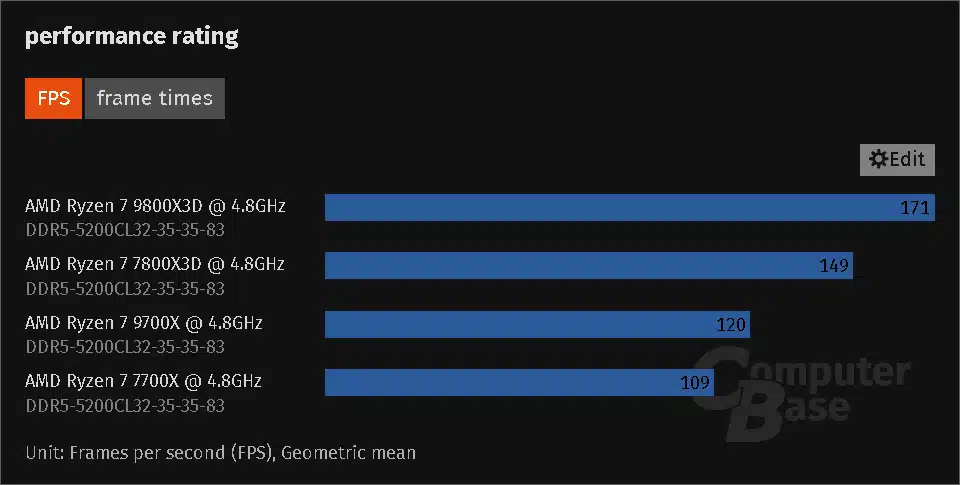
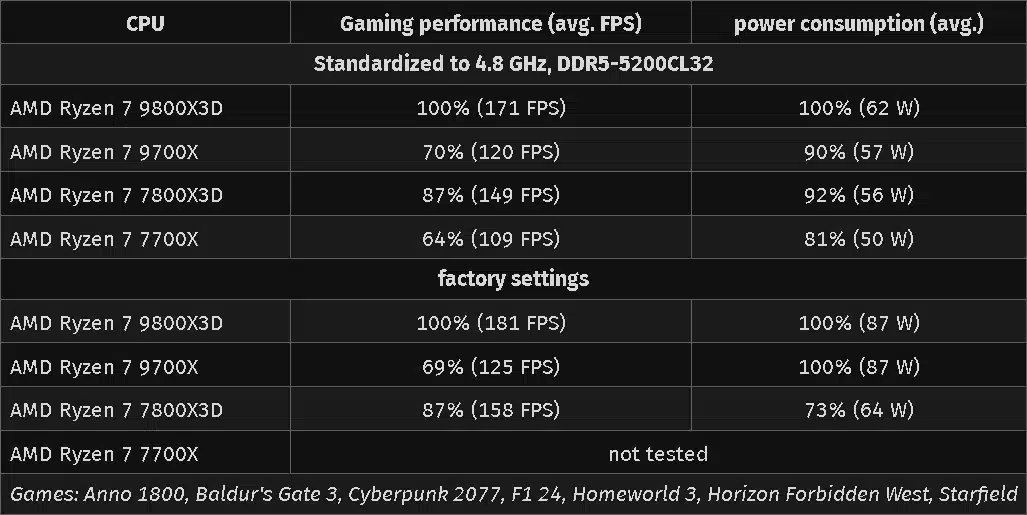
…the Ryzen 7 9800X3D and Ryzen 7 7800X3D are fifteen percent apart in the course reduced to seven games. The fact that it is not more may be due to the measurement inaccuracy of one or two percent, but in the end this also makes it clear once again: the new CPU wins in games over the old one because of the cache, not because of the higher (memory) clock.
Discussion (7 replies)
Join Discussion →I'm not fully read up on DDR5 yet, but isn't 5200MT/s a little slow?
I though Wendell over at Level1techs was talking about achieving 1:1:1 ratios with fabric at 2133 and DDR5-6400?
Or am I imagining this?
What I heard is that 6000 was the sweet spot for AMD atm
I realized I am damn near illiterate on DDR5 settings and AM5, so I did some googling.
I found this test at Techpowerup to be the most helpful.
So, definitions:
FCLK: The Clock speed of the Fabric that connects the chiplets on the package.
UCLK: The Clock speed of the Uncore or I/O die which notably includes the memory controller.
MCLK: The RAM clocks in Mhz (will be half of the MT/s figure because DDR)
Apparently previously (on AM4) AMD used to recommend running FCLK : UCLK : MCLK at 1:1:1, but with AM5, they now recommend just letting FCLK float at auto, and running UCLK and MCLK at 1:1.
UCLK is typically stable up to 3000Mhz but can get difficult to get stable above that. (which probably explains the DDR5-6000 recommendation) but there are gains to be had if you can get your UCLK stable above 3000.
According to that test, the following configurations seem to trade blows depending on workload/title:
DDR MT/s
MCLK
UCLK
FCLK
[/TR]
DDR5-6400
3200 Mhz
3200 Mhz (1:1)
2100 Mhz (Auto)
[/TR]
DDR5-7200
3600 Mhz
1800 Mhz (1:2)
2100 Mhz (Auto)
[/TR]
DDR5-8000
4000 Mhz
2000 Mhz (1:2)
2100 Mhz (Auto)
[/TR]
[/TABLE]
They did this test on a Ryzen 9-9950x
I clicked through like 20 pages of results, only to find that there was no clear winner between these three. They almost seemingly randomly traded blows near the top, though I think the DDR5-6400 one was closer to the top on the type of things I do more, but that may just be in my head.
So the question is what to do if you are buying into the platform and don't know if you will win the I/O Die silicon lottery and be able to hit a 3200 UCLK. I guess one could buy DDR5-6400 ram, and just clock it down to 6000 if the uncore can't be coaxed to do, but then you won't get help from EXPO (Apparently AMD's new alternative to XMP?) to hit the subtimings and have to go in there and tinker yourself.
Or do you just assume you'll never hit a UCLK of 3200, and just buy DDR5-6000 RAM and be happy with EXPO working and not having the headache of tinkering with all the memory subtimings....
Or one could just go for DDR5-8000, use a 1:2 divider between the MCLK and UCLK and thus a clean 2000Mhz on the UCLK, but may not fully take advantage of your floating auto setting on the FCLK if it goes above 2000 (which it did for the reviewer).
I hear many people say that DDR5-8000 loses some performance due tot he more relaxed timings, but I don't think that is the case. You can get DDR5-8000 with a CAS latency of 36 clock cycles, but since the clock is so much faster at 8000, that is equivalnet to 6400/8000*36=28.8 at DDR5-6400, which is actually lower than the lowest CAS latency DDR5-6400 sticks I can find anywhere. (lowest I can find is CAS=30).
I think any performance loss here is more likely due to a lack of full utilization of the FLCK, if it automatically goes to 2100, which it did for the reviewers system.
So maybe, just maybe, we should get some cheap garbage ram, test where the FCLK lands at auto, and then buy the lowest CAS latency RAM we can find at FCLK * 4 ?
(DDR5-8000 if FCLK=2000 or DDR5-8400 if FCLK=2100)?
That said, the lowest CAS latency I can find at DDR5-8400 is 40. That's equivalent to 30.47 at 6400, so a slight timing penalty there...
Who the hell knows.
There do seem to be several options for DDR5-8200 with a CL of 38. That lands you at a DDR5-64000 equivalency of 29.6. Maybe that splits the difference between all of them? I mean, that presumes you can get the RAM stable that fast to begin with. And it probably gets pretty hot if you run it there...
Timings seem to scale with clock speed up to ~DDR5-8200 judging by what I ca find for sale, above that, things look like they start to fall apart rather quickly on the timings side, so the DDR5-8400 idea may not be the best, at least not until better RAM comes out.
I mean, really, between any of these configurations the difference is +/- 1% or so in most tests, so it really doesn't amount to much anyway, unless one uses something slower than the three options above.
Biggest issues are IOD (memory controller) and motherboard lottery, as you note, and that this testing is not using an X3D part. Seeing where those stack up regardless of memory hotrodding on a 9950X kind of drives the point home, since 6000 C28/30/32 is stupid cheap.
The other part is that the CPUs just tend to not use the bandwidth provided. Perhaps there's some edge workloads where that's not the case, and perhaps those should be run on an enterprise (or at least HEDT) platform too.
I just bought a 64 gig 6000 kit with EXPO settings from G Skill for my upcomming build.
Yep, from what I've heard 6000 is the sweet spot but 6200-6400 might achieve that as well with the right timings. However, from 9800X3D to 9950 there are quite a few reviews out using 6000 for testing.
Is the source a bit slow? I mean....
No the cache is the same, there are process improvements and IPC improvements that allow the better performance especially when you compare clock to freaking clock.