
Gameplay Performance – Ray Tracing
Alan Wake 2
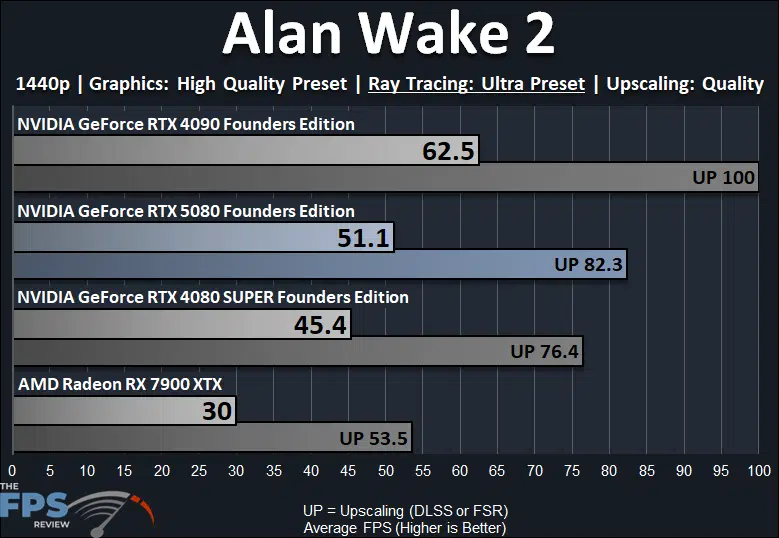
In Alan Wake 2 we dropped the resolution down to 1440p to enable the new “Ultra” Ray Tracing preset in Alan Wake 2. This new quality option is enabled in the new beta developer build provided access to by NVIDIA, which supports DLSS 4 and also a new higher “Ultra” RT option. Even at 1440p, though, the NVIDIA GeForce RTX 5080 FE isn’t exactly playable, some might find it playable, but you might still want to enable Upscaling to really get smooth gameplay. The NVIDIA GeForce RTX 5080 FE is only 13% faster than the GeForce RTX 4080 Super FE, however, with Ray Tracing. The uplift doesn’t seem as large as we would have expected, and you’ll see this replicated in other games as well. The NVIDIA GeForce RTX 5080 FE is 18% slower than the GeForce RTX 4090 FE.
Black Myth: Wukong
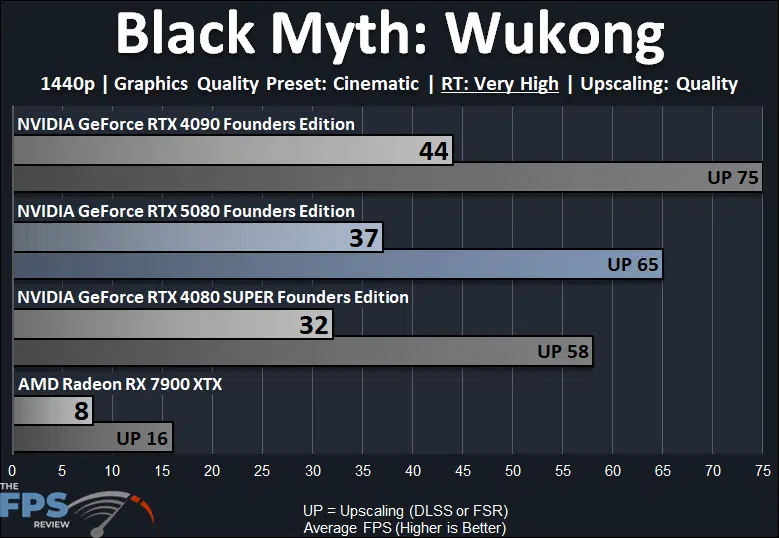
In Black Myth: Wukong we also dropped the resolution down to 1440p due to the Very High RT option in this game being very demanding. The NVIDIA GeForce RTX 5080 FE is not playable even at 1440p with Very High RT without Upscaling. You will need to enable Upscaling, which brings you just to 60FPS in this game at 1440p with Very High RT. The NVIDIA GeForce RTX 5080 FE is 16% faster than the GeForce RTX 4080 Super FE, but that only equates to a 5 FPS difference. This puts the NVIDIA GeForce RTX 5080 FE 16% slower than the GeForce RTX 4090 FE.
Cyberpunk 2077
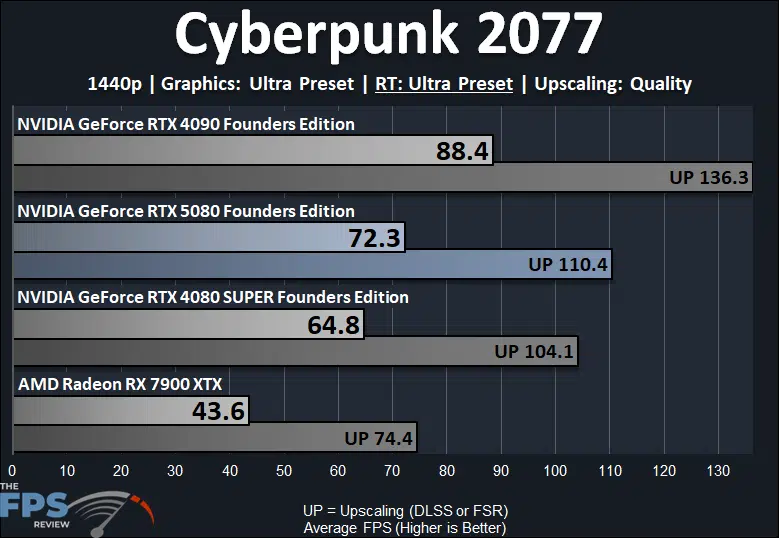
In Cyberpunk 2077 we also lowered the resolution to 1440p to enable the “Ultra” Ray Tracing preset, this is the regular RT, not Overdrive. The NVIDIA GeForce RTX 5080 FE does provide a playable experience without needing Upscaling at 1440p with RT, but enabling Upscaling certainly helps smooth out performance. The NVIDIA GeForce RTX 5080 FE is just 12% faster than the GeForce RTX 4080 Super FE, and that puts it 18% slower than the GeForce RTX 4090 FE.
Dying Light 2
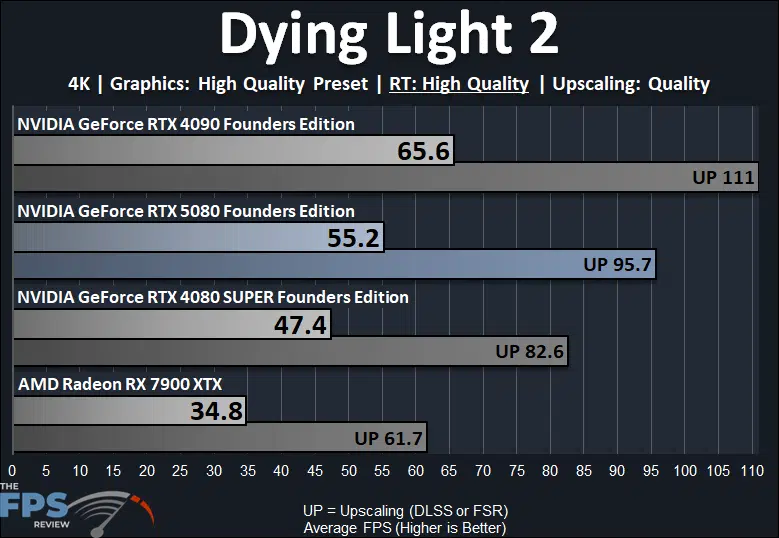
In Dying Light 2 the NVIDIA GeForce RTX 5080 FE doesn’t even get us to 60FPS at 4K with High Ray Tracing in this older game. You will need Upscaling at 4K to enjoy it. The NVIDIA GeForce RTX 5080 FE is 16% faster than the GeForce RTX 4080 Super FE and 16% slower than the GeForce RTX 4090 FE.
F1 24
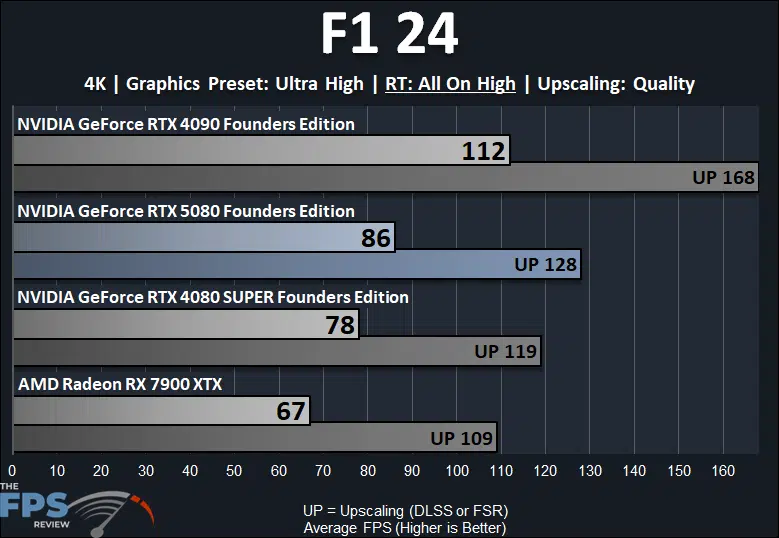
In F1 24 this game is playable at 4K with the highest quality RT on the NVIDIA GeForce RTX 5080 FE. The NVIDIA GeForce RTX 5080 FE is though only 10% faster than the GeForce RTX 4080 Super FE, which is disappointing to say the least. This puts the NVIDIA GeForce RTX 5080 FE 23% below the GeForce RTX 4090 FE.
Star Wars Outlaws
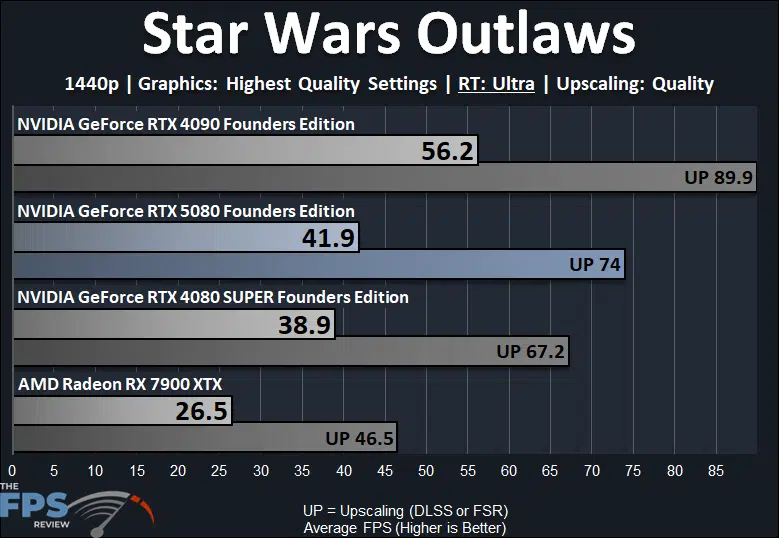
In Star Wars Outlaws, the NVIDIA GeForce RTX 5080 FE cannot provide a playable gameplay experience even at 1440p with the “Ultra” Ray Tracing option enabled, but neither could the RTX 4090 FE either. In order to achieve a playable experience with the NVIDIA GeForce RTX 5080 FE you will have to enable Quality DLSS at the very least, which will then give you performance above 70FPS average. To further the disappointment, the NVIDIA GeForce RTX 5080 FE is only 8% faster than the GeForce RTX 4080 Super FE at these settings, ouch. This puts the NVIDIA GeForce RTX 5080 FE 25% slower than the GeForce RTX 4090 FE.
Discussion (19 replies)
Join Discussion →Long story short get an RTX4080 while you can.
No surprise here, given the specs, I didn't expect the RTX 5080 to do any better.
The RTX5070Ti hopefully will be a much better option as it's supposed to be right behind the RTX4080.
I'm very disappointed, I can't remember the last time a next gen x80 card wouldn't beat or at least meet the next up tier.
I remember when I got my 1070 that it was supposed to be on par with the 980ti
Looks like 5080 is a dud. I hope people read reviews before buying them on ebay for hundreds more. Maybe holding on to the 4090 is a good idea. But, the 4090 just increased in resale value!
So why is the 5090 not anywhere twice as fast as the 5080? what's holding it back?
Honestly, I'd love to see some deep dive on if the 5090 is being constrained by CPU. I've seen some side mentions on a couple sources saying it seems that way but no deep dive.
Reminds me of the 1000 series to 2000 series jump, only without the DLSS carrot there to give you a reason to bite.
On a side note, I've seen a few posts claiming that the new transformer DLSS mode is much more improved quality than the old one. So much as DLSS balanced mode being indistinguishable from quality mode and even performance mode being much better than before.
That should be pretty easy to test with time available.
System 1: Ryzen 9700X Down clocked, or even just set to 65w
System 2: Ryzen 9800X3D pushed as high as you can go with clock
run both systems at 4k and see if there is any significant difference
I mean it's a BIT more than that. You might want to use Intel's monitoring tools to see how things are working and better project where there is a bottleneck between the platforms for differences.
That's an interesting idea, give me some ideas (examples) of what to test to accomplish this. I also think it is true that the 5090 is being held back by the CPU, I said as much in my review.
Thanks for that suggestion, as I said above, I personally think that is a great idea to test. Right now, something like that wont be soon, but I've got it written down in my potential reviews doc.
It would need to be basic. at 4k whatever refresh is the GPU at 100% while the CPU is running at max ghz high utilization across cores? That's how I would logically think a held back device would look.
But it would need to be a slim test.. like perhaps raster only... I'm not sure on that.
Jay has a video on how to use the intel tool to track and see if the CPU or GPU is throttling. *shrugs*. It seems kind of esoteric to me. All the info I've seen calling out CPU throttling has been at higher res where NORMALLY that would be at lower rests... so it's interesting.
[embedded media]
Presentmon is the tool that you can use... just a idea. Jays video has some info on how to use it but there are better tutorials online.
Gotta wonder if a cutdown GB202 die is on the table for a $1499 5080 Ti w/ 24 GB VRAM.
It appears the 5080 is a good overclocker. If that is consistent across a bunch of samples then it's a great candidate for water cooling to open up some possible additional headroom.
Good point. A lot of folks are complaining about how close this is to a 4080 SUPER but things could get really interesting when OC'd and liquid cooled since you don't have to worry about hitting a 600W power limit for the cable.