
Cyberpunk 2077
Cyberpunk 2077 was launched to PC in December of 2020 based on the REDengine 4. Cyberpunk 2077 is well known for its continual addition of advanced Ray Tracing and Path Tracing features, including DLSS 4, Ray Reconstruction, and Frame Generation. It also features a highly detailed geometric environment, advanced shadowing and lighting, and global illumination. We are utilizing the game’s built-in graphics presets for selecting graphics quality modes. We will be using the built-in benchmark, but utilizing Frameview to capture 1% Lows.
Native Resolution
The first graph below is at the “Ultra” quality preset, the second graph is at the “High” quality preset at 1080p.
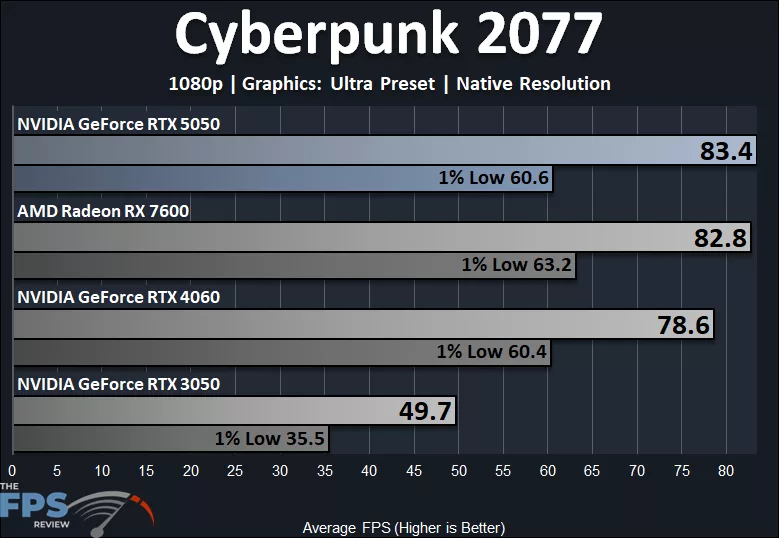
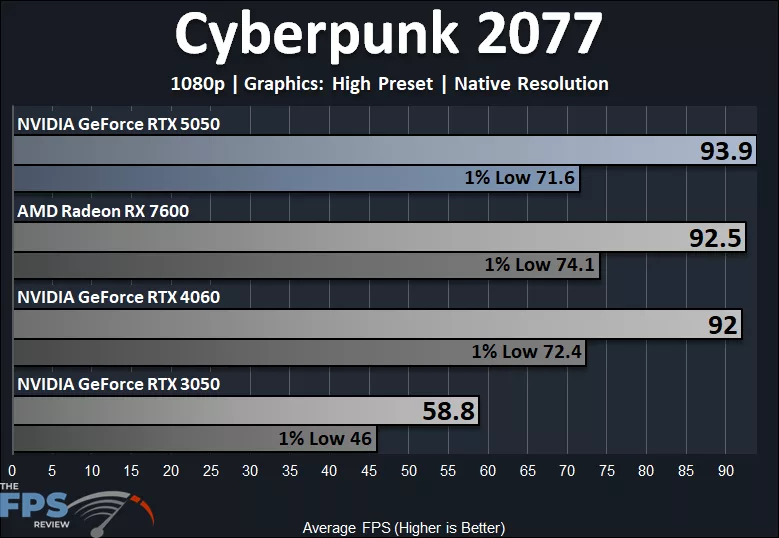
In Cyberpunk 2077, the GeForce RTX 5050 does quite well at 1080p and “Ultra” settings at Native Resolution, providing 83FPS average and 1% Lows at 60FPS. This is slightly faster than the AMD Radeon RX 7600, and 6% faster than the GeForce RTX 4060 and 68% faster than the GeForce RTX 3050. The 1% Lows of the Radeon RX 7600 are slightly higher.
At “High” quality settings, the GeForce RTX 5050 maintains 1% Lows above 70FPS, and averages in the 90% range. It is on par with the Radeon RX 7600 and GeForce RTX 4060 in performance, and 60% faster than the GeForce RTX 3050.
DLSS Upscaling
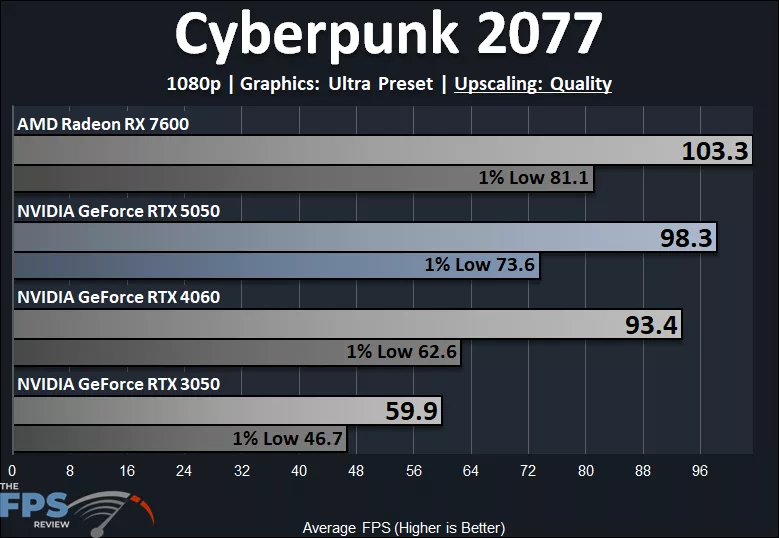
We don’t really need Upscaling in this game at 1080p, as it plays smooth at Native Resolution on Ultra, but here are the DLSS Upscaling results anyway. The GeForce RTX 5050 falls slightly down, but this is because we are using the higher quality DLSS 4 Transformer Model on the GeForce RTX 5050, while the Radeon RX 7600 is using an inferior image quality FSR 3. The GeForce RTX 5050 is 5% faster than the GeForce RTX 4060 and 64% faster than the GeForce RTX 3050 with both using DLSS 4 Transformer Model. The 1% Lows are above 70FPS on the GeForce RTX 5050.
Ray Tracing w/ DLSS Upscaling
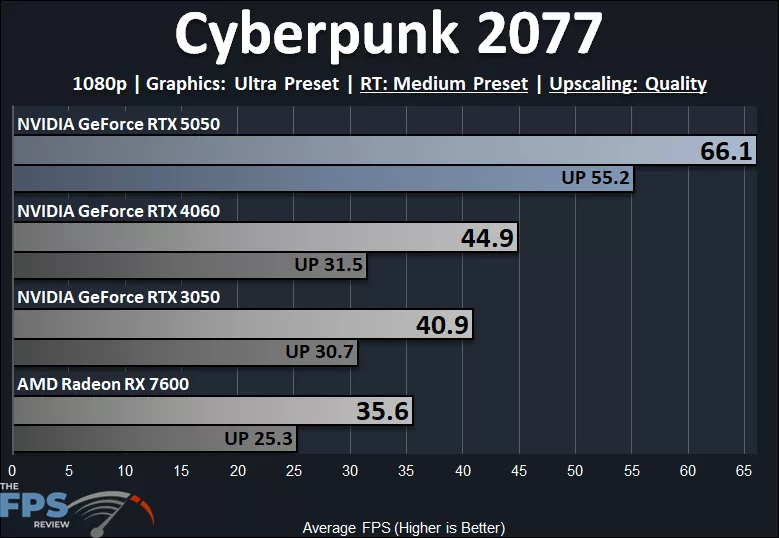
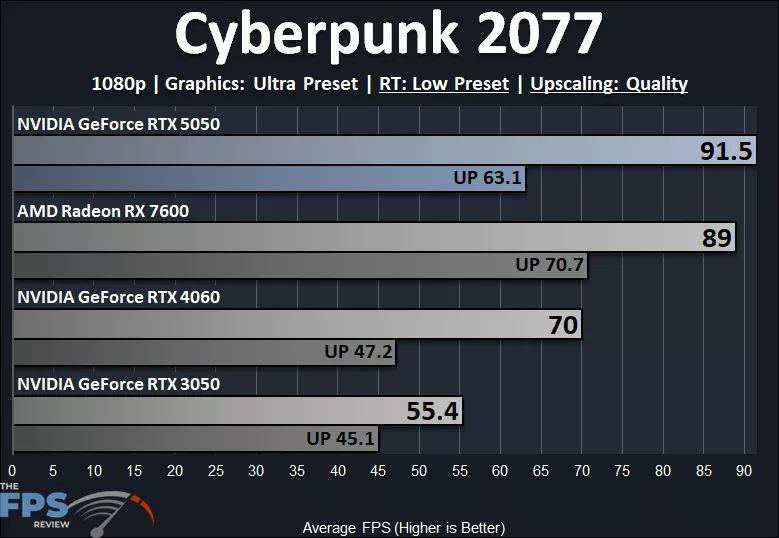
In Cyberpunk 2077, we can enable the normal Ray Tracing quality modes, so we have tried out both Medium and Low. At Medium, we see some interesting results. The GeForce RTX 5050 is actually able to provide a playable experience at “Medium” Ray Tracing with DLSS Upscaling Quality enabled, providing 66FPS average and playable 1% Lows at 55FPS. This shows a huge leg up over the GeForce RTX 3050 and GeForce RTX 4060, even. The GeForce RTX 5050 is 47% faster than the GeForce RTX 4060 and 62% faster than the GeForce RTX 3050, showing massive gains using RT compared to the RTX 4060 and RTX 3050. It is, of course, also 86% faster than the Radeon RX 7600.
At “Low” RT, the GeForce RTX 5050 remains the top performer here, beating the GeForce RTX 4060 by 31% and the GeForce RTX 3050 by 65%. The Radeon RX 7600 shoots forward because it isn’t using RT reflections on Low RT mode, so it does a lot better here, but the GeForce RTX 5050 still edges it out, except for the 1% Low,s which is interesting.
Discussion (4 replies)
Join Discussion →Buy a used 4060.
Seems like a particularly hard sell when the 50-series' biggest party trick is at its least useful when the base framerate is a little tenuous.
The 130w/8GB combo is also kind of harsh. That's high enough draw that going for the modern card on an efficiency basis (while it will help a bit) won't be as dramatic an effect as you might like; and if you hit a VRAM wall anywhere it will be in the same place you would on a 3050; and one of the 12GB 3060s will still be chugging along for 40 watts more.
OEMs love these low end SKUs.
- Yeah, this is basically a repurposed laptop chip that would otherwise be used to bump a $499 office laptop into the $799 "entry gaming laptop" market.
These cards absolutely have their place however, good way to stand up a hella basic gaming PC that will be thesus' shipped into something respectable over time.
If you know what you're doing though, used 3080's and 6800XT's are starting to hit the $299 and lower price point (while 3070 and 6700XT are at $250 and below) and you'd get a helluva lot more bang from your buck there.