
Cyberpunk 2077
Cyberpunk 2077 was launched to PC in December of 2020 based on the REDengine 4. Cyberpunk 2077 is well known for its continual addition of advanced Ray Tracing and Path Tracing features, including DLSS 4, Ray Reconstruction, and Frame Generation. It also features a highly detailed geometric environment, advanced shadowing and lighting, and global illumination. We are utilizing the game’s built-in graphics presets for selecting graphics quality modes. We will be using the built-in benchmark, but utilizing Frameview to capture 1% Lows.
Native Resolution
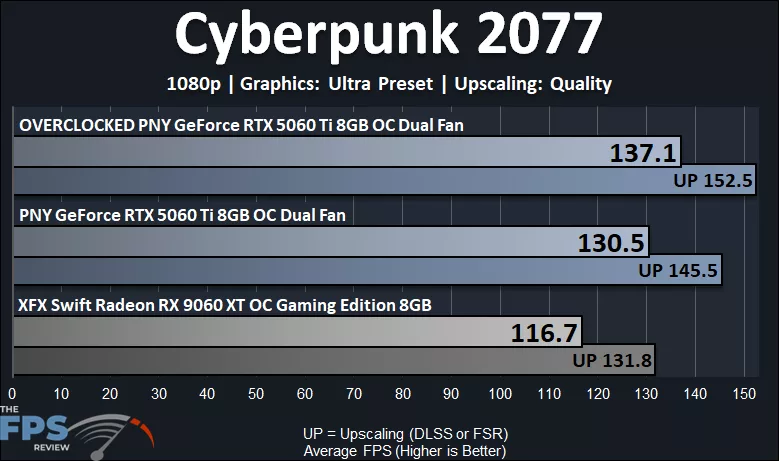
In Cyberpunk 2077, we are running at 1080p native resolution with “Ultra” settings enabled, which are the game’s highest settings without Ray Tracing. The PNY GeForce RTX 5060 Ti 8GB OC is easily able to handle this game at native resolution 1080p, highest in-game settings, with a smooth and playable 130FPS average FPS. The PNY GeForce RTX 5060 Ti 8GB OC ends up being 12% faster than the Radeon RX 9060 XT 8GB. Overclocking the PNY GeForce RTX 5060 Ti 8GB OC improves performance by 5%.
Ray Tracing w/ DLSS Upscaling
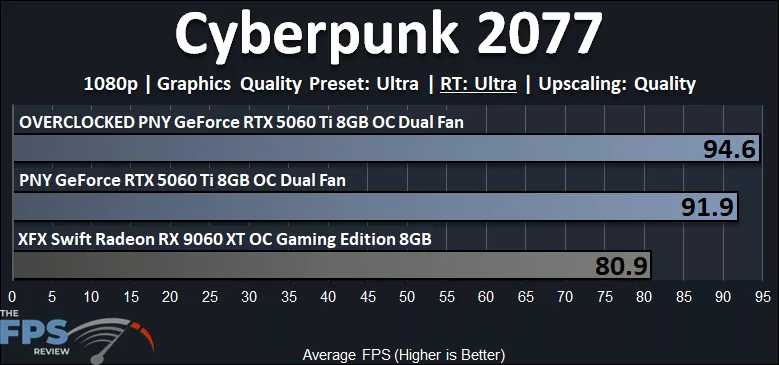
Of course, we can enable Ray Tracing in Cyberpunk 2077, and so here we have enabled the “Ultra” Ray Tracing setting at 1080p with DLSS Quality Upscaling enabled. The PNY GeForce RTX 5060 Ti 8GB OC can handle this easily, with 91FPS average, providing a smooth and playable gameplay experience. The PNY GeForce RTX 5060 Ti 8GB OC is 14% faster than the Radeon RX 9060 XT 8GB video card. This shows that Ray Tracing is playable on the PNY GeForce RTX 5060 Ti 8GB OC with DLSS Upscaling. Overclocking the PNY GeForce RTX 5060 Ti 8GB OC provides a 3% uplift.