
Test Setup
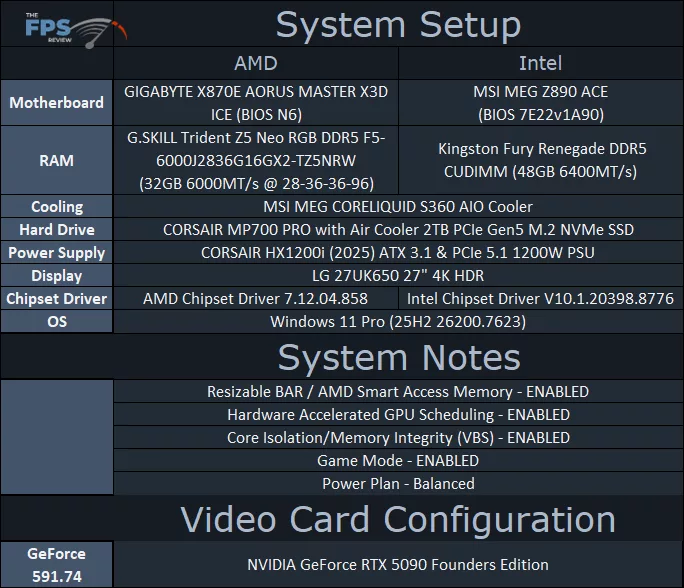
For our AM5 AMD platform, we are using a GIGABYTE X870E AORUS MASTER X3D ICE motherboard. We have installed a beta BIOS provided by AMD that gives recommended and validated performance for the Ryzen 7 9850X3D, and we are using this same BIOS on all AMD CPUs compared. This BIOS is based on AGESA ComboAM5 1.2.7.1. We are using 32GB of DDR5 @ 6000MT/s. For the chipset drivers, we have downloaded the latest version available on GIGABYTE’s website for this motherboard, which supersedes the version available on AMD.com’s driver page. The GIGABYTE version on the website is 7.12.04.858 dated January 15th 2026, which is newer than the version on AMD.com, which is version 7.11.26.2142.
On the Intel platform, we are using an MSI MEG Z890 ACE motherboard with BIOS 7E22v1A90 installed, which was released this month, January 2026. We are using Kingston Fury Renegade CUDIMM DDR5 48GB memory running at the CUDIMM speeds of 6400MT/s. We are using the latest Intel chipset drivers downloaded from Intel’s webpage, which superscedes the version on MSI’s webpage. The version we are using is V10.1.20398.8776. We also have all other Intel drivers from MSI’s webpage for this motherboard installed, this includes the Intel Dynamic Tuning Technology (Intel DTT) drivers version 9.0.11905.54373 installed, and the Intel Application Optimization app installed as well and enabled.
We are using a fresh install of Windows 11 Pro on both platforms, with the latest Windows Updates 25H2 26200.7623. We are using the default “Balanced” power profile in Windows Settings, and Core Isolation/Memory Integrity (VBS) is Enabled, which is the default Windows configuration.