Conclusion
It is an important time to look at the performance of 8GB video cards, with prices out of whack, and availability an issue, this may be an alternative many gamers have to make out of necessity. The 8GB variant of AMD’s Radeon RX 9060 XT is AMD’s most affordable RDNA 4 GPU in 2026, and availability will be better than the 16GB variant. It is at least the cheapest way to enter the RDNA 4 realm of performance and features, including AMD FSR 4.
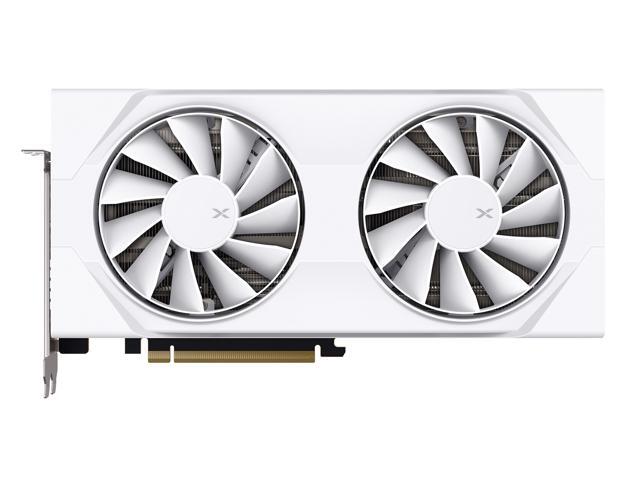
The XFX Swift Radeon RX 9060 XT OC Gaming Edition 8GB is an entry-level dual-fan video card from XFX in its Swift lineup. It features a no-frills, simplified layout but still offers a factory overclocked GPU with a higher TDP. It has a compact form, and we wanted to give it a thorough review in 13 games. For our review, we focused on the 1080p gameplay experience for these 8GB video cards. However, we still ran most games at the Ultra/Epic gameplay settings to see what is possible out of them at 1080p native resolution, as well as when Upscaling is enabled. We even tested Ray Tracing where we could. Our goal was to find out what the gameplay experience really was from the XFX Swift Radeon RX 9060 XT OC Gaming Edition 8GB at 1080p.
Performance
We found that many games were actually playable at 1080p native resolution on the highest game settings with the XFX Swift Radeon RX 9060 XT OC Gaming Edition 8GB. Others needed only to enable FSR Upscaling or lower the game quality settings a bit. In Alan Wake 2, we were able to play at a high 86FPS average at native 1080p resolution at High Quality. Battlefield 6 was playable at 1080p native resolution at 78FPS at the Overkill quality setting. Black Myth Wukong was graphically intense; we had to turn the quality down to High settings, but then we got 74FPS playable gameplay at native 1080p.
Call of Duty Black Ops 7 was more than playable at 1080p native resolution on Extreme at 130FPS average. Clair Obscur: Expedition 33 was graphically demanding; we would need to lower to Medium quality settings at 1080p native resolution for playable performance. However, you can also enable FSR Upscaling at Epic settings for smooth gameplay. Cyberpunk 2077 was more than playable at 1080p native resolution at Ultra at 103FPS average. Doom: The Dark Ages was playable at Ultra Nightmare settings at 1080p native at 81FPS average.
Dying Light: The Beast was riding the line on High Quality at 1080p native, but using FSR Upscaling was playable, and this game supports FSR 4 for better image quality. Horizon Forbidden West was playable at 89FPS average at 1080p native resolution. Indiana Jones was more than playable at 1080p at Medium with 112FPS average. Kingdom Come Deliverance II was playable at Ultra at 70FPS average at 1080p native. Mafia: The Old Country was graphically intense; you’ll probably want to use FSR 4 Upscaling for better performance at 1080p. The same is true for Stalker 2, FSR 4 Upscaling, or lower in-game settings.
In all scenarios where performance isn’t acceptable, FSR Upscaling fixed that at the highest game settings at 1080p. With FSR 4 being supported on Radeon RX 9060 XT, in the games, we can turn it on or force it enabled, you’ll at least not have the image quality too far ruined at 1080p. The other alternative is just lowering game settings to Medium settings, and then you’ll achieve very playable and smooth framerates at 1080p native resolution.
The one sticking point of the XFX Swift Radeon RX 9060 XT OC Gaming Edition 8GB is going to be the Ray Tracing performance. It still lags behind the NVIDIA equivalent quite a bit. The GeForce RTX 5060 Ti 8GB had a big leg up in many games due to the better Ray Tracing performance. In games where you could turn on optional Ray Tracing features, the XFX Swift Radeon RX 9060 XT OC Gaming Edition 8GB lagged behind. Ray Tracing also consumes more VRAM, and even at 1080p, 8GB is limiting.
That said, with FSR Upscaling enabled at 1080p, some Ray Tracing gameplay scenarios were playable. Call of Duty: Black Ops 7 was playable at 71FPS average with RT and Ray Regeneration. Cyberpunk 2077 was playable on Ultra Ray Tracing with FSR 4 Upscaling at 79FPS average. That’s about it, the cases where we could enable optional Ray Tracing were fewer and far in between with the XFX Swift Radeon RX 9060 XT OC Gaming Edition 8GB compared to the GeForce RTX 5060 Ti 8GB. In the games that have Ray Tracing built into the engine, the XFX Swift Radeon RX 9060 XT OC Gaming Edition 8GB suffered because of the Ray Tracing performance comparatively.
Overlocking, Power & Temp
The XFX Swift Radeon RX 9060 XT OC Gaming Edition 8GB allowed a 10% Power Limit increase. This improved the base TDP up from 180W up to 200W. The XFX Swift Radeon RX 9060 XT OC Gaming Edition 8GB already has a higher TDP than the reference Radeon RX 9060 XT 8GB of 150W. We found the XFX Swift Radeon RX 9060 XT OC Gaming Edition 8GB boosts quite high with its factory overclock out of the box to begin with. It boosted to 3100MHz while gaming at default, which is already very good for performance. The reference game clock is 2530MHz while the boost clock is 3130MHz. The XFX Swift Radeon RX 9060 XT OC Gaming Edition 8GB is factory overclocked to 2780MHz and 3320MHz.
Unfortunately, we could not get much higher than the default factory overclock as far as manual overclocks go. Though the TDP and power did increase to 200W, we only got about 80-100MHz more out of the GPU. This is just going to be down to Voltages, silicon lottery, and power. That small increase in clock speed, plus our memory overclock, only equated to about a 5% performance advantage from overclocking in games. The memory did overclock well, from 20Gbps up to 22Gbps, giving us the needed memory bandwidth.
The XFX Swift Radeon RX 9060 XT OC Gaming Edition 8GB does extremely well on the temperatures, though. The GPU on the XFX Swift Radeon RX 9060 XT OC Gaming Edition 8GB runs very cool, at default and overclocked, despite the higher power draw. The dual-fan cooler on the XFX Swift Radeon RX 9060 XT OC Gaming Edition 8GB works very well, and this video card will be perfect for a small, small form factor, or Mini-PC build, as it stays very very very cool and quiet while gaming.
Final Points
The XFX Swift Radeon RX 9060 XT OC Gaming Edition 8GB allows a playable gameplay experience in games at 1080p, native resolution, and high gameplay settings. The XFX Swift Radeon RX 9060 XT OC Gaming Edition 8GB is an excellent 1080p gaming video card. It offers AMD FSR 4 Upscaling for those tough-to-hit spots, but you can also lower game settings as needed. Though the overclock didn’t help much, the XFX Swift Radeon RX 9060 XT OC Gaming Edition 8GB already runs at a very high factory overclock in a very small, cool-running package with a low power demand.
In the current state of affairs with GPU pricing today, this video card offers entry into the RDNA 4 lineup, and will be a level that is at the ‘most affordable’ right now for gaming performance from the AMD Radeon RX 9060 XT side of things. We just wanted to at least provide for you expections of what to expect out of the experience at this price point in 2026 for the Radeon RX 9060 XT 8GB variant.