
Overclocking XFX Swift Radeon RX 9060 XT OC Gaming Edition 8GB
To overclock the XFX Swift Radeon RX 9060 XT OC Gaming Edition 8GB, we turned to AMD’s Adrenalin Software control panel under Performance and Tuning for Custom manual overclocking. All the functions were present, however we were not able to increase the Voltage Offset. The Power Limit was limited to an increase of just 10%.
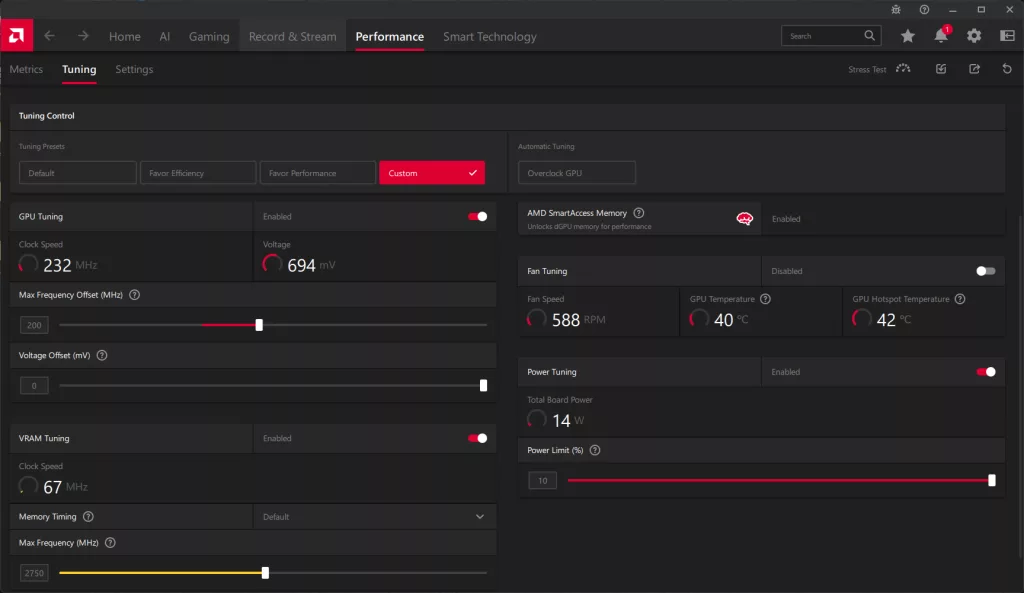
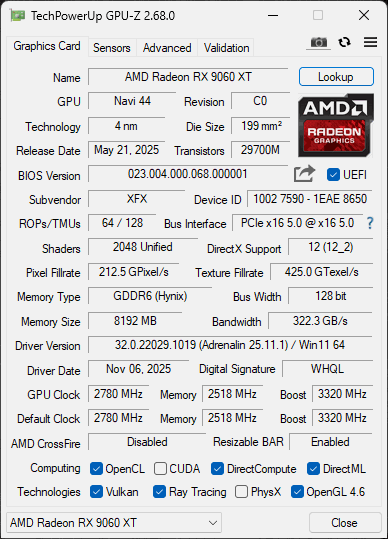
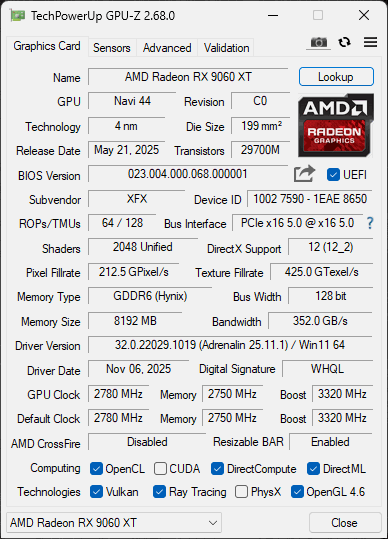
Above you will find the highest overclock. With the way overclocking works on AMD GPUs currently, though we set the Max Frequency Offset to +200MHz, the actual overclock varies, as this is an “Up To” value. This is a rather small overclock value, in the grand scheme, and with just 10% more power, we knew we wouldn’t be able to get much of an overclock. On the memory, we were able to overclock the memory from 20Gbps up to 22Gbps, an increase from 322GB/s of memory bandwidth up to 352GB/s of memory bandwidth, an increase of 9% more memory bandwidth. We did not need to set any custom fan speeds; the GPU remains very cool, and faster fan speeds were not needed or helpful.
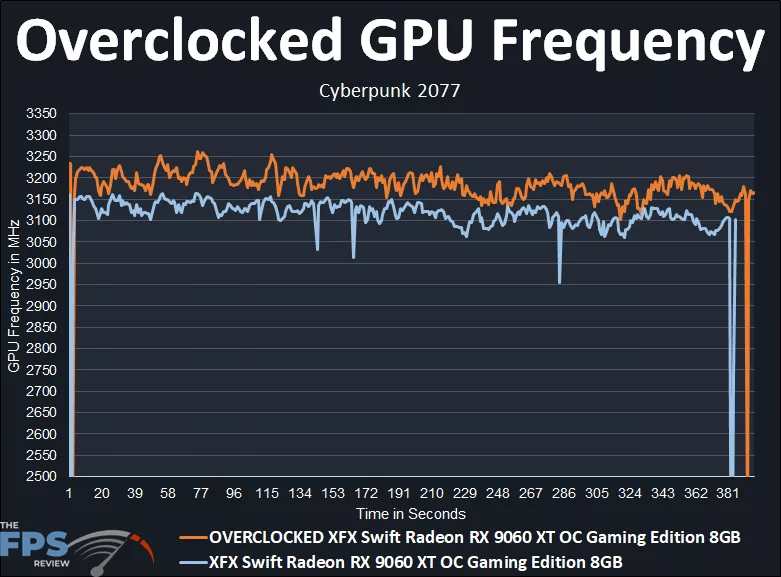
In the above graph, we can first see what the XFX Swift Radeon RX 9060 XT OC Gaming Edition 8GB runs at with the out-of-box OC frequencies. The XFX Swift Radeon RX 9060 XT OC Gaming Edition 8GB has a game clock set at 2780MHz and a boost clock set at 3320MHz. While gaming, the XFX Swift Radeon RX 9060 XT OC Gaming Edition 8GB actually runs between 3100MHz-3150MHz starting out, and settles between 3050MHz and 3100MHz. Therefore, it is hitting in between the Game Clock and the max Boost Clock. If we take the average of the clock speed, the exact average was: 3108MHz for the default clock speed.
When we overclocked the XFX Swift Radeon RX 9060 XT OC Gaming Edition 8GB and took it up to +200MHz on the GPU Offset, that did increase the clock speed slightly. It started out around 3150MHz up to 3250MHz, but then settled between 3150MHz and 3200MHz, certainly higher, but not a lot higher. Taking the exact average of the overclock, the overclocked clock speed is: 3181MHz. In that regard, the overclock we achieved was a small 2.3% GPU clock speed increase, or about 80MHz-100MHz at most over the default. We certainly saw a higher overclock from the memory bandwidth overclock.
Discussion (4 replies)
Join Discussion →In 2026, 8GB video cards will become more and more common as a need.
blox fruits
I wonder if we are entering a time of monitors going for better pictures but lower resolution and refresh rates for mass consumers.
I've been keeping an eye on 1440p stuff and from 2025 through 2026 there are quite a few examples of them getting more image quality related features. Basically catching up to what's been what's been happening with the 4K OLED stuff along with some other new features to boot. Sad part is that while 8 GB will suffice for many games at this resolution but there are certainly some AAA titles which will happily use 12 or 16 GB if the card has it to offer. However, there are some very cool 3rd and 4th gen 21:9 models out and on the way.
1080p panels has seen some improvements as well but I have noticed more effort has been put into to getting panels with insanely fast refresh rates which means as long as the system is overall fast, 8GB is perfect for those panels. It seems like the refresh rate angle is the larger focus for display manufacturers with the non-stop swath of 27" 1080p monitors.
The entire sentence could be deleted, and not be missed.