
Alan Wake 2
Alan Wake 2 was launched in October of 2023 and runs on the Northlight Engine. The game features high-quality assets, volumetric fog, animated foliage, advanced volumetric lighting, high-detail character models, and dense foliage. It also features full Ray Tracing and Path Tracing options that can be enabled with ray-traced reflections and shadows, along with DLSS Ray Reconstruction. It also supports RTX Mega Geometry, DLSS, and FSR Upscaling and Frame Generation. For our testing, we are going to use the in-game graphics preset options for the main quality option, as well as the Ray Tracing preset as needed. Our testing scenario is a manual run-through in the INITIATION 5 – ROOM 665 map.
Native Resolution
The graph below is at the “Ultra” quality preset at 1080p. We are comparing against a GeForce RTX 5060 Ti 8GB video card to match VRAM to VRAM capacity.
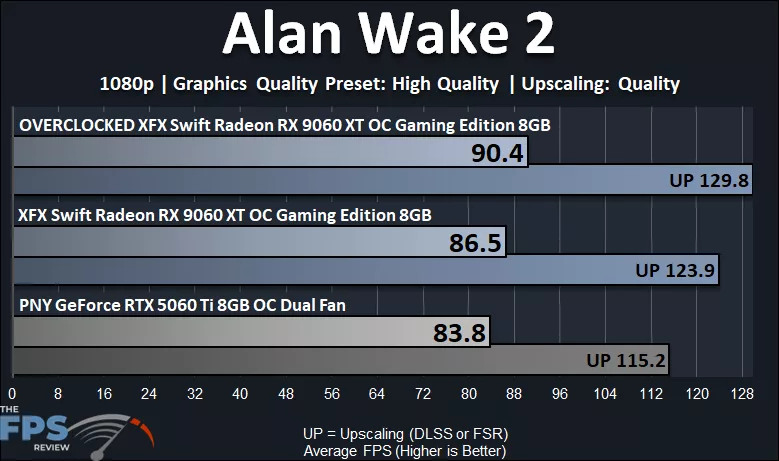
In Alan Wake 2, we are playing at 1080p on the graphics preset of “High Quality,” which is the game’s highest graphics setting. The XFX Swift Radeon RX 9060 XT OC Gaming Edition 8GB plays very well at 1080p in this game at the highest settings. The XFX Swift Radeon RX 9060 XT OC Gaming Edition 8GB allows 86FPS average FPS, so the game runs smoothly and with a high framerate. If we enable FSR Upscaling, that performance is boosted to 123FPS average, so well over 100FPS of performance. The XFX Swift Radeon RX 9060 XT OC Gaming Edition 8GB is 3% faster than the GeForce RTX 5060 Ti 8GB video card as well. Overclocking the XFX Swift Radeon RX 9060 XT OC Gaming Edition 8GB uplifts performance by 5%.
Ray Tracing w/ FSR Upscaling
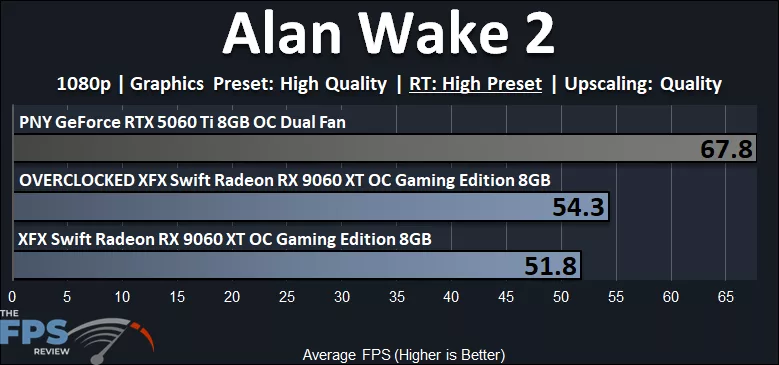
On the XFX Swift Radeon RX 9060 XT OC Gaming Edition 8GB, we can enable “High” preset Ray Tracing. We are running at 1080p with Quality FSR Upscaling, but the performance can’t quite reach 60FPS. Instead, we are at about 51 FPS. For this game, it is still playable, but definitely not the best experience on the XFX Swift Radeon RX 9060 XT OC Gaming Edition 8GB with Ray Tracing. The XFX Swift Radeon RX 9060 XT OC Gaming Edition 8GB is 24% slower than the GeForce RTX 5060 Ti 8GB, which takes the lead in Ray Tracing performance in this game. Overclocking the XFX Swift Radeon RX 9060 XT OC Gaming Edition 8GB improves performance by 5%.