
Rendering Performance
In all of our graphs to follow, the bars are arranged from the fastest MT/s speed down, so 8800MT/s is on top, with 6400MT/s on the bottom, and this arrangement is locked in independent of the performance shown; they are not arranged by result, but rather the DDR5 memory speed.
Cinebench 2026
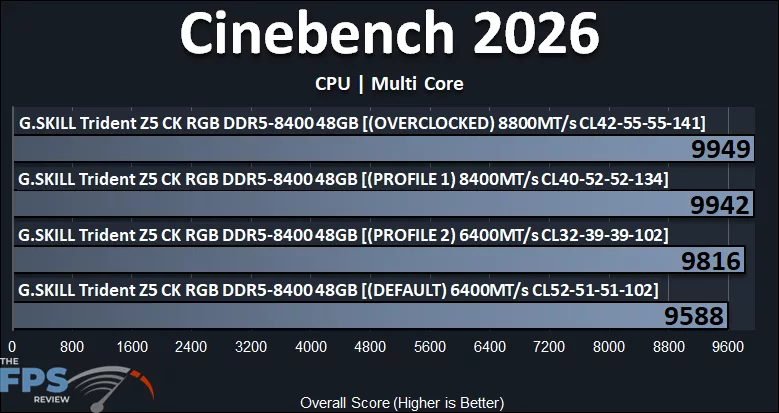
Cinebench 2026 shows that the memory performance can affect the rendering performance overall here. Moving up to XMP Profile 2 actually improves performance by 2.3%. Enabling XMP Profile 1 at 8400MT/s improves performance by 4% over the default. At 8800MT/s, performance is about the same.
Blender Benchmark
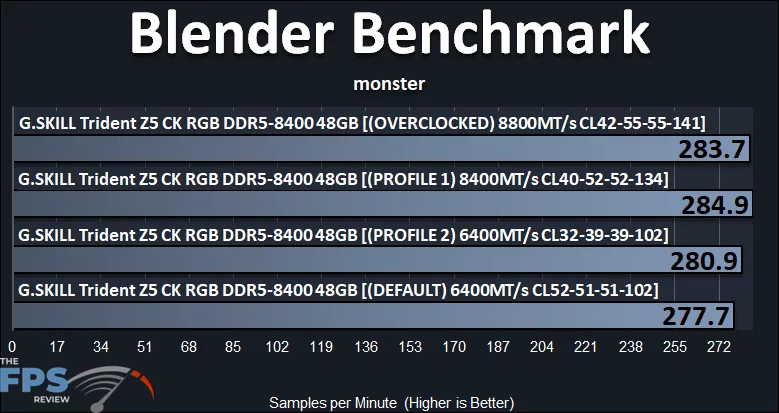
In the Blender Benchmark under the monster scene, moving up to XMP Profile 2 improves performance by 1%, while XMP Profile 1 improves performance by 3% over the default. 8800MT/s regresses slightly, but is still above default.
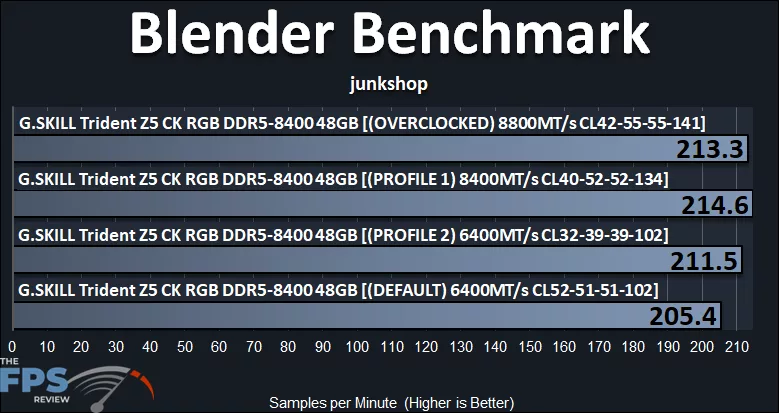
There seem to be larger differences in the junkshop scene, with the higher memory speeds being beneficial. Enabling XMP Profile 2 improves performance by 3% over the default, and XMP Profile 1 improves by 4%.
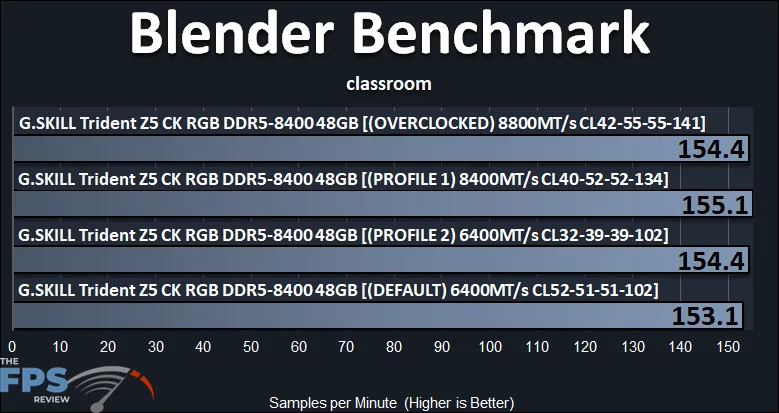
In the classroom scene, the results are smushed pretty close together. There’s an ever-so-slight difference in support of the higher memory XMP profiles, but it is very small.
V-Ray 6 Benchmark
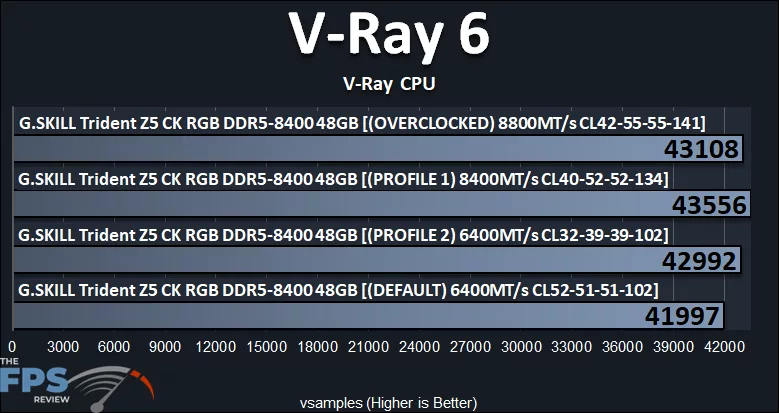
In the V-RAY 6 benchmark, there is a clear advantage with the higher memory profiles. Enabling XMP Profile 2 improves performance by 2% over the default. Enabling XMP Profile 1 improves performance by 4% over the default, and 8800MT/s slightly regresses.
HandBrake
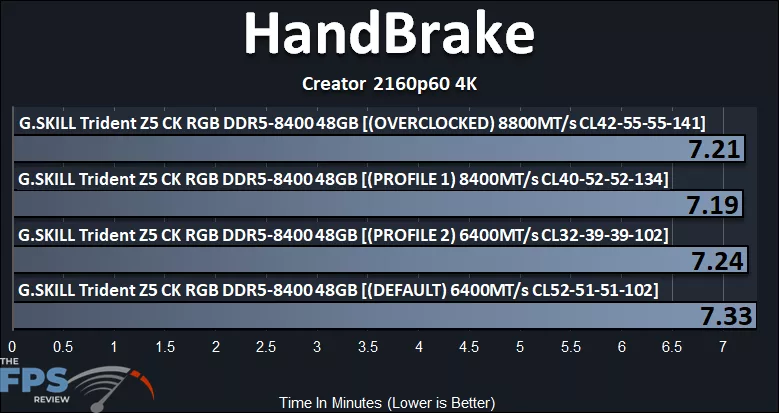
When transcoding video in HandBrake, the higher memory speeds make a definite difference in speeding up your video rendering. When we move to just XMP Profile 2 at 6400MT/s, the time reduces by almost .10 seconds. Moving up to XMP Profile 1 improves that even more and has the quickest render time at 7.19 minutes and seconds.
7-Zip
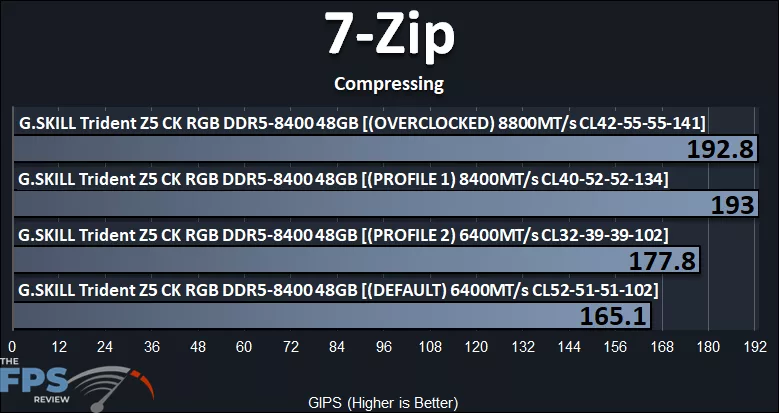
The higher memory profiles do wonders for 7-Zip compression performance. Even just simply utilizing XMP Profile 2 at 6400MT/s improves compression performance by 8%. However, when you enable XMP Profile 1 at 8400MT/s with CL40 timings, the best performance is achieved and is 17% faster than the default 6400MT/s performance.
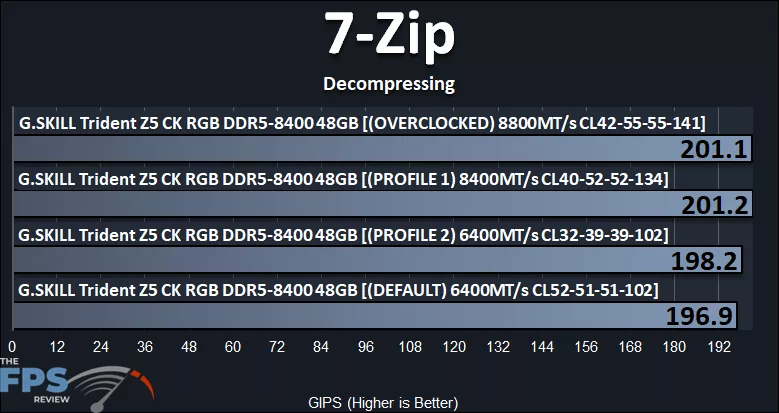
In decompressing, performance is only slightly affected. XMP Profile 1 is 2% faster than the default setting.
Discussion (3 replies)
Join Discussion →Price is ouch, but that's just the way things are now; the performance is wow. Not used to seeing so many gains in, well, everything, whether using tighter times at stock 6400 MT/s or the jump to 8400 MT/s. If I had a high-end Intel system and the money, these would be on my list.
Cool kit, seems similar to my Kingbank 48GB kit, but more expensive. Is this Hynix M die or something else?
These are my current settings.
I am am on AM5 of course, so I currently use my board's Hynix profile for 6000 MT/s with some tweaks. Thoughts?
Also how do I tell if these are CUDIMMs or not?