
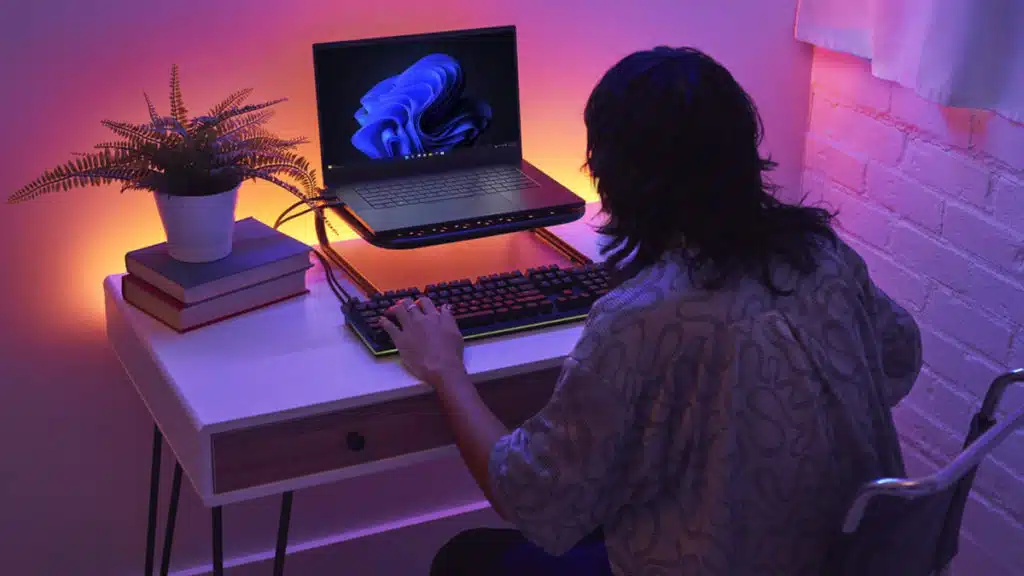
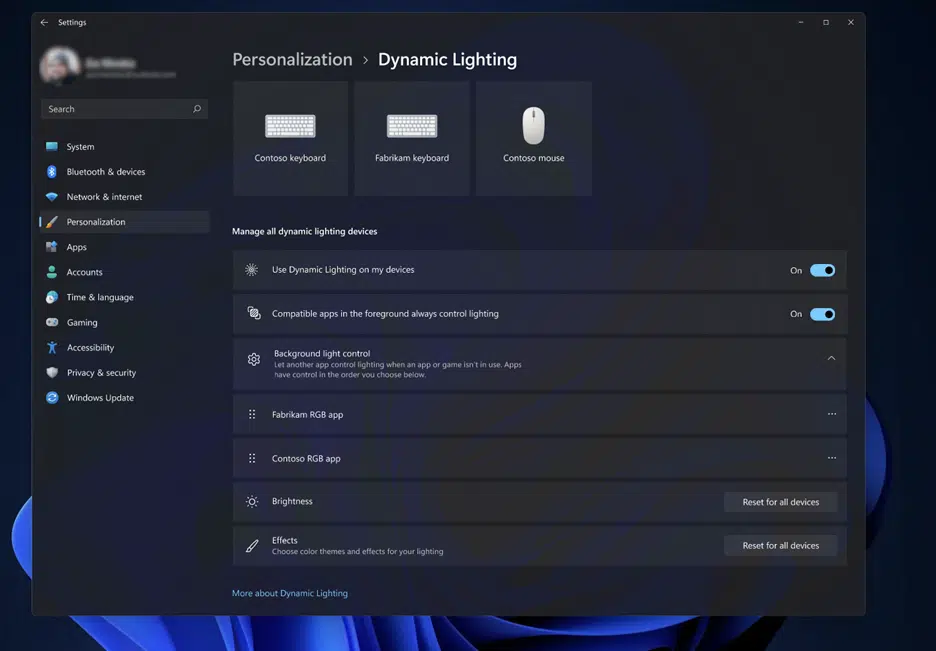
Microsoft has announced that Dynamic Lighting has arrived in Windows 11 as part of the operating system’s newest feature update, enabling users to control their RGB devices merely be visiting the Settings panel. The new feature, which can be found under the Personalization tab, allows any compatible devices, including LED-lit keyboards, mice, and case lighting, to be controlled either individually or as a group, according to a support page that Microsoft has set up with a screenshot that shows off all of its settings. A complete list of devices that are compatible with Windows 11’s new Dynamic Lighting feature can be found below.
Windows 11 Dynamic Lighting Settings
- Use Dynamic Lighting on my devices: Turns Dynamic Lighting On or Off. When Dynamic Lighting is off, devices should function with their default non-Dynamic Lighting behavior. Dynamic Lighting includes a built-in set of basic effects.
- Compatible apps in the foreground always control lighting: Turns the default Dynamic Lighting app behavior On or Off. When this feature is toggled off, a background app can control devices even when a foreground app that wants control is active.
- Background light control: This section lets you prioritize installed apps that have registered themselves as ambient background controllers. (For more info on ambient controllers, see: Dynamic Lighting – UWP applications | Microsoft Learn.) Dragging an app to the top of the list will prioritize it and ensure that it can control devices before other apps in the list. Ambient background settings are tied to a device and the port it’s connected on. If you unplug and then plug the device into a different (USB) port, it will appear as a different device.
- Brightness: This lets you set the LED brightness on your devices. Selecting Reset for all devices will reset the brightness to a default value.
- Effects: Selecting this will open a dropdown that lets you select colors and effects for your devices.
Windows 11 Dynamic Lighting Compatible Devices
Laptops
- MSI CreatorPro Z16
- MSI CreatorPro Z17
Keyboards
- Coming soon: ASUS ROG Scope II Wireless 96 Gaming Keyboard
- Coming soon: HyperX Alloy Origins Core
- Coming soon: HyperX Alloy Origins 60
Mice
- Coming soon: ASUS ROG Harpe Ace AimLab Edition Gaming Mouse
Windows 11 Dynamic Lighting Generally Compatible Devices
Keyboards
- Coming soon: All Logitech G Lightsync RGB devices
- Razer Turret Keyboard Xbox One Edition
- Razer DeathStalker V2 Pro
- Razer DeathStalker V2 Pro TKL
- Razer Ornata V2
- Razer Ornata V3
- Razer Ornata V3 TKL
- Razer Huntsman Tournament Edition
- Razer Huntsman Mini
- Razer Huntsman V2 Analog
- Razer Huntsman V2 Tenkeyless
- Razer Huntsman V2
- Razer Huntsman Mini Analog
- Razer DeathStalker V2
- Razer BlackWidow V4 Pro
- Razer BlackWidow V3 Tenkeyless
Mice
- Coming soon: All Logitech G Lightsync RGB devices
- Microsoft Pro IntelliMouse
- Razer Turret Mouse Xbox One
- Razer Naga Left Handed
- Razer Naga Pro
Windows 11 Dynamic Lighting Troubleshooting
- My updates are always a frame behind
- This is likely a desynchronization issue between the LampArray device (ex. At 30Hz) and the app (ex. Also at 30Hz).
- The color I set is (slightly) different on different devices
- Colors can vary slightly on devices from different manufacturers. This is somewhat expected.
- This also applies to Brightness.
Dynamic Lighting on Windows 11 enables users to control their RGB devices right in Windows Settings. They can use it to extend their Windows accent color onto the devices around them, synchronize RGB effects across devices from different brands and exercise finer control over how their apps control their device’s lights.
Dynamic Lighting helps create cohesion across the RGB devices market and enables new and engaging experiences across applications that are enhanced by RGB lights. In collaboration with partners like Acer, ADATA/XPG, ASUS ROG, HP, HyperX, Lenovo, Logitech G, MSI, NZXT, Razer, SignalRGB, SteelSeries and Twinkly, we’re making RGB experiences more accessible and easier to use for everyone.
Discussion (9 replies)
Join Discussion →Well that's f*cking random, and most unexpected.
I remember reading that RGB control was coming soon.
And that would be nice if they did standardize the control. I don't really like RGB, but having to use half a dozen different software apps to tweak/shut it off/etc was annoying.
But..
That supported hardware list is anemic. I guess if you are a Razer guy, you are set. May as well just be a replacement for Razer controls.
Especially since a lot of those programs are sh1t.
I've been wondering about this for a good while: https://openrgb.org/
Works on both Linux and Windows, which is very much appreciated. I've downloaded the program but have yet to actually try it out.
I used to, but the more I used it the less I liked it, just trying to match everything up hardware/software wise is hard and expensive. I got rid of Asus Armoury Crate due to it being a resource hog, and since I'm not using a windowed case at the moment it really doesn't matter to me. It is nice to see an effort on trying to consolidate the controls though on Microsoft's part.
We got the taskbar icon reimplementation pretty quickly after being announced too; I'd just reloaded my 'main' desktop and had been using a third-party app to restore the Windows 10 taskbar, and it was nice not to have to do that again.
Trying my hand at avoiding some bloat this time as I'd managed to get the system into a state where it would not accept feature updates anymore.
For the RGB stuff - having basic a RGB interface in the OS for RGB controllers / peripherals so that at the very least a static color may be set, or RGB could be turned off, is an outright blessing. Hopefully the list of supported hardware grows; SignalRGB has been doing this more or less commercially for a while and OpenRGB has already been mentioned.
But having no standard (maybe Microsoft 'guides' the creation of a standard, or Wendel and Steve's "Open Pleb" initiative takes off?) is frustrating.
And that's before you get to the point of trying to make the colors match between devices. I have little hope for a color standard for RGB (as in, what color temperature is 'white'?), especially given how much of a crapshoot monitors are. But here's hopin'!
?
I think RGB can be nice but when it looks like clown vomit I'm out. I usually leave it on static white, dark blue, or off.
I wholeheartedly agree that unified control is needed and I do like the option of OS control. The only real problem I have with Windows controlling this is its ability to update and bork things but on the other hand, I've seen that happen with plenty of manufacturer software updates so that could be a wash or a lesson that this is far from reaching a conclusive solution.
The sad part is that I, and most of us here, are still going to need 3rd party software to control other aspects of our hardware such as overclocking and cooling, and provide some nice overlays that play well all games, so until Windows can do that, I'm not nearly as interested in it but at least its a step in the right direction. Meanwhile, I'll still be using MSI CC and AB to do all of the above so jumping back to Windows just for RGB is a no-go.
I get what you're saying - it's mostly that RGB has been pretty poorly implemented overall. The 5v 3-pin system that is most used now allows addressing individual LEDs, but cannot poll the bus to see how many LEDs there actually are, lol.
But to fix that they'd need to implement a third new LED connector / bus standard.
That's my thoughts as well. I usually dim it down also.
And way too many people just leave it on the default rainbow cycle sh1t. Makes me sick to my stomach to even look at it. I considered the rainbow cycle more like a "store demo" that is just showing the range of colors the product's LEDs are capable of, and isn't meant to be actually used by an end user. I always thought the purpose of RGB lighting was to allow you to choose a specific color you want to use, and be able to freely change it whenever you want, as opposed to getting say a blue LED fan where your only just is just that one blue, which can't even be turned off. And yeah, there's also lighting effects, which in some scenarios could be interesting, but overall no one I know bothers with that. They either set a static color or turn it off. There are some effects which are subtle, and those aren't too bad. I find the effects distracting through.
Same here. Even half brightness is usually way too much for me. I tend to put 'em at the lowest they can go, or near that.
EDIT: Actually I have one friend whose GPU and keyboard are stuck on the rainbow cycle because he refuses to install ASUS' or Corsair's sh1tty-@ss software just to change the colors or turn the lighting off. I don't know how we can live with that horrible light-show though. So I guess he would appreciate OS-level controls for that stuff. He's on Win10 though (as are everyone I know), so whatever Microsoft is cooking up will be of no help to him.