
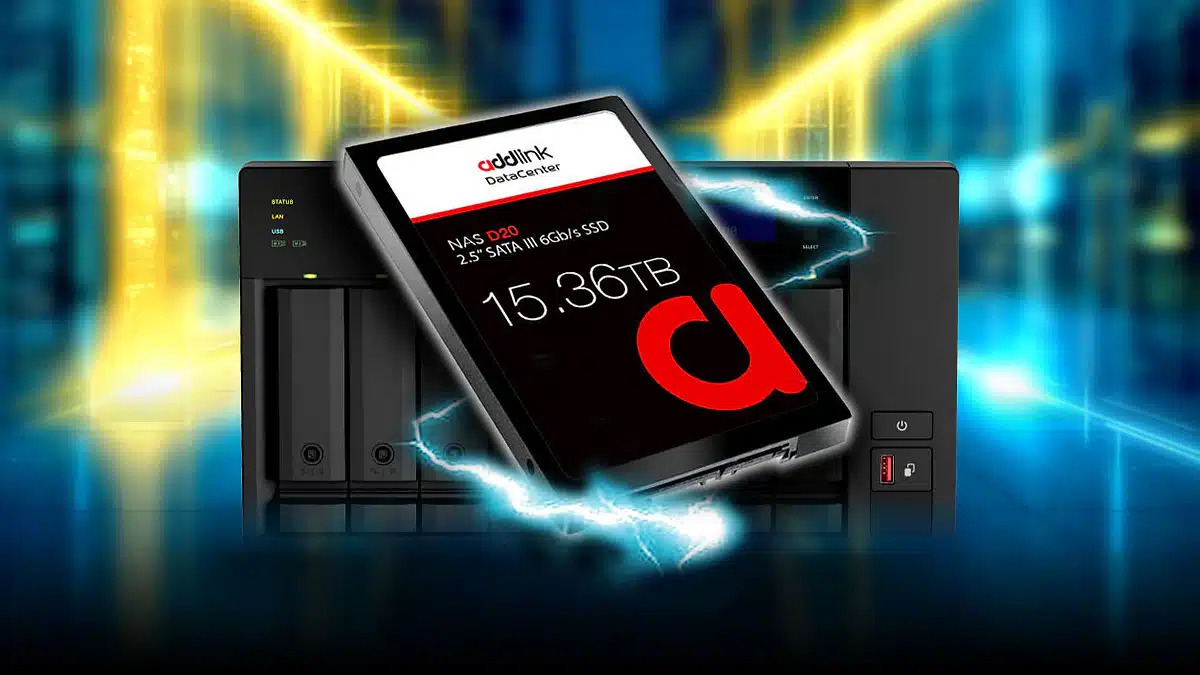
The NAS D60 and NAS D20, two new SSDs that are designed specifically for use with NAS storage systems, are now available for purchase through Amazon, including addlink’s network of authorized distributors and resellers, the company has announced. The former is a Gen 4×4 M.2 SSD, while the latter is a SATA III SSD that comes in capacities ranging from 960 GB to what’s been described as a massive 15.36 TB.
Product links:
Key features include:
- NAS D60 (Gen 4×4 M.2 SSD)
- Speed up to 6000MB/s, Consistent Operation for Intensive Workloads: Unlike typical consumer SSDs, the addlink NAS D60 comes with sustained sequential reads of up to 6000 MB/s and random read/write speeds of up to 800K/60K IOPS. The D60 ensures your network storage operates at peak efficiency, providing faster response times and boosting business productivity.
- 1 DWPD and up to 3800TBW for High Endurance: Designed to endure with 1 DWPD and up to 3800TBW, the D60 can handle continuous 24/7 operations without compromising performance, making it ideal for heavy-duty applications.
- Power Loss Data Protection: The D60 features specialized circuitry for power loss protection, preventing data corruption during unexpected outages by storing data in the DRAM cache.
- NAS D20 (SATA III SSD)
- Consistent and High-Efficiency for Intensive Workloads: The NAS D20 stands out with sustained sequential reads of up to 530MB/s and random read/write speeds of up to 98K/40K IOPS. It ensures optimal network storage performance, delivering faster response times and improving the success rate of business workloads.
- Power Loss Protection for Data Integrity: Equipped with power loss protection (PLP) circuitry, the NAS D20 prevents data corruption during outages by storing data in the DRAM cache. This ensures data integrity during power failures, making it a reliable choice for secure storage.
- High-Capacity Options: Available in 960GB, 1.92TB, 3.84TB, 7.68TB, and a massive 15.36TB, the NAS D20 caters to diverse storage needs, offering ample space for all your data.
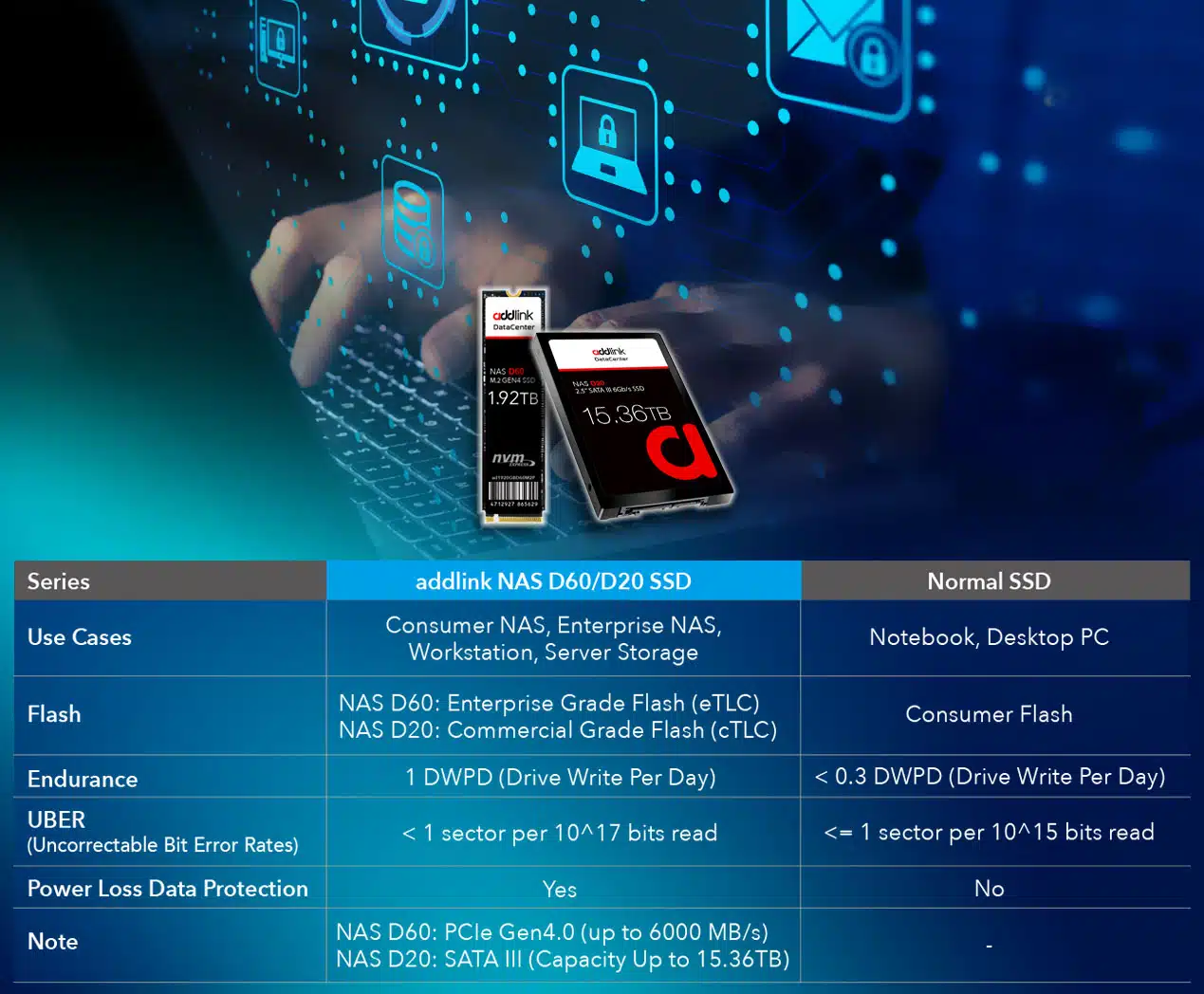
A comparison versus traditional SSDs:
addlink on its latest SSDs:
addlink’s NAS D60 and D20 SSDs exemplify the company’s dedication to innovation and quality. These products are meticulously designed to meet the rigorous demands of modern NAS users, providing reliable, high-performance storage solutions that enhance productivity and data management. Whether for home use or enterprise-level applications, the NAS D60 and D20 offer unmatched performance, endurance, and value.
Discussion (6 replies)
Join Discussion →Wow.
Those D20's are almost as large as my Seagate Enterprise Exos x18 16TB drives.
I'm guessing they are probably pretty expensive, but if they don't cost a huge amount more than a 16TB hard drive, I may consider going with something like this the next time I need a drive update.
My 12x Exos drives are starting to hit the 22k hour mark at this point, but they aren't showing any sign of degrading. I'll probably keep them until either that changes or I start running out of space (but that might be a while, I went a little overboard last upgrade)
 USED  AVAIL  REFER  MOUNTPOINT
57.7T  58.4T  13.6M  /data
Usually it is time for an upgrade when I get to the 80% full mark, which means I have ~35.2TB left to go.
Yeah, it's going to be a while.
You'll notice that my available space is a good deal less than the 192TB total drive space. Some of this is due to 4 drives total worth of space being used for redundant checksums (which brings me down to 128TB total). Some of the remainder is due to ZFS space allocation efficiency and overhead, but some of it is also due to the fact that I have snapshots going back to when I first set up ZFS back in 2014 in here, so lots of deleted files are taking up space still, just in case I need to go back and retrieve them :p
I have it set up so it snapshots (and sends to offsite backup) every night at 4am.
Daily snapshots are kept for 8 days before being automatically purged, one weekly snapshot is kept for 5 weeks before being purged. One monthly snapshot is kept for 13 months before being purged, and one annual snapshot is kept in perpetuity.
So, it may not take quite as long as it looks based on 35.2TB as some space will be used by snapshotting and storing deleted files, as well as redundancy, but still. It is going to be a while.
The interesting part about ZFS is that you can swap in larger drives and grow your pool, but you can never swap in smaller drives and shrink it, without recreating the whole thing, even if you have space available.
At first I thought this might be a problem for these 15.36TB SSD's vs 16TH hard drives, but then I remembered the TiB vs TB bullshit, and that my 16TB hard drives are actually only 14.55TiB (or as I like to call them real TB) so provided the 15.36 is not also expressed in 10-base, I technically could swap them in one by one and even get a small free space bump :p
All of that said, they are probably 10-base and thus useless to me until larger sizes come out.
Also, they are probably prohibitively expensive. (I can't find the price anywhere)
At some point large NAS flash storage will become cheaper than equivalent hard drives (or at least close enough in price to where the difference doesn't matter much) but I don't think that time is yet.
I just noticed that if you say NAS D20 out loud fast, it sounds like "Nasty 20".
I wonder if that was on purpose :p
Yet another post...
The D60 version is already up on Amazon and the 1.92TB drive is "only" $224.
That's actually not bad for a datacenter SSD product. If I had to replace the consumer NVMe drives I am currently using in my server these would probably be on my short list, but again, I would run into that size problem. I can go bigger, not smaller.
I currently have the following NVMe drives in there:
2x 500GB Samsung 980 Pro (2-way ZFS mirrored boot drives)
2x 1TB Samsung 980 Pro (2-Way ZFS mirrored VM data drives for drive images)
2x 1TB Inland Premium (2-Way ZFS mirror for DVR video recording as the hard drives occasionally stuttered during heavy record activity)
2x 4TB WD Black SN850x (striped ZFS read cache (L2Arc) drives for the main hard drive pool)
3x 2TB Inland Premium (3-way ZFS mirror of "special" vdev drives for metadata and small files from the main hard drive pool)
2x 256GB Inland Premium (2-way MDADM mirror dedicated to swap space)
1x 256GB Inland Premium (standalone drive for live TV video ring buffer.)
2x 280GB Intel Optane 900p (2 way ZFS mirror of SLOG/ZIL, ZFS intent log drive that help speed up sync writes to all the ZFS pools)
Should they wind up needing it, at least some of them could be replaced by these D60 drives should they start failing in order to have real enterprise drives instead of consumer drives, but some of them are too large...
Also, modern TLC drives are quite impressive on their write endurance.
Those two 4TB WD Black drives have been hammered as cache drives, being low key written to nearly constantly, whenever the RAM cache needs to purge something to make room. I've written about 14.1TB to each drive since December (29th I think?). We are talking ~67GB per day average for over 200 days straight) and still the reported "Percent Used" in SMART has yet to move from 0%. :p
I lack decimal places and can't divide by zero, but if we assume the drives would hit 1% tomorrow, that is still a predicted life span of 21,700 days. In other words, almost 60 years. And these are TLC, not MLC or SLC.
And that's in this somewhat above average write scenario. I bet they would be predicted to last over 100 years in a typical client machine or "gaming computer".
So can we put the write endurance anxiety when it comes to SSD's to bed yet? Yes, it was real in the early days, but kind of a lot has happened since then.
I mean, in my kind of use, but on a storage server that is being hit HARD all the time by a large office, or as something like a heavy video editing scratch disk use on a workstation that edits videos every day, it might be worth keeping write endurance in mind, but for almost every other application there is no need for write endurance anxiety to be a thing anymore. (At least unless you have defective firmware)
So this amused me.
A couple of weeks ago I came across a 10-pack of old 16GB Optane M10 drives for $37 on ebay.
You know, back when Optane was originally launched in the consumer space intended to be used as cache devices on Intel systems.
They are new old stock, never been used.
The 950MB/s sequential reads and 180MB/s sequential writes aren't much to write home about today, but look at those low queue depth 4k random reads!
That's only like 3x faster than a Samsung 990 Pro...
Not bad for a $3.70 drive :p
Now, one might legitimately ask, what are you going to do with a 16GB drive?
Well, they are great for little appliance boot drives, like Kodi boxes, TrueNAS Core, pfSense / OPNSense, etc. etc.
It's great to have a few of these kicking around...
Raid 0 all 10 of those and you could even have a windows boot drive.
I’m using some old small SSDs for my truenas box, so I totally get the use case. I should go look and see if there are more of those available