
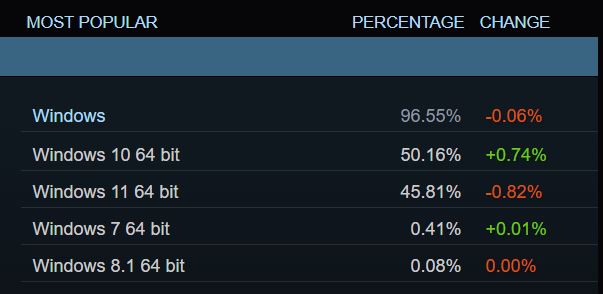
Sometimes you can’t keep a good OS down and according to the latest Steam survey, Windows 10 is still on top after nearly ten years. While Microsoft may have designed Windows 11 with gamers in mind the OS has enough issues to keep gamers from adopting it to the point that it has lost ground in the latest Steam survey. According to the July report Windows 11 usage dropped by 0.82% bringing its total down to 45.81% among Steam users.
However, surprisingly the aging Windows 10 OS saw an increase of 0.74% to reach a current total of 50.16%. It should be noted though that trends such as this are not unheard of as despite the current popularity of Windows 10, it too had an upward battle versus Windows 7. Hilariously it looks like there’s still at least one Steam user running Windows 8.1 (a slightly improved version of one of the most disliked Microsoft operating systems in the last decade).
Pros and Cons of Windows 11
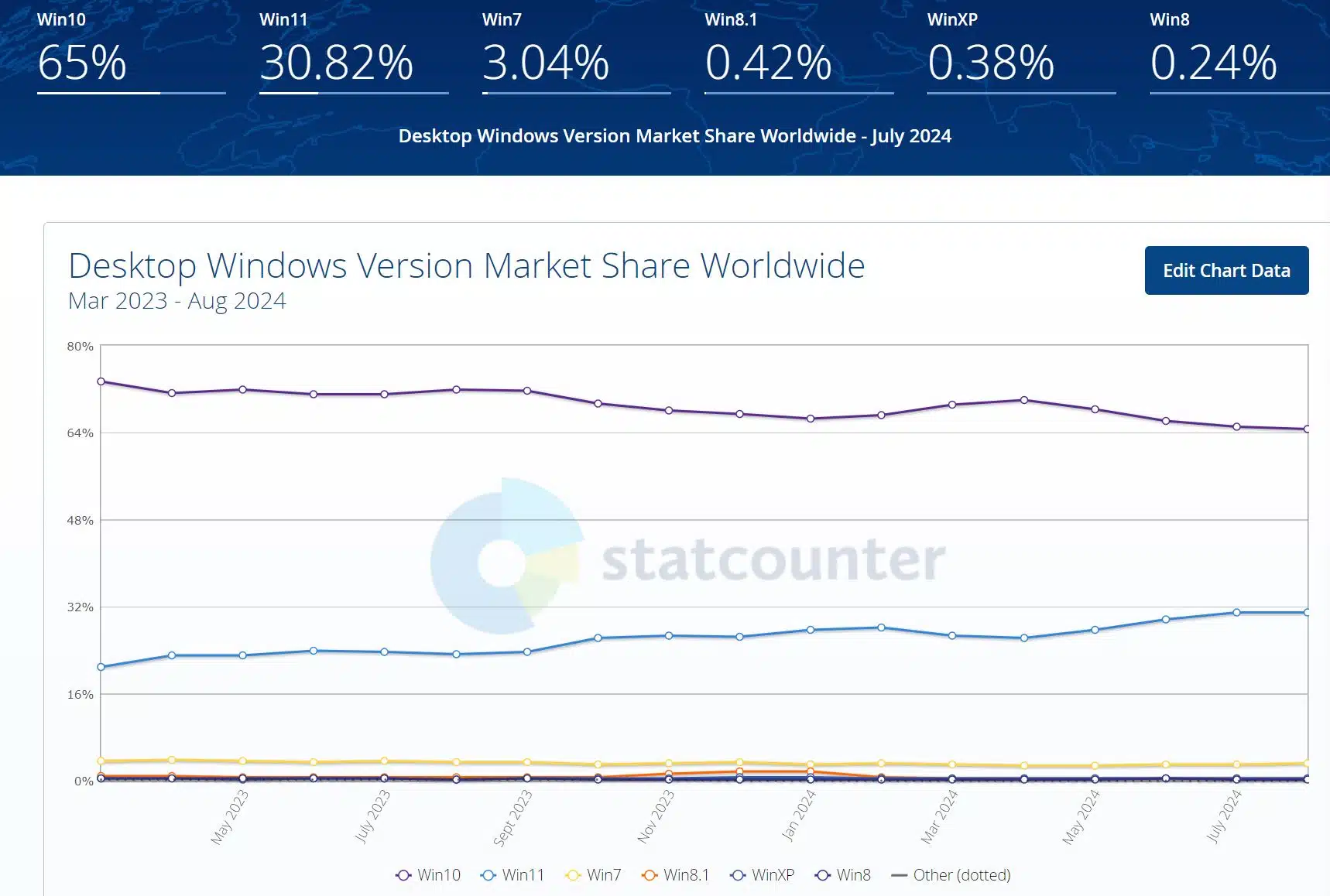
The news only gets worse for the almost four-year-old Windows 11 OS as according to StatCounter (via Notebookcheck), Windows 10 sits at 65% of the market share and its successor is trailing far behind at 30.82% but it does appear to be gaining ground. Microsoft has tried to entice PC users with the newer operating system by adding new features such as Auto HDR and DirectStorage but then there are caveats, as is somewhat normal for a newer OS, to using it. A big hurdle for owners of older PCs and laptops is its TPM 2.0 requirement, but then there can also be the occasional app or hardware compatibility issue. Deprecated OS apps can be a drawback for those who prefer a solution previously available. Lastly, another factor can be the ongoing “ads” that Microsoft seems to be adding to promote its services.
What about the rest?
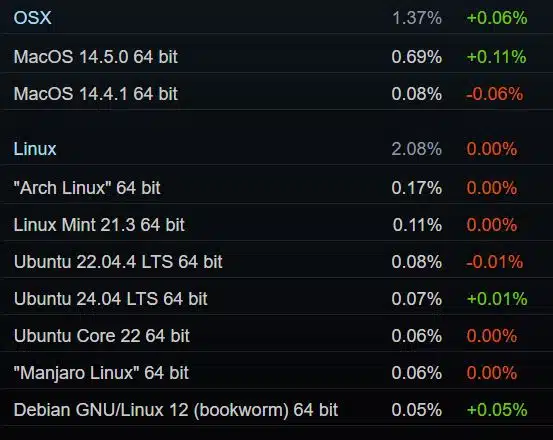
Of course, not all PC users, or Steam users for that matter, use a Microsoft operating system to game with. Linux comes in 2nd place at 2.08% among Steam users with Arch Linux being the distro of choice at 0.17% and then Mint 21.3 at 0.11%. Apple sits at 1.37% with MacOS 14.5.0 at 0.69% and then MacOS 14.4.1 at 0.08%.
Discussion (19 replies)
Join Discussion →Windows 10 is far from a good OS, it's just the lesser of two evils. The last good windows was 7, some say XP even.
I somewhat agree and loved 7 and XP as well but I've become accustomed to 10 mostly, just working as needed. My only grief with it these days is whenever I do a system reset on a machine is all the crap I have to tell "no" to during and after the reinstall. Other than that, it pretty much just does what I need it to.
I've got 11 on my laptop and my biggest complaint there is that there is more work in finding advanced audio/visual settings than there used to be and not really happy about that. Definitely some digging involved to find things that may have only took 2 or 3 clicks before.
Only other complaint for me with 10 really goes to how MS will jack it on occasion with a borked update or removing features to align with what its forcing on 11.
The problem with 10 is that it is not a dependable OS. Every time I install a new copy of 10 somehow there is more bloatware and adware than last time and some setting or option we used to have has disappeared or became even harder to access. They especially like to play 4d chess with the networking settings.
Not to mention my biggest gripe is that it is literally impossible to completely turn off auto-updates. I'm surprised there is not more outcry about this. You want to leave your system unattended to run a long process? Well, prey we won't reboot your computer before you have an opportunity to save your work.
Remember how 7 referred to the system it was running on as "your computer"? It also used language like "please don't turn off your computer"
Well, in 10 it is full mask off, it is no longer "your" computer but, "the" and no more "please" either, just straight up orders: "Don't turn off the computer" Which makes me want to turn it off just for the sake of it.
I don't think this is by accident, they want to normalize not owning a computer, and turning windows into a service.
Windows 3.11 for Workgroups 4LyFe
Totally agree on all.
Most pc users are not enthusiasts who care about that stuff, they just want something that works and keeps itself up to date.
MS does not want to rely on non tech savy users to kleep their machines maintained (aaah the memories of my colleagues at work double clicking on internet links like they would on desktop icons)
I made a gpo adjustment on the Pro edition a very long time ago and auto updates have stayed off....
I constantly forget about doing that. (y)
And that is perfectly fine, even windows 7 had automatic updates and reboots by default. So it would keep itself updated out of the box. The point is that you could change it to require user consent and never force a restart without it.
Clearly that is not the problem they were trying to solve since that was a non-issue to begin with. The "problem" they want to solve is tech savvy users daring to change the default behavior.
Yes, I found some gpedit that made updates opt in, but this is a lousy solution as well, because now I have to manually click on install updates even for updating the AV database in defender daily.
I just want the windows 7 solution back, where it would auto download updates, even install them, but wait for me to manually initiate a reboot if a reboot is required. This is not currently possible in 10, or 11.
Another huge difference is that in 7 you could reboot the computer without installing updates even if they were queued to install during next reboot. You simply had to use the power button to shutdown and it would skip updates. In 10 this is not possible either if updates are ready to be installed they will be installed no matter what, even if you are in a hurry.
Same.
It's part of the massive checklist I made for WIn10 post-install configuration, which is an ~20-page document in mostly 11pt font. I started that list not too long after Win10 came out, and I've been constantly updating it ever since.
When I go to reboot Win10 after it got updates, it gives me two choices: "restart" or "update and restart". Only the latter does what you described.
I really don't have a problem with Windows 11 or how it performs in general. I used to worry about work arounds for updates and such back in the XP days, but I decided to go with the flow long ago with no issues.
I admit I've put up some resistance to it but that was largely due to going from XP>Vista>7>8>8.1>10 in a relatively short span of years and I just got worn out after a bit. Granted, having been on 10 for almost 10 years now I should be over it but in the interim also had to deal OS changes for Android and iOS for my other devices and I'm really burned out with new OSes anymore but I am truly annoyed with the extra effort I have to put in on the laptop for advance audio/video settings. I haven't looked into it but I might see if I can make a shortcut or something to them so I can bypass the nonessential menus.
This basically is what I was trying to say myself. I just got tired of trying to do work arounds for things and with the speed they put out OS's now it just got tiresome.
Yeah - I used to be a control freak and wanted all my widgets and desktop options and everything else my way.
Now - I just want to get stuff done, and so long as the OS doesn't get in my way too badly, I don't really care what it does.
Unfortunately, Windows is about the worst for stepping on it's own dick.