
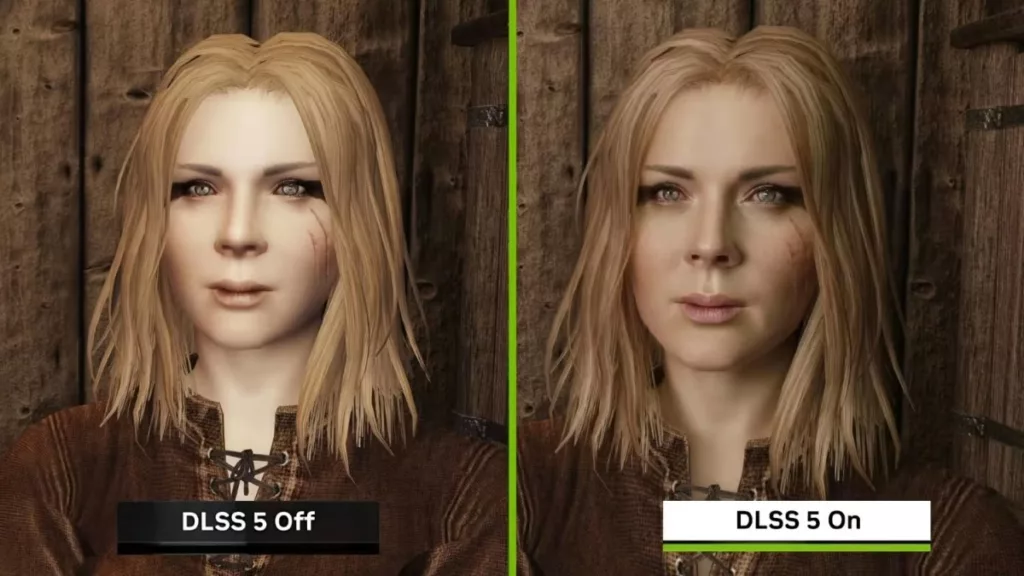
DLSS 5 Autopilot is a new app that allows users a huge amount of control in implementing NVIDIA’s neural rendering solution into games capable of supporting it. Available on GitHub, the app makes it relatively easy for users to install, configure, and use DLSS 5 in games. It can scan your library for compatible apps and games for which it can inject the necessary files needed to use DLSS 5, and will do so via several workpaths depending on what is needed for the app or title. New games will see the most benefit and are often supported by OptiScaler, which provides users with a slider to adjust the “work area” and thus increase performance and lower GPU power draw, but this is just the tip of the iceberg for what you can do with the app.
Per GitHub
- Eight routes, chosen per game. DirectX 9 through 12, Vulkan, OpenGL, 32-bit, emulators and RTX Remix mods each reach the neural network a different way. The tool reads the executable and the folder, offers every route the game allows, marks the one that fits your card, and leaves the choice yours.
- It tells you what happened. Play, then press did it work?: it reads ReShade’s log, the add-on’s, OptiScaler’s and Windows’ own crash record, and says whether the model ran – and when it did not, which part stopped and what to do next.
- Everything else the chain needs. The right
nvngx_dlssnr.dllfor your architecture, ReShade with add-on support, motion-vector shaders, DXVK for DirectX 9, a 64-bit helper for 32-bit games, frame generation where the card has it. - It reads what happened to everyone else. Results people choose to share are pooled into one list the tool reads before an install: once a game has five, you are told which route worked most often on it, and whether the one you picked did worse.
- It takes itself back out. Uninstall restores every file it replaced and removes only what it wrote.
- Nothing is bundled. Each component is fetched from its own publisher, at run time, at a version the tool resolves that day.
As this is a public release, it is still not a perfect solution, but it does make it easy for those who are used to tinkering with settings to try out DLSS 5. A single click is all it takes for the app to install the needed files to the game’s directory, and users can pull up overlays while in-game to make further adjustments. Now, knowing that DLSS can have dramatic performance hits and power draw, it’s probably a good idea to start minimally and gradually increase settings as desired while paying close attention to various metrics, the least of which should be power draw and temps. Users may also want to employ other measures to avoid potential hazards by undervolting or implementing power limits. There’s no guarantee with anything, but safe practices should be considered. DLSS Autopilot can be downloaded here. Another nice thing about Autopilot is that if you’re unsatisfied with DLSS 5, or it simply doesn’t work, one click removes it and restores the game’s original files.
Discussion (13 replies)
Join Discussion →I'll post more about my experiences with this later but I spent a good chunk of this weekend using it and wow, very impressed. There's a learning curve but not much more than using NV CP, MSI AB, or similar apps.
How was your power draw while using it. Did you find a good balance of visuals to performance?
Yep but took some dialing in. I've already been using MSI AB, and the NVIDIA app (in case AB gets ignored) to limit power to 70% but I've got a custom power curve in AB to undervolt as well. Using optiscaler I limited FPS to 70, sometimes 75, since I mostly play RPGs and are more interested in IQ than frames. I also, depending on the game used MFG x3 with a DLSS override to use the NVGX render, just to ensure the most recent dll was being used in case a game had an older one. Then I normally had the DLSS 5 slider set to between 70 - 100% depending on the game. DLSS was set to between Performance (transformer v2) and Quality (transformer v1)
All of this resulted in keeping my 5090s (one w/ 5800X3D and other 9800X3D) at between 250W - 400W! Mileage can vary greatly with the game, and I don't have screenshots since I was testing about a dozen games but I was most impressed with Blood of Dawnwalker but had to disable MFG due to horrible flickering. However, with DLSS 5 at 70%, and the above settings, it looked fantastic and hung between 60-75 FPS using DLSS quality.
When possible it will opt for OptiScaler, which up until now I knew about but hadn't used, and now I'm a huge fan of. Older games will need other paths and I had mixed experiences with those and need to do more testing with. Powerdraw for them is often minimal compared to newer titles.
For those used to digging into toggling PC/GPU settings, this is a godsend but it can be a siginifacnt learning curve for those who are not. Best part, if you really don't like it, only one click to restore/remove but I can't emphasize enough, given the risks of power hungry 5090s, is to tame it before trying. The power draw I got it down to matches what I'd been seeing before trying this but with the added IQ, so I'm very happy. I also updated to the latest NV driver from last week and it seemed to be bug free but I also always recommend doing a restart since they can break the hooks for AB, even if you restart the app. I saw some strange behavior during testing when I didn't and stuck to this approach once I moved on to installing on my 9800X3D rig.
Last note, moving the slider to 70% often allowed higher FPS, upwards and over 115 FPS, but limiting frames to 70-75 really was the icing on the cake for perf/power draw. At 115 FPS power usually hung 350-400 due to the limits via AB. All this, using max/ultra settings including RT at 4K.
One other detail regarding Optiscaler is the option to pick which DLSS 5 profile it uses, I chose cinematic given that's what's been getting the most coverage with all the game hacks since it was leaked. I tried the other two and like it the most but my testing was limited to having to do this on two different rigs, a dozen games, and still wanting to get some time digging into playing Dawnwalker.
One thing I don't like with DLSS 5 so far, and perhaps NV will fix down the road, is that since it's being applied live I have noticed some distortion on some character faces when looking at them closeup. Now depending on your display this might not be noticeable but I was testing with an LG 42" C2 and LG 65" C9 and the best way I can describe it is like when that character on ST Lights of Zetar with the woman who was being possessed. It's not nearly extreme looking but depending on settings could be more pronounced and totally reminded me of those scenes. The still screenshots are not really able to capture this but watching live, say during a conversation with an NPC, I could definitely perceive some semi-transparent distortion.
Ok so I had no idea what that was, but googled "ST Lights of Zetar with the woman who was being possessed" and amazingly:
Courtesy Trekkie Feminist
Yep, that's one. Those scenes totally freaked me out as a kid, mainly because of the audio when it was happening.
Could add a nice creepy effect layer though! ;)
So a little update here. Well, I got a new displaythis weekend and as hoped, it's been a game changer with this.
Here's a breakdown of the changes now that I'm working with a slightly lower resolution of 3440x1440 vs 3840x2160 which is 3,340,800 less pixels having to render but for the record still using the exact same undervolting, power limits, and 70 FPS limit.
My big takeaway with all this is that users must first tame their GPU before attempting to use DLSS 5. Honestly, I feel like folks should be doing this out of the box with them anyway and while there's still significant risks due to power draw and that pesky 12VHPWR connector, not to mention FPS costs, PC users who are used to tinkering with numerous settings can achieve some very impressive results. In the end, those who're simply looking for an image quality boost and not focused on uber high frame rates, can achieve much if they put in the time to configure everything to allocate GPU reources accordingly.
So after having spent a another week with this I can safely say image quality mileage can vary greatly depending on the game but I'm also leaning a lot more towards what @Brent_Justice said in his video regarding DLSS 5 in that honestly, devs should be using this to create better textures for games rather than putting yet another task on users to provide that extra polish.
I like what I've seen, mostly, and am grateful for the option to make these changes but it feels like it would almost be more beneficial to somehow use DLSS 5 to upgrade a game's texture packs (after making a back up of course) rather than the added expenses of it running live in the background during sessions.
Edit: There's got to be a way for the above, I mean, just think of how many texture pack mods are already out there where their creators used AI to make them?
But that would mean fewer sales of compatible video cards to end users ... if this was technology was used as a development tool instead of an after-market tool to upgrade lower cost development. Team Green is in the business of selling video cards, and your proposal seems antithetical to their goals.
A higher res texture base would certainly cost less in performance than DLSS 5 costs.
Game graphics quality options already exist. I think you could have 8K/4K textures at the "Ultra" setting, and then 2K textures at "High" and then lower res textures as you step down in quality setting. I don't understand why game devs aren't already doing this honestly. I understood it back in the day, when game install size was an issue, having to fit on dics and all, but we are way way past that.
Besides just textures though, the quality of games could be improved in other tangible ways: Improved geometry, great world density, longer view distances, reducing pop in, improve animation, and of course further improving path tracing. There's just a myriad of other ways to improve IQ, outside of DLSS 5 that isn't being pushed hard enough, and could be, and that's what really gets me. If game devs are worried about alienating gamers on lower-end hardware, the fix for that already exists, GAME GRAPHICS SETTINGS in-game /shrug
DLSS 5 is literally a post-processing, after effect placed over the game. Yes, it uses vector data, but it has no knowledge of the previous and future frame. It has no idea where the actual light source is coming from. It doesn't know where in the game the sun, for example, is shining on the scene in order to properly light the scene with shadow. ONLY RT/Path Tracing can do this. NOT Neural Rendering.
I'm sorry, but the future is in Path Tracing, not a post-process filter.
I mean... ARE they... REALLY any more. I would argue they are in the business of marketing AI solutions that their cards can run and are looking to move away from being called GPU's to AI Accelerators that HAPPEN to function as a GPU.
LOL... had to quote that... for posterity.