
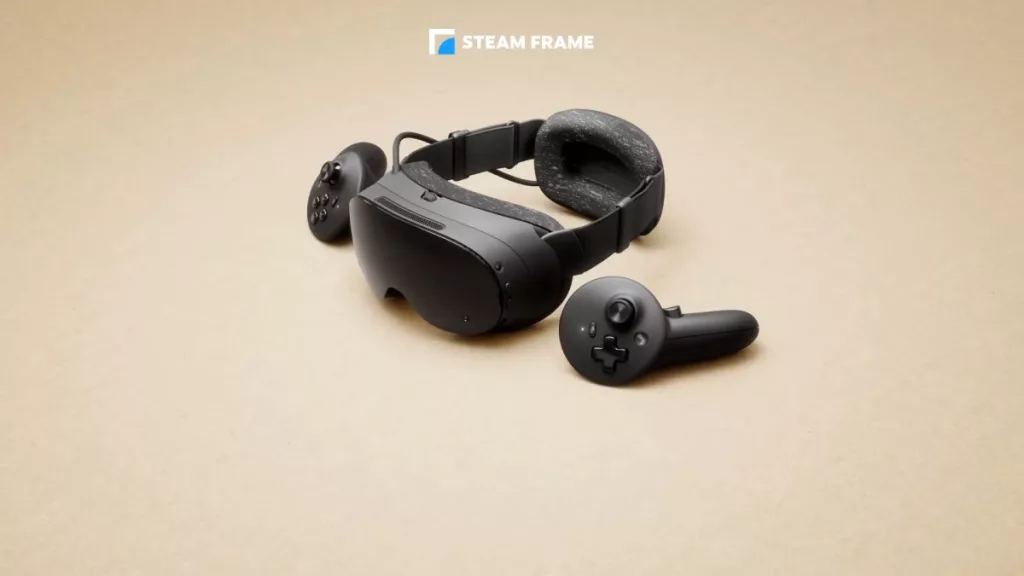
Valve’s second VR headset finally reached reviewers this week, and the verdicts split cleanly down the middle: nobody argues the hardware is bad, and nobody agrees on who should spend $1,059 on it. Elsewhere the week belonged to displays and storage, with two OLED monitors arriving at opposite ends of the price ladder, Sandisk rebranding its flagship SSD without changing a thing inside it, and Remedy shipping a sequel that refuses to render natively on any GPU you own.
Valve Steam Frame
Written reviews:
- Engadget: https://www.engadget.com/2257659/valve-steam-frame-review/
- Road to VR: https://roadtovr.com/valve-steam-frame-review/
- Kotaku: https://kotaku.com/im-not-sure-about-valves-new-1000-vr-headset-2000734260
- ComputerBase: https://www.computerbase.de/artikel/gaming/valve-steam-frame-test.99312/
- Aftermath: https://aftermath.site/steam-frame-review/
Video reviews:
- Gamers Nexus: https://www.youtube.com/watch?v=vcerOYY_K1g
- Linus Tech Tips: https://www.youtube.com/watch?v=3PGKMwgjla0
- IGN: https://www.youtube.com/watch?v=nStfDr2L9oY
- Adam Savage’s Tested: https://www.youtube.com/watch?v=C9JyWAVj94E
Consensus summary: Engadget measured it at 440 grams against the Quest 3’s 515 grams and found the rear battery pack balances it well enough to forget you are wearing it, though glasses wearers get a worse deal. Road to VR is the most positive, reporting zero complaints with head and controller tracking on Valve’s first inside-out headset and calling the standalone mode better than expected, with the caveat that demanding or poorly optimized titles are largely unplayable without a host PC, which is what the Frame-certified program exists to flag. Kotaku is the dissent, describing repeated Wi-Fi connection failures and a headset that was receiving frequent firmware updates throughout the review period, while Aftermath notes that gamepad-while-streaming and Linux dongle support were simply not present yet. The 256 GB model is $1,059, with the 1 TB version around $1,300 and a $60 ergonomics kit that most reviewers consider mandatory.
FPS Review take: We covered the launch and the $1,059 starting price earlier this week, and the reviews don’t add much clarity to the pricing because the hardware everyone praises is wrapped around software that reviewers watched change under them mid-test. Read Road to VR if you already own a capable gaming PC and Kotaku if you were hoping this replaces one, since that is exactly where the two verdicts diverge.
AMD Ryzen 7 9800X3D vs. Other X3D Parts
Written reviews:
- The FPS Review: https://www.thefpsreview.com/2026/09/14/amd-ryzen-7-7700x3d-vs-ryzen-7-9800x3d-cpu-review/
- Club386: https://www.club386.com/amd-ryzen-7-5800x3d-vs-9800x3d/
Consensus summary: Two comparisons landed within three days, both asking what the $479 Zen 5 X3D part actually buys you over an older one. Our own testing against the $329 Ryzen 7 7700X3D found average frame rate gains mostly in the 10 to 12 percent range across 12 games at 1080p on an RTX 5090, with Hogwarts an outlier at 25 percent, while the real separation showed up in the 1% lows: Alan Wake 2 was 36 percent faster, Cyberpunk 2077 23 percent, Stalker 2 21 percent. Outside games the 9800X3D pulled 30 to 33 percent more multi-core and roughly 20 to 30 percent more single-thread performance. Club386 came at it from the AM4 side and found the 9800X3D is the more efficient chip despite drawing more power, by about 19.7 percent, and 29.8 percent better in multi-threaded performance per dollar, while flagging the obvious asterisk that jumping from a 5800X3D means paying for an AM5 board and DDR5 as well.
FPS Review take: The two reviews land on the same shape of answer from opposite directions, which is that the 9800X3D is comfortably the better processor and the argument is entirely about what the platform around it costs. If you are weighing the newer Zen 5 X3D parts instead, our Ryzen 7 9850X3D vs Ryzen 7 7800X3D comparison covers that upgrade path.
Gigabyte MO32U24
Written reviews:
- TechPowerUp: https://www.techpowerup.com/review/gigabyte-mo32u24/
Video reviews:
- Monitors Unboxed: https://www.youtube.com/watch?v=PVKyAAUVpXM
- 1 Up Nerdcore: https://www.youtube.com/watch?v=h8QVshUsa9Q
Consensus summary: TechPowerUp’s verdict is that the panel gets nearly everything right and the connectivity is self-inflicted damage. Samsung’s fourth-generation Penta Tandem QD-OLED hit 299 cd/m² full-screen in SDR and measured 99.19 percent DCI-P3, and at 140 PPI the triangular subpixel layout stopped mattering for text, with weeks of spreadsheet and code work at 125 percent scaling producing no fringing worth noticing. Grayscale accuracy reached reference grade after a two-parameter OSD adjustment. The complaint is the USB-C port, which is capped in a way that undercuts the otherwise flawless automatic KVM, and at $1,000 the MSI MPG 322UR X24 sits $99 higher with the same panel plus DisplayPort 2.1a UHBR20 and 98 W power delivery.
FPS Review take: We flagged this one when it launched with the ObsidianShield coating, and the measured 299 cd/m² full-screen figure is the number that matters, because sustained brightness was the thing OLED could not do two generations ago. Budget for the hundred extra dollars if a single-cable laptop setup is part of your plan.
iiyama G-Master GOB2701QSC
Written reviews:
- KitGuru: https://www.kitguru.net/peripherals/monitors/dominic-moass/iiyama-g-master-gob2701qsc-review-299-tandem-woled/
- Club386: https://www.club386.com/iiyama-g-master-gob2701qsc-b1-review/
Video reviews:
- KitGuru Tech: https://www.youtube.com/watch?v=ctF_HBhvX7M
Consensus summary: iiyama’s first OLED is a 27-inch 1440p 280 Hz panel built on LG’s fourth-generation Tandem WOLED, and both outlets treat the price as the story. KitGuru scored it 7 out of 10 and noted the £299 figure is a temporary G-Master tenth-anniversary deal running until September 27, with the regular £420 MSRP still undercutting the Gigabyte MO27Q28G and ASUS XG27AQWMG using the same panel. Club386 reached the same conclusion from a euro price, calling it the most affordable and best-value Tandem OLED on the market and singling out 65 W USB-C power delivery against the Gigabyte’s 15 W, with the matte coating producing a slightly softer image than a glossy equivalent in exchange for better reflection handling.
FPS Review take: A first-generation OLED from a company nobody associates with OLED, using a panel everyone else is charging more for, is exactly the sort of thing worth watching. Check the date before you get attached to the £299 number, because the anniversary pricing expires at the end of September.
Sandisk Optimus GX Pro 8100 2 TB
Written reviews:
Consensus summary: This is the WD Black SN8100 with the WD branding finally removed, and TechPowerUp is blunt that the drive underneath is identical: the same Silicon Motion SM2508 controller carrying the same Sandisk part number, the same Kioxia BiCS8 218-layer TLC, the same 2 GB DDR4 cache. It still delivers top-tier real-world speed, a very large SLC cache and efficient operation, with the conclusion turning entirely on price. The 2 TB model is $550, with 1 TB at $300, 4 TB at $1,080 and 8 TB at $2,150, endurance running from 600 TBW to 4,800 TBW, and a five-year warranty.
FPS Review take: The Optimus line is the first consumer SSD family to carry Sandisk’s own name rather than a borrowed WD one, and keeping the 8100 numbering is a small mercy for anyone cross-shopping. Our WD BLACK SN7100 review covers the Gen4 tier below this if $550 for 2 TB is a number you would rather not look at right now.
Team Group T-Create Expert P34F 1 TB
Written reviews:
- TechPowerUp: https://www.techpowerup.com/review/team-group-t-create-expert-p34f-1-tb-portable-ssd-with-find-my/
- PCWorld: https://www.pcworld.com/article/3112876/teamgroup-expert-p34f-ssd-review.html
Consensus summary: TechPowerUp calls it the SSD with an AirTag, and that is the entire product: official Apple Find My support driven by an onboard coin cell, relaying position through nearby Apple devices, with an audible alarm for close-range hunting. Tracking worked flawlessly in TechPowerUp’s testing and a large SLC cache held sustained writes above 860 MB/s, with the USB 3.2 Gen 2 10 Gbps ceiling a deliberate choice given where Apple devices top out. PCWorld’s earlier testing is the dissenting data point, with a first sample whose geo-tag worked only intermittently thanks to a loose CR2032 battery contact, and a replacement unit that behaved correctly. At $238 it is expensive for a 10 Gbps drive as you are paying for the tracker.
FPS Review take: Storage that tells you where it is sounds like a gimmick until you count how many drives have quietly left your bag over the years. Our ORICO K20 Mini review covers the more conventional end of the pocket-SSD market if you would rather put the $238 toward capacity.
ASUS B850 NEO Motherboards
Written reviews:
- TechPowerUp (ROG Strix B850-A Gaming Wi-Fi7 Neo): https://www.techpowerup.com/review/asus-rog-strix-b850-a-gaming-wi-fi7-neo/
- Overclockers.com (TUF Gaming B850I WiFi Neo): https://www.overclockers.com/asus-tuf-gaming-b850i-wifi-neo-motherboard-review/
Consensus summary: Two ends of the B850 NEO refresh landed a day apart with very different value verdicts. TechPowerUp found the ROG Strix B850-A Gaming Wi-Fi7 Neo genuinely improved over its predecessor, adding a 20 Gbps Type-C header, 5 Gbps Ethernet in place of 2.5, an extra tool-free M.2 heatsink, more rear Type-A ports and a much more thorough white theme, then concluded the roughly $60 premium is a questionable outlay unless you specifically need those, and flagged the drop from two video outputs to one as a problem for iGPU builds. Overclockers.com handed the TUF Gaming B850I WiFi Neo its Approved stamp, calling it probably the cheapest Mini-ITX board capable of those memory frequencies, with better RAM compatibility than most competing boards, no stability trouble under load or overclocking, and a $272.79 Newegg price the reviewer expects to fall.
FPS Review take: The NEO refreshes keep producing the same verdict, which is that the older board is still on shelves and still cheaper, so the upgrade has to earn its premium on one or two specific ports. Our MSI MAG B850 TOMAHAWK WIFI review shows what the competition looks like at the same tier.
be quiet! Dark Power Pro 14 IO 1300W
Written reviews:
Consensus summary: Cybenetics ran the smaller sibling of the 1600W flagship through a full test bench and came away recommending it with named reservations. It delivers full power at 45°C, meets Cybenetics Titanium requirements at both 115V and 230V, earns LAMBDA A+ and A++ noise ratings, holds tight 12V load regulation, posts extremely low vampire power and a hold-up time past 17 ms, and ships with two 12V-2×6 connectors rated 600W each, silicon carbide parts, Japanese capacitors and a ten-year warranty at $479.90. The criticisms are specific: ripple suppression could be tighter, the 3.3V rail exceeds its transient limits in most tests without output capacitors connected, and fan-failure protection is absent. The verdict treats those as refinements rather than deal-breakers.
FPS Review take: The transient-response caveat is worth reading properly rather than skimming, because it disappears once capacitors are connected, which is the condition your actual build will be in. If you want to see what a comparable-tier unit looked like a generation ago, our Seasonic PRIME PX-1600 review is the closest reference point we have.
MSI MEG Maestro 900R
Written reviews:
- TechPowerUp: https://www.techpowerup.com/review/msi-meg-maestro-900r/
- GeekaWhat: https://geekawhat.com/msi-meg-maestro-900r-case-review/
Consensus summary: MSI’s new flagship full tower is built around presentation, with the motherboard, GPU and cooling pulled into the center of the chassis behind three sides of tempered glass, and both outlets agree the engineering underneath is real. The headline feature is a motherboard tray that detaches completely and rotates into four orientations in seconds, effectively turning the case into a build workstation, joined by a PCIe 5.0 riser and vertical GPU bracket in the box. Front I/O is unusually generous with five USB Type-C ports, one of them 20 Gbps with up to 60W power delivery, though GeekaWhat notes that delivery figure depends on the motherboard and MSI lists support only for its own MEG X870E, X670E, Z890 and Z790 boards. Roof and floor each take 360 mm or 420 mm radiators. The catches are weight, around 30 to 33 kg empty, and a price near $700.
FPS Review take: A rotating, removable motherboard tray is the first genuinely new idea in case design in a while, and it is the sort of feature that matters more to people who swap hardware constantly than to people who build once (Ed: So, our entire audience, then.) Our MSI MAG PANO 100R PZ review covers the panoramic idea at a price that will not require a conversation with your accountant.
Control Resonant PC Performance
Written reviews:
- TechPowerUp (35 GPUs): https://www.techpowerup.com/review/control-resonant-performance-benchmark/
- TechPowerUp (handhelds): https://www.techpowerup.com/review/control-resonant-steam-deck-xbox-ally-x-claw-8-ex-performance-benchmark/
- Tom’s Hardware (28 GPUs): https://www.tomshardware.com/video-games/pc-gaming/control-resonant-pc-performance-tested-28-gpus-take-us-back-to-the-oldest-house-and-a-warped-manhattan-cityscape
- ComputerBase: https://www.computerbase.de/artikel/gaming/control-resonant-benchmark-test.99350/
- DSOGaming: https://www.dsogaming.com/pc-performance-analyses/control-resonant-benchmarks-pc-performance-analysis/
- SweClockers: https://www.sweclockers.com/artikel/43161-control-resonant-finsk-sisu-flyter-so-so-utan-uppskalning
Video reviews:
- zWORMz Gaming: https://www.youtube.com/watch?v=8HDdfug8J_k
- Notebookcheck: https://www.youtube.com/watch?v=zezIQwHDESY
Consensus summary: Remedy’s sequel runs on an evolved Northlight engine with DirectX 12 only, and the headline finding across every outlet is that there is no native rendering mode at all, so every setting runs through DLSS or FSR, with DLAA and FSR Native AA the closest thing to 100 percent scaling. TechPowerUp’s 35-GPU sweep puts 1080p at 60 FPS with maximum settings in reach of an RX 7800 XT, RTX 5070 or RTX 4070 Ti and faster, with fluid 1440p requiring an RTX 5070 Ti or RX 9070 at minimum. The game also hides path tracing behind the label “Indirect Lighting” and enables it on every ray tracing preset including Low, which TechPowerUp had to work around by building a custom configuration to test ray tracing without it. Path tracing itself runs fine on Radeon, but the RT Ultra preset is greyed out on AMD because it requires NVIDIA Mega Geometry and DLSS Ray Reconstruction. Intel gets nothing: XeSS is absent from the game files entirely, and TechPowerUp saw crashes on map load with the Arc A770.
FPS Review take: The settings menu calling path tracing “Indirect Lighting” is going to cost a lot of people a lot of frames before they work out why RT Low is hammering their GPU, so that is the first thing to check. If you are tuning this one, our coverage of DLSS 4.5 Ray Reconstruction working on every RTX card explains what the RT Ultra preset is actually turning on.
Discussion (3 replies)
Join Discussion →Steam Frame is $1299 for the 1TB kit and $1,059 for the 256GB kit.
Man if that monitor was.. well it isnt but an high refresh double woled for 300 is nuts.
First vr headset I have really looked at.